No sound via HDMI/ARC. Such a shame cause I really love EndeavourOS

Hi guys,

Initially the sound worked out of the box. However, after unplugging the HDMI cable and putting it in a different port in my GPU accidentally, sound has stopped working. I have tried different troubleshooting methods, including manually selecting output device both via GUI or terminal, reinstalling OS, etc. The initial version I used when it work, it was the latest version of Endeavour 25.1.1-1.

My setup is AMD GPU Radeon RX 480 8GB , 8GB system RAM, not sure if you want full hardware specs.

I am using the latest version of Endeavour and I’ve tried the LTS one too - there was no difference.

I have a setup where the PC is connected together wih a soundbar to the TV via ARC. I haven’t had any issues with the sound in other linux distros I’ve tried or Windows - so it’s not a hardware/software issue with the cables or the other devices.

When I go in sound settings I can see my device listed as Radeon 480 HDMI and I select normally “Digital Surround 5.1” - this is the setting that usually works.

when I run “pactl list short” I see that my device Radeon 480 appears as suspended.

For the record, in the taskbar volume settings, whenever audio is played, you can see the meter moving but no sound is coming out from my speakers.

I really like Endeavour OS and I genuinely appreciate the work that has been put in it. I’ve already invested many hours in OS setup and reinstall, I honestly don’t want to go to another distro.

Can someone please help me troubleshoot this issue?

Any help or advice will be much appreciated.

Best wishes,

John.

Please stop doing this. There is no need to reinstall a system just because something isn’t working. This is not Windows so chances are it can be fixed. First you need to help us help you.

yes please. inxi -Faz --no-host

Please note that it is a Holiday weekend in America and many will be busy with family and friends. Hopefully others around who are not in America will be able to help.

1 Like

Hi mate,

Thank you so much for getting back so quickly. I did try to troubleshoot before reinstalling the OS, to be fair but, during troubleshooting I managed to destabilize the system :smile: and basic functions were not working in the end.

Once again, much appreciated your help, especially given the holiday time.

Please see the output below:

Summary

Kernel: 6.17.9-arch1-1 arch: x86_64 bits: 64 compiler: gcc v: 15.2.1
clocksource: tsc avail: hpet,acpi_pm
parameters: initrd=\c6f98d8f89c84baebc4a5abf020f5b5e\6.17.9-arch1-1\initrd
nvme_load=YES nowatchdog rw
root=UUID=ed82996a-5dea-4f18-8359-eaa116e14f39
systemd.machine_id=c6f98d8f89c84baebc4a5abf020f5b5e
Desktop: KDE Plasma v: 6.5.3 tk: Qt v: N/A info: frameworks v: 6.20.0
wm: kwin_wayland vt: 1 dm: SDDM Distro: EndeavourOS base: Arch Linux
Machine:
Type: Desktop System: MSI product: MS-7A12 v: 1.0
serial:
Mobo: MSI model: Z170A GAMING PRO CARBON (MS-7A12) v: 1.0
serial: uuid: Firmware: UEFI
vendor: American Megatrends v: 1.90 date: 01/25/2018
Battery:
Device-1: hidpp_battery_0 model: Logitech Wireless Touch Keyboard K400 Plus
serial: charge: 100% (should be ignored) rechargeable: yes
status: discharging
CPU:
Info: model: Intel Core i7-6700 bits: 64 type: MT MCP arch: Skylake-S
gen: core 6 level: v3 note: check built: 2015 process: Intel 14nm family: 6
model-id: 0x5E (94) stepping: 3 microcode: 0xF0
Topology: cpus: 1x dies: 1 clusters: 4 cores: 4 threads: 8 tpc: 2
smt: enabled cache: L1: 256 KiB desc: d-4x32 KiB; i-4x32 KiB L2: 1024 KiB
desc: 4x256 KiB L3: 8 MiB desc: 1x8 MiB
Speed (MHz): avg: 800 min/max: 800/4000 scaling: driver: intel_pstate
governor: powersave cores: 1: 800 2: 800 3: 800 4: 800 5: 800 6: 800 7: 800
8: 800 bogomips: 54398
Flags-basic: avx avx2 ht lm nx pae sse sse2 sse3 sse4_1 sse4_2 ssse3 vmx
Vulnerabilities:
Type: gather_data_sampling status: Vulnerable: No microcode
Type: ghostwrite status: Not affected
Type: indirect_target_selection status: Not affected
Type: itlb_multihit status: KVM: Split huge pages
Type: l1tf mitigation: PTE Inversion; VMX: conditional cache flushes, SMT
vulnerable
Type: mds mitigation: Clear CPU buffers; SMT vulnerable
Type: meltdown mitigation: PTI
Type: mmio_stale_data mitigation: Clear CPU buffers; SMT vulnerable
Type: old_microcode status: Not affected
Type: reg_file_data_sampling status: Not affected
Type: retbleed mitigation: IBRS
Type: spec_rstack_overflow status: Not affected
Type: spec_store_bypass mitigation: Speculative Store Bypass disabled via
prctl
Type: spectre_v1 mitigation: usercopy/swapgs barriers and __user pointer
sanitization
Type: spectre_v2 mitigation: IBRS; IBPB: conditional; STIBP: conditional;
RSB filling; PBRSB-eIBRS: Not affected; BHI: Not affected
Type: srbds mitigation: Microcode
Type: tsa status: Not affected
Type: tsx_async_abort mitigation: TSX disabled
Type: vmscape mitigation: IBPB before exit to userspace
Graphics:
Device-1: Advanced Micro Devices [AMD/ATI] Ellesmere [Radeon RX
470/480/570/570X/580/580X/590] vendor: Micro-Star MSI driver: amdgpu
v: kernel arch: GCN-4 code: Arctic Islands process: GF 14nm built: 2016-20
pcie: gen: 3 speed: 8 GT/s lanes: 16 ports: active: HDMI-A-1 empty: DP-1,
DP-2, DVI-D-1, HDMI-A-2 bus-ID: 01:00.0 chip-ID: 1002:67df class-ID: 0300
temp: 38.0 C
Display: wayland server: X.org v: 1.21.1.21 with: Xwayland v: 24.1.9
compositor: kwin_wayland driver: X: loaded: amdgpu unloaded: modesetting
alternate: fbdev,vesa dri: radeonsi gpu: amdgpu display-ID: 0
Monitor-1: HDMI-A-1 model: Samsung serial: built: 2020 res:
mode: 3840x2160 hz: 60 scale: 175% (1.75) to: 2194x1234 dpi: 81 gamma: 1.2
size: 1872x1053mm (73.7x41.46") diag: 1388mm (54.6") ratio: 16:9 modes:
max: 3840x2160 min: 720x400
API: EGL v: 1.5 hw: drv: amd radeonsi platforms: device: 0 drv: radeonsi
device: 1 drv: swrast gbm: drv: kms_swrast surfaceless: drv: radeonsi
wayland: drv: radeonsi x11: drv: radeonsi
API: OpenGL v: 4.6 compat-v: 4.5 vendor: amd mesa v: 25.2.7-arch1.1
glx-v: 1.4 direct-render: yes renderer: AMD Radeon RX 480 Graphics
(radeonsi polaris10 ACO DRM 3.64 6.17.9-arch1-1) device-ID: 1002:67df
memory: 7.81 GiB unified: no display-ID: :1.0
API: Vulkan Message: No Vulkan data available.
Info: Tools: api: clinfo, eglinfo, glxinfo, vulkaninfo
de: kscreen-console,kscreen-doctor wl: wayland-info
x11: xdpyinfo, xprop, xrandr
Audio:
Device-1: Intel 100 Series/C230 Series Family HD Audio
vendor: Micro-Star MSI driver: snd_hda_intel v: kernel
alternate: snd_soc_avs bus-ID: 00:1f.3 chip-ID: 8086:a170 class-ID: 0403
Device-2: Advanced Micro Devices [AMD/ATI] Ellesmere HDMI Audio [Radeon
RX 470/480 / 570/580/590] vendor: Micro-Star MSI driver: snd_hda_intel
v: kernel pcie: gen: 3 speed: 8 GT/s lanes: 16 bus-ID: 01:00.1
chip-ID: 1002:aaf0 class-ID: 0403
API: ALSA v: k6.17.9-arch1-1 status: kernel-api
tools: alsactl,alsamixer,amixer
Server-1: sndiod v: N/A status: off tools: aucat,midicat,sndioctl
Server-2: PipeWire v: 1.4.9 status: active with: 1: pipewire-pulse
status: active 2: wireplumber status: active 3: pipewire-alsa type: plugin
4: pw-jack type: plugin tools: pactl,pw-cat,pw-cli,wpctl
Network:
Device-1: Intel Ethernet I219-V vendor: Micro-Star MSI driver: e1000e
v: kernel port: N/A bus-ID: 00:1f.6 chip-ID: 8086:15b8 class-ID: 0200
IF: enp0s31f6 state: up speed: 1000 Mbps duplex: full mac:
Info: services: NetworkManager,systemd-timesyncd
Drives:
Local Storage: total: 465.76 GiB used: 8.8 GiB (1.9%)
SMART Message: Unable to run smartctl. Root privileges required.
ID-1: /dev/sda maj-min: 8:0 vendor: Samsung model: SSD 850 EVO 500GB
size: 465.76 GiB block-size: physical: 512 B logical: 512 B speed: 6.0 Gb/s
tech: SSD serial: fw-rev: 2B6Q scheme: GPT
Partition:
ID-1: / raw-size: 463.76 GiB size: 455.41 GiB (98.20%) used: 8.69 GiB (1.9%)
fs: ext4 dev: /dev/sda2 maj-min: 8:2
Swap:
Alert: No swap data was found.
Sensors:
System Temperatures: cpu: 28.0 C pch: 23.5 C mobo: N/A gpu: amdgpu
temp: 38.0 C
Fan Speeds (rpm): N/A gpu: amdgpu fan: 1168
Info:
Memory: total: 8 GiB available: 7.71 GiB used: 2.08 GiB (26.9%)
Processes: 282 Power: uptime: 2m states: freeze,mem,disk suspend: deep
avail: s2idle wakeups: 0 hibernate: platform avail: shutdown, reboot,
suspend, test_resume image: 3.07 GiB services: org_kde_powerdevil,
power-profiles-daemon, upowerd Init: systemd v: 258 default: graphical
tool: systemctl
Packages: pm: pacman pkgs: 1055 libs: 244 tools: yay Compilers:
gcc: 15.2.1 Shell: Bash v: 5.3.3 running-in: konsole inxi: 3.3.40

I’m running an older system from circa 2016:).

Greetings from the UK :slight_smile:

the hardware and driver output look fine to me.

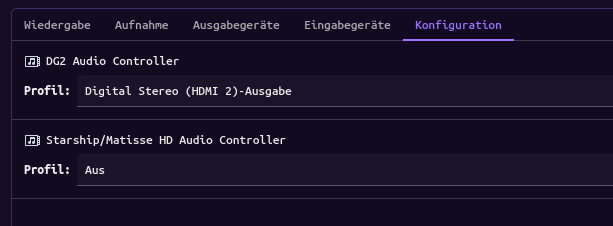
You tried pavucontrolapp? config tab there and select HDMI audio on the GPU entry and disable the second audio device by setting profile to iff in the drop down selection menu.


Thats mine but German :wink:

And just in case see this:
https://discovery.endeavouros.com/audio/pipewire/2021/09/

you can always reset user settings related to see if it helps, and in 90% of cases you can resolve audio issue with pavucontrol

Hi Joe, I just read your wiki posts about pipewire audio​:smiling_face:.

I did what you recommended , turned off the onboard audio from there in configuration. Now it doesn’t show up anymore in the mixer. That also changed my device name from Radeon 480 Elsemere to just HDMI 4 audio .

This indeed helps with the system wrongly choosing the onboard audio vs the GPU but doesn’t solve the problem.

For reference, the onboard audio actually works- I tested it with my headphones ( only device I have).

could you share the output of:
wpctl status

may use pastbin:

wpctl status | eos-sendlog and share the url it gives.

To check if its recognized on pipewire (high level audio system)

And to make sure, it was working before with the same cable ? Is the Display audio on the display itself enabled ?

Is system wake from hibernate or booted from cold state (fresh boot) You should also try to replug the HDMI cable.

Hi Joe,

Here’s the output of that command:

42\. Ellesmere HDMI Audio \[Radeon RX 470/480 / 570/580/590\] \[alsa\]
│      43. Built-in Audio                      \[alsa\]
│
├─ Sinks:
│  \*   50. Ellesmere HDMI Audio \[Radeon RX 470/480 / 570/580/590\] Digital Surround 5.1 (HDMI 3) \[vol: 0.95\]
│      51. Built-in Audio Digital Stereo (IEC958) \[vol: 1.00\]
│
├─ Sources:
│      52. Built-in Audio Analog Stereo        \[vol: 1.00\]
│
├─ Filters:
│
└─ Streams:

Video
├─ Devices:
│
├─ Sinks:
│
├─ Sources:
│
├─ Filters:
│
└─ Streams:

Settings
└─ Default Configured Devices:
0. Audio/Sink    alsa_output.pci-0000_01_00.1.hdmi-surround-extra2

Just as a quick reminder, I’m running HDMI sound via ARC with a Sony soundbar (dolby Atmos capable - HT-G700) and TV. The PC is connected to the TV. Do you think there might be a problem with the soundbar not recognizing the signal sent from the PC?

At my home i plugged the soundbar in the hdmi arc port and the notebook in a normal hdmi port. Seems to work fine.

Maybe try a different hdmi cable.

thank you for the suggestion. I’m not sure about the cable - they are working fine with other Linux distros and windows but, I’ve ordered a spare HDMI 2.1 cable just in case.

output does look okay to me..

so the HDMI cable is connected to a TV device and the soundbar is connected to the TV via another HDMI cable or another audio output? it could be also something with passing the signal on the TV settings?

SOLVED NOW!

I finally found a solution - workaround.

The issue was that my Sony Soundbar was not able to detect correctly the ARC signal send over from the TV. Sony has issued and update that apparently fixes some instability bugs - I will do the update and try again.

Alternatively, my old HDMI cable coud be faulty which may result in an unstable ARC connection - will try a new cable when it’s delivered.

So now it’s down to 2 possible culprits.

For now I’ve established a connection via tossed link(pun intended):grinning_face: and this works .

Thank you so much for helping out.

Best wishes,

John.

1 Like

Yes indeed. There are settings on the TV - audio source was correctly selected as HDMI/ARC and the sound compression correct as PCM/auto .

Definitely something broken in the way ARC is negotiated between TV/soundbar. When I did research apparently it’s common for Sony soundbars to force ARC(when you try to use optical ) or be unstable with it and incompatible with other TV brands when setting up ARC.

In the past, sound failed to play when switching between HDMI sources- TV, PC, Apple TV box. Had to power cycle devices. So definitely culprit found.

So sorry didn’t remember earlier on that, when you see the graphic meter of the sound mixer pulsating that, you have sound output from the PC/OS. :man_facepalming:t2:- mistakes have been made.

Still not quitting Linux however :smiling_face_with_sunglasses:.

Again, thanks for the advice and happy winter holidays everyone

This topic was automatically closed 2 days after the last reply. New replies are no longer allowed.