No sound in Davinci - Not AAC

Hi! I’m trying to get Davinci working, but I can’t get any audio output. This is not the typical codec issue, i am aware of the limitations on Linux.

I have no sound issues in other software.

ResolveDebug.txt is loaded with this line

ALSA lib pcm_pulse.c:758:(pulse_prepare) [error.] PulseAudio: Unable to create stream: No such entity

Output of inxi -Ax :

Audio:
  Device-1: NVIDIA GP106 High Definition Audio vendor: EVGA
    driver: snd_hda_intel v: kernel bus-ID: 0a:00.1
  Device-2: Advanced Micro Devices [AMD] Family 17h HD Audio vendor: ASRock
    driver: snd_hda_intel v: kernel bus-ID: 0c:00.3
  API: ALSA v: k6.18.22-1-lts status: kernel-api
  Server-1: sndiod v: N/A status: off
  Server-2: PipeWire v: 1.6.3 status: active

It should use the second device, my integrated sound card.

pactl info seems to be okay:

Server Name: PulseAudio (on PipeWire 1.6.3)
Server Version: 15.0.0
Default Sample Specification: float32le 2ch 48000Hz
Default Channel Map: front-left,front-right
Default Sink: alsa_output.pci-0000_0c_00.3.analog-stereo
Default Source: alsa_output.pci-0000_0c_00.3.analog-stereo.monitor
Cookie: b253:d37b

When resolve is running pavucontrol shows a new line on the output list but only for a fraction of a second, then it’s disappearing and reappearing endlessly until I quit resolve.

Unfortunately I can’t wrap my head around Linux audio, I have tried to solve this problem but searching for solutions for hours just led me down rabbit holes.

Does anybody have any suggestions?

Welcome to the community @spike :waving_hand::smiley: :enos_flag:

I encountered something similar to this just a few days ago. When launching DaVinci Resolve Studio, my Plasma volume control would indicate a device appearing/disappearing rapidly, so long as Resolve was open, and no sound could be heard within Resolve.

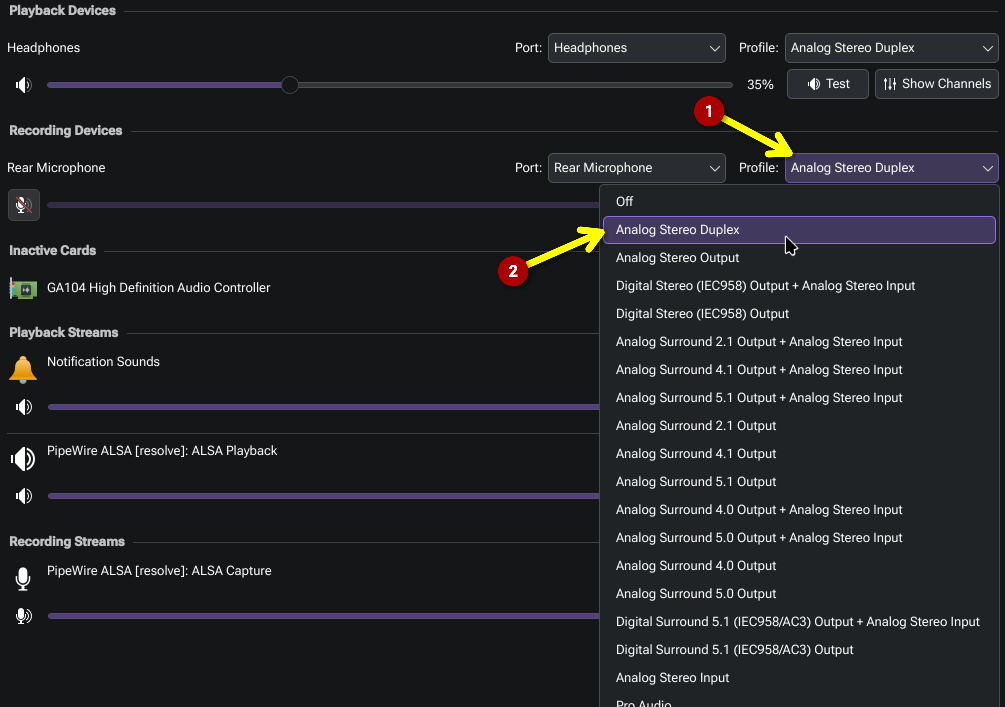
For me, what it ended up being was simply needing to enable an audio recording device in KDE Plasma. The issue would occur if I disabled my microphone input (“Off”).

So instead of “Off”, I set it to:

Hey @Bink !
Thank you, tried to do the same but it didn’t work unfortunately.
I still get hundreds of lines of this:

ALSA lib pcm_pulse.c:758:(pulse_prepare) [error.] PulseAudio: Unable to create stream: No such entity

Been using linux for a few years but i’m still kind of a noob. It seems to me that resolve is trying to use the wrong audio device. Is there any way to trace the “route of the sound”?

Ok, that is a bit different to the error it spams in my system log if I’ve disabled the recording device:

Apr 14 08:24:35 Workstation systemsettings[59093]: qrc:/kcm/kcm_pulseaudio/main.qml:298: ReferenceError: sourceModel is not define

What’s the output for:

yay -Q pipewire-alsa

If it outputs nothing, install it:

yay -Syu pipewire-alsa

The output is:

pipewire-alsa 1:1.6.3-1

You’ve noted the error you saw in DaVinci Resolve’s log (~/.local/share/DaVinciResolve/logs/ResolveDebug.txt).

Perhaps tail the system log, in case there’s something else being output there. To tail it, leave this running before launching DaVinci Resolve:

journalctl -f

I got:

12:49:52 spike-desktop kded6[1215]: Registering ":1.930/StatusNotifierItem" to system tray
12:49:52 spike-desktop kded6[1215]: Service  ":1.930" unregistered
12:49:52 spike-desktop kded6[1215]: Registering ":1.931/StatusNotifierItem" to system tray
12:49:52 spike-desktop kded6[1215]: Service  ":1.931" unregistered
12:49:52 spike-desktop kded6[1215]: Registering ":1.932/StatusNotifierItem" to system tray
12:49:52 spike-desktop kded6[1215]: Service  ":1.932" unregistered
12:49:52 spike-desktop kded6[1215]: Registering ":1.933/StatusNotifierItem" to system tray
12:49:52 spike-desktop kded6[1215]: Service  ":1.933" unregistered
12:49:52 spike-desktop kded6[1215]: Registering ":1.934/StatusNotifierItem" to system tray
12:49:52 spike-desktop kded6[1215]: Service  ":1.934" unregistered
12:49:52 spike-desktop kded6[1215]: Registering ":1.935/StatusNotifierItem" to system tray
12:49:52 spike-desktop kded6[1215]: Service  ":1.935" unregistered
12:49:52 spike-desktop kded6[1215]: Registering ":1.936/StatusNotifierItem" to system tray
12:49:52 spike-desktop kded6[1215]: Service  ":1.936" unregistered
12:49:52 spike-desktop kded6[1215]: Registering ":1.937/StatusNotifierItem" to system tray
12:49:52 spike-desktop kded6[1215]: Service  ":1.937" unregistered
12:49:52 spike-desktop kded6[1215]: Registering ":1.938/StatusNotifierItem" to system tray
12:49:52 spike-desktop kded6[1215]: Service  ":1.938" unregistered
12:49:52 spike-desktop kded6[1215]: Registering ":1.939/StatusNotifierItem" to system tray
12:49:52 spike-desktop kded6[1215]: Service  ":1.939" unregistered
12:49:52 spike-desktop kded6[1215]: Registering ":1.940/StatusNotifierItem" to system tray
12:49:52 spike-desktop kded6[1215]: Service  ":1.940" unregistered
12:49:52 spike-desktop kded6[1215]: Registering ":1.941/StatusNotifierItem" to system tray

and of course tons of these in every second. I guess this is what’s jumping on my tray in the audio section. (even with the mic input enabled)

Sorry I’m plodding through the troubleshooting slowly @spike, it’s actually been a bit of an enigma of an issue, and external information about it non-existent.

Could you share the output of this please:

yay -Q | grep pulse

I just want to check that PipeWire is being favoured, as it supersedes PulseAudio. Some “pulse” packages should be installed, but these should be more for backwards compatibility.

Hey, no worries, i appreciate your help!

The output is:

libpulse 17.0+r98+gb096704c0-1
pipewire-pulse 1:1.6.3-1
pulseaudio-alsa 1:1.2.12-5
pulseaudio-qt 1.8.1-1

Ok, that is what I suspected, based on this. DaVinci Resolve uses ALSA, but we want it to route through PipeWire, not PulseAudio.

Let’s try this:

yay -R pulseaudio-alsa

Then for the sake of thoroughness, restart the system, and retry?

Ok, i removed pulseaudio-alsa, rebooted, now the pulse audio error from resolve’s log is gone, but still no sound.
journalctl -f shows the same thing as before and the tray is doing the same. Now i can see that it’s a microphone icon appearing/disappearing when resolve is running.

I may be wrong but i see no sound related error in ResolveDebug.txt, only these:

0x7f934ddf1000 | SyManager            | ERROR | 2026-04-15 07:00:02,050 | Failed to connect to panel socket
0x7f934ddf1000 | SyManager            | ERROR | 2026-04-15 07:00:02,050 | DRIVER: open /var/tmp/davinci_socket failed
SY panel handler thread starts: 4DDF1000
0x7f9332394000 | LeManager            | ERROR | 2026-04-15 07:00:09,340 | 83, 468
0x7f9332394000 | LeManager            | ERROR | 2026-04-15 07:00:09,340 | 27, 1118
0x7f9332394000 | LeManager            | ERROR | 2026-04-15 07:00:09,340 | 61, 1154, -149
0x7f9332394000 | LeManager            | ERROR | 2026-04-15 07:00:09,340 | 62, 1154, -103
0x7f9332394000 | LeManager            | ERROR | 2026-04-15 07:00:09,340 | 28, 1124
0x7f9332394000 | LeManager            | ERROR | 2026-04-15 07:00:09,340 | 29, 1132
0x7f9332394000 | LeManager            | ERROR | 2026-04-15 07:00:09,340 | 28, 1124
0x7f9332394000 | LeManager            | ERROR | 2026-04-15 07:00:09,340 | 29, 1132

Well that’s progress, hopefully :sweat_smile:

I wonder if the issue might now be similar to what I encountered? Do you have a recording device set?

Oh, maybe you meant hooking up an actual recording device to the pc?

I’m not sure if that’ll make a difference actually, that’s not something I tested for specifically.

In my case, the mic port on the back of my PC just had a cable in it, with nothing connected. Not intentional, it just so happened I’d temporarily hooked up a pair of headphones using it earlier, and the headphones were removed but the cable remained.

The thing that seemed to matter in my case was that the system’s recording device was not set to “off”.

Okay, this is nuts. So plugging a jack into the mic port did help with the tray thing.
I also managed to get a pipewire debug log, and the cause seems to be this:

[W][17:21:55.951320] alsa.pcm     | [  pcm_pipewire.c:  393 on_stream_state_changed()] no target node available
[W][17:21:55.951341] alsa.pcm     | [  pcm_pipewire.c: 1216 on_core_error()] 0x7f606722ab00: error id:2 seq:7 res:-2 (No such file or directory): no target node available

with the mic port plugged in this error is gone.

BUT I still can’t get no sound out of Resolve :smiley:

Now Resolve shows up in the stream in wpctl status

PipeWire 'pipewire-0' [1.6.3, spike@spike-desktop, cookie:2208981160]
 └─ Clients:
        32. kwin_wayland                        [1.6.3, spike@spike-desktop, pid:1098]
        33. WirePlumber                         [1.6.3, spike@spike-desktop, pid:1154]
        41. WirePlumber [export]                [1.6.3, spike@spike-desktop, pid:1154]
        58. pipewire                            [1.6.3, spike@spike-desktop, pid:1264]
        59. libcanberra                         [1.6.3, spike@spike-desktop, pid:1215]
        60.                                     [1.6.3, spike@spike-desktop, pid:1215]
        61. libcanberra                         [1.6.3, spike@spike-desktop, pid:1229]
        62. plasmashell                         [1.6.3, spike@spike-desktop, pid:1229]
        63.                                     [1.6.3, spike@spike-desktop, pid:1229]
        64. xdg-desktop-portal                  [1.6.3, spike@spike-desktop, pid:1108]
        75. PipeWire ALSA [resolve]             [1.6.3, spike@spike-desktop, pid:7207]
        76. PipeWire ALSA [resolve]             [1.6.3, spike@spike-desktop, pid:7207]
        96. wpctl                               [1.6.3, spike@spike-desktop, pid:7858]

Audio
 ├─ Devices:
 │      42. GP106 High Definition Audio Controller [alsa]
 │      43. Family 17h (Models 00h-0fh) HD Audio Controller [alsa]
 │  
 ├─ Sinks:
 │  *   50. Family 17h (Models 00h-0fh) HD Audio Controller Analóg sztereó [vol: 0.80]
 │  
 ├─ Sources:
 │  *   51. Family 17h (Models 00h-0fh) HD Audio Controller Analóg sztereó [vol: 1.00]
 │  
 ├─ Filters:
 │  
 └─ Streams:
        71. PipeWire ALSA [resolve]                                     
             72. input_FR        < ALC892 Analog:capture_FR     [active]
             73. monitor_FL     
             77. input_FL        < ALC892 Analog:capture_FL     [active]
             80. monitor_FR     
        81. PipeWire ALSA [resolve]                                     
             70. output_FR       > ALC892 Analog:playback_FR    [active]
             83. output_FL       > ALC892 Analog:playback_FL    [active]

Video
 ├─ Devices:
 │  
 ├─ Sinks:
 │  
 ├─ Sources:
 │  
 ├─ Filters:
 │  
 └─ Streams:
        65. kwin_wayland                                                
             66. output_1        > plasmashell:input_1  [init]
        67. plasmashell                                                 
             68. input_1         < kwin_wayland:output_1        [init]

Settings
 └─ Default Configured Devices:
         0. Audio/Sink    alsa_output.pci-0000_0c_00.3.analog-stereo

I have also installed realtime-privileges, but it didn’t affect this issue. Although I have to mention that I get these lines:

[I][18:52:56.645823] mod.rt       | [     module-rt.c:  581 check_realtime_privileges()] setrlimit() failed: Operation not permitted
[I][18:52:56.645847] mod.rt       | [     module-rt.c:  587 check_realtime_privileges()] failed to set realtime policy: Operation not permitted
[I][18:52:56.645868] mod.rt       | [     module-rt.c:  552 check_realtime_privileges()] Clamp rtprio 83 to 0
[I][18:52:56.645888] mod.rt       | [     module-rt.c:  560 check_realtime_privileges()] Priority max (0) must be at least 11
[I][18:52:56.645906] mod.rt       | [     module-rt.c:  596 check_realtime_privileges()] can't set rt prio to 83 (try increasing rlimits)

But according to PW this is not an error.

I’m out of ideas again.

In the Arch Wiki it mentions that ALSA can be explicitly instructed to route to PulseAudio (No audio during video preview). I wanted to check that wasn’t currently set on your system, because that might be one reason the issue persists.

cat /etc/asound.conf

It’s fine if that file does not exist. It allows you to set overrides for ALSA. What we don’t want to see is :

pcm.!default pulse
ctl.!default pulse

Can you also try playing a .wav file with aplay, as a means of directly testing ALSA playback. The command is simply:

aplay somefile.wav

It won’t work with an encoded file like MP3, AAC, M4A, WEBM, of it it does you’ll just get intense noise. If you only have those, to quickly create a .wav copy, you can use ffmpeg:

ffmpeg -i somefile.mp3 -a:c pcm_s24le somefile.wav

I did create an asound.conf file trying to solve the problem, but forgot about it.

defaults.pcm.card 1
defaults.ctl.card 1

The wav files played fine with aplay. Renamed asound.conf then rebooted, aplay worked, Resolve didn’t.

Here’s an idea, but please be careful with this one. What I don’t want to happen, is cause you to lose all your DaVinci Resolve projects!

I can’t recall where DaVinci Resolve saves projects by default, I have my location manually set, but I did once lose all my projects when backing up and reformatting (although it was under Windows at that time).

I’d like to suggest you try clearing the current config. Rather than deleting this folder (just in case!), perhaps rename it. So with DaVinci Resolve closed:

mv ~/.local/share/DaVinciResolve ~/.local/share/DaVinciResolve.backup

Then start up DaVinci Resolve. That folder should automatically re-create with defaults.

If for whatever reason you decide that was a bad idea, you can move it back again (after deleting the newly created folder):

mv ~/.local/share/DaVinciResolve.backup ~/.local/share/DaVinciResolve

Thank you so much, @Bink ! This did the trick. Omg, I should’ve thought about this :smiley:

Ah great news @spike! :smiley: We got there in the end!

friday-happy-dance