Not without knowing the Video card being used. The driver being used for said card.
it is Arch made easy. You just don’t understand Arch which seems to be part of the issue. Arch is a system YOU Build from the Ground Up. We only give you a FOUNDATION on which to build YOUR SYSTEM.
until you give us the basics we can only guess as to what the issue is.
OK thanks. Fair enough. My new EOS install was 4 days ago. Am organising another, slightly older EliteMini G4 and start from scratch again (Core i5-8600 CPU @ 3.10GHz). Be right back.
Ethernet is intel with e1000e module which can sometimes be problematic. I also see intel WiFi with iwlwifi module. Both should work. What are you using and what isn’t working?
The audio is intel. Do you have audio if connected directly to the audio out on the desktop. Check this first.
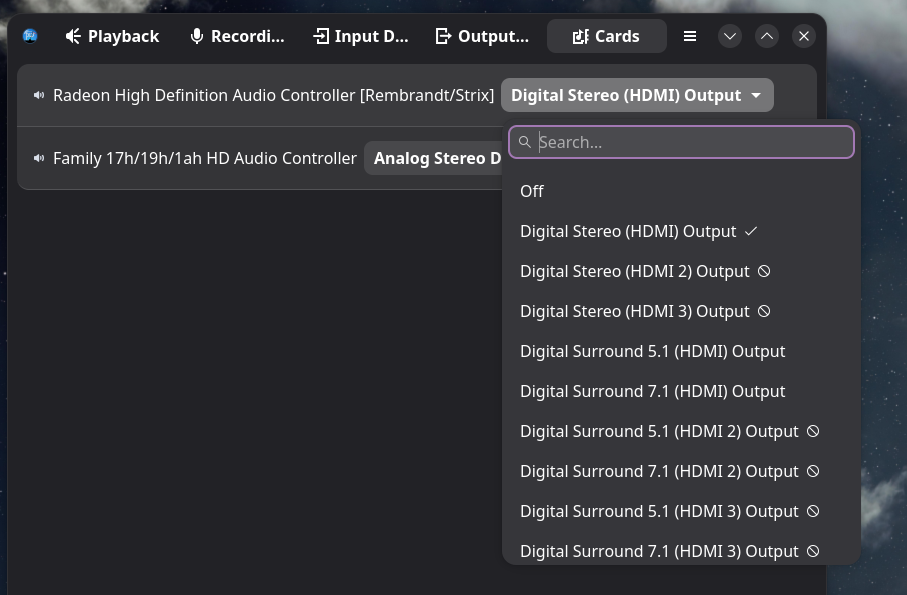
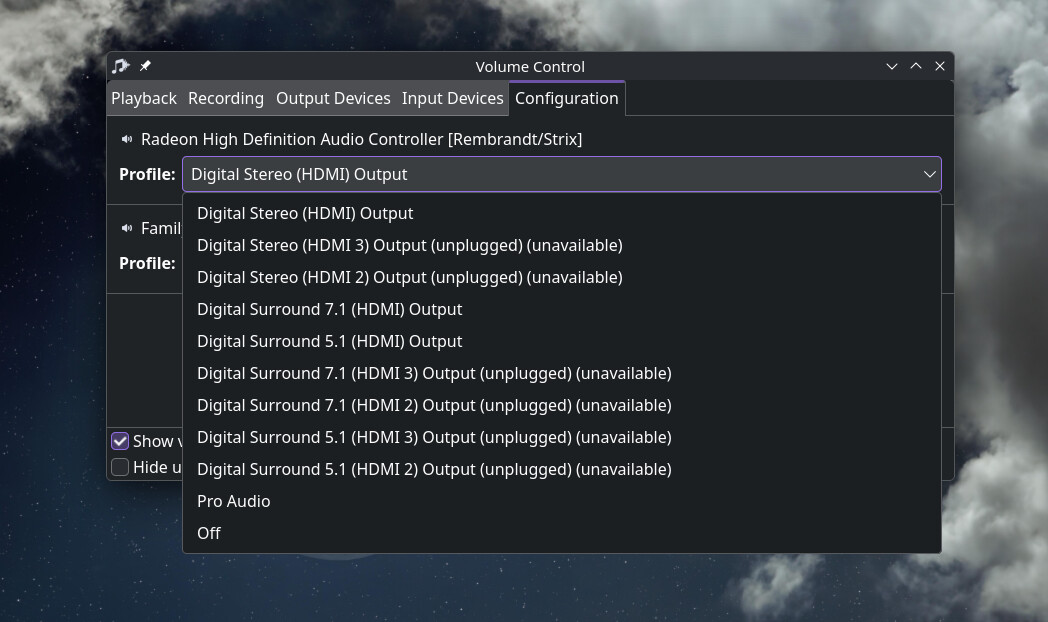
HDMI/DisplayPort Audio: Audio over display cables often appears as a separate output device in sound settings. If it’s not working, ensure the correct output profile is selected.
I did an online install. It means I can connect to the router on wi-fi.
The HDMI cable worked perfectly well with the same monitor in Win 11 previously installed on this PC. Thunar can’t find my NAS. I also remember that when trying with a laptop I had the same network (NAS) problem and I also tried at least a dozen HDMI cables. I couldn’t find a more recent BIOS.
Have you confirmed that sound actually works from the sound output jack to speakers? If so when using HDMI ensure the correct output profile is selected. If sound output works and you have it set to HDMI output in the audio configuration and it still doesn’t work then you may need to add a quirk or addition to a .conf file for the audio.
You may have to add the NAS to the fstab to mount it on boot in order to browse files and or possibly some other things needed. There should be some posts regarding NAS that you could browse and you may require to set up samba.This is not my expertise even though i may potentially be able to help. Probably better off if someone specifically helps you with that issue.
Edit: Sorry, I guess if sound worked on the HDMI on Windows then sound works. So i just want you to make sure the output for sound is using the correct profile.
Intel Ethernet I219-LM: Look for a setting like “LAN Option ROM” and ensure it is enabled. Could be it works with Windows drivers but Linux needs that to be enabled.
HDMI sound over DP it is as it looks like Display is connected with DP ? Bets way to resolve audo not piped to the correct output is to use pavucontrol (Gui) go on configuration tab, disable all other devices (set tem to off profile in the dropdowns) and only enable the one you want the output to get piped to. The device will be named as your GPU mostly and you will have a profile dropdown were you have to choose hdmi 2 output.
DAC usb could be it needs an out of kernel driver or option set it is not listed in the inxi output i think may show the output of lsusbwill show better info, or unplug it open a terminal run journalctl -f and check what it outputs when plugging the DAC in this will in most cases show good info to fin the device model and stuff that goes wrong.
And yea truth is that going for EndeavourOS only give you a brae minimal setup to start with, but it gives you also total control, no need to debloat in teh first place, and a wide range of users willing to help with every thing to resolve and setup.
Sound works with headphones. Without them sound comes from the tiny speaker on the system board. In the settings I only see that entry for sound output.
I’ve been through forum entries for a long while and found no solution to edit fstab, especially the part about editing & saving in terminal root mode. The other difficult part was finding the mount point. It’s not as simple as typing 192.168.1.xx:8080. But anyway, I’m sure after trying for a few weeks, I’ll finally manage NAS access with Samba.
I actually also tried via NFS, since this is 100 percent Linux stuff. But I wasn’t succesful, although setting up an NFS share on my NAS was very easy.
No sound from HDMI seemes to be the more serious problem I have.
ok basically this is what you need sudo nano /etc/fstab
sudo is the command you use to gain super user privileges. (root)
nano is the TUI text editor you will use to edit the fstab file
/etc/fstab is the location of your fstab.
Audio stuff is hard. I think you can do it with pactl commands. What does this show?
pactl list sinks
Edit: To set the deafult sink (Device)
Use pactl set-default-sink <sink_name_or_index> (e.g., pactl set-default-sink alsa_output.pci-0000_00_1f.3.analog-stereo).
Edit: There is also a package in the AUR that automatically changes the sink to the next one and so on. I have never used it as i don’t have any audio issues. It’s called pulseaudio-nextsink