No boot menu after freeze and hard reboot

Hi there,

My desktop froze during a system update. I’m not sure it was because of the update since I was doing (too) many different demanding things concurrently. Anyway, after about 10 minutes of total freeze, I hit the power button to force a hard reboot. On reboot, no GRUB/boot menu was available anymore and I had no other choice than landing in the BIOS ultimately.

I booted from a live USB and tried to follow a few threads and how-tos, but with no luck regarding my issue. Among them was:

I’ve to say that I don’t really know where to go. I’m a decent daily Linux user, but I never really dug into GRUB, systemd-boot, etc and those kind of things. I even mentioned GRUB above just because this was the term I think we were using a few years ago, but I might have used it improperly.

Anyway, here are a few things you might be interested in, done from the live USB:

$ blkid
/dev/nvme0n1p3: UUID="677cc208-c007-4ec4-baff-e0e0689e50c9" TYPE="crypto_LUKS" PARTUUID="0e2c5c0c-90a5-4024-887c-c0b7a23c1bb0"
/dev/nvme0n1p1: UUID="F840-6F55" BLOCK_SIZE="512" TYPE="vfat" PARTLABEL="EFI" PARTUUID="0cb102e6-258d-4f34-ad9b-19abf9e91753"
/dev/nvme0n1p2: UUID="3089c9b2-b9b8-4d09-83f2-c755f8012b5e" TYPE="crypto_LUKS" PARTLABEL="endeavouros" PARTUUID="547ca051-c13a-4358-a492-39c6ded1cea8"

AFAIK, /dev/nvme0n1p3 is swap.

I installed this system about 1.5 years ago. The main partition is encrypted, so I mounted it like so:

$ sudo cryptsetup open /dev/nvme0n1p2 myp2
$ sudo mount /dev/mapper/myp2 /mnt
$ ls /mnt/
@  @cache  @home  @log
$ ls /mnt/@
bin  boot  dev  efi  etc  home  lib  lib64  mnt  opt  proc  root  run  sbin  srv  sys  tmp  usr  var

From there, I think the next step is to mount the EFI one? So I did:

$ ls /mnt/@/efi/
(empty)

$ sudo mount /dev/nvme0n1p1 /mnt/@/efi
$ ls /mnt/@/efi/
bc8665e9ec5047c4a2574e6d5899f441  EFI  loader

AFAIK, everything went well, so I was able to chroot into the mounted installed system:

$ sudo arch-chroot /mnt/@/
==> WARNING: /mnt/@/ is not a mountpoint. This may have undesirable side effects.

Unfortunately, I don’t really know what to do next from here.

This is bootctl command output (from chroot), if that matters:

# bootctl
Not booted with EFI or running in a container, skipping EFI variable modifications.
System:
Not booted with EFI

Available Boot Loaders on ESP:
          ESP: /efi
         File: ├─/efi//EFI/systemd/systemd-boot-fallbackx64.efi (systemd-boot 260.1-2-arch)
               ├─/efi//EFI/systemd/systemd-bootx64.efi (systemd-boot 261.1-1-arch)
               └─/efi//EFI/BOOT/BOOTX64.EFI (systemd-boot 261.1-1-arch)

Boot Loader Entry Locations:
          ESP: /efi ($BOOT)
       config: /efi//loader/loader.conf
        token: endeavouros

0 entries, no entry could be determined as default.

Is anyone willing to help me out? Basically, I suppose I need to fix something somewhere to get my boot menu back but I’ve no clue how, and I don’t want to try random things and make everything worse.

Thank you very much! :folded_hands:

I tried to go further with the diagnosis.

First, I noticed I wasn’t properly mounting the volumes. It’s now done as I think it should be:

$ sudo umount /mnt/@/efi
$ sudo umount /mnt
$ sudo mount -o subvol=@ /dev/mapper/myp2 /mnt
$ sudo mount -o subvol=@home /dev/mapper/myp2 /mnt/home
$ sudo mount -o subvol=@cache /dev/mapper/myp2 /mnt/var/cache
$ sudo mount -o subvol=@log /dev/mapper/myp2 /mnt/var/log
$ sudo mount /dev/nvme0n1p1 /mnt/efi

I took the opportunity to mount other directories as well, just in case.

Then I tried to check a few things after doing a $ sudo arch-chroot /mnt.

The /efi directory, FYI

# tree /efi
/efi
├── bc8665e9ec5047c4a2574e6d5899f441
├── EFI
│   ├── BOOT
│   │   └── BOOTX64.EFI
│   ├── Linux
│   └── systemd
│       ├── systemd-boot-fallbackx64.efi
│       └── systemd-bootx64.efi
└── loader
    ├── entries
    ├── entries.srel
    ├── loader.conf
    └── random-seed

8 directories, 6 files

Duplicate entries in /etc/kernel/cmdline

# cat /etc/kernel/cmdline
nvme_load=YES nowatchdog rw rootflags=subvol=/@ rd.luks.uuid=3089c9b2-b9b8-4d09-83f2-c755f8012b5e root=/dev/mapper/luks-3089c9b2-b9b8-4d09-83f2-c755f8012b5e rd.luks.uuid=677cc208-c007-4ec4-baff-e0e0689e50c9 resume=/dev/mapper/luks-677cc208-c007-4ec4-baff-e0e0689e50c9 rw rootflags=subvol=/@ rd.luks.uuid=3089c9b2-b9b8-4d09-83f2-c755f8012b5e root=/dev/mapper/luks-3089c9b2-b9b8-4d09-83f2-c755f8012b5e rd.luks.uuid=677cc208-c007-4ec4-baff-e0e0689e50c9 resume=/dev/mapper/luks-677cc208-c007-4ec4-baff-e0e0689e50c9 rw rootflags=subvol=/@ rd.luks.uuid=3089c9b2-b9b8-4d09-83f2-c755f8012b5e root=/dev/mapper/luks-3089c9b2-b9b8-4d09-83f2-c755f8012b5e rd.luks.uuid=677cc208-c007-4ec4-baff-e0e0689e50c9 resume=/dev/mapper/luks-677cc208-c007-4ec4-baff-e0e0689e50c9

The human-readable version is:

nvme_load=YES nowatchdog

rw rootflags=subvol=/@ rd.luks.uuid=3089c9b2-b9b8-4d09-83f2-c755f8012b5e root=/dev/mapper/luks-3089c9b2-b9b8-4d09-83f2-c755f8012b5e rd.luks.uuid=677cc208-c007-4ec4-baff-e0e0689e50c9 resume=/dev/mapper/luks-677cc208-c007-4ec4-baff-e0e0689e50c9

rw rootflags=subvol=/@ rd.luks.uuid=3089c9b2-b9b8-4d09-83f2-c755f8012b5e root=/dev/mapper/luks-3089c9b2-b9b8-4d09-83f2-c755f8012b5e rd.luks.uuid=677cc208-c007-4ec4-baff-e0e0689e50c9 resume=/dev/mapper/luks-677cc208-c007-4ec4-baff-e0e0689e50c9

rw rootflags=subvol=/@ rd.luks.uuid=3089c9b2-b9b8-4d09-83f2-c755f8012b5e root=/dev/mapper/luks-3089c9b2-b9b8-4d09-83f2-c755f8012b5e rd.luks.uuid=677cc208-c007-4ec4-baff-e0e0689e50c9 resume=/dev/mapper/luks-677cc208-c007-4ec4-baff-e0e0689e50c9

So it looks like the entries are duplicated 3 times. I guess this isn’t good, right?

More issues in /etc/kernel

# tree /etc/kernel/
/etc/kernel/
├── cmdline
└── install.d
    ├── 50-dracut.install
    └── 90-loaderentry.install

2 directories, 3 files

# cat /etc/kernel/install.d/50-dracut.install 
# cat /etc/kernel/install.d/90-loaderentry.install

Both files are empty, which appears to be unexpected and not good either, right?

I still don’t know where to start or how to proceed though, and I’m still seeking help.

I backed up both directories, just in case:

# tar -cvpzf /home/me/efi_backup.tar.gz /efi
# tar -cvpzf /home/me/efi_backup.tar.gz /etc/kernel

Thanks for reading.

you need to update the system. try to ping something like google to make sure you have a connection and if you do you need to update the system.

Thank you very much for your insight!

Properly finishing the update was something I did previously. I ran pacman -Suuy though. A couple of unrelated packages were updated, then:

:: Running post-transaction hooks...
(1/6) Creating temporary files...
(2/6) Reloading system manager configuration...
  Skipped: Running in chroot.
(3/6) Enqueuing marked services...
  Skipped: Running in chroot.
(4/6) Arming ConditionNeedsUpdate...
(5/6) Reloading system bus configuration...
  Skipped: Running in chroot.
(6/6) Checking which packages need to be rebuilt
fatal library error, lookup self

What about the duplicate entries in /etc/kernel/cmdline and the empty files in /etc/kernel/install.d/?

you need to deal with one issue at a time right now its more important to get the system back up and booting.

When did you finish the update?

After mounting the partition from the live USB and chrooting into it. And just right now as well, as you suggested it.

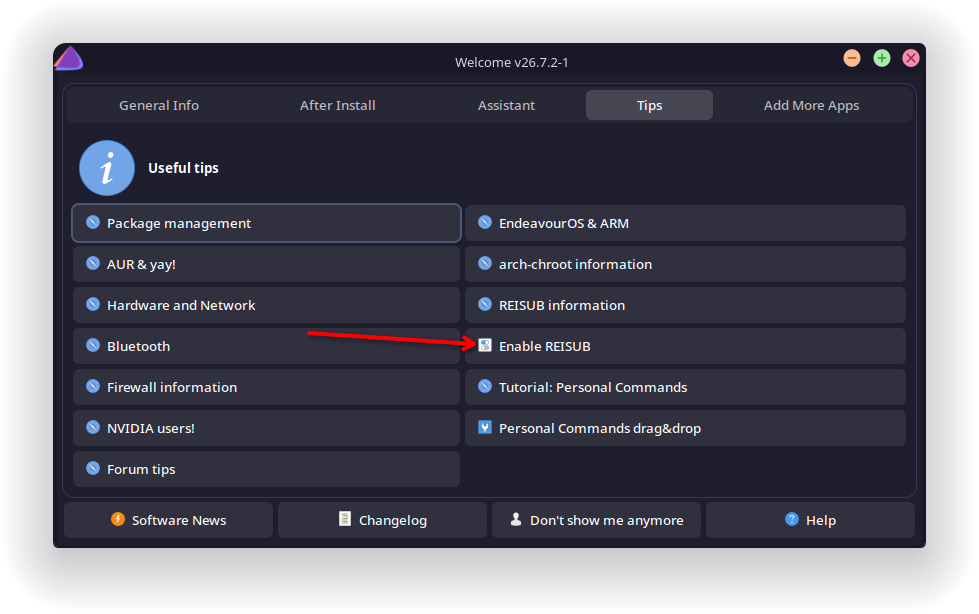
sounds like you need to reinstall your bootloader I do believe its bootctl install for systemd-boot (make sure you mount the efi drive before doing so) also you should always try to REISUB before physically shutting down.

Can enable through the welcome app these days too.

Wonderful, my system is now booting normally. Thank you very much for your help!

Thank you also for the REISUB tips, it’s a very neat addition indeed. I just enabled it and hopefully I’ll remember to use it next time.

By comparing to another EOS system, I figured out that both 50-dracut.install and 90-loaderentry.installfiles in /etc/kernel/install.d are expected to be empty (or both systems are corrupted…).

Should I worry about and take care of the duplicate entries in /etc/kernel/cmdline?

In any case, thanks again @thefrog for your help. It’s much appreciated!