@porferry
So it looks like you have hybrid graphics. You have Nvidia installed. I checked the Nvidia site and the driver version is 450xx series and you have 455xx so I need to look at that on Arch and check. I did notice your ram usage seems a little high on KDE. Not sure what you were doing when you posted it? What is the problem with graphics? I know it’s hybrid but Its probably running on the Intel chip. It is possible to install optimus-manager and be able to switch between Intel and Nvidia.
Edit: Did you happen to install the nvidia-dkms version drivers?
If you want to try optimus-manager to switch graphics.
yay -S optimus-manager-qt
reboot the computer
check optimus manager service (should be running)
systemctl status optimus-manager
To start and enable it run (if it is not running):
sudo systemctl enable --now optimus-manager
Now switch to Nvidia GPU, right-click on the Tray and select “Switch to Nvidia“
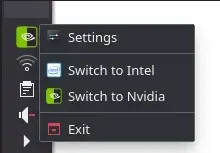
Hope this works for you. Keep in mind when you switch graphics to save your work first as it automatically logs you out.
Optimus manager has the same functionality as Bumblebee, (despite the technical differences) it allows you to switch between Intel and Nvidia graphics on hybrid laptops. The difference is that Optimus Manager has better performance for gaming and has support for the Vulkan drivers so you can properly game with the latest games on Linux (Lutris, Steam, Wine)
Here is the github page. You should read the section on usage as there is command line usage also.
the solution works perfectly. thanks again!
2 Likes
Just wanted to ask again when you reinstalled EndeavourOS did you only have to install the sof-firmware to get the sound working or also use one of my other suggestions too?
For endeavour - i only had to install the sof-firmware and reboot, and sound was working.
For manjaro (which i only attempted as i didn’t know how to work with the nvidia hybrid system and their mhwd is very easy) - sound did not work despite the above and module blacklisting.
I now have endeavour working on both my desktop and laptop, both with kde…
It feels great!!
Thanks!
3 Likes
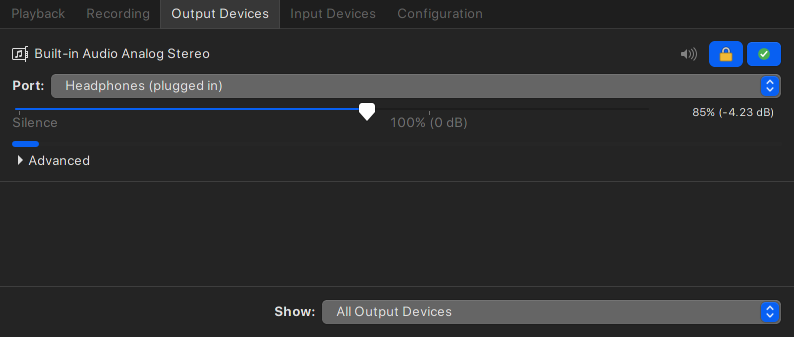
Ran into an issue where I had no audio devices ie. sound but got sound when connected headphones / external speakers… These steps solved my problem
- Try opening pulse audio volume control via terminal using this command
pavucontrol
(For my case, I got an error message in the terminal)
Otherwise if pulse audio opens , check that speakers aren’t muted
Proceed to step 2 if you still haven’t solved your issue
2.Uninstall pulse audio eg . yay -Rcns pavucontrol (can also use pacman instead of yay)
3.Purge(delete) the ~/.config.pulse folder (can check output if you got an error in terminal)
4.Reinstall pulse audio eg . yay -S pavucontrol
5.Reboot
6.Open pulse audio and it should work.
PS: Again confirm speakers aren’t muted . lol .