New GPU or Not?

PC Build Specs -

  • MB: MSi Z370 GAMING M5 - [ADDED AT BUILD-TIME 2017]
  • PSU: Corsair CX750M (750 Watt) - [ADDED NEW 2020]
  • CPU: Intel i7-8700k @ 3.7GHz - [ADDED AT BUILD-TIME 2017]
  • GPU: ZOTAC Nvidia GeForce RTX 3060 Ti (8GB GDDR6 VRAM) - [ADDED USED 2025]
  • Ram: Corsair Vengeance LPX 32GB (2 x 16GB) DDR4 DRAM 3000MHz - [ADDED NEW 2020]
  • Storage: Samsung 960 EVO 500 GB NVMe M.2 SSD - [ADDED NEW 2020]
  • Storage: Crucial P310 1 TB NVMe M.2 SSD - [ADDED NEW 2025]

I’ve added/swapped out a few things, but this old build has been serving me rather well. I’d been toying with the idea of a new build prior to the whole RAM/GPU pricing mess. That’ll have to wait. So, with the old MB and CPU, is it even worth upgrading the GPU? If so, which one? Or should I just hold on until I can afford a new build from scratch?

That is getting a bit long in the tooth, but if it’s serving you without issue, I’d just ride till you can afford to build a whole new rig. Moore’s Law may affect CPUs but GPUs are still kinda newer technology (as integrated processing units). I suspect you’ll see some significant gains in the next year or two, despite shortages and predicted obsolescence of the PC market (just remember this IS the year of Linux, no?).
Hopefully a year from now will see the market settle down.

I planed to upgrade my older DDR4 11th gen Intel rig at the end of 2026 with Intel Nova Lake, since that would be a worthwhile upgrade. Seeing how things were going in late 2025 I decided to scratch that plan and considered a worst case: if I would rock the same setup for another four years, what would hurt most? My answer was the 8 GB GPU for gaming and local AI, so I jumped on a 9060 XT 16 GB. But that GPU was also significant performance upgrade to my existing 3 year old GPU too, which may differ in your case.

No general recommendation, depends on workload and local prices, just my 2 cents.

That’s a hell of a GPU right there.

Wait. Just check the price developments for a potential replacement card, such as the Radeon RX 9060 XT in it’s 16GB variant. Which definitely would be an upgrade to the 3060TI.

It’s prices went up from it’s MSRP at launch ($349) and are still $90 higher than that at the moment.
From the perspective of the economics, it simply doesn’t makes much sense currently.

Probably don’t need to say this..but I will for the sake of documenting it lol.
If you see a good deal, don’t think about it…buy it, because it probably won’t last.

That said with the expectation that you feel your old rig is not working for you adequately. You didn’t clarify that point.

This is true.

It’s working adequately, for sure. 1080p gaming is rock solid, no issues. I can even push a few games to 1440p. Perhaps it’s just a build-itch I’ve been feeling the need to scratch. Of course I can wait until (IF) pricing settles down enough for me to afford a totally new build. Maybe I’ll get lucky and find a decent used 9060XT 16GB or similar. But yeah… maybe holding off is a good idea.

A good friend of mine who is suffering from astigmatism used to say :

I don’t care to upgrade to 1440p or even 4k. My eyesight is screwed up anyway. And a visit to the Optician might be way cheaper than the upgrade to a newer GPU these days.

Have you considered a GPU mortgage? :winking_face_with_tongue:

My lounge room gaming PC is similar to yours @UncleSpellbinder, except using an older MSI Z170I Gaming Pro AC ITX board with an Intel i7-7700K, 32GB RAM, and a comparatively modest Nvidia 1660 Super.

1080p gaming at max settings is not an issue, and most games are happy at 1440p at max or near max settings (4K TV). I would note though, we’re not typically playing triple-A games, it’s a computer for my kids (daughters) mostly.

Unless there’s a particular issue a new GPU would solve, that would be my recommendation.

A new GPU is going to be bottle-necked by your old PCIe 3.0 board (MSI Z370 Gaming M5), so it’s a lot of money, for something that can’t really stretch its legs.

I see people approaching full computer upgrades by purchasing a bit here, a bit there, as money permits. From a budgeting perspective I can understand the reasoning, but in the long run, the PC you could have had would be superior to the PC you will have because of that approach.

Hardware is constantly getting better and generally speaking, that produces downward price pressure on the existing options. Save up enough to buy the system outright at a later date, and you’ll be buying into newer faster hardware at the same price, than if you were to purchase it in dribs and drabs now.

Moreover, the components you purchase later altogether, will be designed for each other. If purchasing a PCIe 5.0 GPU now for your PCIe 3.0 motherboard, what’s to say when you finally upgrade the PC there aren’t PCIe 6.0 boards and GPU’s?

Hi Uncle, good start of the week to you!

I apologize for the “long” answer I want to give but I want to be detailed in my reasoning: TL;DR: Wait until you can build a fully specc’d new PC. Your GPU is fine, and I would even say maybe even held back a tiny bit by the processor- it’s not bad, but it’s already quite old and even 2-3 years after those came out, when Ryzen came along those i7s were already “out of date” (GENERALLY speaking not literally).
I would love to ask, in your 1080p play sessions, what is your GPU usage %? As long as the game demands it, if it’s 90% or even 95% or above at all times, then great. If it’s 85% or below or goes up and down, then my suspicion about the CPU is true.

Anyway, due to unforeseen events (mobo dead), availability and money, I have ended up with a Frankenstein of a mismatch that isn’t quite as bad, but shun some light into some things. I can be wrong, but I personally feel that in the last 5 years with all the “RT, PT, FrameGen, upscaling, AI” we have gone back to the rule of thumb of: Good processor always good choice like it was 10-15 years ago. People keep talking about technologies, graphics and 5090s or even PCIE slots and I think it’s the wrong approach.

My current rig as it stands is as follows:

Asrock B450M HDV

2x8 - 16GBs of RAM (rated originally 2666MT/s but OC’d to a stable 3000MT/s (or 3200, can’t remember, same shit basically).

Ryzen 5 5500X3D

RX 9060XT 16GB (lol)

Thermaltake SmartRGB 600W PSU (I have a 850W core reactor still sealed in box because I didn’t feel to change and rewire all the stuff yet and also while much better quality PSU, is not really needed but I’ll put it in eventually).

The idea was using a bonus I got at work to TRY to get a 9070XT 16GB for the future and a 1440p monitor to make use of that new card. The stretch was a bit too much since I would’ve needed the new PSU without doubt. So I decided to spend a bit less, since the performance difference for me wasn’t huge considering the money being limited and get the monitor, the PSU, the 9060XT 16GB instead and a UPS (this is a different story XD). The whole idea was getting the GPU (more expensive part) early and THEN finish the build with new MoBo, CPU and RAM but prices went nuts so I left the hobby momentarily and got into tennis instead haha.

Within that context, and after many many benchmark/review videos and my own experience, here’s what I came up with:

  • If your CPU is weak-ish, depending on the type of game you play, X3D is not worth the hassle/price as it will give you great performance on some things or scenarios but make no difference in others. For example, I had an R5 2600, of course this CPU is miles better but for some reason it didn’t blow my mind? Yes, FPS went up and overall LOWS were much better, steady lines which is great, but in moments where raw CPU matters such as compiling shaders or being fast at loading assets such as in open-world shooters, it’s still a bit lack-luster due to the low speed it has.
  • 9060XT (16GBs always! pretend 8GB doesn’t exist) is actually an insanely capable card. No matter the card, if you play without scaling, you will have low FPS nowadays - so with the premise that upscaling is used anyway, “mid tier” 1440p gaming with this card is definitely possible; Would I like to have the 9070XT instead? Yes, but is not critical. Regarding PCIE, yes, this card is being hampered by the 3.0 interface however, * as already shown in testing by Hardware Unboxed for example, LOWER PCI-E Interfaces are worse considerably when VRAM is exceeded. However, 16GBs or more of VRAM, this is not relevant as you will ALWAYS want 16GBs (12 minimum) or more anyway. This is important because it will come later in the conclusion.
  • Depending on the type of game, DDR5 faster memory will yield you better results but not by much. DDR4 3200 MT/s is still 90-95% completely fine and it doesn’t matter much.
  • PCI-E interface for the SSD doesn’t really matter much as it has a bunch of variables: SSD controller, your own CPU PCI-E lanes and maybe IMC, the bifurcation done by the MoBo itself and its chipset and then also (critically important!!), when streaming game assets, you will rarely reach any “insane speed” as it’s not something constant but rather random access to a lot of tiny and bigger stuff. This is where cache and NAND flash memory comes in (If I’m not wrong). In plain English, having an NVMe SSD for games is 99% completely fine and it doesn’t matter much if it’s PCI-E 3.0, 4.0 or 5.0. Of course, if you can have a 4.0 or 5.0 working at full capacity, it’s better but not needed.
  • I personally like to play with constant FLUIDITY and NO TEARING. I don’t play Counter-Strike anymore, but everything else I play now looks fine or constantly fluid - now that I have a 185hz monitor, I can safely say 100-120FPS constant minimum is IMO the sweetspot because you stop perceiving that “stutteriness” that comes from having lower FPS. I am not 100% sure, but I do think that this has to do with the monitor being higher refresh rate - similar stuff happens on phones and my previous monitor, 1080p@75hz, if I had 70FPS stable it was completely fine.

In conclusion, it is my opinion that today, while having a good GPU is great and matters quite a bunch, having a beefy CPU is still an unbeatable golden rule. You can always lower graphics or res (I personally can’t use lower res than the monitor’s because everything looks slightly fuzzy and I hate it) to give yourself a bit more FPS. But you can’t really do much for the CPU to work better. CPUs ALWAYS work at “100%” in the sense that whether is 2 cores or all core, it will always TRY to be as fast as possible giving you the best snappier result - meanwhile the GPU will work “scaling up”.

In simple with a real example: If you have a 1080 capable GPU and play at 720p for more FPS, you will achieve that as long as your CPU is good / fast enough to process all those frames. If you have spikes or stutter and lower % usage for the GPU, means the CPU isn’t able to handle all of it. This is when you increase graphics/res to give the CPU a breather and you have better and more stable lows, at the cost of lower FPS across the board because of the GPU not being capable of more and sometimes those FPS you don’t get matter a ton.

This ties in with all the “AI” stuff nowadays - Since upscaling gives you MORE FPS and makes the GPU work less, you need a good CPU to keep up. Upscaling is basically the previous situation I mentioned but with an easy toggle. This technology, imo is the BEST one so far and the only one that should matter.

However, if you can/need to activate FRAME GEN, you definitely need AT LEAST 60fps or more for it to be “good enough” and for that you need… you guessed it a good CPU as well.

CPU overhead is needed for a lot of stuff in general, and this is not counting things OUTSIDE of gaming. But even inside of gaming as I mentioned before, having a beefy CPU is always a great choice.

So, to finish :stuck_out_tongue: do not buy a new GPU, especially not for the current CPU you have right now. Wait until you can save and make a full rounded up build.

Personally i would wait until you can afford a whole new build. I agree with @Bink a new Gpu with the current hardware isn’t really going to change a lot.

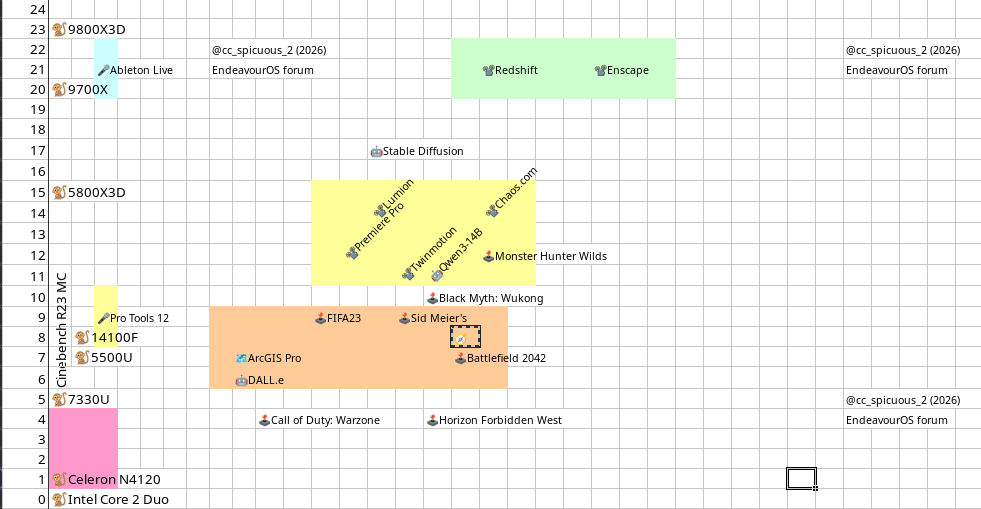
On two dimensions, Cinebench points and Passmark points (GPU), your current system coordinates is {8; 17}.

GPU

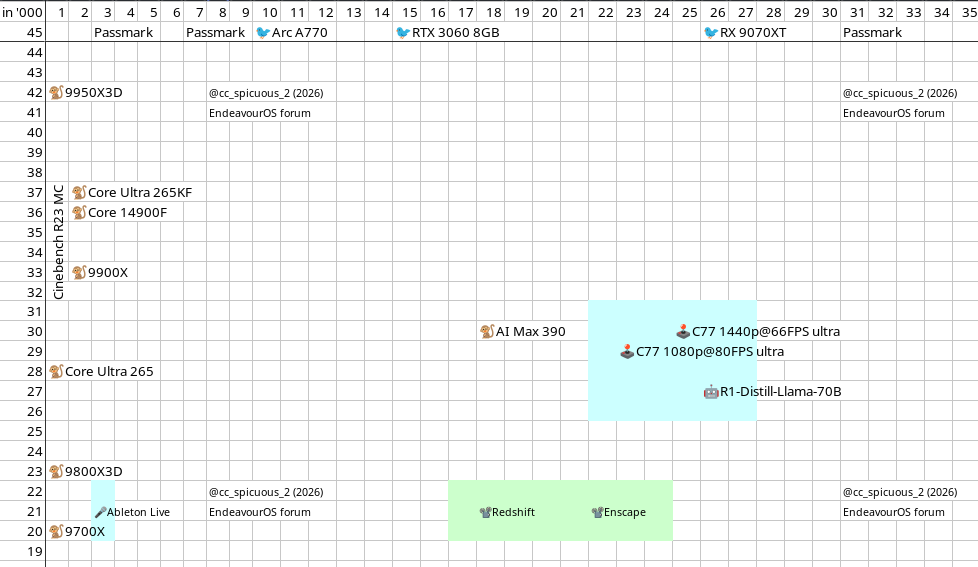
The current GPU darling in the market is the RX 9070XT, which brings your system to {8, 26}, equivalent to RTX 3080 / 3080 Ti, 4070.

CPU-GPU pair

RX 9070XT owners have one of three CPU performance levels:

  • higher {29, 26},
  • high {18; 26} and
  • standard {15; 26}

The higher pair allows for Cyberpunk 77 at 1440p ultra at 66 fps, DeepSeek and Qwen LLMs. LLMs require NVIDIA cards, though.

The high pair allows for Enscape, DALL.e, and Redshift, all prominent graphics and video applications, essential for A/V pros.

The standard pair allows for video games at the recommended system requirements, although the GPU is way over the top.

CPU laptop standard

Your current CPU is equivalent to the current CPUs by AMD, the AMD Ryzen 7430U, INtel Core Ultra 236V, Ryzen Z1, and Apple A18 Pro , and Snapdragon 8 Gen 4. These are mainly laptop / mobile CPUs.

CPU-iGPUs

At the moment, AMD offers iGPUs for laptops that score higher than your current dGPU:

  • Ryzen AI 300 Max 90 {30, 18}.

Comment/Opinion

If you play video games, your current system would benefit from a minor CPU-motherboard upgrade rather than from a GPU upgrade. (Ryzen 7600X, 5800X3D, Core i 13400, Core i 10900K)

If you want to go into professional A/V, you need to get a CPU-GPU pair at high levels; and if AI is what you’re interested in, at higher levels.
EDIT 2:

Left-hand (y-axis): Cinebench R23 MC with various CPU models, in '000.

Top-line (x-axis): Passmark scores for GPU performane with three GPU models as examples, in '000. @Bink @latisullivan

A few more cents from a gaming vantage point:

Imho most answers are valid at “normal times”, but don’t apply in the current environment.

AI drives up tech prices everywhere. Yes, maybe it’s a bubble, but the .com bubble bursting doesn’t mean it destroyed google, amazon, facebook,… It will kill the bubble, not the tech and proven baseline demand which will be applied to more fields.

Middle East events drive up costs, which have not even remotely hit. And God forbid other unforeseen events like China doing something funny in 2027. Then private people will rock their current systems until 2033.

Steam Machine is delayed. There are signs that the current console and PC-GPU cycle will be prolonged, making current equivalent hardware relevant for a longer time.

A CPU upgrade would provide a significant boost right now, but also requires an investment into a lot of components (mobo, CPU, RAM, cooler). And then you would need a new GPU too - otherwise what’s the point spending that money and be completely GPU bottle-necked? If the money isn’t available today don’t assume it to be cheaper in a year.

We are not in the usual “in the future you get more for the same money”-cycle. And I expect that to be the case for longer than a year. A lot longer actually. Hopefully I’m wrong.

On the other hand even if you play at 1080p@60fps then 8 GB is already a bottle-neck. At least in my experience. It’s very noticeable that the current console generation is targeting more than 8 GB for even older AAA titles. On top of that Linux is not as lightweight as consoles, just the DE and some active apps can easily add 1 GB+ to the VRAM consumption. In other words having more VRAM often allows to dial up graphics on the same, old CPU budget.

tl;dr If you have access to a decent 16 GB GPU that doesn’t break the bank I would jump on it. Whatever the vendor or model. With that you can probably relax for the next two years and see wherever the market is going.

And I just have to top it off with this chestnut:

“Go not to the Elves for counsel,
for they will say both no and yes.
Elves seldom give unguarded advice,
for advice is a dangerous gift,
even from the wise to the wise,
and all courses may run ill.”

— Gildor -The Lord of the Rings, The Fellowship of the Ring (J. R. R. Tolkien)

Based on your Motherboard and CPU getting the latest GPU in today’s price environment is going to be well pricey.

Unless you see that in the next 1-2 years, your setup becoming a major bottleneck or you cannot play the latest games at the highest fps, stick with it.

If you can afford a build in today’s insane price points then go for it, but note that the prices will come down. The AI bubble has to crash and if the conflict in middle east does not do it then Gravity will. It is only a matter of time.

Smart move would be to weather out this perfect storm. It too shall past in the next few quarters. If not before the mid terms.

Just something else to consider @UncleSpellbinder, as I know you’re a creative person, and you have at least dabbled in some LLM usage.

It has been said by some that the AMD GPU’s are more stable under Linux, and there may be some validity to that. The introduction of Wayland had it’s teething issues, I can confirm that. In more recent times though, with the advent of Nvidia’s own open-source kernel module, things have been running very well.

If you were to use something like DaVinci Resolve with an AMD GPU however, you would have been experiencing ongoing painful issues for much of the year so far.

A number of creative tools can leverage CUDA, as well as locally run LLM’s. Now of course a newer more powerful GPU regardless of brand would likely be faster regardless of CUDA usage, as tools these days can also leverage Vulkan ( :vulcan_salute: ) but I just thought I’d note it.

i would consider motherboard/cpu/ram/good heatsink with Amd Gen3 , because you have PCI Express 4.0 16x video card.
for example any good X570 or B550 motherboard with 2x line Pci gen 4 ( check in comparison X570 motherboard / B550 motherboard )
for CPU try to get any 5950x and see for memory DDR4 3600

for your 8700K
smp: Brought up 1 node, 12 CPUs
[ 0.044308] smpboot: Max logical packages: 1
[ 0.044308] smpboot: Total of 12 processors activated (88704.00 BogoMIPS)

for 5950x
x86: Booting SMP configuration:
[ 0.600850] … node #0, CPUs: #1 #2 #3 #4 #5 #6 #7 #8 #9 #10 #11 #12 #13 #14 #15 #16
[ 0.632899] Spectre V2 : Update user space SMT mitigation: STIBP always-on
[ 0.632923] #17 #18 #19 #20 #21 #22 #23 #24 #25 #26 #27 #28 #29 #30 #31
[ 0.664880] smp: Brought up 1 node, 32 CPUs
[ 0.664884] smpboot: Max logical packages: 1
[ 0.664885] smpboot: Total of 32 processors activated (217626.36 BogoMIPS)

this possible to add V3 with ALHP