a while back i installed grub to test it out but after a week i uninstalled it again cuz i didnt like it (and felt slow compared to systemd-boot)
after that, i had no issues with systemd-boot
i ran pacman -Syu for a systemupdate (7.1.8 → 7.1.9) last week and that already broke something. i manage to fix it quite quickly with a live arch iso
something like this, iirc
mount /dev/nvme... /mnt
mount /dev/nmve... /mnt/efi
arch-chroot /mnt
bootctl repair
that allowed me to boot again and i thought it was done
yesterday i ran another pacman -Syu for kernel 7.1.11
and it broke again
did the same as above but this time it didnt help
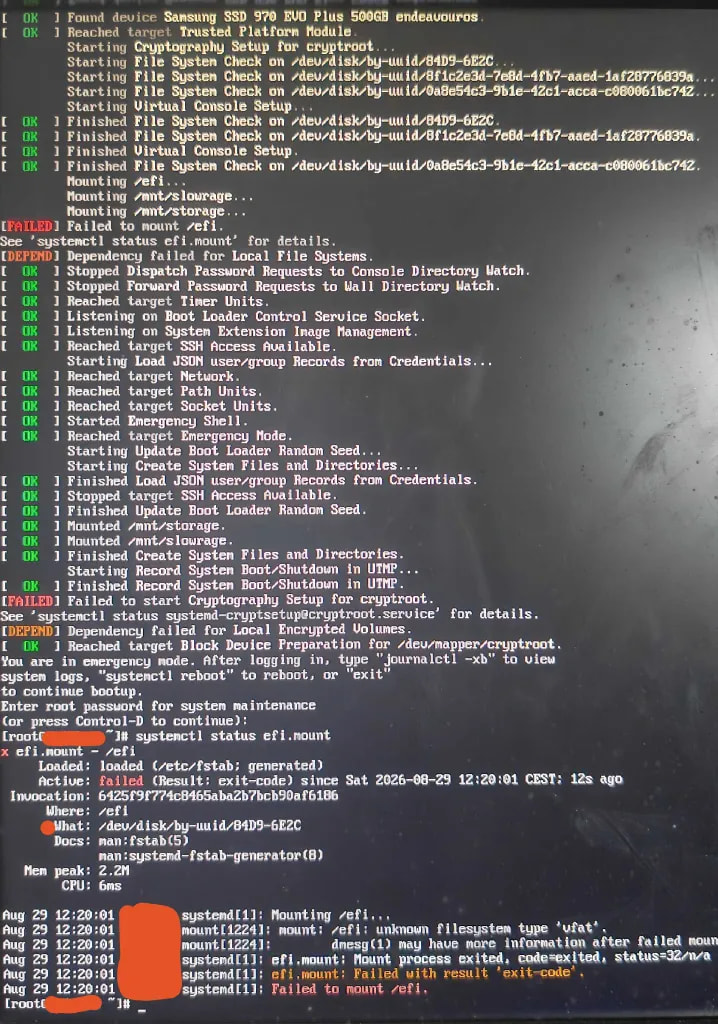
i now believe i seriusly broke something on my bootloader but i dont want to reinstall my OS (i have 2 additional drive in my PC, so i can if i absolutely have to)
(see image below for boot startup output)
i did some research and also asked some LLMs for help without success
it seems that the update maybe didnt properly install the kernel or something?
since (from emergency mode)
# uname -r
7.1.9-arch1-2

# ls /usr/lib/modules
7.1.11-arch1-1
im unsure if anything else is needed for help, just lmk plz
thanks in advance
systemd-boot is part of systemd so it will always be installed.
However, you don’t have our automation. I guess you manually created the loader entries by hand?
What you have right now definitely won’t work. Your initramfs are being generated in /boot because you are using the non-systemd-boot automation package.
You have two choices(both in an arch-chroot):
Mount your ESP at /boot then reinstall your kernel packages