Need help "fixing" UEFI mode for Linux

Hello!


If you need a lot of details about my issue, you can read this post.


To “resume”, I tried installing “CachyOS” several times in my laptop. But the installation always (except for the first time, where I made a mistake, a mistake that pushed me to decide to reinstall) failed with an error related to being unable to finish installing the bootloader.

I also got a message telling me that my BIOS has a bug, while trying to intall “Garuda LInux” (when I tried to see if other distros got the same or a similar error while installing). That, also while trying to install the bootloader.

And, after looking for a similar issue to mine that could help me solve my problem, I found some info saying that one can try using “efibootmgr“ to fix issues like those. But I haven’t found any easy-to-understand guide that makes it clear enough for me to do what’s needed to “clean” my “nvram”. Also, when I try to use this tool, I only get a message saying:

“No BootOrder is set; firmware will attempt recovery“

So, I guess that tool is useless at the moment.

I also found a tool called “efivar” that I honestly don’t know if would be helpful in this case.

I also found that one can use “UEFI Shell“ to fix problems like these. But I have no idea how to use that thing.

So, I would like to know if someone can help me try to fix this issue. I guess someone with experience fixing this kind of issue.

By the way, during my annoying journey trying to fix this issue, I reinstalled EOS without any (aparent) issues. Just to find that the system had actually got installed in “UEFI mode”. Because the “EFI” folder is there, even though it seems to be missing some files. And even so, when I use “bootctl status“, I get this message:
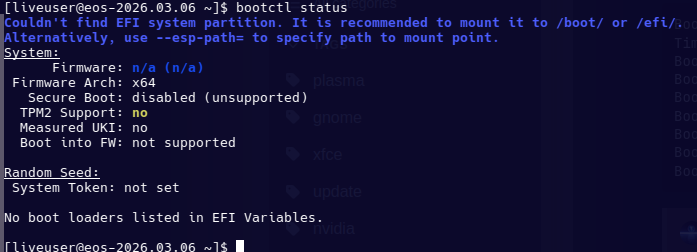
That, even though “Secure Boot” is in setup mode in BIOS.

Same thing that I got in CachyOS, Garuda Linux and NIxOS.

During my journey I also found some info pointing to a possible kernel bug (can’t recollect where I found that info). So, I wonder if someone knows how to test that possibility. And I mention this possibility because I have a similar laptop where I also tried to install CachyOS, and I do get the same error about being unable to install the bootloader. Even though that laptop actually says that “Secure Boot” is in “Setup mode”. So, could it be a kernel bug and/or a bug in the installer of some distros?.

Any help guiding me in a way to be able to fix this seriously annoying and, apparently, practically undocumented issue will be very appreciated.

If you need any logs that may able to help you get an idea about what’s going on, just tell me wich ones you need and I will post them.

THANKS in advance.

There’s quite a lot of homework you set for us here, as your linked post also links various other posts :sweat_smile:

So is it… working now?

With respect to efibootmgr, you can use it to list, and remove bootloaders.

To list:

efibootmgr

If for example, there was a bootloader there you wanted to delete called Boot0021 (number 0021), to delete it you’d do this:

sudo efibootmgr -B -b 0021

-B : Delete bootnum (command being applied).
-b : Modify bootnum XXXX (selects which bootnum to apply it to).

Nope. It isn’t. At least not as it should with UEFI mode active in order to be able to activate “Secure Boot” for EOS.

Note:

Right now, I have “Windows 10” installed on that laptop. I did that so I could see if Windows gave me the same type of error. But no, Windows is working completely normally with “Secure Boot” enabled (as expected from Windows, I guess).

I was able to install EOS but not other distros I tried. And EOS got installed supposedly in UEFI mode. Because It did get an “EFI” folder and a few files inside it when I was able to install it. It boots and works, but once I check the bootloader status, “bootctl” says that the system is not running in UEFI mode. Even though the BIOS is already in setup mode since installation. And even though the installer actually installed the bootloader in some form of “pseudo-UEFI-mode”. And I say “pseudo-UEFI-mode” because I got an EFI folder and a few files. But the system still says I am not using UEFI mode.

About the “efibootmgr”, well, I mentioned that it is useless on my laptop at the moment. Because, regardless of the “efibootmgr” command that I use, I only get a “No BootOrder is set; firmware will attempt recovery“ message.

Do you mean that the link leads to a list of different links or something like that?

Because I checked it and it leads directly to my post on the “CachyOS” forum.

THANKS for trying to help! :smiley:

My only meaning was that it was a lot of information to wade through to try and understand the issue :wink:

Secureboot is actually not officially supported by EndeavourOS, and I wonder if this might be the simple reason you’re encountering difficulties.

If you’d like to try and make it work, it might be possible, but if seeking help for that you might need to start a topic that focuses on that.

Check out the installation tips and tricks, which details some things you need to consider before installation, such as disabling Secureboot, the Compatibility Support Module (CSM) and Fastboot.

https://discovery.endeavouros.com/installation/live-iso-tricks-tips/2021/03/

Yeah, I am aware of that, but it is not the reason I found difficulties. Considering that just before this mess happened, it (Secure Boot) was working perfectly fine on EOS.

Thanks! But I already did before I posted this. Just so I could make sure I wasn’t missing something, but everything I did was correct. And the problem seems to be unrelated to something like this.

In the end, it seems to be the BIOS image the technician used to make it work again, or the NVRAM is already faulty.

THANKS!