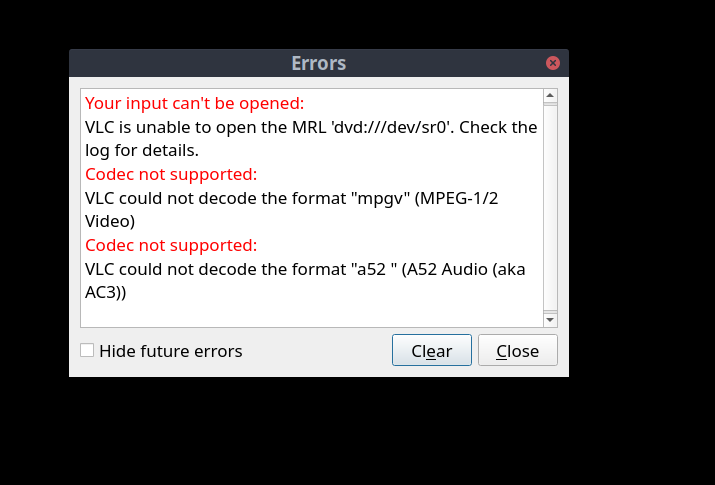
thrift store DVD score of three Stones documentaries. The DVD boxes are in French and English.
My theories:
-
are these regional errors and all is lost?
-
one magic AUR package to make all this go away?
-
two magic AUR packages to make all this go away?
-
handbrake here I come?
-
I’m out of theories.
thanks for any kick in the rear towards the right approach in order to play these dvds on my PC (so I can rip or convert to iso lager)
graci-
if you have mpv installed you can check if the disk is at least playable with this command
mpv dvd://
make sure the dvd is actually playable first. I know times handbrake doesn’t always see the disk and I have to reload it. (the disk)
1 Like
came back to edit that the lo-res (pirate?) DVD does play on my DVD player/TV
1 Like
cactux
4
For the codecs, you need to install the plugins from the repo. They just split everything to its own packages. So that is what it is.
2 Likes
I wasn’t going use Handbrake except maybe to take it a digital friendly format for usb. Let me try it
How about trying one magic repo package?
Assuming it’s not already installed:
sudo pacman -Syu vlc-plugins-all
This will install all plugins, so your VLC will be ready for anything you throw at it.
4 Likes
yeah that is correct arch split the vlc packages I remember some convo around here about that now.
1 Like
got it.
I always heard it was easier to rip or create mp4 from VLC so wanted to try it.
stand by for followup
I picked a hell of a start for getting rid of my plastic DVD collection 
1 Like
thefrog
10
Handbrake defaults to this ( or at least it did when I installed it) I changed mine over to mkv
@Stagger_Lee’s idea of VLC plugins worked. SOLVED!
Got some Stones action now.
That was a little to easy .
Thank you all
3 Likes
I should use MKV. good catch. my tv adores the mkvs but not all the mp4s.
1 Like
system
Closed
13
This topic was automatically closed 2 days after the last reply. New replies are no longer allowed.