Yeah the funny thing is on the test install it runs fine in wayland. Not sure why its giving me this issue over here. Its the same machine but a different setup (with the old X11 stuff freshly still new to being old) I removed my BraveSoftware folder from ./config thinking maybe a setting in my config folder but even with a new folder it just repeats the same message. I use Zen as a daily and only had brave for a few accounts that prefer a chromium browser. I have Helium installed and it works fine on both sides so Its just brave being a bunghole lol.
There are some notes here on managing GTK and QT applications which might help you. I to am in the deep end of the WM world now daily driving Noctalia Umbriel. Actually replaced my Niri install.
The main command I find from that that works for me with LXQT is the gsettings command
gsettings set org.gnome.desktop.interface color-scheme 'prefer-dark'
running that worked on both LXQT/Openbox and LXQT/Labwc and solved my theme issues. you can change the color-scheme to “prefer-light” if you want a light theme forced.
Not sure why I didn’t think of this before however I decided to login to just the labwc side and try brave over there and see if the issue persist. It did not. So it seems there is something between LXQT getting the correct information from brave or vice versa. Such as the case in a virtual environment as well.
What! that is loopy. No wonder nothing worked.
Got bored, so configured labwc, and yes Brave runs fine. Still don’t like xml as a config file format, but the crazy thing is:
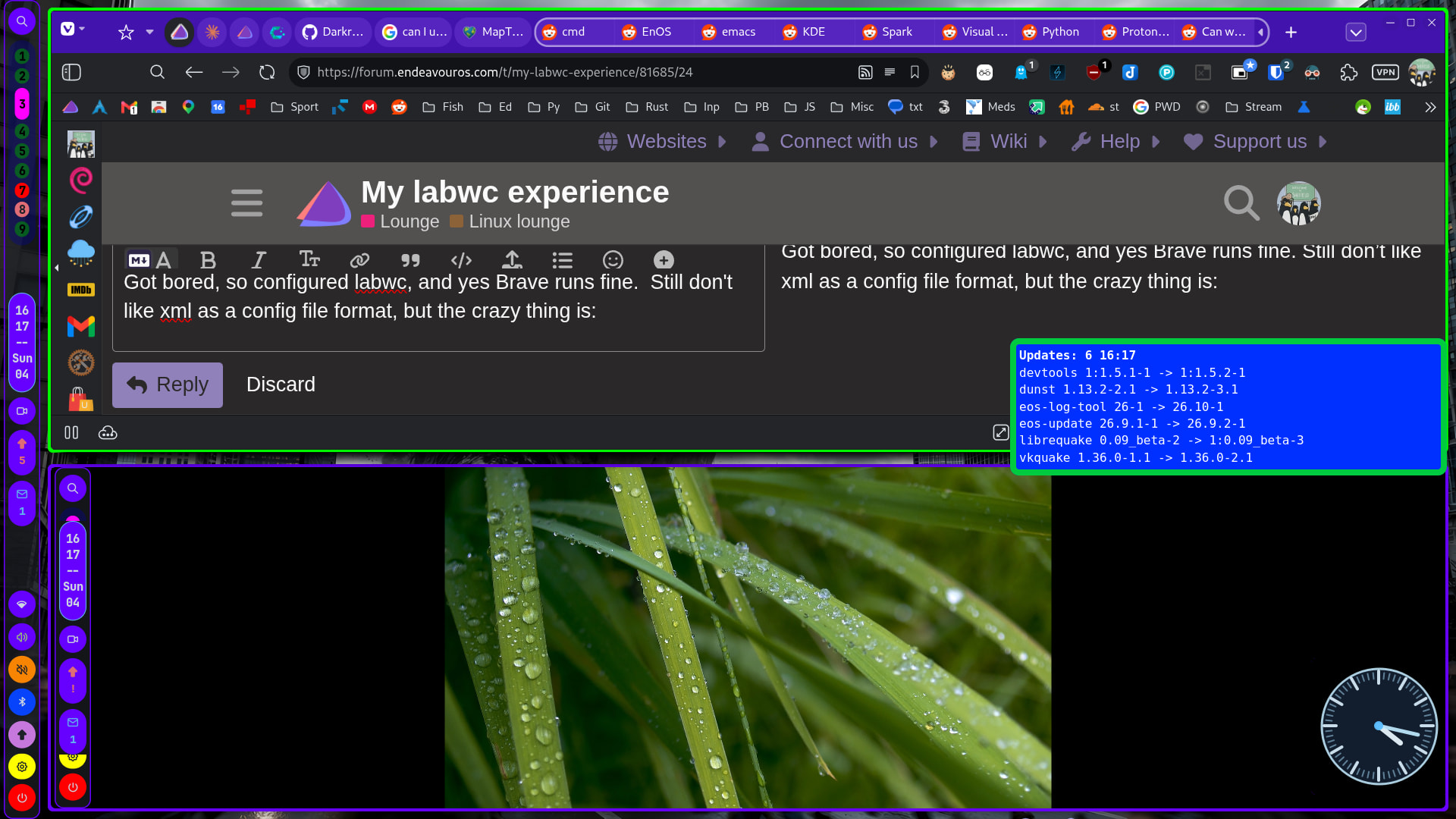
Labwc running in a window on MangoWM

The only thing LabWC lacks (IMHO) is a command line IPC prog, like hyprctl and mmsg (in hyprland & mango respectivley). Scripting it is not that easy…
Well I have been running it for about 9 days now and I have to say I haven’t noticed much difference in the work flow. The feel is pretty much the same as my openbox feel. I have really enjoyed just using this side and have not logged on to the X side in about 4 or 5 days now. My shortcuts all work the same and I couldn’t be happier with the overall turn out. At some point I’ll probably clean up some of those unused X11 programs I have installed for openbox, However for now its not much space and their is no conflicts with them there.
Hey, in Openbox I use snap to corners and snap to edges. But in Labwc, I can’t seem to get snap to corners to work. I have to use snap to edges: like snap to right edge, then snap to bottom edge to get a window to snap to the bottom-right corner.
Is this something you use and have been able to get to work?
In Openbox the following works, but is completely invalid if used in Labwc:
<keybind key="W-KP_3">
      <action name="UnmaximizeFull"/>
      <action name="MoveResizeTo">
        <x>-0</x>
        <y>-0</y>
        <width>50%</width>
        <height>50%</height>
      </action>
</keybind>
Labwc shows the following (which is a lot cleaner), but it doesn’t work for me at all:
<keybind key="W-KP_3">
      <action name="SnapToRegion" region="bottom-right" />
</keybind>
Two other things that don’t work for me are switching workspaces via keyboard shortcut or sending a window to workspace via keyboard shortcut. I currently have to click on the workspace button or right-click a window’s title bar respectively.
<!-- Switch to workspace 1–4 -->
  <keybind key="W-1"><action name="GoToDesktop" to="1" /></keybind>
  <keybind key="W-2"><action name="GoToDesktop" to="2" /></keybind>
  <keybind key="W-3"><action name="GoToDesktop" to="3" /></keybind>
  <keybind key="W-4"><action name="GoToDesktop" to="4" /></keybind>

<!-- Move active window to workspace 1–4 -->
  <keybind key="W-S-1"><action name="SendToDesktop" to="1" /></keybind>
  <keybind key="W-S-2"><action name="SendToDesktop" to="2" /></keybind>
  <keybind key="W-S-3"><action name="SendToDesktop" to="3" /></keybind>
  <keybind key="W-S-4"><action name="SendToDesktop" to="4" /></keybind>
It’s weird because Labwc doesn’t complain about anything unless I use an Openbox string, so it would seem I have the correct strings in the config file, but they don’t work.
I am thinking of leaving KDE for a bit to let them sort out the mess with the users who say they have no problems with Wayland sessions
Any help would be appreciated. 
Er… never mind. I did what you did. I used Lumo in this case. Just gave it my whole config and asked it to fix it for me. I had everything right except that some things were in the wrong places, so they didn’t work.
The full working config in case someone needs it:
<!--
This file contains all supported config elements & attributes with
default values.
-->

<labwc_config>

  <core>
    <decoration>client</decoration>
    <gap>0</gap>
    <adaptiveSync>no</adaptiveSync>
    <allowTearing>no</allowTearing>
    <autoEnableOutputs>yes</autoEnableOutputs>
    <reuseOutputMode>no</reuseOutputMode>
    <xwaylandPersistence>no</xwaylandPersistence>
    <primarySelection>yes</primarySelection>
  </core>

  <placement>
    <policy>cascade</policy>
  </placement>

  <theme>
    <fallbackAppIcon>labwc</fallbackAppIcon>
    <titlebar>
      <layout>icon:iconify,max,close</layout>
      <showTitle>yes</showTitle>
    </titlebar>
    <cornerRadius>8</cornerRadius>
    <keepBorder>yes</keepBorder>
    <maximizedDecoration>titlebar</maximizedDecoration>
    <dropShadows>no</dropShadows>
    <dropShadowsOnTiled>no</dropShadowsOnTiled>
    <font place="ActiveWindow">
      <name>JetBrains Mono</name>
      <size>10</size>
      <slant>normal</slant>
      <weight>normal</weight>
    </font>
    <font place="InactiveWindow">
      <name>JetBrains Mono</name>
      <size>10</size>
      <slant>normal</slant>
      <weight>normal</weight>
    </font>
    <font place="MenuHeader">
      <name>JetBrains Mono</name>
      <size>10</size>
      <slant>normal</slant>
      <weight>normal</weight>
    </font>
    <font place="MenuItem">
      <name>JetBrains Mono</name>
      <size>10</size>
      <slant>normal</slant>
      <weight>normal</weight>
    </font>
    <font place="OnScreenDisplay">
      <name>JetBrains Mono</name>
      <size>10</size>
      <slant>normal</slant>
      <weight>normal</weight>
    </font>
  </theme>

  <windowSwitcher preview="yes" outlines="yes" unshade="yes">
    <osd show="yes" style="classic" output="all" thumbnailLabelFormat="%T" />
    <fields>
      <field content="icon" width="5%" />
      <field content="desktop_entry_name" width="30%" />
      <field content="title" width="65%" />
    </fields>
  </windowSwitcher>

  <resistance>
    <screenEdgeStrength>20</screenEdgeStrength>
    <windowEdgeStrength>20</windowEdgeStrength>
    <unSnapThreshold>20</unSnapThreshold>
    <unMaximizeThreshold>150</unMaximizeThreshold>
  </resistance>

  <resize>
    <popupShow>Never</popupShow>
    <drawContents>yes</drawContents>
    <minimumArea>8</minimumArea>
  </resize>

  <focus>
    <followMouse>yes</followMouse>
    <followMouseRequiresMovement>yes</followMouseRequiresMovement>
    <raiseOnFocus>no</raiseOnFocus>
  </focus>

  <snapping>
    <range inner="10" outer="10" />
    <cornerRange>50</cornerRange>
    <overlay enabled="yes">
      <delay inner="500" outer="500" />
    </overlay>
    <topMaximize>yes</topMaximize>
    <notifyClient>always</notifyClient>
  </snapping>

<desktops>
  <popupTime>250</popupTime>
  <names>
    <name>1</name>
    <name>2</name>
    <name>3</name>
    <name>4</name>
  </names>
</desktops>

  <regions>
    <region name="top-left"     x="0%"  y="0%"  height="50%"  width="50%"  />
    <region name="top"          x="0%"  y="0%"  height="50%"  width="100%" />
    <region name="top-right"    x="50%" y="0%"  height="50%"  width="50%"  />
    <region name="left"         x="0%"  y="0%"  height="100%" width="50%"  />
    <region name="center"       x="10%" y="10%" height="80%"  width="80%"  />
    <region name="right"        x="50%" y="0%"  height="100%" width="50%"  />
    <region name="bottom-left"  x="0%"  y="50%" height="50%"  width="50%"  />
    <region name="bottom"       x="0%"  y="50%" height="50%"  width="100%" />
    <region name="bottom-right" x="50%" y="50%" height="50%"  width="50%"  />
  </regions>

  <keyboard>
    <numlock>on</numlock>
    <layoutScope>global</layoutScope>
    <repeatRate>25</repeatRate>
    <repeatDelay>600</repeatDelay>

    <!-- Workspace switching -->
    <keybind key="W-1"><action name="GoToDesktop" to="1" /></keybind>
    <keybind key="W-2"><action name="GoToDesktop" to="2" /></keybind>
    <keybind key="W-3"><action name="GoToDesktop" to="3" /></keybind>
    <keybind key="W-4"><action name="GoToDesktop" to="4" /></keybind>

    <!-- Move window to workspace -->
    <keybind key="W-S-1"><action name="SendToDesktop" to="1" /></keybind>
    <keybind key="W-S-2"><action name="SendToDesktop" to="2" /></keybind>
    <keybind key="W-S-3"><action name="SendToDesktop" to="3" /></keybind>
    <keybind key="W-S-4"><action name="SendToDesktop" to="4" /></keybind>

    <!-- Application launchers -->
    <keybind key="W-d">
      <action name="Execute" command="wmenu-run -f 'JetBrains Mono 16' -N '11111b' -n '#94e2d5' -M 'fab387'" />
    </keybind>
    <keybind key="W-s">
      <action name="Execute" command="fsearch" />
    </keybind>
    <keybind key="W-f">
      <action name="Execute" command="mullvad-exclude firefox -P profileName1" />
    </keybind>
    <keybind key="W-C-b">
      <action name="Execute" command="firefox -P profileName2" />
    </keybind>
    <keybind key="W-S-d">
      <action name="Execute" command="~/.config/hypr/scripts/wofi_menu" />
    </keybind>

    <!-- Window management -->
    <keybind key="A-Tab"><action name="NextWindow" /></keybind>
    <keybind key="A-S-Tab"><action name="PreviousWindow" /></keybind>
    <keybind key="W-Return"><action name="Execute" command="xfce4-terminal" /></keybind>
    <keybind key="W-a"><action name="Execute" command="xfce4-terminal" /></keybind>
    <keybind key="A-F4"><action name="Close" /></keybind>
    <keybind key="W-w"><action name="Close" /></keybind>
    <keybind key="W-q"><action name="Close" /></keybind>
    <keybind key="W-Up"><action name="ToggleMaximize" /></keybind>

    <!-- Snap to edges -->
    <keybind key="W-Left"><action name="SnapToEdge" direction="left" combine="yes" /></keybind>
    <keybind key="W-Right"><action name="SnapToEdge" direction="right" combine="yes" /></keybind>
    <keybind key="W-Down"><action name="SnapToEdge" direction="down" combine="yes" /></keybind>

    <!-- Client menu -->
    <keybind key="W-Space">
      <action name="ShowMenu" menu="client-menu" atCursor="no" />
    </keybind>

    <!-- Audio controls -->
    <keybind key="XF86_AudioLowerVolume">
      <action name="Execute" command="amixer sset Master 5%-" />
    </keybind>
    <keybind key="XF86_AudioRaiseVolume">
      <action name="Execute" command="amixer sset Master 5%+" />
    </keybind>
    <keybind key="XF86_AudioMute">
      <action name="Execute" command="amixer sset Master toggle" />
    </keybind>

    <!-- Brightness controls -->
    <keybind key="XF86_MonBrightnessUp">
      <action name="Execute" command="brightnessctl set +10%" />
    </keybind>
    <keybind key="XF86_MonBrightnessDown">
      <action name="Execute" command="brightnessctl set 10%-" />
    </keybind>

    <!-- Snap to regions via Numpad -->
    <keybind key="W-KP_7"><action name="SnapToRegion" region="top-left" /></keybind>
    <keybind key="W-KP_8"><action name="SnapToRegion" region="top" /></keybind>
    <keybind key="W-KP_9"><action name="SnapToRegion" region="top-right" /></keybind>
    <keybind key="W-KP_4"><action name="SnapToRegion" region="left" /></keybind>
    <keybind key="W-KP_5"><action name="SnapToRegion" region="center" /></keybind>
    <keybind key="W-KP_6"><action name="SnapToRegion" region="right" /></keybind>
    <keybind key="W-KP_1"><action name="SnapToRegion" region="bottom-left" /></keybind>
    <keybind key="W-KP_2"><action name="SnapToRegion" region="bottom" /></keybind>
    <keybind key="W-KP_3"><action name="SnapToRegion" region="bottom-right" /></keybind>
  </keyboard>

  <mouse>
    <doubleClickTime>500</doubleClickTime>

    <context name="Frame">
      <mousebind button="W-Left" action="Press">
        <action name="Focus" /><action name="Raise" />
      </mousebind>
      <mousebind button="W-Left" action="Drag">
        <action name="Move" />
      </mousebind>
      <mousebind button="W-Right" action="Press">
        <action name="Focus" /><action name="Raise" />
      </mousebind>
      <mousebind button="W-Right" action="Drag">
        <action name="Resize" />
      </mousebind>
    </context>

    <context name="Border">
      <mousebind button="Left" action="Press">
        <action name="Focus" /><action name="Raise" />
      </mousebind>
      <mousebind button="Left" action="Drag">
        <action name="Resize" />
      </mousebind>
    </context>

    <context name="TitleBar">
      <mousebind button="Left" action="Press">
        <action name="Focus" /><action name="Raise" />
      </mousebind>
      <mousebind button="Right" action="Click">
        <action name="Focus" /><action name="Raise" />
      </mousebind>
      <mousebind direction="Up" action="Scroll">
        <action name="Unshade" /><action name="Focus" />
      </mousebind>
      <mousebind direction="Down" action="Scroll">
        <action name="Unfocus" /><action name="Shade" />
      </mousebind>
    </context>

    <context name="Title">
      <mousebind button="Left" action="Drag">
        <action name="Move" />
      </mousebind>
      <mousebind button="Left" action="DoubleClick">
        <action name="ToggleMaximize" />
      </mousebind>
      <mousebind button="Right" action="Click">
        <action name="ShowMenu" menu="client-menu" />
      </mousebind>
    </context>

    <context name="Maximize">
      <mousebind button="Left" action="Click">
        <action name="ToggleMaximize" />
      </mousebind>
      <mousebind button="Right" action="Click">
        <action name="ToggleMaximize" direction="horizontal" />
      </mousebind>
      <mousebind button="Middle" action="Click">
        <action name="ToggleMaximize" direction="vertical" />
      </mousebind>
    </context>

    <context name="WindowMenu">
      <mousebind button="Left" action="Click">
        <action name="ShowMenu" menu="client-menu" atCursor="no" />
      </mousebind>
      <mousebind button="Right" action="Click">
        <action name="ShowMenu" menu="client-menu" atCursor="no" />
      </mousebind>
    </context>

    <context name="Icon">
      <mousebind button="Left" action="Click">
        <action name="ShowMenu" menu="client-menu" atCursor="no" />
      </mousebind>
      <mousebind button="Right" action="Click">
        <action name="ShowMenu" menu="client-menu" atCursor="no" />
      </mousebind>
    </context>

    <context name="Shade">
      <mousebind button="Left" action="Click">
        <action name="ToggleShade" />
      </mousebind>
    </context>

    <context name="AllDesktops">
      <mousebind button="Left" action="Click">
        <action name="ToggleOmnipresent" />
      </mousebind>
    </context>

    <context name="Iconify">
      <mousebind button="Left" action="Click">
        <action name="Iconify" />
      </mousebind>
    </context>

    <context name="Close">
      <mousebind button="Left" action="Click">
        <action name="Close" />
      </mousebind>
    </context>

    <context name="Client">
      <mousebind button="Left" action="Press">
        <action name="Focus" /><action name="Raise" />
      </mousebind>
      <mousebind button="Middle" action="Press">
        <action name="Focus" /><action name="Raise" />
      </mousebind>
      <mousebind button="Right" action="Press">
        <action name="Focus" /><action name="Raise" />
      </mousebind>
    </context>

    <context name="Root">
      <mousebind button="Left" action="Press">
        <action name="ShowMenu" menu="root-menu" />
      </mousebind>
      <mousebind button="Right" action="Press">
        <action name="ShowMenu" menu="root-menu" />
      </mousebind>
      <mousebind button="Middle" action="Press">
        <action name="ShowMenu" menu="root-menu" />
      </mousebind>
      <mousebind direction="Up" action="Scroll">
        <action name="GoToDesktop" to="left" wrap="yes" />
      </mousebind>
      <mousebind direction="Down" action="Scroll">
        <action name="GoToDesktop" to="right" wrap="yes" />
      </mousebind>
    </context>
  </mouse>

  <touch>
    <mouseEmulation>no</mouseEmulation>
  </touch>

  <tablet rotate="0" mouseEmulation="no">
    <area top="0.0" left="0.0" width="0.0" height="0.0" />
    <map button="Tip" to="Left" />
    <map button="Stylus" to="Right" />
    <map button="Stylus2" to="Middle" />
  </tablet>

  <tabletTool motion="absolute" relativeMotionSensitivity="1.0" />

  <libinput>
    <device category="default">
      <tap>yes</tap>
      <scrollFactor>1.0</scrollFactor>
    </device>
  </libinput>

  <menu>
    <ignoreButtonReleasePeriod>250</ignoreButtonReleasePeriod>
    <showIcons>yes</showIcons>
  </menu>

  <magnifier>
    <width>400</width>
    <height>400</height>
    <initScale>2.0</initScale>
    <increment>0.2</increment>
    <useFilter>yes</useFilter>
  </magnifier>

</labwc_config>