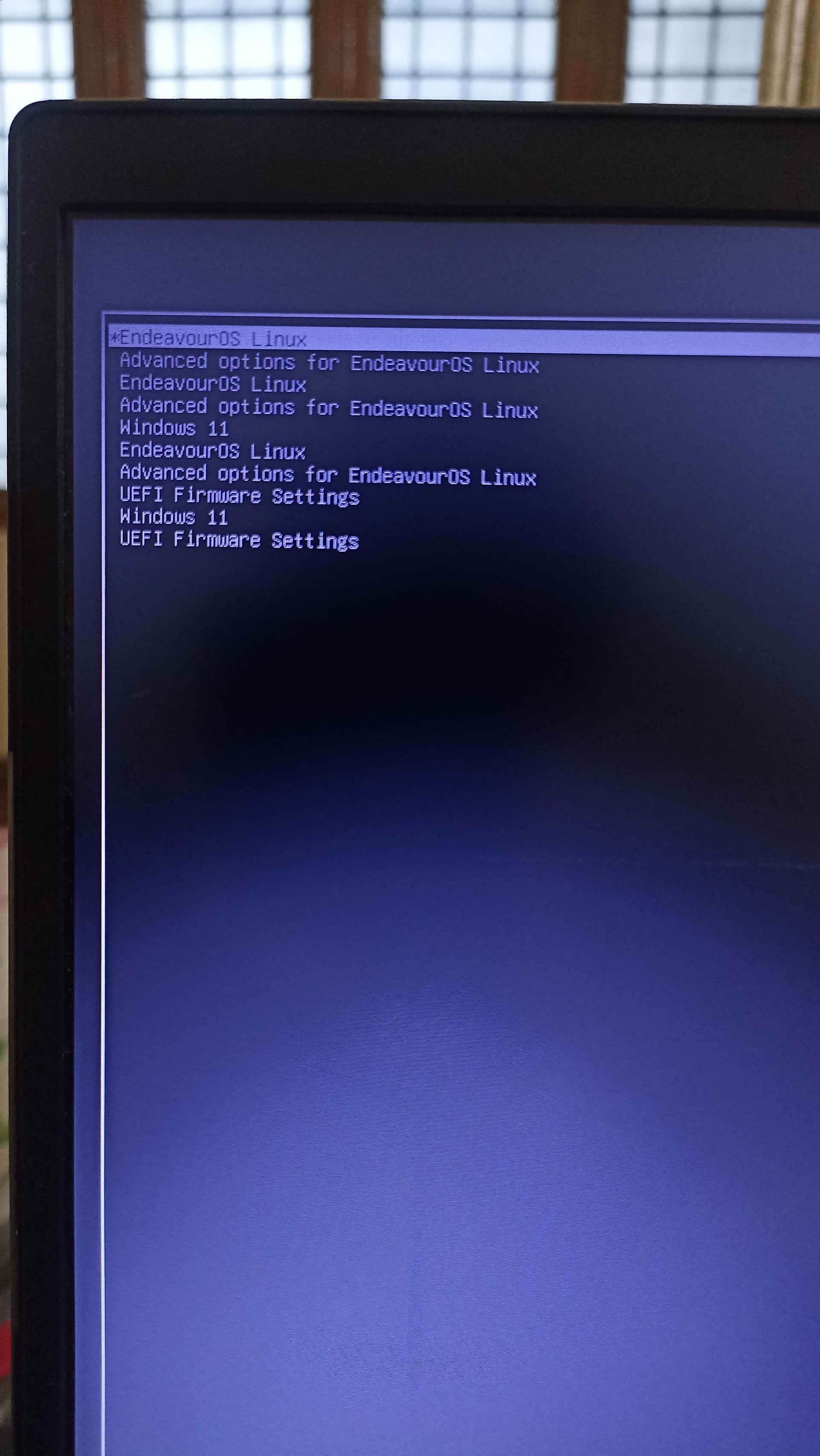
I updated my system to EndeavourOS Mercury this morning, and after rebooting, I noticed that my GRUB menu now shows multiple boot entries for both EndeavourOS and Windows 11 ( I’m dual booting Windows 11 and EndeavourOS ).
Before the update, everything was working fine with a single entry for each OS. Now, there are duplicate entries that weren’t there before.
Has anyone else encountered this issue? Is there a way to clean up the extra boot entries and make GRUB display only one entry per OS?
I have also attached a screenshot of my grub boot screen with this forum. I am also ready to send any logs or configuration files, if required.
I have already tried regenerating the grub menu with that command.
Running it outputs the following:
Generating grub configuration file ...
Found linux image: /boot/vmlinuz-linux
Found initrd image: /boot/initramfs-linux.img
Found fallback initrd image(s) in /boot:  initramfs-linux-fallback.img
Found linux image: /boot/vmlinuz-linux
Found initrd image: /boot/initramfs-linux.img
Found fallback initrd image(s) in /boot:  initramfs-linux-fallback.img
Found linux image: /boot/vmlinuz-linux
Found initrd image: /boot/initramfs-linux.img
Found fallback initrd image(s) in /boot:  initramfs-linux-fallback.img
Warning: os-prober will not be executed to detect other bootable partitions.
Systems on them will not be added to the GRUB boot configuration.
Check GRUB_DISABLE_OS_PROBER documentation entry.
Adding boot menu entry for UEFI Firmware Settings ...
Adding boot menu entry for UEFI Firmware Settings ...
done
The output above probably states that there’s just something wrong with the grub-mkconfig command itself? I am not really sure because it adds the UEFI boot menu entry two times and the entries for linux image and the fallback image multiple times even though my /boot only has a single linux image file and a single fallback image file.
Running ls on /boot outputs the following:
drwxr-x--- 4 root root     1024 Jan  1  1970 efi
drwxr-xr-x 6 root root     4096 Feb 12 10:58 grub
-rw------- 1 root root 64054579 Feb 11 09:28 initramfs-linux-fallback.img
-rw------- 1 root root 17929274 Feb 11 09:28 initramfs-linux.img
-rw-r--r-- 1 root root  8139776 Nov 12 22:50 intel-ucode.img
-rw-r--r-- 1 root root 13873664 Feb 11 09:28 vmlinuz-linux
Alright i fixed it, After some research i found this forum:
Below are the steps i took by following what i could gather from that forum:
sudo mv /etc/grub.d /etc/grub.d.old
sudo pacman -Syu
sudo grub-mkconfig -o /boot/grub/grub.cfg
After rebooting my system, the boot entry was perfectly normal, but windows was missing, so i uncommented theGRUB_DISABLE_OS_PROBER="false"line from/etc/default/gruband regenerated thegrub.cfgfile and now i could see the entry for windows as well in the grub menu.
 :
: here you go man:
 No issues that I know of when compared to mine.