I really don’t know where to start troubleshooting, i think my wifi onboard card is not enabled or some drivers are missing or something else. it works in windows, but in endevour, nothing..?
For the record, please show the output of
inxi -Fza
[enio@enioentity ~]$ inxi -Fza
System:
  Kernel: 6.17.5-zen1-1-zen arch: x86_64 bits: 64 compiler: gcc v: 15.2.1
    clocksource: tsc avail: hpet,acpi_pm
    parameters: BOOT_IMAGE=/@/boot/vmlinuz-linux-zen
    root=UUID=bbc4da9b-0112-4642-8b1a-0ce99a6e817b rw rootflags=subvol=@
    nowatchdog nvme_load=YES loglevel=3
  Desktop: KDE Plasma v: 6.5.1 tk: Qt v: N/A info: frameworks v: 6.19.0
    wm: kwin_wayland vt: 1 dm: SDDM Distro: EndeavourOS base: Arch Linux
Machine:
  Type: Desktop Mobo: Micro-Star model: MPG X870E CARBON WIFI (MS-7E49) v: 1.0
    serial: <superuser required> uuid: <superuser required> UEFI: American
    Megatrends LLC. v: 1.A33 date: 04/22/2025
CPU:
  Info: model: AMD Ryzen 7 9800X3D bits: 64 type: MT MCP arch: Zen 5 gen: 5
    level: v4 note: check built: 2024+ process: TSMC n4 (4nm) family: 0x1A (26)
    model-id: 0x44 (68) stepping: 0 microcode: 0xB404032
  Topology: cpus: 1x dies: 1 clusters: 1 cores: 8 threads: 16 tpc: 2
    smt: enabled cache: L1: 640 KiB desc: d-8x48 KiB; i-8x32 KiB L2: 8 MiB
    desc: 8x1024 KiB L3: 96 MiB desc: 1x96 MiB
  Speed (MHz): avg: 4134 min/max: 603/5272 boost: enabled scaling:
    driver: amd-pstate-epp governor: powersave cores: 1: 4134 2: 4134 3: 4134
    4: 4134 5: 4134 6: 4134 7: 4134 8: 4134 9: 4134 10: 4134 11: 4134 12: 4134
    13: 4134 14: 4134 15: 4134 16: 4134 bogomips: 150399
  Flags-basic: avx avx2 ht lm nx pae sse sse2 sse3 sse4_1 sse4_2 sse4a
    ssse3 svm
  Vulnerabilities:
  Type: gather_data_sampling status: Not affected
  Type: ghostwrite status: Not affected
  Type: indirect_target_selection status: Not affected
  Type: itlb_multihit status: Not affected
  Type: l1tf status: Not affected
  Type: mds status: Not affected
  Type: meltdown status: Not affected
  Type: mmio_stale_data status: Not affected
  Type: old_microcode status: Not affected
  Type: reg_file_data_sampling status: Not affected
  Type: retbleed status: Not affected
  Type: spec_rstack_overflow mitigation: IBPB on VMEXIT only
  Type: spec_store_bypass mitigation: Speculative Store Bypass disabled via
    prctl
  Type: spectre_v1 mitigation: usercopy/swapgs barriers and __user pointer
    sanitization
  Type: spectre_v2 mitigation: Enhanced / Automatic IBRS; IBPB:
    conditional; STIBP: always-on; PBRSB-eIBRS: Not affected; BHI: Not
    affected
  Type: srbds status: Not affected
  Type: tsa status: Not affected
  Type: tsx_async_abort status: Not affected
  Type: vmscape mitigation: IBPB on VMEXIT
Graphics:
  Device-1: Advanced Micro Devices [AMD/ATI] Navi 21 [Radeon RX 6800/6800 XT
    / 6900 XT] vendor: ASUSTeK driver: amdgpu v: kernel arch: RDNA-2
    code: Navi-2x process: TSMC n7 (7nm) built: 2020-22 pcie: gen: 4
    speed: 16 GT/s lanes: 16 ports: active: DP-3 empty: DP-1, DP-2, HDMI-A-1,
    Writeback-1 bus-ID: 03:00.0 chip-ID: 1002:73bf class-ID: 0300
  Device-2: Advanced Micro Devices [AMD/ATI] Granite Ridge [Radeon Graphics]
    vendor: Micro-Star MSI driver: amdgpu v: kernel arch: RDNA-2 code: Navi-2x
    process: TSMC n7 (7nm) built: 2020-22 pcie: gen: 4 speed: 16 GT/s
    lanes: 16 ports: active: none empty: DP-4, DP-5, DP-6, HDMI-A-2,
    Writeback-2 bus-ID: 7a:00.0 chip-ID: 1002:13c0 class-ID: 0300 temp: 36.0 C
  Device-3: Microdia Dual Mode Camera (8006 VGA) driver: hid-generic,usbhid
    type: USB rev: 2.0 speed: 12 Mb/s lanes: 1 mode: 1.1 bus-ID: 3-3.4:7
    chip-ID: 0c45:8006 class-ID: 0301
  Device-4: Logitech Webcam C310 driver: snd-usb-audio,uvcvideo type: USB
    rev: 2.0 speed: 480 Mb/s lanes: 1 mode: 2.0 bus-ID: 3-4:4 chip-ID: 046d:081b
    class-ID: 0102 serial: <filter>
  Display: wayland server: X.org v: 1.21.1.20 with: Xwayland v: 24.1.9
    compositor: kwin_wayland driver: X: loaded: amdgpu
    unloaded: modesetting,radeon alternate: fbdev,vesa dri: radeonsi
    gpu: amdgpu display-ID: 0
  Monitor-1: DP-3 model: LG (GoldStar) ULTRAGEAR serial: <filter>
    built: 2021 res: mode: 2560x1440 hz: 165 scale: 100% (1) dpi: 93 gamma: 1.2
    size: 697x392mm (27.44x15.43") diag: 800mm (31.5") ratio: 16:9 modes:
    max: 2560x1440 min: 640x480
  API: EGL v: 1.5 hw: drv: amd radeonsi platforms: device: 0 drv: radeonsi
    device: 1 drv: radeonsi device: 2 drv: swrast gbm: drv: radeonsi
    surfaceless: drv: radeonsi wayland: drv: radeonsi x11: drv: radeonsi
  API: OpenGL v: 4.6 compat-v: 4.5 vendor: amd mesa v: 25.2.5-arch1.2
    glx-v: 1.4 direct-render: yes renderer: AMD Radeon RX 6900 XT (radeonsi
    navi21 LLVM 21.1.4 DRM 3.64 6.17.5-zen1-1-zen) device-ID: 1002:73bf
    memory: 15.62 GiB unified: no display-ID: :1.0
  API: Vulkan v: 1.4.328 layers: 5 device: 0 type: discrete-gpu name: AMD
    Radeon RX 6900 XT (RADV NAVI21) driver: mesa radv v: 25.2.5-arch1.2
    device-ID: 1002:73bf surfaces: N/A device: 1 type: integrated-gpu name: AMD
    Radeon Graphics (RADV RAPHAEL_MENDOCINO) driver: mesa radv
    v: 25.2.5-arch1.2 device-ID: 1002:13c0 surfaces: N/A
  Info: Tools: api: clinfo, eglinfo, glxinfo, vulkaninfo
    de: kscreen-console,kscreen-doctor wl: wayland-info
    x11: xdpyinfo, xprop, xrandr
Audio:
  Device-1: Advanced Micro Devices [AMD/ATI] Navi 21/23 HDMI/DP Audio
    driver: snd_hda_intel v: kernel pcie: gen: 4 speed: 16 GT/s lanes: 16
    bus-ID: 03:00.1 chip-ID: 1002:ab28 class-ID: 0403
  Device-2: Advanced Micro Devices [AMD/ATI] Radeon High Definition Audio
    [Rembrandt/Strix] vendor: Micro-Star MSI driver: snd_hda_intel v: kernel
    pcie: gen: 4 speed: 16 GT/s lanes: 16 bus-ID: 7a:00.1 chip-ID: 1002:1640
    class-ID: 0403
  Device-3: Advanced Micro Devices [AMD] Family 17h/19h/1ah HD Audio
    vendor: Micro-Star MSI driver: snd_hda_intel v: kernel pcie: gen: 4
    speed: 16 GT/s lanes: 16 bus-ID: 7a:00.6 chip-ID: 1022:15e3 class-ID: 0403
  Device-4: Micro Star USB Audio driver: hid-generic,snd-usb-audio,usbhid
    type: USB rev: 2.0 speed: 480 Mb/s lanes: 1 mode: 2.0 bus-ID: 3-10:8
    chip-ID: 0db0:0b58 class-ID: 0300
  Device-5: Logitech Webcam C310 driver: snd-usb-audio,uvcvideo type: USB
    rev: 2.0 speed: 480 Mb/s lanes: 1 mode: 2.0 bus-ID: 3-4:4 chip-ID: 046d:081b
    class-ID: 0102 serial: <filter>
  API: ALSA v: k6.17.5-zen1-1-zen status: kernel-api
    tools: alsactl,alsamixer,amixer
  Server-1: PipeWire v: 1.4.9 status: active with: 1: pipewire-pulse
    status: active 2: wireplumber status: active 3: pipewire-alsa type: plugin
    4: pw-jack type: plugin tools: pactl,pw-cat,pw-cli,wpctl
Network:
  Device-1: Realtek RTL8125 2.5GbE vendor: Micro-Star MSI driver: r8169
    v: kernel pcie: gen: 2 speed: 5 GT/s lanes: 1 port: d000 bus-ID: 08:00.0
    chip-ID: 10ec:8125 class-ID: 0200
  IF: enp8s0 state: up speed: 100 Mbps duplex: full mac: <filter>
  Device-2: Realtek RTL8126 5GbE vendor: Micro-Star MSI driver: r8169
    v: kernel pcie: gen: 3 speed: 8 GT/s lanes: 1 port: c000 bus-ID: 09:00.0
    chip-ID: 10ec:8126 class-ID: 0200
  IF: enp9s0 state: down mac: <filter>
  Info: services: NetworkManager,systemd-timesyncd
Bluetooth:
  Device-1: Foxconn / Hon Hai driver: btusb v: 0.8 type: USB rev: 1.1
    speed: 12 Mb/s lanes: 1 mode: 1.1 bus-ID: 3-9:6 chip-ID: 0489:e10a
    class-ID: e001
  Report: btmgmt ID: hci0 rfk-id: 0 state: down bt-service: disabled
    rfk-block: hardware: no software: no address: N/A
Drives:
  Local Storage: total: 29.11 TiB used: 1.76 TiB (6.0%)
  SMART Message: Unable to run smartctl. Root privileges required.
  ID-1: /dev/nvme0n1 maj-min: 259:5 vendor: Western Digital model: WD BLACK
    SN850X HS 2000GB size: 1.82 TiB block-size: physical: 512 B logical: 512 B
    speed: 63.2 Gb/s lanes: 4 tech: SSD serial: <filter> fw-rev: 620361WD
    temp: 36.9 C scheme: GPT
  ID-2: /dev/nvme1n1 maj-min: 259:0 vendor: Kingston model: SKC2500M81000G
    size: 931.51 GiB block-size: physical: 512 B logical: 512 B speed: 31.6 Gb/s
    lanes: 4 tech: SSD serial: <filter> fw-rev: S7780102 temp: 33.9 C
    scheme: GPT
  ID-3: /dev/sda maj-min: 8:0 vendor: Western Digital
    model: WD30EFRX-68EUZN0 size: 2.73 TiB block-size: physical: 4096 B
    logical: 512 B speed: 6.0 Gb/s tech: HDD rpm: 5400 serial: <filter>
    fw-rev: 0A80 scheme: GPT
  ID-4: /dev/sdb maj-min: 8:16 vendor: Western Digital
    model: WD6002FRYZ-01WD5B0 size: 5.46 TiB block-size: physical: 4096 B
    logical: 512 B speed: 6.0 Gb/s tech: HDD rpm: 7200 serial: <filter>
    fw-rev: 1M02 scheme: GPT
  ID-5: /dev/sdc maj-min: 8:32 vendor: Western Digital
    model: WUH721818ALE6L4 size: 16.37 TiB block-size: physical: 4096 B
    logical: 512 B speed: 6.0 Gb/s tech: HDD rpm: 7200 serial: <filter>
    fw-rev: W680 scheme: GPT
  ID-6: /dev/sdd maj-min: 8:48 vendor: Seagate model: WDC WDS200T2B0A-00SM50
    size: 1.82 TiB block-size: physical: 512 B logical: 512 B speed: 6.0 Gb/s
    tech: SSD serial: <filter> fw-rev: 00WD scheme: GPT
Partition:
  ID-1: / raw-size: 1.82 TiB size: 1.82 TiB (100.00%) used: 640.52 GiB (34.4%)
    fs: btrfs dev: /dev/nvme0n1p2 maj-min: 259:7
  ID-2: /boot/efi raw-size: 1000 MiB size: 998 MiB (99.80%)
    used: 580 KiB (0.1%) fs: vfat dev: /dev/nvme0n1p1 maj-min: 259:6
  ID-3: /home raw-size: 1.82 TiB size: 1.82 TiB (100.00%)
    used: 640.52 GiB (34.4%) fs: btrfs dev: /dev/nvme0n1p2 maj-min: 259:7
  ID-4: /var/log raw-size: 1.82 TiB size: 1.82 TiB (100.00%)
    used: 640.52 GiB (34.4%) fs: btrfs dev: /dev/nvme0n1p2 maj-min: 259:7
Swap:
  Alert: No swap data was found.
Sensors:
  System Temperatures: cpu: 40.8 C mobo: N/A
  Fan Speeds (rpm): N/A
  GPU: device: amdgpu temp: 41.0 C mem: 38.0 C fan: 0 watts: 11.00
    device: amdgpu temp: 36.0 C
Info:
  Memory: total: 60 GiB note: est. available: 60.38 GiB used: 4.94 GiB (8.2%)
  Processes: 424 Power: uptime: 1h 31m states: freeze,mem,disk suspend: deep
    avail: s2idle wakeups: 0 hibernate: platform avail: shutdown, reboot,
    suspend, test_resume image: 24.13 GiB services: org_kde_powerdevil,
    power-profiles-daemon, upowerd Init: systemd v: 258 default: graphical
    tool: systemctl
  Packages: pm: pacman pkgs: 1397 libs: 388 tools: yay pm: flatpak pkgs: 0
    Compilers: clang: 21.1.4 gcc: 15.2.1 Shell: Bash v: 5.3.3
    running-in: konsole inxi: 3.3.39
```
The hardware output is showing both Ethernet and the Bluetooth but not the WiFi Chip. It uses Qualcomm NCM865 that supports Wi-Fi 7 (802.11be) and Bluetooth 5.4.
It should be using the ath12k module i think. Not sure what the issue is? The ath12k has had some issues with firmware previously.
Edit: You could try loading module with
sudo modprobe ath12k_pci
Edit: If this doesn’t work maybe try the ath12k that is in linux-firmware-git
i get this when i input that command- modprobe: FATAL: Module ath12k_pci not found in directory /lib/modules/6.17.5-zen1-1-zen
how do i check that other option?
It may not have the proper firmware.
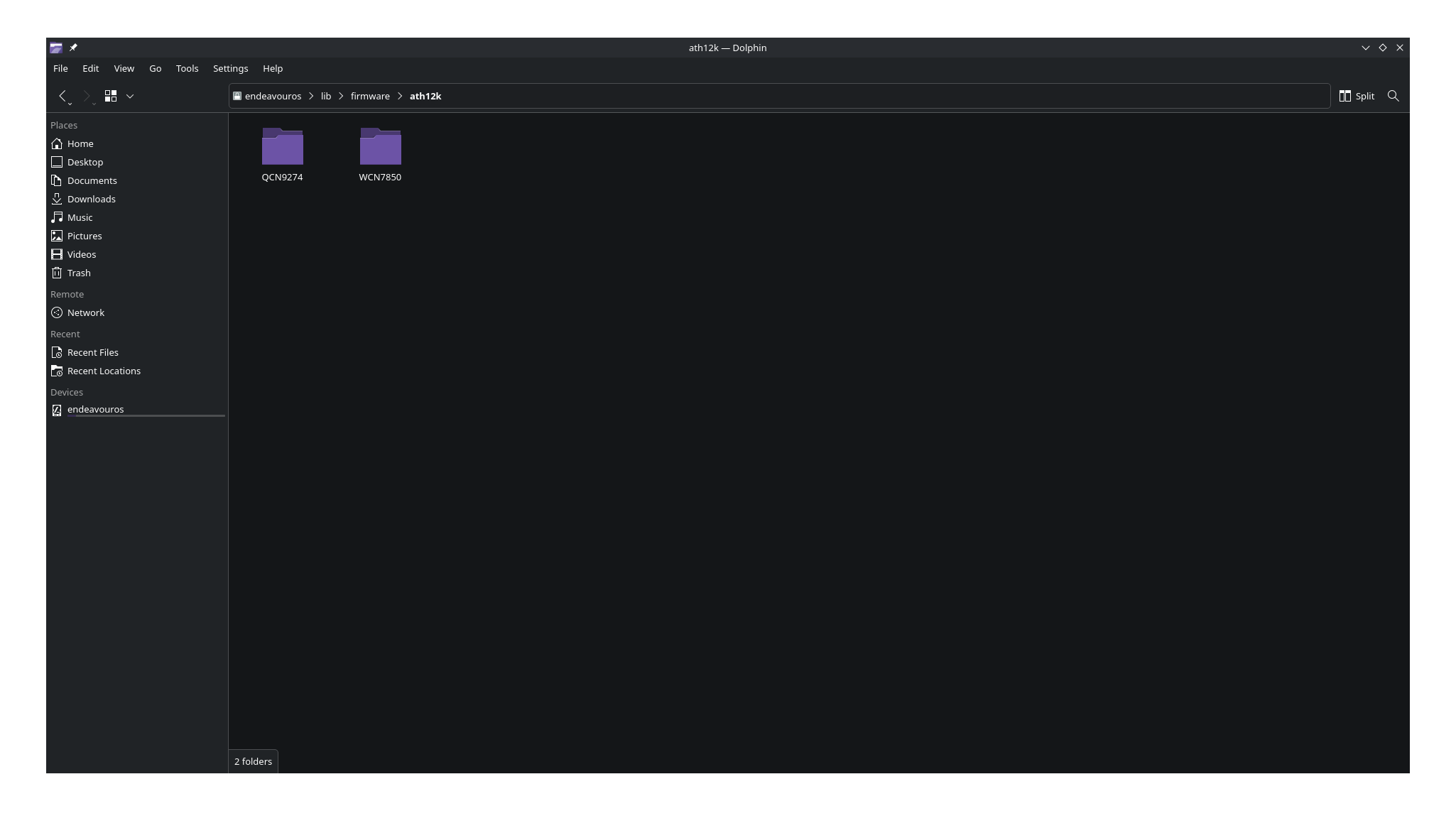
Edit: This is what i show for the ath12k on my system in /lib/firmware/ath12k
It doesn’t show your chip?
@enioentity
Are you dual booting with Windows?
One other thing you could try is to shutdown, unplug the power cord to the tower, hold down the power button for 30 seconds. Then plug power back into the tower and you can start the computer with the power button. Some of these boards with onboard WiFi sometimes put the WiFi in sleep under some idle conditions and can happen also with power management in windows. Usually you need to turn off the fast start up feature in Windows under Power Management.
Edit: But, I don’t see any module loaded for the hardware so it may be a firmware issue.
1 Like
i have those two files like you do on the picture. yes i have dualboot with one ssd nvme for linux, other ssd nvme for win..
Does the WiFi work on Windows?
yes. it is automatically recognized and working on win. win 11 is my backup os for some things i need still.
Just for curiosity could you try shutting it down and then unplug the tower. Wait a sec and then hold down the power button for over 30 seconds to drain the power from the board. Then you can plug it back in and power it on and see if the WiFi shows up in linux. But I would first recommend going into Windows and under power management turn off the Fast Start Up Feature.
1 Like
If the above doesn’t work you may need the firmware. You could get from here for ath12k.
Okay so it was powered down then.
I think that powerdown/powerup did it. Now it works, and i can see wifi networks. Thank you for help.
1 Like
No problem glad it works. It should show under inxi -Na the correct chip and module as loaded now.
Here is the chip, if anyone else run into this problem - Qualcomm WCN785x Wi-Fi 7 320MHz 2x2 [FastConnect 7800]
vendor: Foxconn Band Simultaneous Wireless driver: ath12k_pci v: N/A
modules: ath12k pcie: gen: 3 speed: 8 GT/s lanes: 2 bus-ID: 10:00.0
chip-ID: 17cb:1107 class-ID: 0280
1 Like
So it shows this chip. I got the info from another site saying it was Qualcomm NCM865. You never know what the chip is if it doesn’t show in the hardware so sometimes it’s a guess.