Moving forward (dying ssd)

What would you do if this was you?

This is Endeavour SSD at present:

This is the gnome-disks Endeavour view from Solus (separate SSD).

Endeavour looking at itself in gnome-disks is identical picture.

I guess that’s two opinions but with the same app across two OS’s…so not sure I’m trusting the message here. Gparted says nothing…

Questions:

  1. How do I best get a 3rd opinion on dying?

  2. This is a three-yr old brand new SSD that Endeavour lives on. I’ve had HDD platters last 25 years for godsakes…ok that is not a question

My first instinct is to buy a new SSD and clone Endeavour to it. If that fails I am not opposed to a fresh install. A PITA but I like fresh installs.

  1. What would you do going forward?

Thank you.

The smartctl tool will gives you access to some tests and info. To grab a report of the SSD’s status, run:

sudo smartctl -a /dev/sda

To run tests:

sudo smartctl -t short /dev/sda
sudo smartctl -t long /dev/sda
sudo smartctl -t conveyance /dev/sda

From the wiki:

  • Short: runs tests that have a high probability of detecting device problems,
  • Extended or Long: the test is the same as the short check but with no time limit and with complete disk surface examination,
  • Conveyance: identifies if damage incurred during transportation of the device.
1 Like

First step, back up all data to trusted storage.

Does your board have an M.2 socket?

If not, do you have a spare PCIe slot you could install an M.2 PCIe card into? If so, I’d suggest considering an M.2 to replace your SSD.

1 Like

On it, thank you, will report back

1 Like

this implies time is of the essence :slight_smile:

got the PCIe.

Yeah if a drive is telling you its failing, best not to dawdle.

A total failure may not be imminent, but if the data is important to you, better to not take chances.

$ sudo smartctl -a /dev/sda
[sudo] password for drunkenvicar:
smartctl 7.5 2025-04-30 r5714 [x86_64-linux-6.18.13-330.current] (local build)
Copyright (C) 2002-25, Bruce Allen, Christian Franke, www.smartmontools.org

=== START OF INFORMATION SECTION ===
Model Family: Samsung based SSDs
Device Model: SAMSUNG MZ7LN128HCHP-000L1
Serial Number: S1ZMNXAGB04953
LU WWN Device Id: 5 002538 d00000000
Firmware Version: EMT04L0Q
User Capacity: 128,035,676,160 bytes [128 GB]
Sector Size: 512 bytes logical/physical
Rotation Rate: Solid State Device
TRIM Command: Available
Device is: In smartctl database 7.5/5706
ATA Version is: ACS-2, ATA8-ACS T13/1699-D revision 4c
SATA Version is: SATA 3.1, 6.0 Gb/s (current: 6.0 Gb/s)
Local Time is: Sun Mar 1 18:13:33 2026 MST
SMART support is: Available - device has SMART capability.
SMART support is: Enabled

=== START OF READ SMART DATA SECTION ===
SMART overall-health self-assessment test result: FAILED!
Drive failure expected in less than 24 hours. SAVE ALL DATA.
See vendor-specific Attribute list for failed Attributes.

General SMART Values:
Offline data collection status: (0x00) Offline data collection activity
was never started.
Auto Offline Data Collection: Disabled.
Self-test execution status: ( 0) The previous self-test routine completed
without error or no self-test has ever
been run.
Total time to complete Offline
data collection: ( 0) seconds.
Offline data collection
capabilities: (0x53) SMART execute Offline immediate.
Auto Offline data collection on/off support.
Suspend Offline collection upon new
command.
No Offline surface scan supported.
Self-test supported.
No Conveyance Self-test supported.
Selective Self-test supported.
SMART capabilities: (0x0003) Saves SMART data before entering
power-saving mode.
Supports SMART auto save timer.
Error logging capability: (0x01) Error logging supported.
General Purpose Logging supported.
Short self-test routine
recommended polling time: ( 2) minutes.
Extended self-test routine
recommended polling time: ( 64) minutes.
SCT capabilities: (0x003d) SCT Status supported.
SCT Error Recovery Control supported.
SCT Feature Control supported.
SCT Data Table supported.

SMART Attributes Data Structure revision number: 1
Vendor Specific SMART Attributes with Thresholds:
ID# ATTRIBUTE_NAME FLAG VALUE WORST THRESH TYPE UPDATED WHEN_FAILED RAW_VALUE
5 Reallocated_Sector_Ct 0x0033 100 100 010 Pre-fail Always - 0
9 Power_On_Hours 0x0032 091 091 000 Old_age Always - 41828
12 Power_Cycle_Count 0x0032 096 096 000 Old_age Always - 3476
170 Unused_Rsvd_Blk_Ct_Chip 0x0032 100 100 010 Old_age Always - 0
171 Program_Fail_Count_Chip 0x0032 100 100 010 Old_age Always - 0
172 Erase_Fail_Count_Chip 0x0032 100 100 010 Old_age Always - 0
173 Wear_Leveling_Count 0x0033 075 075 005 Pre-fail Always - 531
174 Unexpect_Power_Loss_Ct 0x0032 099 099 000 Old_age Always - 452
178 Used_Rsvd_Blk_Cnt_Chip 0x0013 100 100 010 Pre-fail Always - 0
180 Unused_Rsvd_Blk_Cnt_Tot 0x0013 100 100 010 Pre-fail Always - 394
184 End-to-End_Error 0x0033 096 096 097 Pre-fail Always FAILING_NOW 4
187 Uncorrectable_Error_Cnt 0x0032 100 100 000 Old_age Always - 0
194 Temperature_Celsius 0x0032 067 042 000 Old_age Always - 33
199 CRC_Error_Count 0x003e 099 099 000 Old_age Always - 274
233 Media_Wearout_Indicator 0x0013 073 073 000 Pre-fail Always - 12322864
241 Total_LBAs_Written 0x0032 099 099 000 Old_age Always - 29558
242 Total_LBAs_Read 0x0032 099 099 000 Old_age Always - 104707
249 NAND_Writes_1GiB 0x0032 099 099 000 Old_age Always - 67984

SMART Error Log Version: 1
No Errors Logged

Warning! SMART Self-Test Log Structure error: invalid SMART checksum.
SMART Self-test log structure revision number 1
Num Test_Description Status Remaining LifeTime(hours) LBA_of_first_error

1 Short offline Completed without error 00% 32675 -

Warning! SMART Selective Self-Test Log Structure error: invalid SMART checksum.
SMART Selective self-test log data structure revision number 1
SPAN MIN_LBA MAX_LBA CURRENT_TEST_STATUS
1 0 0 Not_testing
2 0 0 Not_testing
3 0 0 Not_testing
4 0 0 Not_testing
5 0 0 Not_testing
255 0 65535 Read_scanning was never started
Selective self-test flags (0x0):
After scanning selected spans, do NOT read-scan remainder of disk.
If Selective self-test is pending on power-up, resume after 0 minute delay.

The above only provides legacy SMART information - try ‘smartctl -x’ for more

–”Drive failure expected in less than 24 hours” – I feel like Snake Plissken now…
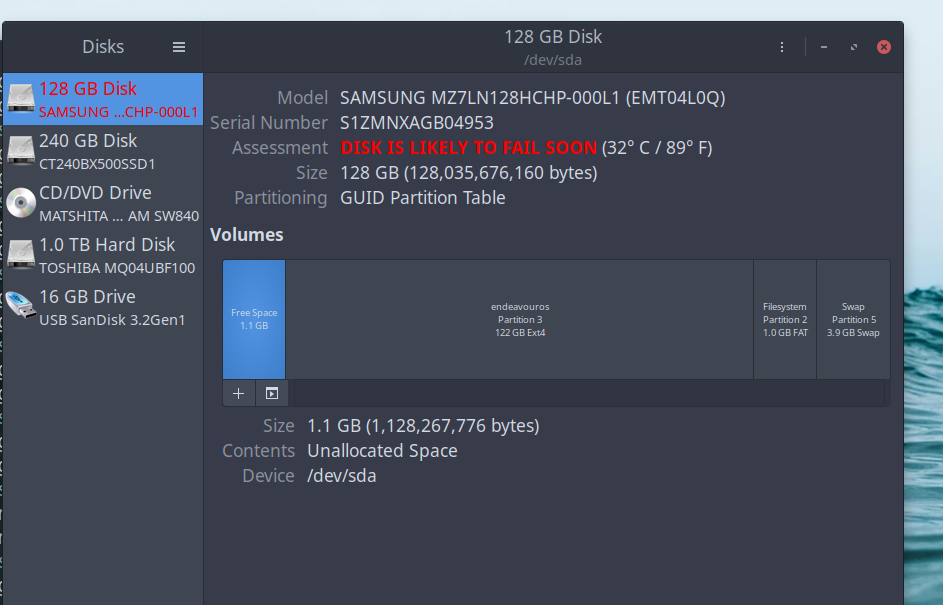
Ok that looks pretty serious.

I suggest booting up off a USB Live ISO, and performing a backup of important data there to a trusted storage device.

That will reduce read/writes on the SSD, if it’s acting as your OS drive at the moment. The less it’s accessed, the better. If you have another computer, use it to create your USB Live ISO if you don’t have one already.

Alternatively, you could connect the SSD to the other computer and back it up that way.

$ sudo smartctl -t short /dev/sda
smartctl 7.5 2025-04-30 r5714 [x86_64-linux-6.18.13-330.current] (local build)
Copyright (C) 2002-25, Bruce Allen, Christian Franke, www.smartmontools.org

=== START OF OFFLINE IMMEDIATE AND SELF-TEST SECTION ===
Sending command: “Execute SMART Short self-test routine immediately in off-line mode”.
Drive command “Execute SMART Short self-test routine immediately in off-line mode” successful.
Testing has begun.
Please wait 2 minutes for test to complete.
Test will complete after Sun Mar 1 18:19:47 2026 MST
Use smartctl -X to abort test.


Waited 2 min, will look for log

I strongly recommend postponing any further tests, until after you’ve had a chance to fully backup. The tests risk exacerbating the issue.

4 Likes

found no log.

Will take your advice. In Solus now and have backup media ready.

Thanks for being there so fast. Going dark for a while.

1 Like

a man wearing a headset says copy that while talking on the phone

1 Like

/home is gracefully going to an external drive via grsync at the moment

Ordered a new SSD

Reasoning: all tests sounded DIRE and finite.

Expectations: fresh install

1 Like

While you’re doing that, I’ll share some details of the error being reported.

The 184 / 0xB8 End-to-End_Error’s the drive is reporting, indicate that the parity data between host and drive to not match. In an oversimplified nutshell, the system sends xyz data, the drive reports that it received xyb data, which doesn’t match.

Some causes for this are presented as:

  1. Physical damage to the hard drive: Physical damage to the hard drive, such as scratches or impact, can cause errors in the end-to-end data transfer process, leading to the 0xB8 error.
  2. Corrupted data on the hard drive: If there is corrupted data on the hard drive, it can cause errors in the end-to-end data transfer process, resulting in the 0xB8 error.
  3. Faulty cables or connectors: Faulty cables or connectors connecting the hard drive to the motherboard can cause errors in data transfer, leading to the 0xB8 error.
  4. Power supply issues: Inadequate power supply or power surges can disrupt the data transfer process and cause errors, including the 0xB8 error.
  5. Firmware issues: Outdated or corrupt firmware on the hard drive can also cause errors in the end-to-end data transfer process, resulting in the 0xB8 error.
  6. Overheating: Overheating of the hard drive can cause errors in data transfer and lead to the 0xB8 error.

Source

These CRC errors may be related to the above issue, or not. Your drive does report a lot of unexpected power losses:

I’d suggest using a new SATA cable too, as it is presented as one of the possible causes for failure.

1 Like

Solus checks healthy. So power supply ruled out. That leaves the other 5 items…

So from your list of 1-6 maybe board sata 2.5 connection, cables, connectors…corrupted day…and Lenovo has been throwing a FWUpdate error every single boot lately…that I have never looked into

edit: this is a light bulb moment..the firmware message

It’s also possible it’s just well used. I’m not quite sure how to interpret the wear data though, as yours has presented different values than I would have expected:

Endeavour and Solus lived together on that dying 120 until late last year. I gave Solus it’s own SSD.

That means I used Gparted to nuke all of Solus and give the balance of the SSD back to Endeavour /root (ext4).

Or……like you said SSD just plain wore out.

Grsync still doin its thing. I’m chasing these errors you highlighted. lots of superuser reading..

Maybe I screwed that up that nuke/grow-partition thing?

I’d suspect these issues are hardware level, and not related to your partition adjustments.

1 Like

In this old Lenovo M93 refurb there’s a lone 2.5 sata slot. I have a brand new piggyback sata cable where the two distros share this lone slot.

This has worked splendidly as I do an F12 boot anyway (irrelevant).

For that reason, and the fact that Solus SSD is healthy I can rule out:

-sata cable

-MOBO 2.5 board connectors

It’s either the Lenovo Firmware warning every boot or tan ailing SSD or both..

I think