OK, so I’ve been running EndeavourOS as my main system since May (nearly a year) and I’m ready to let go of my dual-boot Win11 setup for good. The 4TB drive I have in my laptop is set up with 8 total partitions, four for Win11 and four for EnOS (/EFI, /swap, /[root], and /Home) with no encryption on any partition. The new install will have encryption on /Home.
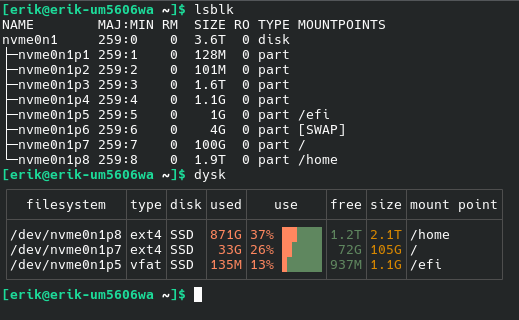
I had planned on cloning the root and home partitions to a spare drive using Acronis drive image (which I used to migrate from the original 1TB drive to the 4TB drive), but Acronis is giving an error that my root and home partitions have errors and refuses to copy them anywhere. When I boot into the EnOS live ISO installer and run FSCK on the partitions they have no errors. One option I have is to nuke all the partitions except for /home, then setup EnOS on the remaining space, then copy the contents of /home(old) to /home(new) then delete /home(old) and expand /home into the now empty space. But I figure my safest option is to back up the contents of root & home to a separate external drive, nuke all the partitions on the drive, set up EnOS from the live ISO, then copy all my data back after the setup.
I’m in no particular hurry to get this done, everything seems to be running perfectly fine.
But I know that a lot of you folks have done this process hundreds of times, and have “lessons learned” or best-practices to pass on. I always say “a wise man learns from his mistakes, but a wiser man also learns from the mistakes of others.”
So…whatcha got? 