So basically when I launch a game I need to go into my sound settings and turn my Scarlett 2i2 off and back on again before my mic will work. Its like the game cant grab the mic when it boots and needs to be re-initialized after the game boots. The mic is being picked up but my team mates say that it is choppy and broken and they cant hear me. Once I restart it the problem is gone.
Does anyone know how I could fix this? I do have the scarlett alsa driver.
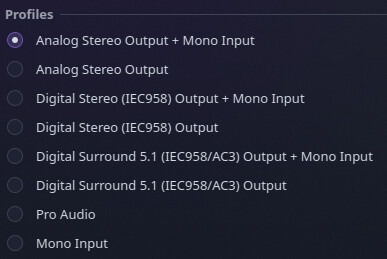
I’ve just come off the back of a fair bit of audio troubleshooting, one of my issues was with choppy mic audio or audio cutting off. what profile is your mic set to? what kind of mic is it, analogue or usb? I had choppy mic audio when the profile was set to pro audio, making sure I was on analog or digital stereo + mic helped. I also had issues with pipewire suspending, are you getting the same thing?
Sorry for the late reply the website wouldnt work for a while.
I am using a scarlett 2i2 with a rode podmic. I run my headphones and mic through the scarlett. I installed the alsa scarlett gui and I have pro audio enabled.
Apparently my mic is super choppy in games but not always for some reason. Another issue is that if im listening to a video in my browser vocaroo doesnt work. Choppy and distorted audio. If i mute the video it all works fine.
disabling “remove background” noise options in things like discord and vocaroo also fix it in those applications.
I set it to “default line 1, line 3, line 4, mic 1, mic 2” and i guess ill try it. The maker of the alsa gui driver thing says to use pro audio but i guess ill try this
 I hope you enjoy your time here.