I can see the monitor in the display app (shows off) I can disconnect the other monitor and it boots up with both individually. However with both connected they are just not working now. Here is the lastest update
Sorry but eos-sendlog isn't working for me atm (maybe another issue?)

[details="Summary"]
[2025-11-30T11:53:15-0500] [PACMAN] Running 'pacman --sync -y -u --'
[2025-11-30T11:53:15-0500] [PACMAN] synchronizing package lists
[2025-11-30T11:53:17-0500] [PACMAN] starting full system upgrade
[2025-11-30T11:55:29-0500] [ALPM] running '90-kernel-remove.hook'...
[2025-11-30T11:55:29-0500] [ALPM-SCRIPTLET] :: kernel-install removing kernel 6.17.8-arch1-1
[2025-11-30T11:55:29-0500] [ALPM] transaction started
[2025-11-30T11:55:29-0500] [ALPM] upgraded amd-ucode (20251111-1 -> 20251125-1)
[2025-11-30T11:55:29-0500] [ALPM] upgraded protobuf (33.0-2 -> 33.1-1)
[2025-11-30T11:55:29-0500] [ALPM] upgraded android-tools (35.0.2-22 -> 35.0.2-23)
[2025-11-30T11:55:29-0500] [ALPM] upgraded bat (0.26.0-1 -> 0.26.0-2)
[2025-11-30T11:55:29-0500] [ALPM] upgraded sqlite (3.51.0-1 -> 3.51.1-1)
[2025-11-30T11:55:29-0500] [ALPM] upgraded libcups (2:2.4.14-1 -> 2:2.4.15-1)
[2025-11-30T11:55:29-0500] [ALPM] upgraded libnghttp3 (1.12.0-1 -> 1.13.1-1)
[2025-11-30T11:55:29-0500] [ALPM] upgraded device-mapper (2.03.36-2 -> 2.03.37-1)
[2025-11-30T11:55:29-0500] [ALPM] upgraded cups (2:2.4.14-1 -> 2:2.4.15-1)
[2025-11-30T11:55:30-0500] [ALPM] upgraded dracut (108_eos-1 -> 109_eos-1)
[2025-11-30T11:55:30-0500] [ALPM] upgraded endeavouros-branding (25.02.1.2-1 -> 25.11.1.1-1)
[2025-11-30T11:55:30-0500] [ALPM] warning: /etc/pacman.d/endeavouros-mirrorlist installed as /etc/pacman.d/endeavouros-mirrorlist.pacnew
[2025-11-30T11:55:30-0500] [ALPM] upgraded endeavouros-mirrorlist (25.7-1 -> 25.11.1-1)
[2025-11-30T11:55:30-0500] [ALPM] upgraded libdatrie (0.2.13-4 -> 0.2.14-1)
[2025-11-30T11:55:30-0500] [ALPM] upgraded eos-reboot-recommended (25.11-1 -> 25.11.1-1)
[2025-11-30T11:55:30-0500] [ALPM] upgraded eos-bash-shared (25.11.3-1 -> 25.11.4-1)
[2025-11-30T11:55:30-0500] [ALPM] upgraded fetch-iso (25.11-1 -> 25.11.2-1)
[2025-11-30T11:55:30-0500] [ALPM] upgraded graphviz (14.0.4-1 -> 14.0.5-1)
[2025-11-30T11:55:30-0500] [ALPM] upgraded libproxy (0.5.11-1 -> 0.5.12-1)
[2025-11-30T11:55:30-0500] [ALPM] upgraded gspell (1.14.1-2 -> 1.14.2-1)
[2025-11-30T11:55:31-0500] [ALPM] upgraded imagemagick (7.1.2.8-1 -> 7.1.2.9-1)
[2025-11-30T11:55:31-0500] [ALPM] upgraded inxi (3.3.39.1-1 -> 3.3.40.1-1)
[2025-11-30T11:55:31-0500] [ALPM] upgraded lib32-libnghttp3 (1.12.0-1 -> 1.13.1-1)
[2025-11-30T11:55:31-0500] [ALPM] upgraded lib32-libxau (1.0.11-2 -> 1.0.12-1)
[2025-11-30T11:55:31-0500] [ALPM] upgraded libnice (0.1.22-2 -> 0.1.23-1)
[2025-11-30T11:55:31-0500] [ALPM] upgraded libteam (1.32-2 -> 1.32-3)
[2025-11-30T11:55:31-0500] [ALPM] upgraded liburcu (0.15.4-1 -> 0.15.5-1)
[2025-11-30T11:55:31-0500] [ALPM] upgraded libxslt (1.1.43-2 -> 1.1.45-1)
[2025-11-30T11:55:32-0500] [ALPM] upgraded linux (6.17.8.arch1-1 -> 6.17.9.arch1-1)
[2025-11-30T11:55:32-0500] [ALPM] upgraded linux-firmware-whence (20251111-1 -> 20251125-1)
[2025-11-30T11:55:32-0500] [ALPM] upgraded linux-firmware-amdgpu (20251111-1 -> 20251125-1)
[2025-11-30T11:55:32-0500] [ALPM] upgraded linux-firmware-atheros (20251111-1 -> 20251125-1)
[2025-11-30T11:55:32-0500] [ALPM] upgraded linux-firmware-broadcom (20251111-1 -> 20251125-1)
[2025-11-30T11:55:32-0500] [ALPM] upgraded linux-firmware-cirrus (20251111-1 -> 20251125-1)
[2025-11-30T11:55:33-0500] [ALPM] upgraded linux-firmware-intel (20251111-1 -> 20251125-1)
[2025-11-30T11:55:33-0500] [ALPM] upgraded linux-firmware-mediatek (20251111-1 -> 20251125-1)
[2025-11-30T11:55:33-0500] [ALPM] upgraded linux-firmware-nvidia (20251111-1 -> 20251125-1)
[2025-11-30T11:55:33-0500] [ALPM] upgraded linux-firmware-other (20251111-1 -> 20251125-1)
[2025-11-30T11:55:33-0500] [ALPM] upgraded linux-firmware-radeon (20251111-1 -> 20251125-1)
[2025-11-30T11:55:33-0500] [ALPM] upgraded linux-firmware-realtek (20251111-1 -> 20251125-1)
[2025-11-30T11:55:33-0500] [ALPM] upgraded linux-firmware (20251111-1 -> 20251125-1)
[2025-11-30T11:55:36-0500] [ALPM] upgraded linux-headers (6.17.8.arch1-1 -> 6.17.9.arch1-1)
[2025-11-30T11:55:36-0500] [ALPM] upgraded lvm2 (2.03.36-2 -> 2.03.37-1)
[2025-11-30T11:55:36-0500] [ALPM] upgraded neon (0.35.0-1 -> 0.36.0-1)
[2025-11-30T11:55:36-0500] [ALPM] upgraded ninja (1.13.1-2 -> 1.13.2-1)
[2025-11-30T11:55:36-0500] [ALPM] upgraded openvpn (2.6.16-1 -> 2.6.17-1)
[2025-11-30T11:55:37-0500] [ALPM] upgraded parallel (20251022-1 -> 20251122-1)
[2025-11-30T11:55:37-0500] [ALPM] upgraded qt6-translations (6.10.0-1 -> 6.10.1-1)
[2025-11-30T11:55:37-0500] [ALPM] upgraded qt6-base (6.10.0-3 -> 6.10.1-1)
[2025-11-30T11:55:38-0500] [ALPM] upgraded qt6-declarative (6.10.0-2 -> 6.10.1-1)
[2025-11-30T11:55:38-0500] [ALPM] upgraded qt6-imageformats (6.10.0-1 -> 6.10.1-1)
[2025-11-30T11:55:38-0500] [ALPM] upgraded qt6-multimedia-ffmpeg (6.10.0-3 -> 6.10.1-1)
[2025-11-30T11:55:38-0500] [ALPM] upgraded qt6-multimedia (6.10.0-3 -> 6.10.1-1)
[2025-11-30T11:55:38-0500] [ALPM] upgraded qt6-svg (6.10.0-2 -> 6.10.1-1)
[2025-11-30T11:55:38-0500] [ALPM] upgraded qt6-tools (6.10.0-2 -> 6.10.1-1)
[2025-11-30T11:55:38-0500] [ALPM] upgraded radicale (3.5.8-1 -> 3.5.9-1)
[2025-11-30T11:55:38-0500] [ALPM] upgraded upower (1.90.10-1 -> 1.91.0-1)
[2025-11-30T11:55:38-0500] [ALPM] upgraded welcome (25.11-1 -> 25.11.1-1)
[2025-11-30T11:55:38-0500] [ALPM] upgraded xorg-server-common (21.1.20-1 -> 21.1.21-1)
[2025-11-30T11:55:38-0500] [ALPM] upgraded xorg-server (21.1.20-1 -> 21.1.21-1)
[2025-11-30T11:55:39-0500] [ALPM] upgraded xorg-server-xvfb (21.1.20-1 -> 21.1.21-1)
[2025-11-30T11:55:39-0500] [ALPM] upgraded zlib-ng (2.2.5-1 -> 2.3.1-1)
[2025-11-30T11:55:39-0500] [ALPM] upgraded yay (12.5.2-2 -> 12.5.3-1)
[2025-11-30T11:55:39-0500] [ALPM] transaction completed
[2025-11-30T11:55:40-0500] [ALPM] running '20-systemd-sysusers.hook'...
[2025-11-30T11:55:40-0500] [ALPM] running '30-systemd-daemon-reload-system.hook'...
[2025-11-30T11:55:40-0500] [ALPM] running '30-systemd-hwdb.hook'...
[2025-11-30T11:55:41-0500] [ALPM] running '30-systemd-restart-marked.hook'...
[2025-11-30T11:55:41-0500] [ALPM] running '30-systemd-tmpfiles.hook'...
[2025-11-30T11:55:41-0500] [ALPM] running '30-systemd-udev-reload.hook'...
[2025-11-30T11:55:44-0500] [ALPM] running '30-systemd-update.hook'...
[2025-11-30T11:55:44-0500] [ALPM] running '60-depmod.hook'...
[2025-11-30T11:55:45-0500] [ALPM] running '90-kernel-install.hook'...
[2025-11-30T11:55:45-0500] [ALPM-SCRIPTLET] Running kernel-install for 6.17.9-arch1-1
[2025-11-30T11:56:03-0500] [ALPM-SCRIPTLET] dracut[W]: If you need to use bluetooth, please include it explicitly.
[2025-11-30T11:56:04-0500] [ALPM-SCRIPTLET] dracut[W]: If you need to use bluetooth, please include it explicitly.
[2025-11-30T11:56:13-0500] [ALPM] running 'dbus-reload.hook'...
[2025-11-30T11:56:13-0500] [ALPM] running 'detect-old-perl-modules.hook'...
[2025-11-30T11:56:13-0500] [ALPM] running 'eos-rankmirrors.hook'...
[2025-11-30T11:56:13-0500] [ALPM-SCRIPTLET]   -> configuration set to rank mirrors
[2025-11-30T11:56:16-0500] [ALPM-SCRIPTLET] e[1;92m==> eos-rankmirrors: info: extracting package endeavouros-mirrorlist 25.11.1-1 ...
[2025-11-30T11:56:16-0500] [ALPM-SCRIPTLET] e[0me[1;92m==> eos-rankmirrors: info: ranking EndeavourOS mirrors, please wait ...
[2025-11-30T11:56:24-0500] [ALPM-SCRIPTLET] e[0m
[2025-11-30T11:56:24-0500] [ALPM-SCRIPTLET] ==> Writing new ranked EndeavourOS mirrorlist to /etc/pacman.d/endeavouros-mirrorlist.pacnew.
[2025-11-30T11:56:24-0500] [ALPM-SCRIPTLET]
[2025-11-30T11:56:24-0500] [ALPM] running 'eos-reboot-required.hook'...
[2025-11-30T11:56:25-0500] [ALPM] running 'gtk-update-icon-cache.hook'...
[2025-11-30T11:56:25-0500] [ALPM] running 'rebuild-detector.hook'...
[2025-11-30T11:56:30-0500] [ALPM-SCRIPTLET] foreign	webcamoid
[2025-11-30T11:56:30-0500] [ALPM] running 'update-desktop-database.hook'...
[2025-11-30T11:57:21-0500] [PACMAN] Running 'pacman --upgrade --noconfirm -- /home/thefrog/.cache/paru/clone/zen-browser-bin/zen-browser-bin-1.17.11b-1-x86_64.pkg.tar.zst'
[2025-11-30T11:57:21-0500] [ALPM] transaction started
[2025-11-30T11:57:22-0500] [ALPM] upgraded zen-browser-bin (1.17.8b-1 -> 1.17.11b-1)
[2025-11-30T11:57:22-0500] [ALPM] transaction completed
[2025-11-30T11:57:22-0500] [ALPM] running '30-systemd-update.hook'...
[2025-11-30T11:57:22-0500] [ALPM] running 'gtk-update-icon-cache.hook'...
[2025-11-30T11:57:22-0500] [ALPM] running 'rebuild-detector.hook'...
[2025-11-30T11:57:23-0500] [ALPM-SCRIPTLET] foreign	zen-browser-bin
[2025-11-30T11:57:23-0500] [ALPM] running 'update-desktop-database.hook'...
[/details]
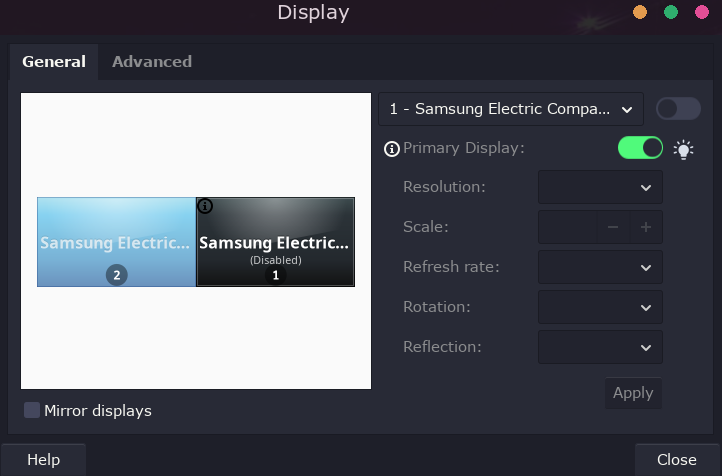
here is the screenshot of the display. I can click the toggle button on but the monitor stays off regardless as long as both are hooked up. the one not working is connected via hdmi. the other vga.
here is inxi info
System:
  Kernel: 6.17.9-arch1-1 arch: x86_64 bits: 64 compiler: gcc v: 15.2.1
    clocksource: tsc avail: hpet,acpi_pm
    parameters: initrd=\cd44f97944404c7d93b49fe70b61a393\6.17.9-arch1-1\initrd
    nvme_load=YES nowatchdog rw
    root=UUID=9d7ba6be-c24c-427b-8b3b-6ea4caecbb76 rw
    root=UUID=9d7ba6be-c24c-427b-8b3b-6ea4caecbb76
    systemd.machine_id=cd44f97944404c7d93b49fe70b61a393
  Desktop: Openbox v: 3.6.1 with: plank tools: avail: slock vt: 7
    dm: LightDM v: 1.32.0 Distro: EndeavourOS base: Arch Linux
Machine:
  Type: Desktop System: HP product: HP Desktop M01-F1xxx v: N/A
    serial: <superuser required> Chassis: type: 3 serial: <superuser required>
  Mobo: HP model: 87D6 v: SMVB serial: <superuser required>
    part-nu: 1J7M1AA#ABA uuid: <superuser required> Firmware: UEFI vendor: AMI
    v: F.44 date: 07/19/2024

CPU:
  Info: model: AMD Ryzen 3 4300G with Radeon Graphics bits: 64 type: MT MCP
    arch: Zen 2 gen: 2 level: v3 note: check built: 2020-22
    process: TSMC n7 (7nm) family: 0x17 (23) model-id: 0x60 (96) stepping: 1
    microcode: 0x860010D
  Topology: cpus: 1x dies: 1 clusters: 1 cores: 4 threads: 8 tpc: 2
    smt: enabled cache: L1: 256 KiB desc: d-4x32 KiB; i-4x32 KiB L2: 2 MiB
    desc: 4x512 KiB L3: 4 MiB desc: 1x4 MiB
  Speed (MHz): avg: 1997 min/max: 1400/3800 boost: enabled scaling:
    driver: acpi-cpufreq governor: schedutil cores: 1: 1997 2: 1997 3: 1997
    4: 1997 5: 1997 6: 1997 7: 1997 8: 1997 bogomips: 60685
  Flags-basic: avx avx2 ht lm nx pae sse sse2 sse3 sse4_1 sse4_2 sse4a
    ssse3 svm
  Vulnerabilities:
  Type: gather_data_sampling status: Not affected
  Type: ghostwrite status: Not affected
  Type: indirect_target_selection status: Not affected
  Type: itlb_multihit status: Not affected
  Type: l1tf status: Not affected
  Type: mds status: Not affected
  Type: meltdown status: Not affected
  Type: mmio_stale_data status: Not affected
  Type: old_microcode status: Not affected
  Type: reg_file_data_sampling status: Not affected
  Type: retbleed mitigation: untrained return thunk; SMT enabled with STIBP
    protection
  Type: spec_rstack_overflow mitigation: Safe RET
  Type: spec_store_bypass mitigation: Speculative Store Bypass disabled via
    prctl
  Type: spectre_v1 mitigation: usercopy/swapgs barriers and __user pointer
    sanitization
  Type: spectre_v2 mitigation: Retpolines; IBPB: conditional; STIBP:
    always-on; RSB filling; PBRSB-eIBRS: Not affected; BHI: Not affected
  Type: srbds status: Not affected
  Type: tsa status: Not affected
  Type: tsx_async_abort status: Not affected
  Type: vmscape mitigation: IBPB before exit to userspace
Graphics:
  Device-1: Advanced Micro Devices [AMD/ATI] Renoir [Radeon Vega Series /
    Radeon Mobile Series] vendor: Hewlett-Packard driver: amdgpu v: kernel
    arch: GCN-5 code: Vega process: GF 14nm built: 2017-20 pcie: gen: 3
    speed: 8 GT/s lanes: 16 ports: active: DP-1 off: HDMI-A-1 empty: none
    bus-ID: 0c:00.0 chip-ID: 1002:1636 class-ID: 0300 temp: 24.0 C
  Device-2: Logitech Webcam C270 driver: snd-usb-audio,uvcvideo type: USB
    rev: 2.0 speed: 480 Mb/s lanes: 1 mode: 2.0 bus-ID: 5-1.4.3:5
    chip-ID: 046d:0825 class-ID: 0102 serial: <filter>
  Display: x11 server: X.Org v: 21.1.21 compositor: Picom v: 12.5 driver: X:
    loaded: amdgpu dri: radeonsi gpu: amdgpu display-ID: :0 screens: 1
  Screen-1: 0 s-res: 1920x1080 s-dpi: 96 s-size: 508x285mm (20.00x11.22")
    s-diag: 582mm (22.93")
  Monitor-1: DP-1 mapped: DisplayPort-0 model: Samsung LS27D36xG
    serial: <filter> built: 2025 res: mode: 1920x1080 hz: 60 scale: 100% (1)
    dpi: 82 gamma: 1.2 size: 598x336mm (23.54x13.23") diag: 686mm (27")
    ratio: 16:9 modes: max: 1920x1080 min: 720x400
  Monitor-2: HDMI-A-1 mapped: HDMI-A-0 note: disabled pos: primary
    model: Samsung LS24D40xG serial: <filter> built: 2245 res: 1920x1080 dpi: 92
    gamma: 1.2 size: 528x297mm (20.79x11.69") diag: 606mm (23.9") ratio: 16:9
    modes: max: 1920x1080 min: 720x400
  API: EGL v: 1.5 hw: drv: amd radeonsi platforms: device: 0 drv: radeonsi
    device: 1 drv: swrast gbm: drv: kms_swrast surfaceless: drv: radeonsi x11:
    drv: radeonsi inactive: wayland
  API: OpenGL v: 4.6 compat-v: 4.5 vendor: amd mesa v: 25.2.7-arch1.1
    glx-v: 1.4 direct-render: yes renderer: AMD Radeon Graphics (radeonsi
    renoir ACO DRM 3.64 6.17.9-arch1-1) device-ID: 1002:1636 memory: 500 MiB
    unified: no
  API: Vulkan Message: No Vulkan data available.
  Info: Tools: api: eglinfo, glxinfo, vulkaninfo de: xfce4-display-settings
    x11: xdpyinfo, xprop, xrandr
Audio:
  Device-1: Advanced Micro Devices [AMD/ATI] Renoir/Cezanne HDMI/DP Audio
    vendor: Hewlett-Packard driver: snd_hda_intel v: kernel pcie: gen: 3
    speed: 8 GT/s lanes: 16 bus-ID: 0c:00.1 chip-ID: 1002:1637 class-ID: 0403
  Device-2: Advanced Micro Devices [AMD] Family 17h/19h/1ah HD Audio
    vendor: Hewlett-Packard driver: snd_hda_intel v: kernel pcie: gen: 3
    speed: 8 GT/s lanes: 16 bus-ID: 0c:00.6 chip-ID: 1022:15e3 class-ID: 0403
  Device-3: Logitech Webcam C270 driver: snd-usb-audio,uvcvideo type: USB
    rev: 2.0 speed: 480 Mb/s lanes: 1 mode: 2.0 bus-ID: 5-1.4.3:5
    chip-ID: 046d:0825 class-ID: 0102 serial: <filter>
  API: ALSA v: k6.17.9-arch1-1 status: kernel-api
    tools: alsactl,alsamixer,amixer
  Server-1: PipeWire v: 1.4.9 status: active with: 1: pipewire-pulse
    status: active 2: wireplumber status: active 3: pipewire-alsa type: plugin
    4: pw-jack type: plugin tools: pactl,pw-cat,pw-cli,wpctl
Network:
  Device-1: Realtek RTL8821CE 802.11ac PCIe Wireless Network Adapter
    vendor: Hewlett-Packard driver: rtw88_8821ce v: kernel pcie: gen: 1
    speed: 2.5 GT/s lanes: 1 port: e000 bus-ID: 09:00.0 chip-ID: 10ec:c821
    class-ID: 0280
  IF: wlan0 state: up mac: <filter>
  Device-2: Realtek RTL8111/8168/8211/8411 PCI Express Gigabit Ethernet
    vendor: Hewlett-Packard driver: r8169 v: kernel pcie: gen: 1 speed: 2.5 GT/s
    lanes: 1 port: d000 bus-ID: 0a:00.0 chip-ID: 10ec:8168 class-ID: 0200
  IF: enp10s0 state: up speed: 100 Mbps duplex: full mac: <filter>
  Info: services: NetworkManager, systemd-timesyncd, wpa_supplicant
Bluetooth:
  Device-1: Realtek Bluetooth 4.2 Adapter driver: btusb v: 0.8 type: USB
    rev: 1.1 speed: 12 Mb/s lanes: 1 mode: 1.1 bus-ID: 1-12:3 chip-ID: 0bda:b00a
    class-ID: e001 serial: <filter>
  Report: btmgmt ID: hci0 rfk-id: 0 state: down bt-service: enabled,running
    rfk-block: hardware: no software: yes address: <filter> bt-v: 4.2 lmp-v: 8
    status: discoverable: no pairing: no
Drives:
  Local Storage: total: 10.24 TiB used: 3.17 TiB (31.0%)
  SMART Message: Unable to run smartctl. Root privileges required.
  ID-1: /dev/nvme0n1 maj-min: 259:0 vendor: Toshiba
    model: KBG40ZNV512G KIOXIA size: 476.94 GiB block-size: physical: 512 B
    logical: 512 B speed: 31.6 Gb/s lanes: 4 tech: SSD serial: <filter>
    fw-rev: HP00AE00 temp: 35.9 C scheme: GPT
  ID-2: /dev/sda maj-min: 8:0 vendor: Seagate model: ST1000LM014-1EJ164
    size: 931.51 GiB block-size: physical: 4096 B logical: 512 B speed: 6.0 Gb/s
    tech: HDD rpm: 5400 serial: <filter> fw-rev: SM28 scheme: GPT
  ID-3: /dev/sdb maj-min: 8:16 vendor: Seagate model: BUP Portable
    size: 3.64 TiB block-size: physical: 4096 B logical: 512 B type: USB
    rev: 3.2 spd: 5 Gb/s lanes: 1 mode: 3.2 gen-1x1 tech: N/A serial: <filter>
    fw-rev: 1707 scheme: GPT
  ID-4: /dev/sdc maj-min: 8:32 vendor: Seagate model: Portable
    size: 4.55 TiB block-size: physical: 4096 B logical: 512 B type: USB
    rev: 3.0 spd: 5 Gb/s lanes: 1 mode: 3.2 gen-1x1 tech: N/A serial: <filter>
    fw-rev: 0712 scheme: GPT
  ID-5: /dev/sdd maj-min: 8:48 vendor: Western Digital
    model: WD7500BMVW-11AJGS4 size: 698.61 GiB block-size: physical: 512 B
    logical: 512 B type: USB rev: 3.0 spd: 5 Gb/s lanes: 1 mode: 3.2 gen-1x1
    tech: HDD rpm: 5400 serial: <filter> fw-rev: 1004 scheme: MBR
Partition:
  ID-1: / raw-size: 475.93 GiB size: 467.39 GiB (98.21%)
    used: 53.94 GiB (11.5%) fs: ext4 dev: /dev/nvme0n1p2 maj-min: 259:2
Swap:
  Kernel: swappiness: 60 (default) cache-pressure: 100 (default) zswap: yes
    compressor: zstd max-pool: 20%
  ID-1: swap-1 type: file size: 512 MiB used: 0 KiB (0.0%) priority: -2
    file: /swapfile
Sensors:
  System Temperatures: cpu: 31.8 C mobo: N/A gpu: amdgpu temp: 25.0 C
  Fan Speeds (rpm): N/A
Info:
  Memory: total: 32 GiB note: est. available: 30.69 GiB used: 2.97 GiB (9.7%)
  Processes: 282 Power: uptime: 30m states: freeze,mem,disk suspend: deep
    avail: s2idle wakeups: 0 hibernate: platform avail: shutdown, reboot,
    suspend, test_resume image: 12.26 GiB
    services: power-profiles-daemon,upowerd Init: systemd v: 258
    default: graphical tool: systemctl
  Packages: pm: pacman pkgs: 1235 libs: 349 tools: pacseek,paru,yay
    Compilers: gcc: 15.2.1 Shell: Bash v: 5.3.3 running-in: alacritty
    inxi: 3.3.40
any Ideas?
Same update had no such affect with my laptop (NVIDIA)