KDEWallet popups started happening-I never used it?

Hi Everyone,

Hope you’re all having a great day :-).

KDE Wallet has just started to popup, randomly, asking me to enter my password.

Working for a large bank, I’ve been brainwashed to hesitate over anything that just popups for what I perceive as “no reason”.

I did a quick search of this forums and the internet and can only find instructions for troubleshooting KDEWallet popups after it’s been setup.

KDE Wallet was never setup. Ever, since my first experimental install of Linux Mint 2 years ago, I did not use Linux for like 20 years before that.

This started happening approx. 1 month ago.

It is fairly random and seems to happen at login and when I open or am using (meaning the popup happened sometime after I opened one of these apps) a web browser (Firefox, Librewolf or Vivaldi) and steam is when I have noticed it popping it.

This is my kwalletrc contents:

===

[Wallet]
First Use=false

===

Had I ever used it I wouldn’t think about this but I’ve never used it and I have concerns.

I am looking for a way to find out what is accessing kde wallet, how to stop it and whether or not I should use kde wallet as I never have (opinions for that one please?)

Thanks a bunch for any and all comments/help/sarcastic funny comments :slight_smile:

To stop Vivaldi using kwallet even when I disabled the bloody thing, I had to pass --password-store=basic as a command line option. I suspect Firefox will be similar.

@MyNameIsRichard TYVM for your response MyNameISRichard?

NO,

Firefox uses it’s own AES-256-CBC encryption to store the password locally to the local disk and AES256-GSM for syncing profile and bookmarks/passwords etc.

After the password is entered to unlock the password file though ANY good java script, or behind the scene downloadable attack would be able to read those things fairly easily and especially during the accessing of them by the OS.

That illustrates the importance of Script, ad and privacy blockers in the browser AND DNS blockers at the firewall or whatever device/software you may use for that.

Chrome uses a crappy old encryption method ( I forget what the encryption method is but a white hat hacker at work, we have a massive team of these responsible for Cyber Security, hacked a Web press made website admin account in 38 seconds using a Zero Flipper, Chrome web browser and Web Press Scanner (terminal app, I think it is available from Arch repos but definitely available for the Tails OS they all use at work, so it MIGHT be Vivaldi wanting to store password in the OS “wallet” or password manager. Chrome has itself setup to use the OS’s password manager or Wallet (OSX key-chain and Linux OS’s wallets and Windows credential manager-all have better encryption than any Chrome based browser).

HAD this admin used Firefox to manage the web press site and save passwords it would be a LOT harder to just hack it like that. HAD the admin use two factor authentication it is ALMOST impossible to hack in this way–you’d need some phishing or other social engineering strategy to grab information from the admin himself. Or a LOT of time.

==================

Either-way, all that above is a digression from what I asked for.

I suspect that what is happening is Vivaldi and STEAM want to access the wallet right way and it is rather innocent and for my own good.

However and isn’t there always a however.

One of my Credit Card profiles was stolen shortly before X Mas and it was after I made a purchase online.

Or at least I believe it was.

Whomever did this is a pro because they purchased admittance to the George Bush Sr. Memorial Museum in Texas online, the Museum uses shopify to process payments. The they waited to see what would happen.

I was sitting at work in Canada when I got the SMS notification, about 1 minute after the purchase was made and I thought, that’s odd, I don’t remember purchasing admission for 2 to this museum in Texas 1.5 minutes ago, either there is foul play afoot or I am having a fugue…

SO, like I said in my post title I would like to know howto track down what exactly what is trying to access my kde wallet.

I mean even if the kde wallet manager isn’t installed there MUST be way to track whats accessing it or KDE has done a piss poor job of it haven’t they?

(I don’t really think they’ve done a piss poor job, I think I lack knowledge :slight_smile: )

BTW Vivaldi NOT using KWallet is MUCH less secure than if Vivaldi IS using KWallet.

BUT if you do not save passwords or credit card info in Vivaldi then yah–disable it.

I am pretty sure this still works if you are NOT using the OS to protect Vivaldi (maybe not because he might have done something different than Google allows) on googles password files stored locally:

What is this: ‘xdg-desktop-portal

I just noticed this.

============

when I open Vivaldi it says this is trying to access my KDE wallet.

when I opened steam just now no kwallet prompt must have been initiate by something else while I was playing a game or looking around in steam.

EDIT Start:  This came up approx. 5 minutes after opening steam,

The application 'xdg-desktop-portal' has requested to open the wallet 'kdewallet'. Please enter the password for this wallet below.

EDIT Finish:

DO I just monitor or or search the dmesg log?

IS that where I’ll find these actions trying to access kwallet?

Thanks again for any comments that may lead me in the right direction; straight up answers are always welcome :slight_smile: of course.

This is basically what is used to access your files when an application requests it. And by that I mean, when you press “Open file”, “Export”, “Save”, or “Save As”, etc. in an application. See here: https://wiki.archlinux.org/title/XDG_Desktop_Portal

“X-based dialog for accessing the files on your desktop via a permitted door”.

1 Like

wow. Why woulds that be trying to access Kwallet?

Thats just weird right?

OK. SO, the app can access files if I allow it.

Anyway to find out what app is trying this?

All this is not in my wheelhouse, so you’ll have to wait for someone else to come along to answer your questions.

In the meantime: https://wiki.archlinux.org/title/KDE_Wallet#Unlock_KDE_Wallet_automatically_on_login

I use both Vivaldi and Firefox (and FireDragon and Brave), and I don’t have this issue at all, nor did I personally set up KWallet.

Now, that may sound like something is truly wrong, but it may not be. For instance, I use Opennbox for work, and whenever I log into KDE and open Vivaldi, I am first warned about possible profile corruption, then logged out of all sites I was logged into. When I switch back to Openbox and open Vivaldi, I have to go through the same process again. This also happens with Brave.

In contrast, Firefox and FireDragon don’t even give me a warning, and I remain logged into all the sites just fine.

In fact, the Chromium-based browser issue even happens if I log into different KDE sessions, meaning X11 and Wayland.

Not sure if any of this helps. As I said, not my area of knowledge.

1 Like

There’s a lot being said in this topic burying the real guts of the issue, so forgive me please @MyNameIsNobody if you’ve already detailed this. It was too much to dig through, so I skimmed.

  • What desktop environment are you using @MyNameIsNobody ?

  • Is your desktop set to automatically log in?

It helps sooth my mind that this is normal and just unfamiliar to me.

TY.

I will keep digging though.

1 Like

Hi Bink-sorry for the rambling, “a lot said in this thread” is very polite of you. I call it crazy myself but I am a 63 yr old redneck calling it like it is, even for myself. Nuts that’s me :slight_smile:

  • What desktop environment are you using @MyNameIsNobody ? KDE/Plasma

  • Is your desktop set to automatically log in? NO I type my password every-time I log in.

I have never setup kde wallet and AFAIK never used it at all.

The popups started about a month or so ago.

It’s quite alright @MyNameIsNobody. This is the sort of community where some friendly banter is welcome. My skimming was more a reflection on me, and my time today. It can be tricky too plucking out the relevant details of an issue, amidst lots of other info.

I’ve not encountered this particular issue on my KDE Plasma systems, but I have encountered it on LXQt. After trying to address it a number of times, I’d resigned to it being typical with that desktop environment as it’s been consistently doing it for years now, except oddly, a couple of weeks ago, it stopped through no effort on my part! I wish I could say how it was fixed :downcast_face_with_sweat: but it did coincide with a system update.
Another really simple thing to check, is your system fully up to date?

eos-update --yay

Lots of things store data in your wallet. If you disable the wallet, those applications will just store data in a less secure manner, often completely unencrypted.

Usually the wallet gets transparently unlocked by PAM when you login and you don’t even know it is in use. Have you changed your password recently? If so, that could be why you started getting prompts.

1 Like

@Dalto YES. I changed my password about a month or so ago.

REALLY? Is that not just synchronized when it is done?

Is it THIS simple?

Is there a way to determine if this is the cause?

OR

Am I now at a place where I need to decide if this is OK or just wipe the disk, reinstall and start over? Or take a chance and monitor my credit cards and bank accounts closely, more closely than I do now I mean?

@Bink My system is completely up to date now, In did an update this morning but again right now and there was more. So yes, now it is up to date.

Although, your reflections on the issue being present for you for so long combined with Dalto’s comment on password changes has me thinking I am over reacting and I should just sign into kwallet and monitor everything closely after that for a while.

I don’t like it when identity theft happens to me, I am in IT after all, so it’s dam embarrassing, but I DO have all the MFA auth and notifications out the ying yang and the financial institutions all have “free” insurance coverage for their customers so it isn’t really harmful-it’s just embarrassing and a PITA.

SO, I am going to reboot now (new kernel) and if it asks again I’ll just sign onto it and monitor my financial accounts a lot closer for a bit.

I’m also going to take it offline tonight and do an overnight scan for rootkits and Linux virii (I was amused to find such things exists now and horrified to learn there were a LOT of them, not Windows LOT of them but still a LOT of them).

Thanks all. Hopefully this paranoid old mans questions have helped more than just me.

Ah I see. If the concern was that KWallet popping up requesting a password might be a security breach of some sort, it’s right to be cautious, but it is also not unusual.

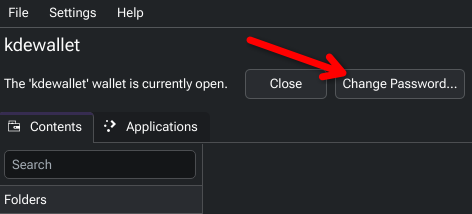
In kwalletmanager, you could try changing the password to match your login password? This hopefully addresses the issue @dalto queried, with respect to changing your account password.

You can also confirm here, that your wallet is named kdewallet, which is necessary for auto-unlock.

1 Like

Yes, just install KDE Wallet Manager if it isn’t already installed and change the password to match. Then when you login, it will get unlocked automatically and you won’t see it anymore.

I DID reboot, it IS Vivaldi trying to access the kde wallet -it did not say on the password prompt that appeared but it appeared the instant I click to open Vivaldi, I tried LibreOffice, Firefox and steam first and nothing no kwallet prompt.

I installed kwalletmanager as suggested and when I clicked the change password button it ask me to access the wallet, I used my root password, that worked and allowed me to change the password to my current user password.

While I was in there I clicked the applications tab and the only thing present is Vivaldi.

I applied the password changes, closed kwallet, opened Vivaldi, entered the new password, closed Vivaldi, re-opend Vivaldi and no password prompt from wallet anymore.

I do not get prompted to enter a password into kwallet during boot (ideal)

I do not get prompted to enter a password when opening Vivaldi.

TY all very much!

Mystery solved, paranoid episode over and posted question answered.

=====

I’ll give this to Bink for suggesting the kwalletmanager but I wish I could give it to everyone who replied!

I am under the impression you all didn’t care who gets the Resolved button but who knows.

1 Like

Glad to hear it’s sorted. Hats off to @dalto too, for checking if you’d changed your account password. That ultimately lead to the solution.

1 Like