KDE Dolphin file manager is terrible with large files

First, thanks to Amazon for not letting me watch the UHD Hobbit I bought from them in full quality unless I use their app on a smart TV / Android / etc. On Linux, Windows, or macOS in a browser you get a low-resolution, low-bitrate stream because… honestly I have no idea why.
Screw you anyway, Bezos.

But I like to actually own the things I buy, so life found a way and I ended up with my film in proper UHD — around 100 GB. I wanted to move it to my external M.2 drive to bring over to a friend’s place and watch together. And that’s where the fun started.

Across several drives (Samsung PM991, WD 2TB), different USB-C / Type-A ports, and two different enclosures (UGREEN w/ JMicron JMS583, ORICO w/ Realtek RTL9210B), write speeds were abysmal — a brief ~1 GB/s burst for the first ~13 GB, then a collapse to ~100 MB/s, or as low as ~40 MB/s. There’s one culprit I ruled out before getting to the actual point, because it muddies these reports and people will bring it up:

The UGREEN’s JMicron JMS583 bridge has broken UAS firmware under Linux — it reset-storms under sustained writes (uas_eh_abort_handler / reset SuperSpeed looping in dmesg), which tanks speed. I had to manually disable UAS via a kernel quirk (options usb-storage quirks=152d:0583:u) to stabilize it. That’s a JMicron problem, not KDE. With a proper data cable and the quirk in place, lsusb -t confirmed the device on a 10000M bus — full 10 Gbit/s, stable.

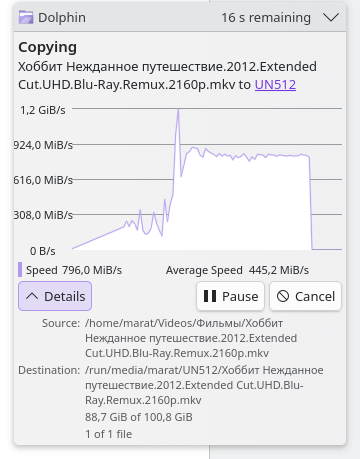
Here’s the part that is on KDE. After fixing the link and the bridge — confirmed 10 Gbit/s, confirmed stable — the speed was still garbage in Dolphin. So I benchmarked properly. Raw dd with oflag=direct (bypassing page cache entirely) copied the actual 100 GB file at 579 MB/s sustained, dead flat, no cliff. An 80 GB synthetic write held 725 MB/s.

Then I copied the film’s file with every file manager I came to mind:

Tool Time / effective speed Backend
Thunar ~1 min GIO/GVfs
Nautilus ~1 min GIO/GVfs
Nemo ~1 min GIO/GVfs
PCManFM-Qt ~1.5 min thin/GIO
dd (oflag=direct) 3 min / 579 MB/s raw syscalls
Dolphin many minutes / ~40–300 MB/s KIO

And as I’ve discovered this isn’t new. The same complaints show up in Google going back over a decade - 2014. KDE’s own bug tracker has it as an open issue — [LINK: bug #402276, “Dolphin transfer speeds moderately slower than other file managers,” still open, last touched Jan 2026].
Baloo and KIO in general have a notorious reputation for terrible performance.

The sad part is that I genuinely love Dolphin. Functionality and UI/UX-wise it’s my favorite file manager by a mile — the thumbnailing alone (it’ll generate a preview for damn near anything) is best-in-class in my opinion.
There could be something else going on here. I just used Dolphin to copy a 4.6 GB ISO, one to an NVME and the other to a external USB-connected HHD. Both copies completed in under 12 seconds. I’m wondering if the problem is with baloo; I always disable this on every system that uses it.

This system is not KDE, it’s Hyprland with a few KDE-based apps. It’s interesting that you’re having issues with large files. In my experience, it’s been huge number of small files that slow down transfers.

Try 46/80/100+ GB files.

OK - a 90GB file, copied from NVME to SSD, took just under 3 minutes.

it’s really weird but I was reading today that moving large files like that is problematic if NTFS is involved. May not be your use case (?)

My sheer fear and irrational repulsion for everything Plasma stems from Baloo, as ringo mentioned. As an indexer it throttled my system to where it would not function. Every single chance I gave it. Big freeze. But I need a shrink.

What do I hate more than Baloo? Hardware troubleshooting. Might be the weak link here.

2 cents

The file system being used might be a factor. For our testing to try and replicate, it’d be good to be able to take that into consideration.

#8th response is where I read about this today:

My system is using default EXT4 and both external drives are exFAT. I’ll try to format them to EXT4 too and share the results here.

Well, that’s weird now.
Also, my drives were both empty when file transfer of 100GB was happening — Samsung in Ugreen enclosure is 512GB and WD Blue in Orico enclosure is 2TB.

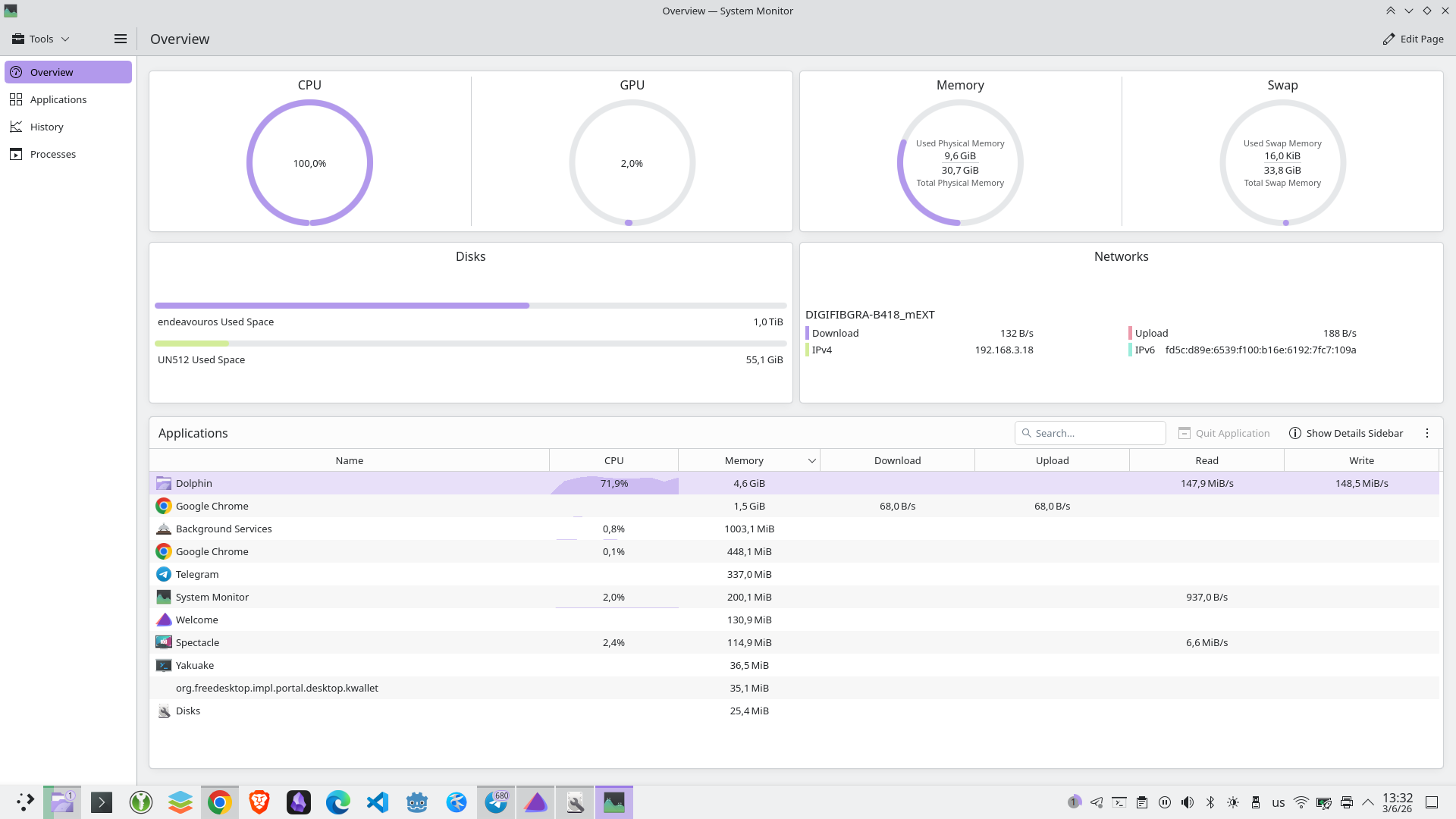
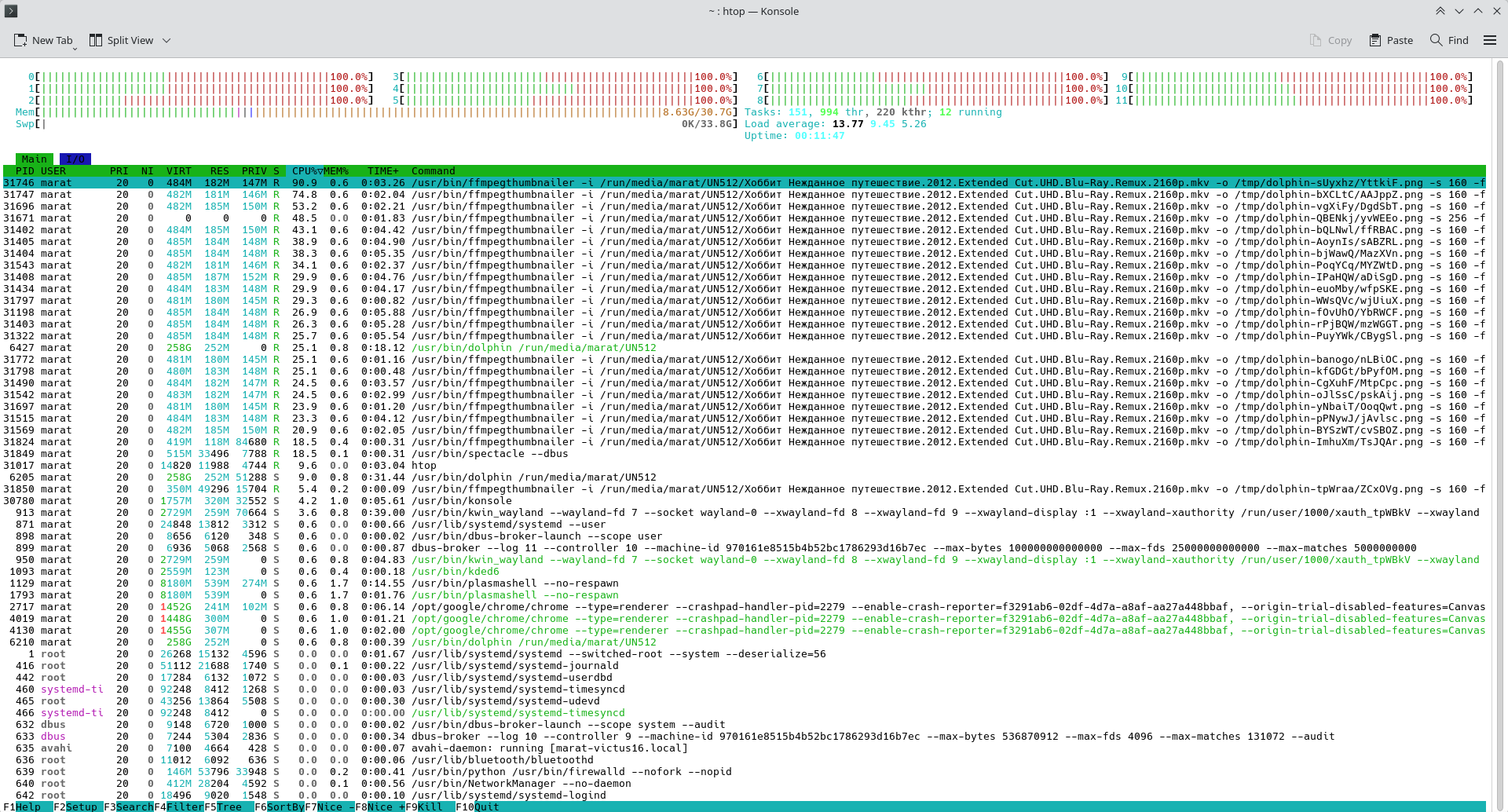
Have you checked your CPU usage while copying? I can copy a 100 GB file with sustained 1.5 GB/s, but it essentially hugs one core.

The KIO magic is known for being much slower in big file/many files situations than raw file commands, that’s the price for supporting all the non-raw protocols (smb, ftp, webdav, sshfs, archives, …).

My CPU is a Ryzen 5600H, and Dolphin eats about 40% CPU when moving large files.
Didn’t test others but I didn’t notice visible system slowdowns like what happens with Dolphin.

Formatted the external drive from exFAT to EXT4 and speed has significantly improved, though still a bit slower than the rest of the file managers and weirdly inconsistent in the first half of the file transfer.
The problem is EXT4 is unusable for the purpose of universal portable memory storage that’s might be connected to a lot of non-Linux devices which unfortunately won’t be able to read it.

And perfomance -

I think this is because of the way Unix handles and stores files vs the way Windows does. Unix file permissions must be stripped as Windows has no interpretation of them. I’m sure rewriting permissions for the new file system takes a little more time than just a simple copy and paste. However with files of that size I would really suggest doing that at the command line where less resources are used an the copy generally goes much faster than the Gui counter part IME

Dolphin (and by extension Plasma) has a habit of reporting copy operations as complete well before they’re genuinely complete and cache flush synced. Case in point, writing a 50GB file to a USB stick :

Plasma : 12 seconds later : Yeah, complete!

USB Stick : Still flashing away busy writing

Not sure if this works with KDE however you could try adding this to remove that behavior

This works for me using LXQT on those rare occasions I copy graphically to usb. it works pretty decently for me

For movies that I buy digitally that are Movies Anywhere eligible, like The Hobbit is, those movies can be watched on a smart TV with the Fandango at Home app, Apple TV app, etc., or the Movies Anywhere app too. I find that the bonus features and ability to stream with Dolby Vision can vary among apps, so it’s worthwhile to try different ones. I stream to a Roku attached to a Sony TV primarily.

At home I usually watch everything on my laptop because I’m shortsighted - unlike with TV, I don’t need to wear glasses to watch comfortably.

Also, when I come to visit friends I prefer not to risk password compromise while logging into my accounts on their TVs. And it takes more effort than just plugging in a cable and watching the movie.