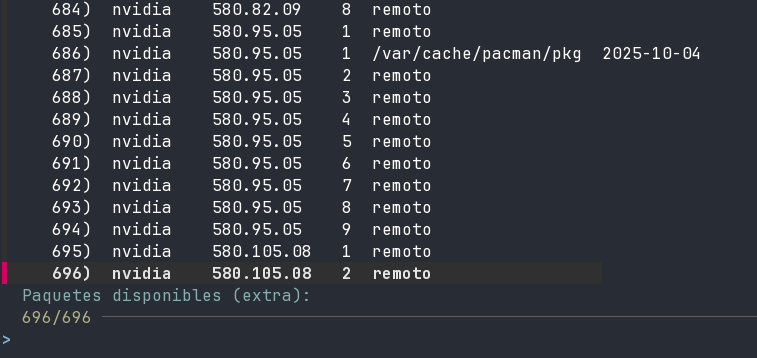
Hi. I have an HP Victus 16 Laptop. It has an nvidia RTX4060 for laptop.
Until this morning I was happyly using my system since months with EXWM, and I decided to take a look to Budgie.
I installed the Budgie package and when logged I noticed my second monitor (an LG ultrawide monitor with a 2560x1080 resolution), now gives 1920x1080.
I logged into KDE and same (and came back to EXWM with same results). Something is broken (not saying related to Budgie installation, just giving context)
This is my xrandrd –query, it no longer shows 2560x1080 as possible mode.
[devgiu@caelum ~]$ xrandr --query
Screen 0: minimum 8 x 8, current 3840 x 1080, maximum 32767 x 32767
HDMI-0 connected 1920x1080+0+0 (normal left inverted right x axis y axis) 673mm x 284mm
   1920x1080     60.00*+  59.94    50.00
   1680x1050     59.95
   1600x900      60.00
   1280x1024     75.02    60.02
   1280x720      60.00    59.94    50.00
   1152x864      75.00
   1024x768      75.03    60.00
   800x600       75.00    60.32
   720x576       50.00
   720x480       59.94
   640x480       75.00    59.94    59.93
eDP-1-1 connected primary 1920x1080+1920+0 (normal left inverted right x axis y axis) 355mm x 200mm
   1920x1080    144.00*+  60.01    59.97    59.96    60.00    59.93
   1680x1050     59.95    59.88
   1400x1050     74.76    59.98
   1600x900      59.99    59.94    59.95    59.82
   1280x1024     85.02    75.02    60.02
   1400x900      59.96    59.88
   1280x960      85.00    60.00
   1440x810      60.00    59.97
   1368x768      59.88    59.85
   1280x800      59.99    59.97    59.81    59.91
   1152x864      75.00
   1280x720      60.00    59.99    59.86    59.74
   1024x768      85.00    75.05    60.04    85.00    75.03    70.07    60.00
   1024x768i     86.96
   960x720       85.00    75.00    60.00
   928x696       75.00    60.05
   896x672       75.05    60.01
   1024x576      59.95    59.96    59.90    59.82
   960x600       59.93    60.00
   832x624       74.55
   960x540       59.96    59.99    59.63    59.82
   800x600       85.00    75.00    70.00    65.00    60.00    85.14    72.19    75.00    60.32    56.25
   840x525       60.01    59.88
   864x486       59.92    59.57
   700x525       74.76    59.98
   800x450       59.95    59.82
   640x512       85.02    75.02    60.02
   700x450       59.96    59.88
   640x480       85.09    60.00    85.01    72.81    75.00    59.94
   720x405       59.51    58.99
   720x400       85.04
   684x384       59.88    59.85
   640x400       59.88    59.98    85.08
   576x432       75.00
   640x360       59.86    59.83    59.84    59.32
   640x350       85.08
   512x384       85.00    75.03    70.07    60.00
   512x384i      87.06
   512x288       60.00    59.92
   416x312       74.66
   480x270       59.63    59.82
   400x300       85.27    72.19    75.12    60.32    56.34
   432x243       59.92    59.57
   320x240       85.18    72.81    75.00    60.05
   360x202       59.51    59.13
   360x200       85.04
   320x200       85.27
   320x180       59.84    59.32
   320x175       85.27
DP-1-1 disconnected (normal left inverted right x axis y axis)
  1680x1050 (0x1c0) 146.250MHz -HSync +VSync
        h: width  1680 start 1784 end 1960 total 2240 skew    0 clock  65.29KHz
        v: height 1050 start 1053 end 1059 total 1089           clock  59.95Hz
  1280x1024 (0x1c2) 135.000MHz +HSync +VSync
        h: width  1280 start 1296 end 1440 total 1688 skew    0 clock  79.98KHz
        v: height 1024 start 1025 end 1028 total 1066           clock  75.02Hz
  1280x1024 (0x1c3) 108.000MHz +HSync +VSync
        h: width  1280 start 1328 end 1440 total 1688 skew    0 clock  63.98KHz
        v: height 1024 start 1025 end 1028 total 1066           clock  60.02Hz
  1152x864 (0x1c7) 108.000MHz +HSync +VSync
        h: width  1152 start 1216 end 1344 total 1600 skew    0 clock  67.50KHz
        v: height  864 start  865 end  868 total  900           clock  75.00Hz
  1024x768 (0x1c8) 78.750MHz +HSync +VSync
        h: width  1024 start 1040 end 1136 total 1312 skew    0 clock  60.02KHz
        v: height  768 start  769 end  772 total  800           clock  75.03Hz
  1024x768 (0x1c9) 65.000MHz -HSync -VSync
        h: width  1024 start 1048 end 1184 total 1344 skew    0 clock  48.36KHz
        v: height  768 start  771 end  777 total  806           clock  60.00Hz
  800x600 (0x1ca) 49.500MHz +HSync +VSync
        h: width   800 start  816 end  896 total 1056 skew    0 clock  46.88KHz
        v: height  600 start  601 end  604 total  625           clock  75.00Hz
  800x600 (0x1cb) 40.000MHz +HSync +VSync
        h: width   800 start  840 end  968 total 1056 skew    0 clock  37.88KHz
        v: height  600 start  601 end  605 total  628           clock  60.32Hz
  640x480 (0x1ce) 31.500MHz -HSync -VSync
        h: width   640 start  656 end  720 total  840 skew    0 clock  37.50KHz
        v: height  480 start  481 end  484 total  500           clock  75.00Hz
  640x480 (0x1cf) 25.175MHz -HSync -VSync
        h: width   640 start  656 end  752 total  800 skew    0 clock  31.47KHz
        v: height  480 start  490 end  492 total  525           clock  59.94Hz
I tried almost everything I guess, including removing optimus-manager, installing prime and so on.
The only way I can get the right resolution is changing this in nvidia-settings (and only with nvidia as primary)
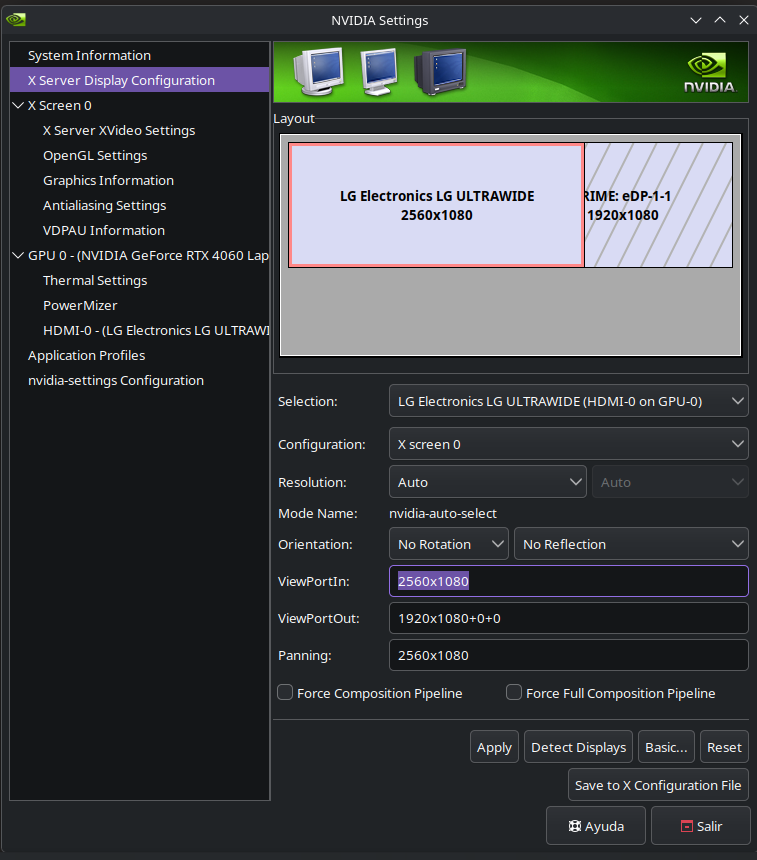
But this is for scale, not real resolution.
Some has an idea about what can be the issue and how to solve? Obivously I tried with several HDMI cables, and this monitor and the same cable works as expected with 2560 resolution on an win11 laptop.