After 3 or 4 days of using EndeavourOS Plasma, my PC no longer detects the microphone or camera, restarting the system helps, but like it may work only after the second reboot, and I found no solutions online
Welcome to the community @Georgvwt 


Could you tell us a bit about your microphone, camera and the application you’re trying to use them in? Are these built into a laptop, and/or external devices?
Are they connected via USB?
Perhaps share your system information with us, in case it might provide something of help.
inxi -Fxxc0z
Microphone and camera are build into the monitor i use, i tried to use them in discord/zoom/google meet, didn’t worked.
Here’s the info:
System:
    Kernel: 6.18.21-1-lts arch: x86_64 bits: 64 compiler: gcc v: 15.2.1
    Desktop: KDE Plasma v: 6.6.4 tk: Qt v: N/A wm: kwin_wayland dm: SDDM
        Distro: EndeavourOS base: Arch Linux
    Machine:
        Type: Desktop System: ASUS product: N/A v: N/A serial:
        Mobo: ASUSTeK model: PRIME A520M-K v: Rev X.0x
            serial:  part-nu: SKU Firmware: UEFI
            vendor: American Megatrends v: 2814 date: 12/27/2022
CPU:
    Info: 6-core model: AMD Ryzen 5 5600G with Radeon Graphics bits: 64
        type: MT MCP arch: Zen 3 rev: 0 cache: L1: 384 KiB L2: 3 MiB L3: 16 MiB
    Speed (MHz): avg: 2368 min/max: 404/4466 boost: enabled cores: 1: 2368
        2: 2368 3: 2368 4: 2368 5: 2368 6: 2368 7: 2368 8: 2368 9: 2368 10: 2368
        11: 2368 12: 2368 bogomips: 93459
    Flags-basic: avx avx2 ht lm nx pae sse sse2 sse3 sse4_1 sse4_2 sse4a ssse3
Graphics:
    Device-1: Advanced Micro Devices [AMD/ATI] Cezanne [Radeon Vega Series /
        Radeon Mobile Series] vendor: ASUSTeK driver: amdgpu v: kernel arch: GCN-5
        pcie: speed: 8 GT/s lanes: 16 ports: active: DP-1 empty: HDMI-A-1
        bus-ID: 08:00.0 chip-ID: 1002:1638 temp: 46.0 C
    Device-2: Realtek USB Video device driver: snd-usb-audio,uvcvideo
        type: USB rev: 2.0 speed: 480 Mb/s lanes: 1 bus-ID: 1-4.4:7
        chip-ID: 0bda:58fe
    Display: wayland server: X.org v: 1.21.1.21 with: Xwayland v: 24.1.9
        compositor: kwin_wayland driver: X: loaded: modesetting
        alternate: fbdev,vesa dri: radeonsi gpu: amdgpu display-ID: 0
    Monitor-1: DP-1 model: Philips 241PQPY res: 1920x1080 hz: 60 dpi: 92

    API: EGL v: 1.5 platforms: device: 0 drv: radeonsi device: 1 drv: swrast
        gbm: drv: kms_swrast surfaceless: drv: radeonsi wayland: drv: radeonsi x11:
        drv: radeonsi
    API: OpenGL v: 4.6 compat-v: 4.5 vendor: amd mesa v: 26.0.4-arch1.1
        glx-v: 1.4 direct-render: yes renderer: AMD Radeon Graphics (radeonsi
        renoir ACO DRM 3.64 6.18.21-1-lts) device-ID: 1002:1638 display-ID: :1.0
    API: Vulkan v: 1.4.341 surfaces: N/A device: 0 type: integrated-gpu

    Info: Tools: api: clinfo, eglinfo, glxinfo, vulkaninfo
        de: kscreen-console,kscreen-doctor wl: wayland-info
        x11: xdpyinfo, xprop, xrandr
Audio:
    Device-1: Advanced Micro Devices [AMD/ATI] Renoir/Cezanne HDMI/DP Audio
        vendor: ASUSTeK driver: snd_hda_intel v: kernel pcie: speed: 8 GT/s
        lanes: 16 bus-ID: 08:00.1 chip-ID: 1002:1637
    Device-2: Advanced Micro Devices [AMD] Ryzen HD Audio vendor: ASUSTeK
        driver: snd_hda_intel v: kernel pcie: speed: 8 GT/s lanes: 16
        bus-ID: 08:00.6 chip-ID: 1022:15e3
    Device-3: Realtek USB Video device driver: snd-usb-audio,uvcvideo
        type: USB rev: 2.0 speed: 480 Mb/s lanes: 1 bus-ID: 1-4.4:7
        chip-ID: 0bda:58fe
    API: ALSA v: k6.18.21-1-lts status: kernel-api
    Server-1: sndiod v: N/A status: off
    Server-2: PipeWire v: 1.6.2 status: active with: 1: pipewire-pulse
        status: active 2: wireplumber status: active 3: pipewire-alsa type: plugin
        4: pw-jack type: plugin
Network:
    Device-1: Realtek RTL8111/8168/8211/8411 PCI Express Gigabit Ethernet
        vendor: ASUSTeK RTL8111H driver: r8169 v: kernel pcie: speed: 2.5 GT/s
        lanes: 1 port: f000 bus-ID: 03:00.0 chip-ID: 10ec:8168
    IF: enp3s0 state: down mac:
    Device-2: TP-Link Archer T4U ver.3 driver: rtl88x2bu type: USB rev: 2.1
        speed: 480 Mb/s lanes: 1 bus-ID: 1-6:3 chip-ID: 2357:0115
    IF: wlan0 state: up mac:
    IF-ID-1: br-d9687c565b46 state: down mac:
    IF-ID-2: docker0 state: down mac:
    IF-ID-3: utun420 state: unknown speed: 10000 Mbps duplex: full mac: N/A
    Bluetooth:
    Device-1: Realtek Bluetooth Radio driver: btusb v: 0.8 type: USB rev: 1.1
        speed: 12 Mb/s lanes: 1 bus-ID: 5-2:2 chip-ID: 2550:8761
    Report: btmgmt ID: hci0 rfk-id: 2 state: up address:  bt-v: 5.1
    lmp-v: 10
Drives:
    Local Storage: total: 523.5 GiB used: 229.79 GiB (43.9%)
    ID-1: /dev/nvme0n1 vendor: MSI model: M371 500GB size: 465.76 GiB
        speed: 31.6 Gb/s lanes: 4 serial:  temp: 41.9 C
    ID-2: /dev/sda vendor: Kingston model: DataTraveler 3.0 size: 57.73 GiB
        type: USB rev: 2.1 spd: 480 Mb/s lanes: 1 serial:
Partition:
    ID-1: / size: 455.41 GiB used: 229.6 GiB (50.4%) fs: ext4
        dev: /dev/nvme0n1p2
Swap:
    ID-1: swap-1 type: zram size: 3.77 GiB used: 3.39 GiB (90.0%) priority: 100
        dev: /dev/zram0
Sensors:
    System Temperatures: cpu: 59.5 C mobo: N/A gpu: amdgpu temp: 47.0 C
    Fan Speeds (rpm): N/A
Info:
    Memory: total: 8 GiB note: est. available: 7.55 GiB used: 4.55 GiB (60.3%)
    Processes: 402 Power: uptime: 4h 1m wakeups: 1 Init: systemd v: 260
        default: graphical
    Packages: 1207 pm: pacman pkgs: 1153 pm: flatpak pkgs: 54 Compilers:
        gcc: 15.2.1 Shell: Zsh v: 5.9 running-in: konsole inxi: 3.3.40
I use this as my micro, and as i said it is just disappear sometimes
Ok so it looks like you have the Philips 241P4QPYKEB monitor, with built-in webcam and microphone.
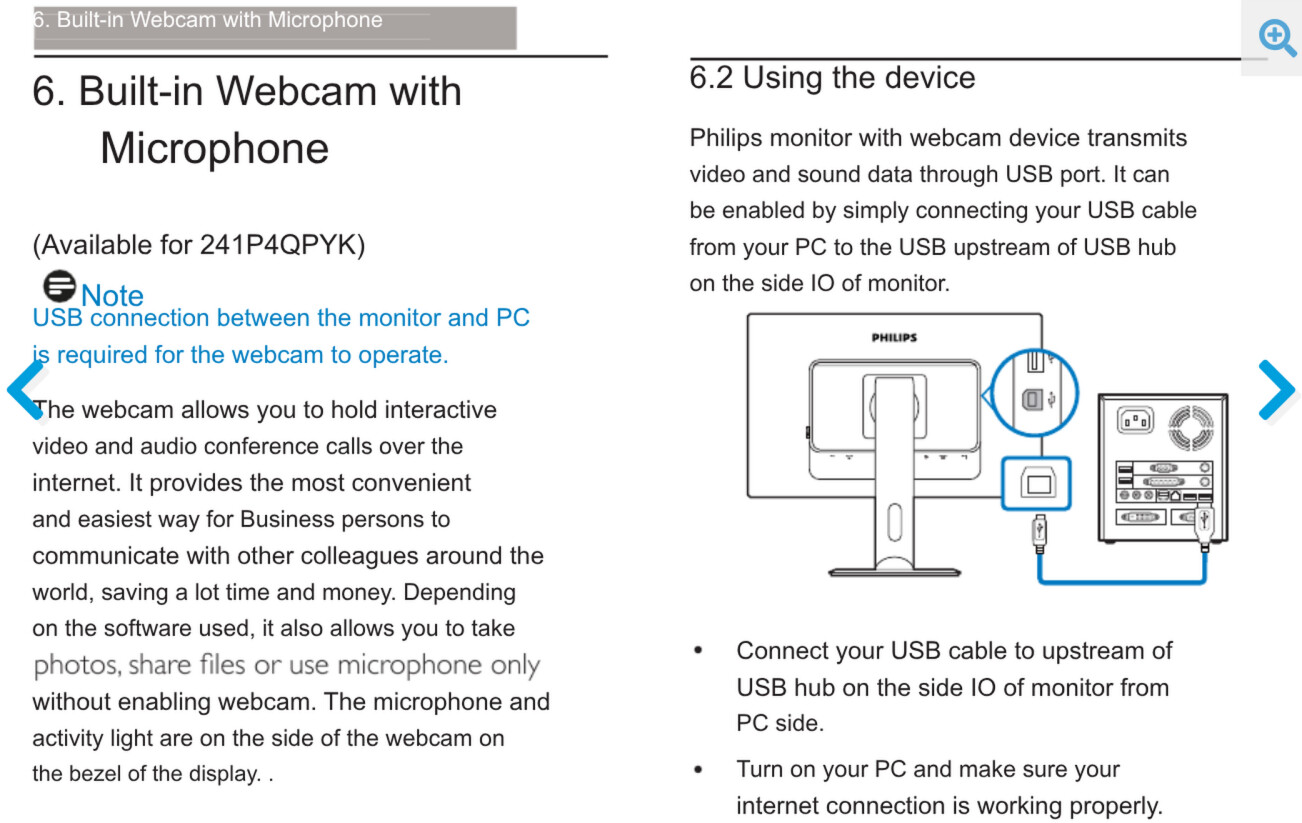
This is connected to your computer via USB cable. It’d be worth:
- Trying different USB ports on your PC
and failing that: - Trying a different USB cable
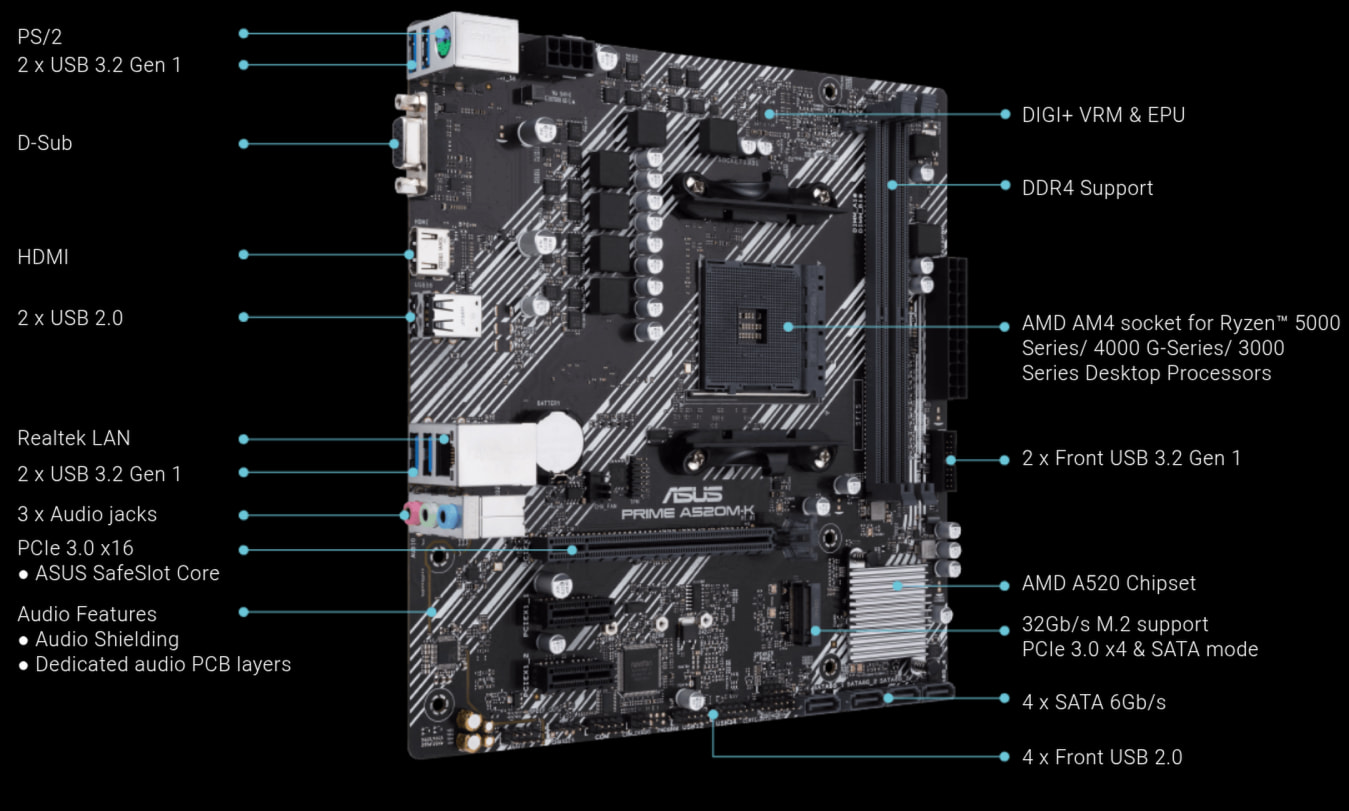
Your Asus PRIME A520M-K motherboard has 2x USB 2.0 (black), and 4x USB 3.2 Gen 1 (blue) ports on the back. Try plugging the USB cable coming from your monitor, into one of the blue USB 3.2 Gen 1 ports.
If it’s already using one of those ports, then try one of the black ports.
Okay i’ll try