Installation bug for german local

Because i can not attach my experience to the already opened thread i use for this one.
if u install a EOS in german with actual download iso “…03-2023_R3_1” u get 2 bugs.

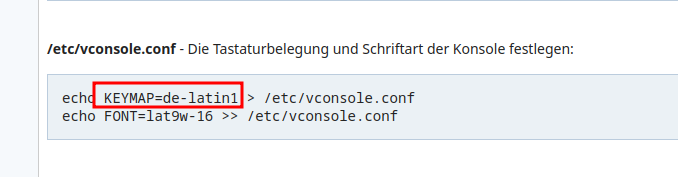
  1. the console tty doesnt match with your keyboard layout. u have to actualize the /etc/vconsole.conf to “KEYMAP=de-latin1”

  2. u can not login to tty as root because roots login shell in passwd is set wrong. u have to change it to /bin/bash

EOS has bugs but i love it because its a roling release. to all the best.

Bugs… we have many users that most likely use German language. This is the first time i hear of this.

Edit: If this is the case did you report it under bugs?

What was root shell set in passwd before your change?
fresh install German:
2023-10-11_01-09

2023-10-11_01-10

And as far as i know de is a valid entry for german keymap in vconsole.conf:
2023-10-11_01-17

yes, with this both entries u get the errors. try to login via tty. this will not function. test the keyboard. its no german layout.

yes, of course. It`s a configuration fault and worked not out of the box correctly.

Well i wouldn’t know as I only use English keyboard but I’m just surprised no one has brought it up before. :person_shrugging:

Do you know David Kriesel? He explored a bug from Xerox Copy Centers that had been manipulating Copies for 8 years. No other had noticed this bug before - over a time of 8 years. Such a flashy bug. Incredible.
https://www.youtube.com/watch?v=7FeqF1-Z1g0
Maybe the second “bug” is a feature. No one shall login to the console with root. My own wanne do that.

the 1. “bug” show this:
the “de” layout differs from the “normal” de layout by missing “§” and “ß” and the backslash and all umlauts (mutated vowels). Not much, but u wont find the characters.

It is de-german layout but does not reflect the default german layout most keyboards have… no Umlauts and some special signs are different…
Nothing EndeavourOS is specifacally setting up… thats the default mechanism calamares is using.
It is simply the first match what calamares is using…
There was similar issue with italian layout but not for TTY it was used as the X default.

But indeed funny that no one mentioned this over the years… but a most signs are working and also y/z are in the right place…

@dalto we should have a look into this.

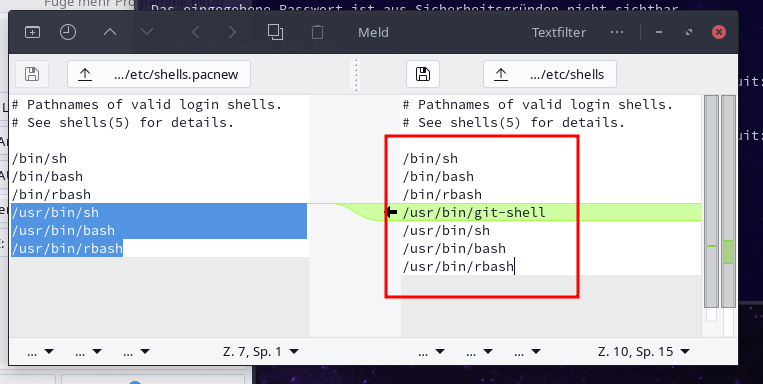
This was an issue where the shell was being set to /usr/bin/bash but it wasn’t in /etc/shells. It was recently fixed.

1 Like

ah that brings in the light !

i just done a test about the vconsole issue… if i comment out the de/de map entry it takes de-latin1 instead:
2023-10-11_17-25

Not sure if this is the most best way to solve the issue :wink:

Localization is pretty far outside my area expertise. Will making that change break things for a different group of users?

the other option would be to put the entry under the de-latin1 entry… so it will be still available…
I am also nit the expert in general… but now after checking around that i see that i have all my personal installs set to the same de-latin1… that`s simply something i do as long as i do use arch.

And in the german archwiki it is also mentioned:

2023-10-11_18-21

Even the example inb the man page say it :wink:
https://man.archlinux.org/man/vconsole.conf.5.en

Aside from that i never saw a german keyboard without Umlauts.

just checked and the issue will get self solved in case you install latest release Cassini R3 in offline mode directly after first boot it has the BUG but after updating system it got resolved.
(user needs to solve pacdiff and merge pacnew in the default /etc/shells file… or use welcome app diffmerge tool…)
{welcome at archlinux :wink: }


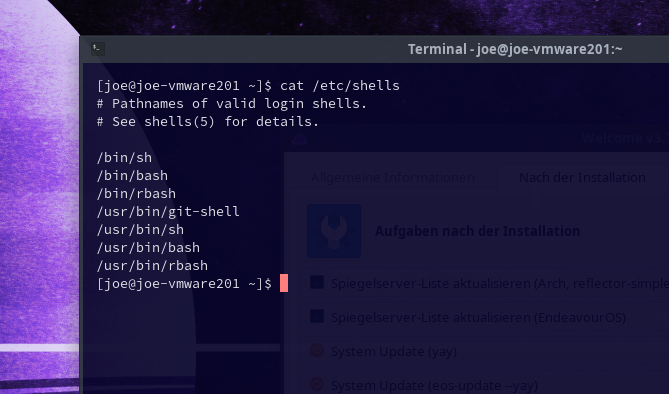
Be aware to not remove/replace git-shell here …

2023-10-11_18-35

1 Like

I tried to research about the de layout it takes… but… i do not find a single info where it mentions no Umlauts for german keymap…

I’m not sure if this can be useful to you. If not just disregard …
https://iask.ai/?mode=question&q=arch+linux+%2B+Umlauts+for+german+keymap

~!"#$%&/()=?` ^1234567890\ QWERTZUIOP* qwertzuiop@+ ASDFGHJKL{} asdfghjkl# >YXCBVBNM;:_ <yxcvbnm,.-

typing in TTY with vconsole set to de… from top left to right caps lock and no caps lock one line after the other :wink:

It is QWERTZ but no Umlauts…

Thats default German layout even with the signs on the german standard keyboard:

°!"§$%&/()=?` ¹2345678890ß’ QWERTZUIOPÜ* qwertzuiopü+ ASDFGHJKLÖÄ’ asdfghjklöä# >YXCVBNM;:_ <yxcvbnm,.-

Thanks for try to hep … but there is no issue getting Umlauts working we only need to set the correct de-latin1 map instead of the de map calamares is choosing in the lottery it does in that stuff :wink:

My personal “Monk” is asking myself what is this de map even for?

1 Like
/usr/share/kbd/keymaps/i386/qwertz/de.map.gz
# de.map: German keymap
# (Renamed from gr.map, since it is not a Greek map.)
# Some changes due to Olaf Flebbe (flebbe@pluto.tat.physik.uni-tuebingen.de)
# More changes by Jochen Hein <jochen@jochen.org>.

keymaps 0-2,4-6,8-10,12
alt_is_meta
include "qwertz-layout"
	altgr keycode  16 = at
control altgr keycode  16 = nul
	altgr keycode  50 = mu
include "linux-with-alt-and-altgr"
	plain keycode  83 = KP_Comma
include "compose.latin1"
include "euro2.map"
strings as usual

#             Normal           Shift            AltGr           Strg
keycode   1 = Escape           Escape
keycode   2 = one              exclam
keycode   3 = two              quotedbl         two             nul
keycode   4 = three            numbersign       three           Escape
keycode   5 = four             dollar
keycode   6 = five             percent
keycode   7 = six              ampersand
keycode   8 = seven            slash            braceleft
keycode   9 = eight            parenleft        bracketleft
keycode  10 = nine             parenright       bracketright
        control altgr keycode  10 = Control_bracketright
keycode  11 = zero             equal            braceright
keycode  12 = backslash        question
        control altgr keycode  12 = Control_backslash
keycode  13 = apostrophe       grave
keycode  14 = Delete           Delete
        alt     keycode  14 = Meta_Delete
keycode  15 = Tab              Meta_Tab
keycode  26 = at               backslash
keycode  27 = plus             asterisk         asciitilde
keycode  28 = Return
	alt	keycode  28 = Meta_Control_m
keycode  29 = Control
keycode  39 = bracketleft      braceleft
keycode  40 = bracketright     braceright
        control shift keycode  40 = Control_bracketright
keycode  41 = asciicircum      asciitilde      Meta_grave       Control_asciicircum
keycode  42 = Shift
keycode  43 = numbersign       apostrophe
keycode  51 = comma            semicolon
keycode  52 = period           colon
keycode  53 = minus            underscore       Meta_minus
        shift control keycode  53 = Control_underscore
keycode  54 = Shift
keycode  56 = Alt
keycode  57 = space            space            Meta_space      nul
keycode  58 = Caps_Lock
keycode  86 = less             greater          bar
keycode  97 = Control
/usr/share/kbd/keymaps/i386/qwertz/de-latin1.map.gz
# de-latin1.map: German keymap
# (Renamed from gr-latin1.map, since it is not a Greek map.)
# Some changes due to Olaf Flebbe (flebbe@pluto.tat.physik.uni-tuebingen.de)
# More changes by Jochen Hein <jochen@jochen.org>.

keymaps 0-2,4-6,8-10,12
alt_is_meta
include "qwertz-layout"
	altgr keycode  16 = at
control altgr keycode  16 = nul
	altgr keycode  50 = mu
include "linux-with-alt-and-altgr"
	plain keycode  83 = KP_Comma
include "euro2.map"
include "compose.latin1"
strings as usual

#             Normal           Shift            AltGr           Strg
keycode   1 = Escape           Escape
keycode   2 = one              exclam
keycode   3 = two              quotedbl         twosuperior     nul
keycode   4 = three            section          threesuperior   Escape
keycode   5 = four             dollar
keycode   6 = five             percent
keycode   7 = six              ampersand
keycode   8 = seven            slash            braceleft
keycode   9 = eight            parenleft        bracketleft
keycode  10 = nine             parenright       bracketright
        control altgr keycode  10 = Control_bracketright
keycode  11 = zero             equal            braceright
keycode  12 = ssharp           question         backslash
        control altgr keycode  12 = Control_backslash
keycode  13 = dead_acute       dead_grave
        alt     keycode  13 = Meta_acute
        shift   alt   keycode  13 = Meta_grave
keycode  14 = Delete           Delete
        alt     keycode  14 = Meta_Delete
keycode  15 = Tab              Meta_Tab
keycode  26 = +udiaeresis       +Udiaeresis
keycode  27 = plus             asterisk         dead_tilde
keycode  28 = Return
	alt	keycode  28 = Meta_Control_m
keycode  29 = Control
keycode  39 = +odiaeresis       +Odiaeresis
keycode  40 = +adiaeresis       +Adiaeresis
keycode  41 = dead_circumflex   degree   Meta_asciicircum        Control_asciicircum
keycode  42 = Shift
keycode  43 = numbersign       apostrophe
keycode  51 = comma            semicolon
keycode  52 = period           colon
keycode  53 = minus            underscore       Meta_minus
        shift control keycode  53 = Control_underscore
keycode  54 = Shift
keycode  56 = Alt
keycode  57 = space            space            Meta_space      nul
keycode  58 = Caps_Lock
keycode  86 = less             greater          bar
keycode  97 = Control

So now i could write Email to Jochen and Olaf …

Just testet to simply put de after de-latin1 and it does what the trick too… and in case someone selecting something that would match to that whatever no umlaut German keymap… it will be still there…


Starting job "Definiere Tastaturmodel zu pc105, Layout zu de-" ( 17 / 42 ) 
19:02:18 [6]: virtual Calamares::JobResult SetKeyboardLayoutJob::exec()
    Executing SetKeyboardLayoutJob 
19:02:18 [6]: bool SetKeyboardLayoutJob::writeVConsoleData(const QString&, const QString&) const
    Writing vconsole data to "/tmp/calamares-root-7et09442/etc/vconsole.conf" 
19:02:18 [6]: QString SetKeyboardLayoutJob::findConvertedKeymap(const QString&) const
    Looking for converted keymap in "" 
19:02:18 [6]: QString findLegacyKeymap(const QString&, const QString&, const QString&)
    Looking for legacy keymap "de" "pc105" "" in QRC 
    .. Found legacy keymap "de-latin1" with score 12 
    .. Found legacy keymap "de" with score 12 
    .. Written KEYMAP= "de-latin1" to vconsole.conf 0 
19:02:18 [6]: bool SetKeyboardLayoutJob::writeX11Data(const QString&) const
    Writing X11 configuration to "/tmp/calamares-root-7et09442/etc/X11/xorg.conf.d/00-keyboard.conf" 
    .. Written XkbLayout "de" ; XkbModel "pc105" ; XkbVariant "" to X.org file "/tmp/calamares-root-7et09442/etc/X11/xorg.conf.d/00-keyboard.conf" 0 
19:02:18 [6]: bool SetKeyboardLayoutJob::writeDefaultKeyboardData(const QString&) const
    Writing default keyboard data to "/tmp/calamares-root-7et09442/etc/default/keyboard" 
    .. Written XKBMODEL "pc105" ; XKBLAYOUT "de" ; XKBVARIANT "" to /etc/default/keyboard file "/tmp/calamares-root-7et09442/etc/default/keyboard" 0