Heya,
I removed the line under open apps, thinking it’d be cleaner. Sure is… and now I can’t see which apps are actually active 
Forgot to note down where I changed this setting. Does anyone know?
Heya,
I removed the line under open apps, thinking it’d be cleaner. Sure is… and now I can’t see which apps are actually active
Forgot to note down where I changed this setting. Does anyone know?
If you opened it on the command line, just use the up arrow, and if you opened it in a gui, use open recent. If it was edited a long time ago, you may be out of luck with those options though.
What desktop environment are you using?
Ah right, forgot to add that. KDE Plasma
I added an image to show what I mean. The red line used to be white. Showing if an app was active or not. Looked through all menu’s I can think of and haven’t been able to trace it 
Sorry, I’m in the UK. I can’t view imgur.
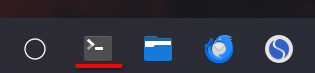
Whew. Found the upload button.
Thanks. And you edited a file and removed a line?
I unchecked a checkbox in a menu somewhere while I was setting up this new PC. And I can’t recall where I found it.
Been through every menu in:
System Settings
Kvantum Manager
Panel Colorizer Configuration
Icon-Only Task Manager Configuration
Not sure what I’m missing.
Edit: Tried adding another icon-only task manager, but it’s the same there.
Are you using the default theme or something else? (guessing something else) The theme is probably doing it.
The only thing I can think of is going to System Settings → Colours & Themes → colours and having a poke around in there.
Of course it will depend on what theme you are using and maybe it’s theme specific.
Seems like it’s the plasma style theme that does this, but I did do a system update after making the change. I suppose it’s possible the setting was yoinked from the menu or it’s a bug. Breeze shows highlights, while any custom theme does not. Thanks for the tip! Much appreciated
Seems it was related to the plasma themes. Appreciate the help!
As @MyNameIsRichard mentioned you can change the colours in settings, if using kvantum you may have to disable it or try edit its config
Couldn’t find anything there. I believe maybe the themes are just outdated and not up to date with the latest plasma version. I’ll tinker a bit and see if I can figure it out. Thanks :3
Figured it out 
Applets only caused the menu to shift down too far. Changing it back to Panels and Applets pushed it up. Found margin setting in Panel Colorizer which must have been offset by accident. No idea how that happened, but here we are Thanks for taking the time to help. I greatly appreciate it!
