I’ve made a clean install of endeavouros + i3wm but I’m not getting the nice settings I see in the repo:
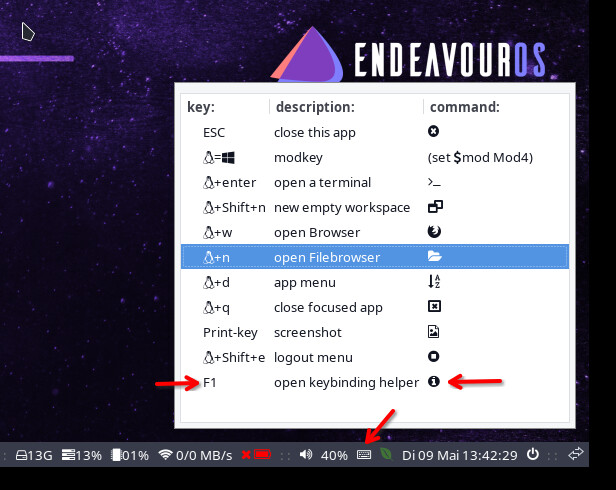
I see I can import this settings from the repo but I was wondering what did went wrong…
A bit more information would probably help. How did you install etc
And welcome to the forum.
I’ve copied the ISO into a USB pendrive with ventoy and booted from there, then followed the instructions from the installation guide… not sure what details are important here… I’ve selected to delete all the data from the destination and choose the i3wm as a DE.
thanks!
EDIT: I’ve downloaded the latest ISO from the website the TITAN release
Since they already have it installed wouldn’t it be better/easier to use eos-packagelist? Re-installing seems like a bit of overkill unless I’m missing something.
An installation takes cca 5 minutes. I was asked at the end whether I want Win/Esc/Alt key for Super and got a minimal i3 config. No dunstrc and more.
Copying configs from a test NEO system is faster and easier imho.
@duub ,
1st of all check installation log re why /etc/skel/set_once.sh failed.
The skel directory contains the setup files. So if you have nothing to lose:
cd
cp -r /etc/skel/.config .
cp -r /etc/skel/.local .
cp /etc/skel/.gtkrc-2.0 .
and so on until you have problems
and restart i3
Hi,
thank you for replying, It’s a clean install because i was distrohopping and i wanted to test it.
I’ve already copied the files and now I have the endeavouros i3 setup, much better.
about the log… I’ve found a line that says:
“installing eos-settings-i3wm…”
but there’s no error related after that line
i will check.. but nothing changed related to i3 with teh new ISO the Setup is handled over packages outside the ISO.
we tested the same before releasing ISO and it was working, i do see the same here, but if i create new user it does have the settings, and settings package is installed..
strange issue.. looks like user is created before the package eos-settings-i3wm package is installed. all the conigs are default on users path but they are in under /etc/skel ..
This is not related to i3 at all.. every install have the same issue now.. out of a sudden..
XFCE4 the same issue: https://0x0.st/P99t.txt
@duub FWIW, as a devoted i3-wm user who participated in testing various ISO candidates for this Titan release, I can report that I found no particular issues (of course my personalized desktop environment setup always takes a little doing to replicate from defaults). But the i3 defaults were consistent with what they’d always been in my past experience.
Since I don’t use the default browser, file manager, etc., I always have to go into the config file and redirect those Super+ macro shortcuts to my personal choices. You might need to take that step too.
As noted above by @joekamprad, the ISO doesn’t even have the i3 files included since they come from a subsequent online download during installation once the ISO is already up and running. 
Happy to see if I can help sleuth your issue further but don’t have much to go on at the moment.
Meanwhile, welcome to the forum! Great to have you with us. 
EDIT: If interested, here’s a link to my own modified config file at this link. You can inspect and cannibalize as you might wish to customize things. The link won’t last forever so it might be gone at some point in the the future: https://0x0.st/P99y.txt
That is an interesting problem.
users needs to be run before networkcfg.
networkcfg needs to be run before packages@online
packages@online needs to be run before users
We used to have a weird hack that dealt with that. I removed it not realizing this impact.
Maybe we should re-copy /etc/skel in a script near the end of the install.
No clue, lets fix it ..
Yesterday that missing skel issue
oh yes still working on this  issue was not with i3 in general..
issue is now resolved by a Hotfix.
That was fast! How it proceeds? At some point it will be released a new ISO with this issue fixed, I want to try again, how can I follow the process? I’m happy I’ve found a bug and it’s been fixed!
Good job! Thanks!
HotFix getting applied when you use online install with starting the installer:
When the next ISO is getting released it will include the Fix.
So everyone will get the fix with current ISO already, thats what HotFix do.
That’s cool! I didn’t know it could be done! Thanks for explaining it!