I forgot about this, yeah I read this and I used the process a while back, and yeah, thanks!
One quesiton though mate, have you done this in UEFI or legacy BIOS?
Only UEFI, all my machines have UEFI instead of legacy. One is an ASUS lappy that I have EOS and Bunsenlabs on (it’s my Crunchbang box, as I used Arch based ISO’s like ArchBang because Archlabs’ installer always had a failure, and I either built Arch or used an installer and pulled off their repo), the other an HP Elitebook that has three builds on it using rEFInd, and the iMac. That’s it for now, until I find a steal of a lot sale on Ebay for a few Thinkpads lol. I want a threadripper in the future, a desktop for my production machine. I like a System76 Theo for that, although I really hate anything Ubuntu, so their PopOS would be tossed for something else lol.
1 Like
Hey man @freebird54 I am looking through the article and I can’t seem to find anything in regards to what additional files I have to add for legacy BIOS support, do you know what else I need to do?
you do have a mixed-up scheme, legacy Bios will not need fat32 partition, this is only for EFI systems.
for Bios system, you do not need a separate /boot partition at all and if then format with ext4!
On EFI the fat32 efi partition must be mounted on /boot/efi and not under /boot.
1 Like
I thought so but the thing is that if I encrypt my root partition and I don’t create a separate boot partition, it will prompt me for the luks decryption password before it shows the grub boot manager screen. I don’t want this, I want it to only prompt me for the decryption key password when I select Linux, that is why I create a separate boot partition (which works).
I see, I will keep that in mind for next time, thanks 
yes true, to not have grub encrypted you have to use separated /boot, i was wondering that you can boot at all with /boot on fat32
1 Like
I suppose the beauty of Linux is that it supports vast majority of formats then
Yeah - that article doesn’t specify BIOS possibilities - trying not to confuse things! All that is required is an edit in the refind.conf file. There is a line that begins
#scanfor
that needs to be un-commented, and to include the keyword hdbios - so that it will look for BIOS mode bootloaders. The line in question looks like this by default:
#scanfor internal,external,optical,manual
and the explanation of its usage is in the surrounding comments.
Hope it helps!
1 Like
It does something very weird. When I added hdbios and uncommented the line out, it still uses grub bootloader, but when I select endeavour, and it asks for the luks password, I enter it in and I end up getting this:
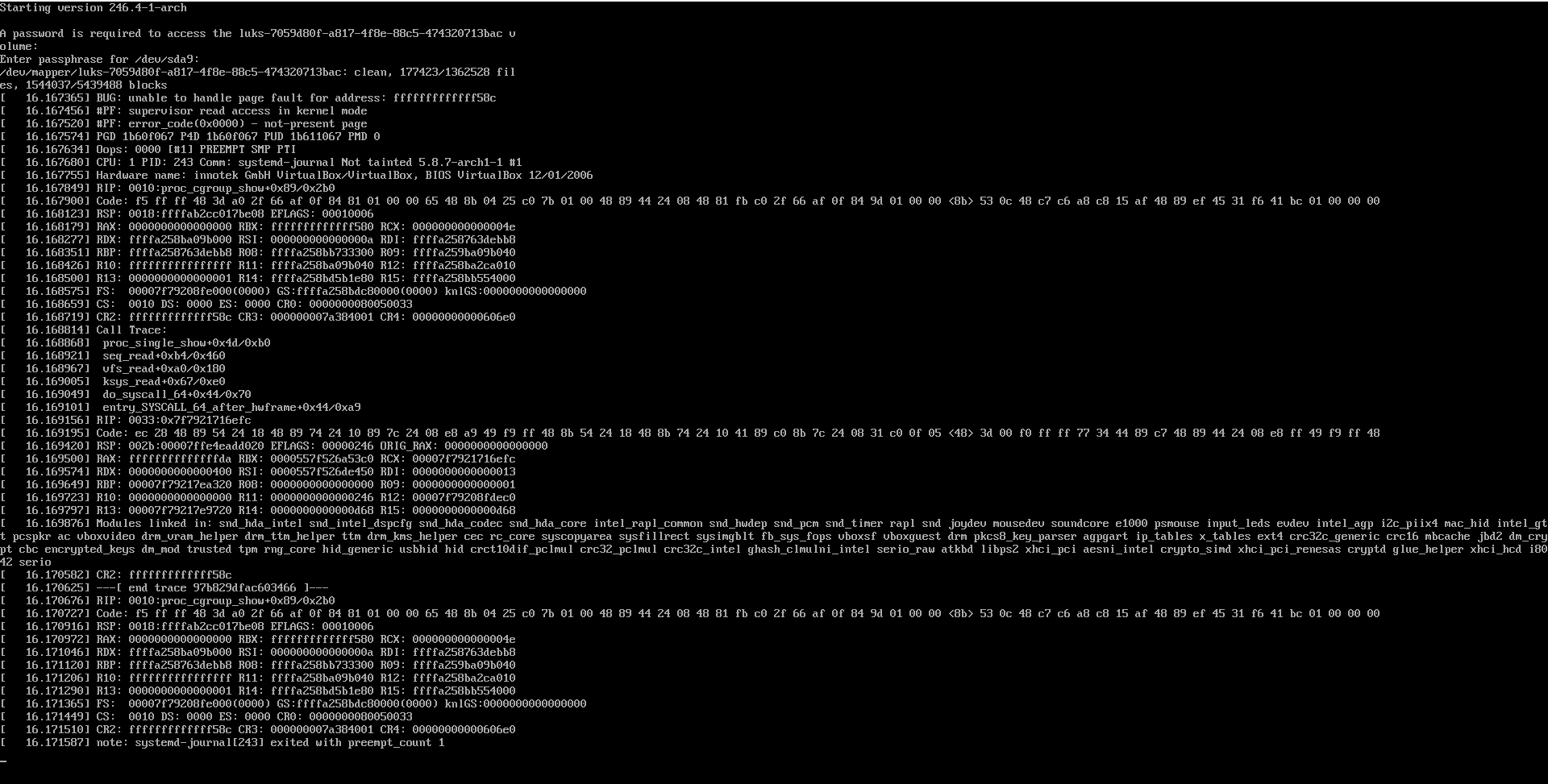
Edit: I rebooted the system and tried again and this error doesn’t happen again but it still uses Grub.
Edit: The location to refind.conf was actually located in /boot/efi/BOOT/ as the directory as you written in the article did not exist.
It’s location would be affected by the partition setup. If you are booting from grub - is that AFTER rEFInd shows, or instead of? If after, then read the information under the icons to see what will actually be used to boot. (it might say vmlinuzlinux on /dev/… OR it might say grub_x86.efi on /dev/…) to skip grub you’d need to choose one that boots vmlinuz directly.
To clarify: You choose EOS in the rEFInd boot loader and then are asked to enter your password from the grub prompt, right?
If so, this is the correct beviour; because rEFInd can’t decrypt your luks partition by itself but instead invokes grub.
[Edit] You can of course load the kernel of unencrypted systems directly from rEFInd.
I am using your setup and have one encrypted and one unencrypted BTRFS set up and also a standard install with grub. I am using rEFInd and booting grub and it only asks to unencrypt when i select the encrypted install with refind. Then it brings up grub menu. The standard install with grub i am booting with vmlinuz image but i can also change that to boot grub if i so desire. I have been messing around with it for a bit.
2 Likes
It never shows up the rEFInd.
rEFInd does not show up at all. Its GRUB fully. I know how the interface looks like for rEFInd.
Are you using legacy BIOS mode or UEFI/EFI?
When you install rEFInd then what ever partition or desktop you have installed it on that is the one it’s on. But, if you are using UEFI then you have to change the boot order to set the boot to rEFInd. It will say that in the boot order. I’m not sure on BIOS if you are installing rEFInd on a Bios partition but it probably is the same? @freebird54 would know better than i.
Edit:
On UEFI once you set the boot order to rEFInd then it will come up when you boot! 
I wasn’t using UEFI.
It didn’t show up at all after setting up rEFInd. I followed all the instructions it just didn’t show up at all.
I think reading from its pages rEFInd doesn’t support BIOS at all 
No it does… I’m pretty sure but @freebird is the expert on it.
Edit:
UEFI is so much better!
I have triple boot and before i have 8 or 9 booting on rEFInd. No issues, using the vmlinuz-linux image to boot from. Right now i have one encrypted boot, one non encrypted both BTRFS and one just normal install. It all works great but you have to make some changes.
Edit: It’s all on UEFI
1 Like