Hey there,
I’m dual-booting Endeavour OS and Windows 11 for the occasional Anti-Cheat issue.
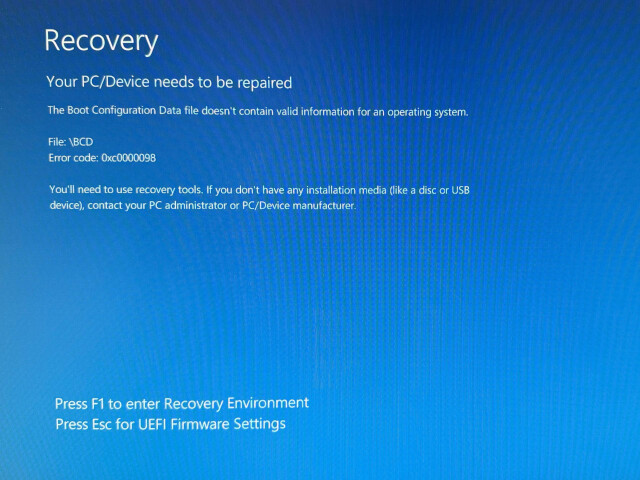
This morning when trying to boot into Windows 11 through the systemd boot loader the first time after a couple of days however, I get the following error message (white on blue):
Recovery[1]
Your PC/Device needs to be repaired
The Boot Configuration Data file doesn’t contain valid information for an operating system.
File: \BCD
Error code: 0x0000098You’ll need to use recovery tools. If you don’t have any installation media (like a disco or USB device), contact your PC administrator or PC/Device manufacturer.
After fidgeting around with a Windows USB key and command prompts I was finally able to boot back into Windows 11.
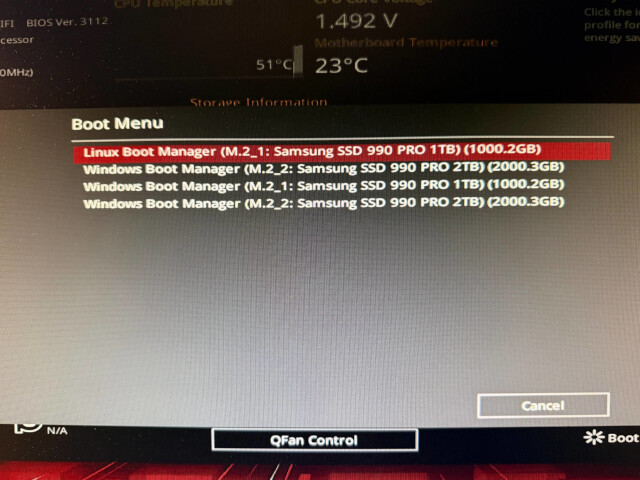
Now, the only issue is that I seemingly have 3 different boot options[2] in my UEFI for Windows alone & the system d boot loader still boots up the previously mentioned error. If I want to get into Windows at the moment, I have to go through UEFI each time.
A bit frustrated and overwhelmed I was hoping that someone here might be able to help me out.
- Is it possible to properly update/refresh the boot points of systemd-boot?
- If yes, how?
- Is it possible to remove unnecessary Windows boot points properly, so they won’t show up in UEFI anymore?
And in a totally unrelated point I’ll probably ask sometime later how to enable secure boot without harming either OS.
Thanks so much!