Greetings everyone!
A newly Endeavour convert here.
I’m on EndeavourOS Xfce and struggle with reverting my mouse cursor back to its default.
What I mean is - that basic black Adwaita cursor icon that you have when installing Arch or Debian from scratch without any further theming. That one is perfect, I want that!
So here is what I did:
- in Xfce Settings - Mouse and Touchpad - Theme, set to
Adwaita
- in ~/.Xresources added line
Xcursor.theme: Adwaita
- in /usr/share/icons/default/index.theme changed the line to
Inherits=Adwaita
Also:
- in ~/.config/gtk-3.0/gtk.css I see no option regarding cursor
- in /etc/lightdm/lightdm.conf I see no option either, so confused
This results in my main cursor indeed became Adwaita now, but when I load Xfce session the mouse flickers changing themes, so clearly there is some other setting that rewrites defaults, then Xfce rewrites it back again.
When I logout to lightdm, the cursor is again Endeavour theme (Qogir or something).
So clearly there is some configuration that I could never find that sets the cursor to Endeavour theme system-wide, and I can only change it for my Xfce session. How do I completely revert it to default, as if it never was themed in the first place?
Welcome to the forum 

Not sure this will work but maybe editing the below mentioned file might do the trick.
.config/xfce4/xfconf/xfce-perchannel-xml/xsettings.xml
Thanks for your suggestion.
Unfortunatelly what I see in this file replicates the Xfce settings that I already adjusted. In other words, “Adwaita” is already there for the cursor theme, and it does work but only for the Xfce session, while I am looking for a system-wide solution.
Is there a configuration for your display manager in /etc?
I found /etc/xdg/xfce4/xfconf/xfce-perchannel-xml/xsettings.xml that looked similar to the xsettings.xml file in my home .config/… but with cursos theme and size values empty. So I inserted there “Adwaita” and “24” and rebooted. Same effect - it only works for Xfce session, the mouse flickers on login and turns to Endeavour theme when logging out to lightdm.
As for the display manager configuration in /etc - I found no options in the lightdm.conf as I already mentioned in my original post, and also nothing in the /etc/lightdm/Xsession
Where else should I look?
maybe try this one /etc/lightdm/slickgreeter.conf.
How could I have missed that! Must be blind…
Indeed there was the settings, so I changed it from Qogir 16 to Adwaita 24 in /etc/lightdm/slick-greeter.conf and it works now for the display manager.
But! When I log in Xfce session the flickering remains.
Also what I noticed is that, before it would flicker from default to some white icon, then to grey Qogir and then to black Adwaita. Now it only flickers from white cursor to the desired black. So the grey Qogir one presumably was coming from that slick-greeter.conf setting. There is something else left in my system that is trying to rewrite the cursor theme before it turns to Xfce settings!
Maybe some settiings that can be found in system settings>session and startup ?
Nothing I could find that would seem relevant to me.
I have a feeling this is not related to the Xfce session but the overall X server, and I just don’t know where to find configurations for this level. A bit of a noob here to be honest.
So because I’m bored, I’ve been trying to replicate this in a virtual machine with no success. No flickering at all when I switch to adwaita. The only thing I can think of is have you tried clearing your cache? (~/.cache/)
Not yet (will try cache after this) but I have found something in the meanwhile!
There was a file ~/.config/gtk-3.0/settings.ini where it was set to Qogir_white 22 cursor. So changing that to Adwaita 24 (along with a few other settings) did some trick.
Now I don’t see the white cursor appearing for a nanosecond that I could see before. But still the mouse flickers. I tried logging in and out a few times, there is no evident of any leftover mouse themes that my eyes could catch, but it just flicker - very briefly but still. Maybe it’s supposed to, at this point I don’t know…
Also, I must have mentioned I am on a very old HP840 Elitebook laptop, so these tiny flickerings might just be not so evident for those who are on powerful machines, while I can clearly notice every tiny lag here due to my machine is slow.
Well the only thing i could find in /etc/X11/xorg.conf.d is a keyboard config file but maybe you also have a mouse config file there or something like that 
I did the same with ~/.config/gtk-4.0/settings.ini and switched Qogir to Adwaita but it would change nothing. Nor did me clearing the .cache
There is still very tiny flickering when logging in. I do believe there is some leftover configuration left. But nothing I could find in /etc/X11/… no. Even doing stuff like sudo find / -type f 2>/dev/null | grep cursor - if that is even right way to do so?
What happens if you try a different compositor, for example Picom?
Nothing changes in terms of mouse flickering.
Hello and welcome,
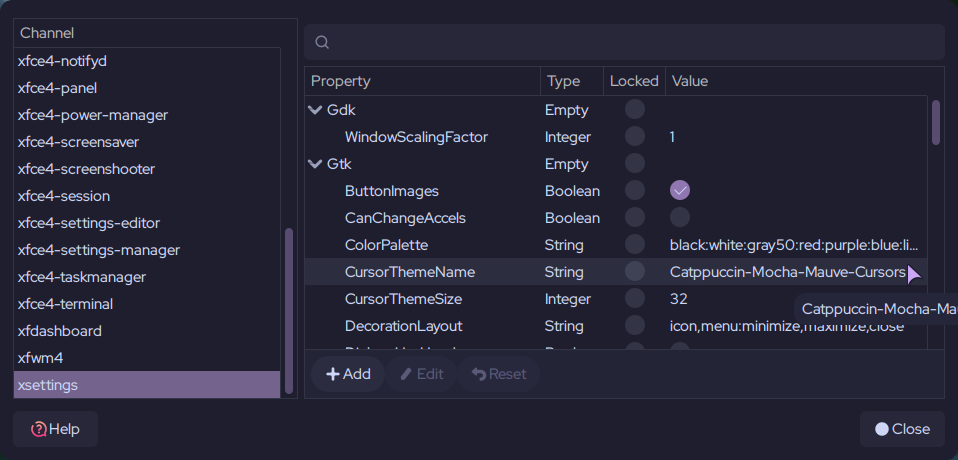
Mine is still set to Qogir and I have no problem with my current cursor theme (Catppuccin-Mocha-Mauve), I tried Adwaita theme and everything is fine.
You can check the setting in the settings editor :
xfce4-settings-editor
edit: I would try to set my themes with other tools, you never know, Lxappearance is a good one.