How to reinstall kernel with arch-chroot?

Hello, all

I updated my system using either sudo pacman -Syu or yay.

Then I tried to reboot my system. And got an error saying vmlinuz-linux is not found. So, following instructions from this discover page, I try to arch-chroot into my system.

I understood I have to mount the second partition first, then I mount the first one. However my nvme0n1p2 is encrypted with LUKS. So I used cryptopen and mounted in /mnt what cryptopen created in /dev/mapper.

But, I assume that doesn’t give me a file system (I see @home and few other similarly named entries). So the next step to mount the first system in /boot fails. (I just learned this has to do with btrfs subvolumes).


I think am doing everything wrong here. And I would like to have some guidance. Please let me know if I should share more information.

I got this issue a few days ago and have been unable to resolve it myself.

  1. Boot into the live environment
  2. Decrypt and mount your luks partition (e. g. /dev/nvme0n1p2) and your root btrfs subvolume
sudo cryptsetup luksOpen /dev/nvme0n1p2 crypt && sudo mount -o compress=zstd,subvol=@ /dev/mapper/crypt /mnt
  1. Mount your EFI boot folder (e. g. /dev/sda1 or whatever; find with lsblk or sudo blkid)
  • for SYSTEMD-BOOT probably
sudo mount /dev/sda1 /mnt/efi
  1. chroot into your system
sudo arch-chroot /mnt
  1. Do some root stuff …
    For instance reinstall kernels with sudo kernel-install

Welcome to the community @rainy! :waving_hand::smiley: :enos_flag:

There’s a piece of this puzzle that seems to be missing and it sits:

missing puzzle piece <--------- here

Do you recall if there were any issues with the update?


I tested this on a fresh install using systemd-boot, LUKS encryption and Btrfs filesystem, using the EndeavourOS USB Live ISO to run all this.

It’s similar to what @2000 has shared, but it mounts Btrfs.

sudo cryptsetup open /dev/nvme0n1p2 mycryptdisk

(supply LUKS passphrase when prompted)

Mount the Btrfs root subvolume:

sudo mount -o subvol=@ /dev/mapper/mycryptdisk /mnt

Now mount EFI:

mkdir -p mnt/efi
sudo mount /dev/nvme0n1p1 /mnt/efi

Finally:

sudo arch-chroot /mnt

Thank you both for your answers! I have been able to chroot into my system. Also, I use GRUB so I mounted nvme0n1p1 in /mnt/boot/efi.

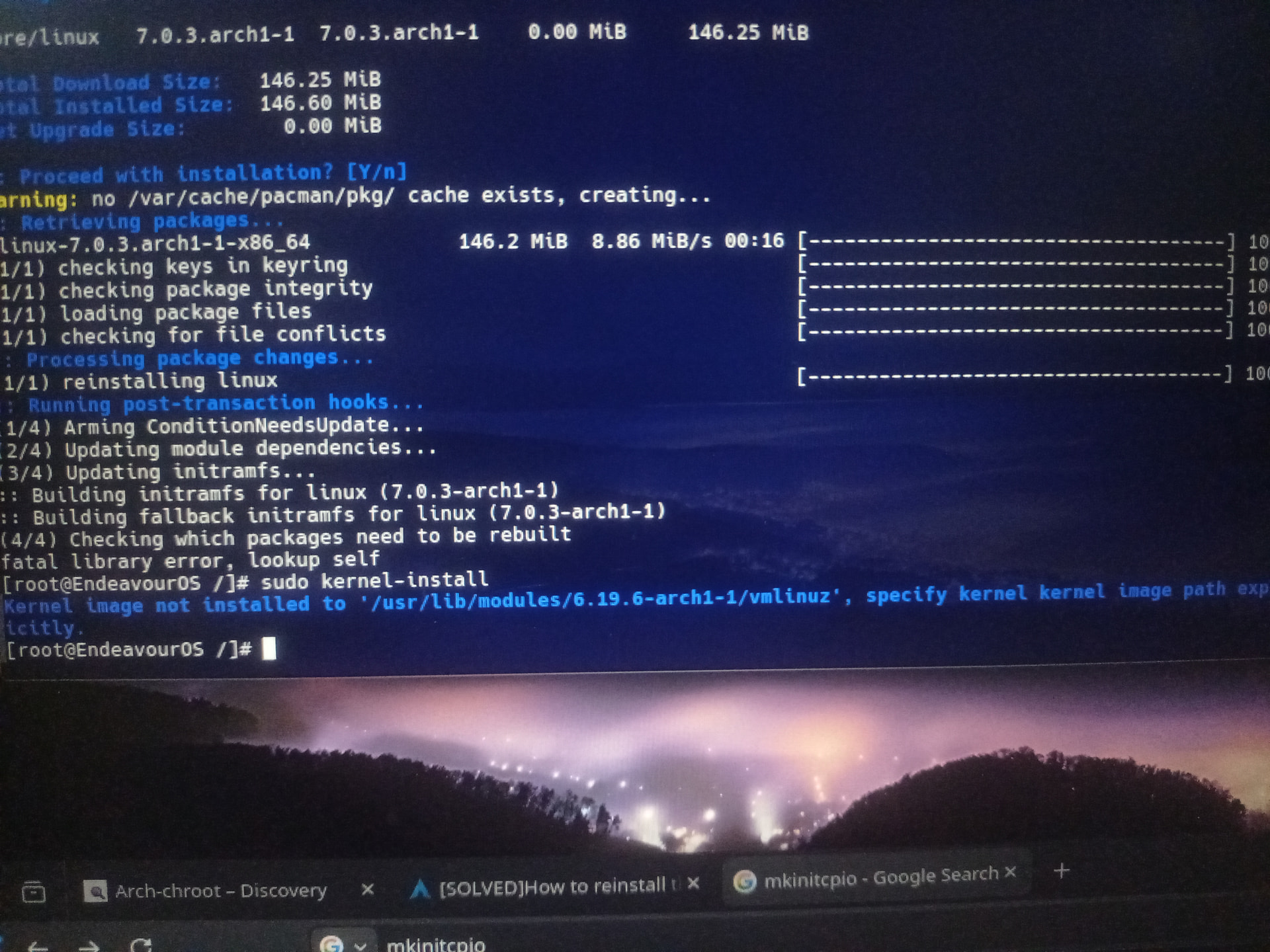
Do I specify this path in the image?

I also tried sudo pacman -S linux which gives me fatal library error, lookup self

I don’t remember exactly but its possible I tried yay and then (noob habit) also did sudo pacman -Syu. Of course, they both did the same thing.

I don’t remember getting any errors. I probably didn’t get any.

Last thing I was doing was running arch inside virt-manager. And I rebooted after that.

Have a look here for repairing a non-booting GRUB:
https://discovery.endeavouros.com/system-rescue/repair-a-non-booting-grub/2021/03/

Thank you. Its booting just fine now! (It was a pain… but I did get to learn a lot).

Glad to hear it :smiley: