hi this is a bit of a strange one, but awhile ago i tested out my btrfs snapshot restore, and ever since then when i boot up the welcome message says something like “Booting initrd of EndeavourOS (dracut-108)” i was just wondering if anyone know how to fix this? it does accurately reflect the current version it used to be 107 before i updated, any help is appreciated thanks
I’m not sure how you using btrfs. Are you using btrfs-assistant with grub bootloader?
Yeah i have both, basically a while ago I did a restore of a backup early on just to test it worked, ran into some complications with restoring the same snapshot that I was booted into at the time (I was told it was fine guess not) but I was able to restore another one and was able to fix it, but it permanently changed the welcome message to “Booting initrd of EndeavourOS dracut-108 (Initramfs)” for some reason
I have the btrfs grub snapshots menu that’s how I was booted into one when I did the restore
You boot from grub into a snapshot in order to boot the computer Then you go into btrfs-assistant and restore a snapshot from there. Is this how you are doing that? I have restored many many times and never had an issue.
no what happened was i used grub-btrfs to boot into a snapshot created by timeshift, then used timeshift while booted into the snapshot to restore the same one i was booted into, this obviously caused problems with my main system when i booted into it after restoring, so i then did the same thing with grub-btrfs again but this time restored a different snapshot that i wasnt booted into at the time, then it fixed everything (my btrfs volumes were @ and not some other thing), but since then the welcome message is different, at no point did i actually use btrfs-assistant during this but i had it installed which is why i said yes originally, sorry for the confusion, note: it does say welcome to endeavourOS but right at the end of the kernel booting mixed in with the rest of the messages which is quite odd i cant remember if it was like that before
here is a link to the forum post i made during it for extra info:
to be clear i was doing it in this way because i was testing if restoring a snapshot would work if i was unable to boot into my system from grub, that way i wouldnt need to chroot into it
I don’t like timeshift and i see others with similar issues using timeshift. btrfs-assistant is much better in my opinion.
aware but timeshift has a better GUI (admittedly with terrible CLI support) so its easier for me, it seems to work fine when i tested it i was just being stupid with it which is why it broke
Why is it a better GUI? btrfs-assistant is great.
Edit: It’s a GUI also.
btrfs assistant shows all the subvolumes, timeshift just shows 1 thing the backup and the date of it, its multipurpose but also makes it more confusing for me, so im more used to timeshifts clear cut “this is your backups, here’s a wizard to set up everything” like schedules and what to backup and such
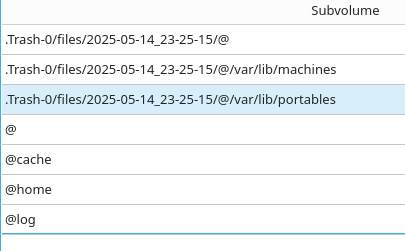

oh well, i deleted them, seems to be fine although the .trash/@ one threw up a bit of a fuss first try, i actually dont know what the machines and portables volumes do normally but seem to be fine
Ok bit of an update, recently I installed a new endeavourOS on a laptop I had and it does the exact same bootup, so clearly this isn’t a bug but a change that must have coincidentally happened during my snapshot fiasco, I still think it’s quite odd to have that there when the previous welcome message on its own was fine but now you fly past that mid bootup, not sure why they made that change but oh well