So, I got rid of the last “spindling rust” in my Workstation - a 16TB Seagate Exos was replaced by an U.3 drive. I kept partitions and everything as it was, just made them a bit bigger. Then I copied everything from one disk to the other “disk” via rsync. As the files are mostly pictures* I want to check for the data integrity. How would you do that? Keep in mind these are several Terrabytes…
*(the disk holds all the pictures of our family, I use immich on this, no, this is not the primary copy nor the backup, just a “working copy”. Original resides on NAS, backup on secondary NAS, third copy on encrypted external drive at my sister’s house, 3-2-1, yada yada)
I’m actually interested in this as well. I currently use a very crude method that is somewhat useful. It involves a duplicate finder and some good old just looking and seeing. I’ve looked for stuff that I could do some kind of “Check” however most things I found back then simply failed to work and I think some of that could have even been back when I was on Windows. I just go used to the way I do it but would be very interested if there is an easier and faster way.
Good to hear that others struggle as well with this. I currently use
diff -rq /sourcepartition /targetpartition
but this kinda feels… wonky.
I also tried to use DoubleCommander’s wonderfull synchronize dirs command, but this tells me that EVERY file is different… I am a bit scared
For every file that is actually transferred, rsync computes a whole-file checksum and verifies that the reconstructed file on the receiver matches before it finishes that file. This means transmission errors during that run (e.g. network glitches) are detected for transferred files.
So, rsync should have you covered. And you could still run rsync with the –checksum option to recheck after the transfer. But this is much slower and not generally needed.
I actually was not aware of rsync automatically checking the integrity. Well, then my current diff run should bring no diffs.
How would I check afterwards with the --checksum arguemnt?
Depends on what criteria this program uses for comparison.
If it compares contents, your rsync operation should cover that already as mentioned above.
But if it compares e.g. timestamps on files, that might make every file different…
Anyway, diff is a reliable program to show if there are any real differences.
does tar offer something like this? I don’t use rsync when archiving. I just tar it. I check the tar by using a duplicate finder but if there is something easier.
diff I’ve always used for files never thought about using it in this way. (however some things should be different)
After posting the above I started doubting my answer, reading about the tar format(s) — there are several, it turns out — and seeing checksums mentioned for at least some of them. E.g. on tar’s wikipedia page, Pre-POSIX.1-1988 (i.e. v7) tar headers contain an 8-byte checksum.
So I did a simple test, creating an archive with tar -cf, and corrupting it with an hexadecimal editor. The errors were not detected, as I expected.
So in practice I was right, but there may be some tools out there that produce archives called “tar” that do have checksums.
One tool I’ve used is called rhash (A similar software some may be familiar with is the unmaintained “hashdeep” tool), You first use it to generate a list of hashes in to a .sfv file, and then you use rhash to compare the hashes stored in the file with the files stored on the drive.
I have two HDDs that are never turned on (cold storage) so I check the integrity from time to time (Only time they are turned on), and it is possible to use rhash to compare the files stored on there to the ones stored on the file, the file being master list of all correct hashes it expects so keep this safe and also should be backed up in case it gets corrupted and could detect files as not matching.If there is a difference in hashes stored in the sfv file compared to the files stored on the drive then it could indicate something is wrong.
I guess the issue is if you add new files or update files to this backup frequently then the sfv would need to be generated again and it can take a while if there are a lot of especially small files (356,000 on 1TB HDD for my use at least) and depending on the hash you are comparing with. But it can be somewhat automated and run in the background.
When comparing hashes you can make rhash write the check progress to a txt file, essentially creating a report, and will tell you the status of every individual file but at the end it will hopefully say “everything OK” anyway.
Just make sure to specify a hash algorithm, such as sha256 or sha512, for any operation or rhash will by default check the file against all 5+ hash algorithms which makes the operation take considerably longer.
True I did kinda hijack this with another issue that while similar is maybe different in scenario. I was hoping to learn of something better than my dinosaur way.
I mean it’s good question. - I just wanted to point it out so we don’t talk past each other offering solutions. For me personally:
1 Validate data comparing two places after transit
I see it as highly unlikely to have a low level bitflip in transit, and every high level interruption is usually caught by the copying tools (disk disconnecting, network issues, …). Depending on the situation I may compare size/file-numbers of source and target, or depending on the tool run a diff or the same transaction again to see if additional data is transferred.
2 Validate data of a single place at rest
Outside of RAIDs covered by filesystems with checksums (e.g. btrfs) and backups for recovery.
3 Validate data of source and an archive after transit
Consider unnoticed errors unlikely too, so I never looked into it. Stupid manual solution would probably be to extract the archive afterwards and use diff tool?
4 Validate data of archives at rest
Essentially dealing with bitrot which should be covered by 2. But for important data I use rar, which allows to configure an overhead (-rr option) which allows to not only detect but also recover data corruption. Never needed it - knocks on wood - but a nice peace of mind.
This is where my biggest concern is. I want to make sure that the tar itself is I’ve done it with a dup finder and by physically checking to make sure. (the dinosaur way) I am hoping to learn a new way lol.
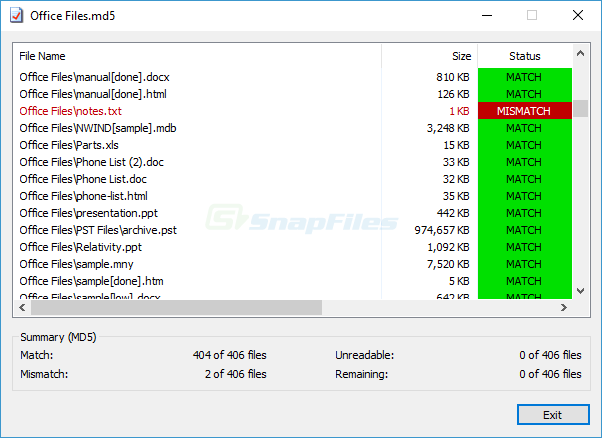
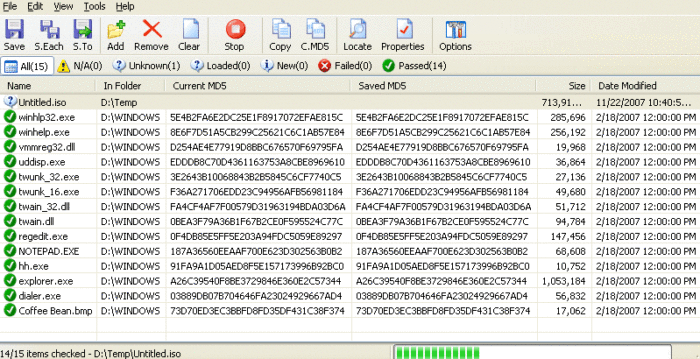
I think i understand what you are looking for. I used a tool in windows where you can create a whole md5 file in one place and you could easily copy it to the other drive or some place where you created your backup to check if the files are matching.