My issue concerns BepInEx mod. I ve been trying to get it to running in Heroes - Olden Era, and have determined that Steam is somehow breaking it. If I run the game within Steam, the mod does not seem to startup, but if I close Steam, and run the game within Wine I can see the mod startup in a small terminal window. At least the mod is starting now, but I m not sure it is doing what it is supposed to do. Is there a test I can do to show the BepInEx framework is working properly? (The mod that requires BepInEx is not working either. Is the reason why I m asking…)
you have to launch the game with a startup option in steam. Are you using the correct launch options according to the instructions?
So I need to run it in steam. OK. Do you by chhance have the launch option? That is the first I heard about that step. Nexus site instructions said nothing about launch options.
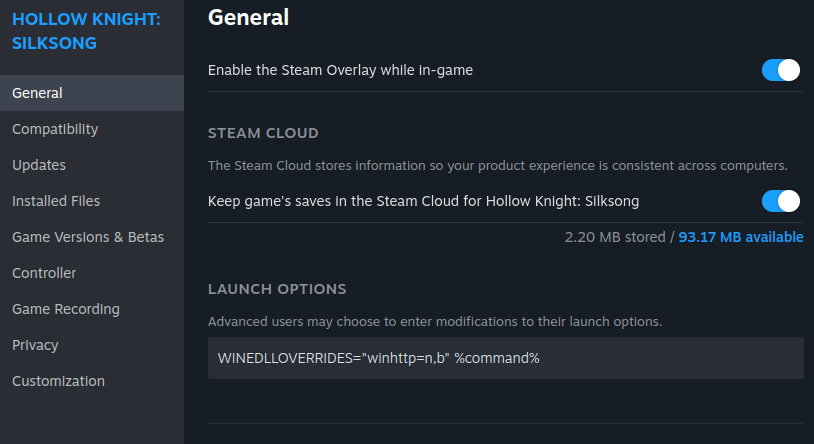
That actually got BepInEx to work in Steam. The mod that requires BepInEx doesn t work still though. I m going to get a few more mods that require BepInEx so I can make sure it is working, and go from there. Thanks 
I also found a reddit thread that mentions the same launch option
Sorry for digging an old post, but for those still interested in using BepInEx :
-
Make sure you use the windows version if you are launching the game through wine/proton/lutris etc… may seem stupid but i’ve seen quite a few make the mistake.
-
The command provided above is correct, you can also set it as a permanent override in your wine profile if you want.
Wine Configuration > Libraries > New override for library > Select winhttp > Apply. -
Make sure your BepInEx and mod versions are compatible, even just a minor difference in version can prevent mods from running.
-
Most of the mods need to be placed in the
modsfolder in the root directory of your game, but sometime you will need to place them in thepluginsfolder, and some in theBepInEx/plugins, even when stated otherwise on the mod page, even more true with older mods. -
And the one thing that solved my problems most of the time : Look in you game folder if you don’t already have
winhttp.dllused by the game, if it was present before installing BepInExe, rename the file present in the BepInEx archive toversion.dllbefore copying it, some games already usewinhttpand some just don’t support using it as an entrypoint. You will have to modify the launch command appropriately :WINEDLLOVERRIDES="version=n,b" %command%.
Even if it was not present before, just changing this magically made it work pretty much every time i had a problem with it.
As for knowing if it is running, unless you specified a quiet option in the config, you should see a console open when launching the game, this is BepInEx running, it can also give you infos on what mods have been loaded, logs, errors etc …