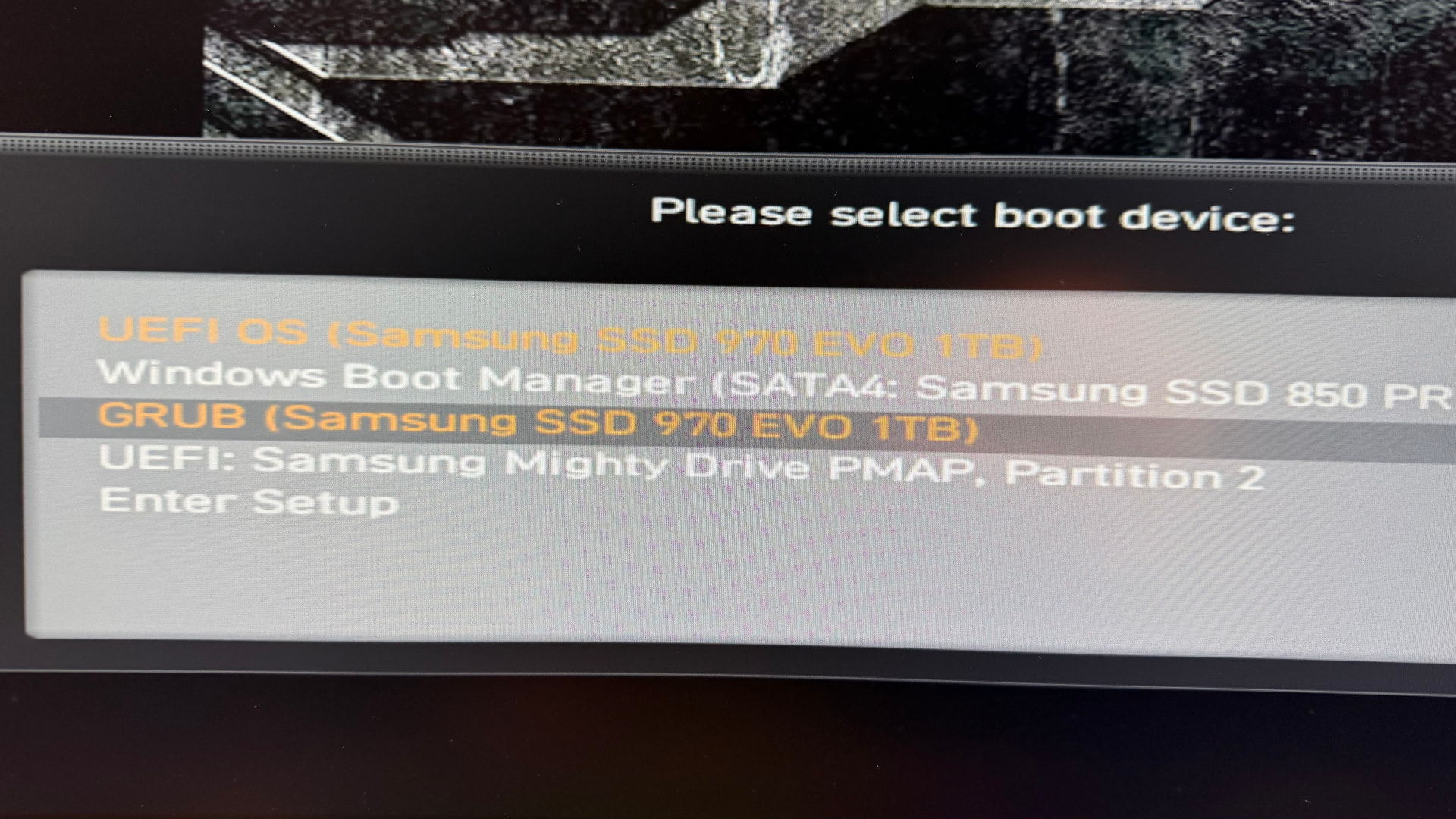
Actually, I’m using Arch Linux, installed via archinstall with automatic partitioning.
Today a Grub update was installed. After installing was done, a message appeared in the terminal.
To use the new features provided in this GRUB update, it is recommended
to install it to the MBR or UEFI. Due to potential configuration
incompatibilities, it is advised to run both, installation and generation
of configuration:
  # grub-install ...
  # grub-mkconfig -o /boot/grub/grub.cfg
Configuring Grub with sudo grub-mkconfig -o /boot/grub/grub.cfg isn’t that hard because I often used this after changing Grub configuration.
Now I wonder what is the correct way to install Grub again. I remember that I read something about that topic here in the community. So, I wanted to use sudo grub-install --no-nvram.
I got the following error.
Installing for x86_64-efi platform.
grub-install: error: cannot find EFI directory.
Here’s the output of lsblk in the terminal.
NAME        MAJ:MIN RM   SIZE RO TYPE MOUNTPOINTS
sda           8:0    0 931.5G  0 disk
`-sda1        8:1    0 931.5G  0 part /mnt/STUFF
sdb           8:16   0   1.8T  0 disk
`-sdb1        8:17   0   1.8T  0 part /mnt/DATEN
sdc           8:32   0   1.8T  0 disk
`-sdc1        8:33   0   1.8T  0 part /mnt/MEDIA
sdd           8:48   0 238.5G  0 disk
|-sdd1        8:49   0   100M  0 part
|-sdd2        8:50   0    16M  0 part
|-sdd3        8:51   0 237.7G  0 part
`-sdd4        8:52   0   722M  0 part
sr0          11:0    1  1024M  0 rom
zram0       253:0    0     4G  0 disk [SWAP]
nvme1n1     259:0    0   1.8T  0 disk
`-nvme1n1p1 259:1    0   1.8T  0 part /mnt/GAMES
nvme0n1     259:2    0 931.5G  0 disk
|-nvme0n1p1 259:3    0     1G  0 part /boot
`-nvme0n1p2 259:4    0 930.5G  0 part /
It seems that there is no EFI, only /boot. So I searched the Arch Wiki and stumbled about sudo grub-install --target=x86_64-efi --efi-directory=esp --bootloader-id=GRUB. I didn’t try that because I don’t know if I have an esp directory.
Someone in another community mentioned that I should use sudo grub-install --target=x86_64-efi --efi-directory=/boot/efi --bootloader-id=GRUB. So I did that.
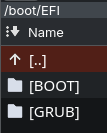
I was a bit confused … Before executing the command, only the BOOT folder and the BOOTX64.EFI file were present in /boot/EFI/.
After executing the command, then there was also an EFI folder containing the GRUB folder and the grubx64.efi file.
In summary:
/boot/EFI/BOOT/BOOTX64.EFI > previous sole structure
/boot/EFI/EFI/GRUB/grubx64.efi > additionally available afterwards
I restored a Timeshift snapshot, because I didn’t want to break my system with trying out the correct way to install Grub.
Could it be that I have to use sudo grub-install --target=x86_64-efi --efi-directory=/boot --bootloader-id=GRUB instead?
Any help would be appreciated. 
Here’s my system info.
System:
  Kernel: 6.17.9-zen1-1-zen arch: x86_64 bits: 64 compiler: gcc v: 15.2.1
  Desktop: KDE Plasma v: 6.5.3 Distro: Arch Linux
Machine:
  Type: Desktop Mobo: Micro-Star model: MAG X570 TOMAHAWK WIFI (MS-7C84)
    v: 1.0 serial: <superuser required> Firmware: UEFI vendor: American
    Megatrends LLC. v: 1.J0 date: 09/04/2025
CPU:
  Info: 12-core model: AMD Ryzen 9 3900X bits: 64 type: MT MCP arch: Zen 2
    rev: 0 cache: L1: 768 KiB L2: 6 MiB L3: 64 MiB
  Speed (MHz): avg: 3759 min/max: 563/4674 boost: enabled cores: 1: 3759
    2: 3759 3: 3759 4: 3759 5: 3759 6: 3759 7: 3759 8: 3759 9: 3759 10: 3759
    11: 3759 12: 3759 13: 3759 14: 3759 15: 3759 16: 3759 17: 3759 18: 3759
    19: 3759 20: 3759 21: 3759 22: 3759 23: 3759 24: 3759 bogomips: 182409
  Flags-basic: avx avx2 ht lm nx pae sse sse2 sse3 sse4_1 sse4_2 sse4a
    ssse3 svm
Graphics:
  Device-1: Advanced Micro Devices [AMD/ATI] Navi 32 [Radeon RX 7700 XT /
    7800 XT] vendor: Sapphire driver: amdgpu v: kernel arch: RDNA-3
    bus-ID: 2f:00.0
  Device-2: Logitech HD Pro Webcam C920 driver: snd-usb-audio,uvcvideo
    type: USB bus-ID: 5-3.3:3
  Display: wayland server: X.org v: 1.21.1.21 with: Xwayland v: 24.1.9
    compositor: kwin_wayland driver: X: loaded: amdgpu
    unloaded: modesetting,radeon dri: radeonsi gpu: amdgpu
    resolution: 3440x1440~144Hz
  API: EGL v: 1.5 drivers: kms_swrast,radeonsi,swrast platforms:
    active: gbm,wayland,x11,surfaceless,device inactive: N/A
  API: OpenGL v: 4.6 compat-v: 4.5 vendor: amd mesa v: 25.2.7-arch1.1
    glx-v: 1.4 direct-render: yes renderer: AMD Radeon RX 7800 XT (radeonsi
    navi32 LLVM 21.1.5 DRM 3.64 6.17.9-zen1-1-zen)
  API: Vulkan v: 1.4.328 drivers: radv surfaces: N/A devices: 1
  Info: Tools: api: clinfo, eglinfo, glxinfo, vulkaninfo
    de: kscreen-console,kscreen-doctor wl: wayland-info
    x11: xdpyinfo, xprop, xrandr
Audio:
  Device-1: Creative Labs CA0132 Sound Core3D [Sound Blaster Recon3D /
    Z-Series BlasterX AE-5 Plus] driver: snd_hda_intel v: kernel
    bus-ID: 25:00.0
  Device-2: Advanced Micro Devices [AMD/ATI] Navi 31 HDMI/DP Audio
    driver: snd_hda_intel v: kernel bus-ID: 2f:00.1
  Device-3: Logitech HD Pro Webcam C920 driver: snd-usb-audio,uvcvideo
    type: USB bus-ID: 5-3.3:3
  API: ALSA v: k6.17.9-zen1-1-zen status: kernel-api
  Server-1: PipeWire v: 1.4.9 status: active
Network:
  Device-1: Realtek RTL8125 2.5GbE vendor: Micro-Star MSI driver: r8169
    v: kernel port: f000 bus-ID: 26:00.0
  IF: enp38s0 state: up speed: 1000 Mbps duplex: full mac: <filter>
  IP v4: <filter> type: dynamic noprefixroute scope: global
  IP v6: <filter> type: dynamic noprefixroute scope: global
  IP v6: <filter> type: dynamic noprefixroute scope: global
  IP v6: <filter> type: noprefixroute scope: link
  WAN IP: <filter>
Bluetooth:
  Device-1: Intel AX200 Bluetooth driver: btusb v: 0.8 type: USB bus-ID: 1-4:3
  Report: btmgmt ID: hci0 rfk-id: 1 state: down bt-service: enabled,running
    rfk-block: hardware: no software: yes address: <filter> bt-v: 5.2 lmp-v: 11
Drives:
  Local Storage: total: 7.51 TiB used: 3.43 TiB (45.7%)
  ID-1: /dev/nvme0n1 vendor: Samsung model: SSD 970 EVO 1TB size: 931.51 GiB
    temp: 32.9 C
  ID-2: /dev/nvme1n1 vendor: Samsung model: SSD 970 EVO Plus 2TB
    size: 1.82 TiB temp: 30.9 C
  ID-3: /dev/sda vendor: Samsung model: SSD 850 EVO 1TB size: 931.51 GiB
  ID-4: /dev/sdb vendor: Western Digital model: WD20EZBX-00AYRA0
    size: 1.82 TiB
  ID-5: /dev/sdc vendor: Western Digital model: WD20EZBX-00AYRA0
    size: 1.82 TiB
  ID-6: /dev/sdd vendor: Samsung model: SSD 850 PRO 256GB size: 238.47 GiB
Partition:
  ID-1: / size: 914.83 GiB used: 47.09 GiB (5.1%) fs: ext4 dev: /dev/nvme0n1p2
  ID-2: /boot size: 1022 MiB used: 123.3 MiB (12.1%) fs: vfat
    dev: /dev/nvme0n1p1
Swap:
  ID-1: swap-1 type: zram size: 4 GiB used: 0 KiB (0.0%) dev: /dev/zram0
Sensors:
  System Temperatures: cpu: 39.4 C mobo: N/A gpu: amdgpu temp: 41.0 C
  Fan Speeds (rpm): N/A gpu: amdgpu fan: 1
Info:
  Memory: total: 32 GiB available: 31.26 GiB used: 3.87 GiB (12.4%)
  Processes: 480 Uptime: 28m Init: systemd
  Packages: 1190 Compilers: gcc: 15.2.1 Shell: Bash v: 5.3.3 inxi: 3.3.40