For me, I have only EndeavourOS, and will never have a “second” OS.
mmm… you are teasing me to ditch systemd-boot and try rEFInd!
Let me read more and decide if I should convert again!
For me, I have only EndeavourOS, and will never have a “second” OS.
mmm… you are teasing me to ditch systemd-boot and try rEFInd!
Let me read more and decide if I should convert again!
I started to think about converting to rEFInd as it supports snapshot booting!
(and I assume as they say if it worked once it will always work!)
Should I try rEFInd?
Any links to how-to?
Should I uninstall systemd-boot?
Help,
Despite fixing my Thinkpad quickly with the supplied instructions, my desktop put up a far greater fight 
To cut a long story short, the desktop now boots fine. The issue is that grub only shows LTE kernel. I have standard linux & linux zen installed too.
I obviously messed something up.
I’m sure theres an easy way to get all my grub entries back???
Thanks
That is up to you. I took a quick look at the snapshot booting docs. It looks like it will take a bit of manual configuration. You probably will have to dig in, experiment and figure out how it works.
You can’t uninstall systemd-boot, but you can uninstall kernel-install-mkinitcpio
Oooops. I’m okay with systemd-boot 
Maybe reinstall the kernels?
But I wonder if it will take double space.
Thanks,
I’ve tried that and then run
sudo grub-mkconfig -o /boot/grub/grub.cfg
Which gives
sudo grub-mkconfig -o /boot/grub/grub.cfg
Generating grub configuration file …
Found theme: /boot/grub/themes/EndeavourOS/theme.txt
Found Intel Microcode image
Found linux image: /boot/vmlinuz-linux
Found initrd image: /boot/initramfs-linux.img
Found fallback initramfs image: /boot/initramfs-linux-fallback.img
Found linux image: /boot/vmlinuz-linux-lts
Found initrd image: /boot/initramfs-linux-lts.img
Found fallback initramfs image: /boot/initramfs-linux-lts-fallback.img
Found linux image: /boot/vmlinuz-linux-zen
Found initrd image: /boot/initramfs-linux-zen.img
Found fallback initramfs image: /boot/initramfs-linux-zen-fallback.img
Warning: os-prober will be executed to detect other bootable partitions.
Its output will be used to detect bootable binaries on them and create new boot entries.
Adding boot menu entry for UEFI Firmware Settings …
done
Reboot and still only LTS kernel shows (looking in grub advanced setting too)
Can we see the output of ls /etc/grub.d
Sure,
ls /etc/grub.d
00_header 10_linux.bak 30_os-prober.bak 35_fwupd README
10_antergos 20_linux_xen 30_uefi-firmware 40_custom
10_linux 30_os-prober 31_hold_shift 41_custom
Thanks
Did you use grub-customizer at some point in the past? You seem to have some custom stuff in there.
You might consider just resetting all that back to defaults.
Yes,
I used it to bypass grub unless right shift pressed I think.
I’ll remove it and try to reset defaults
Thank you
Removing grub-customizer probably won’t clean up after it.
Another person had this issue and after removing it doing the below resolved the issue:
sudo mv /etc/grub.d /etc/grub.d-old
sudo /bin/pacman -S grub
sudo grub-mkconfig -o /boot/grub/grub.cfg
Perfect,
thank you
You might have saved me from breaking it again 
I’m also having this issue. any luck fixing it? Hitting f11 during boot allows you to pick your boot option and i picked another one that allowed me to boot it. but I know this isnt a permanent fix
You need to go into your bios and change the default boot option.
Just fixed it. Followed the tutorial. Hopefully that was all I needed to do.
It’s a not an option in the Bios. Only after i hit F11. Im attaching pictures.
After f11:
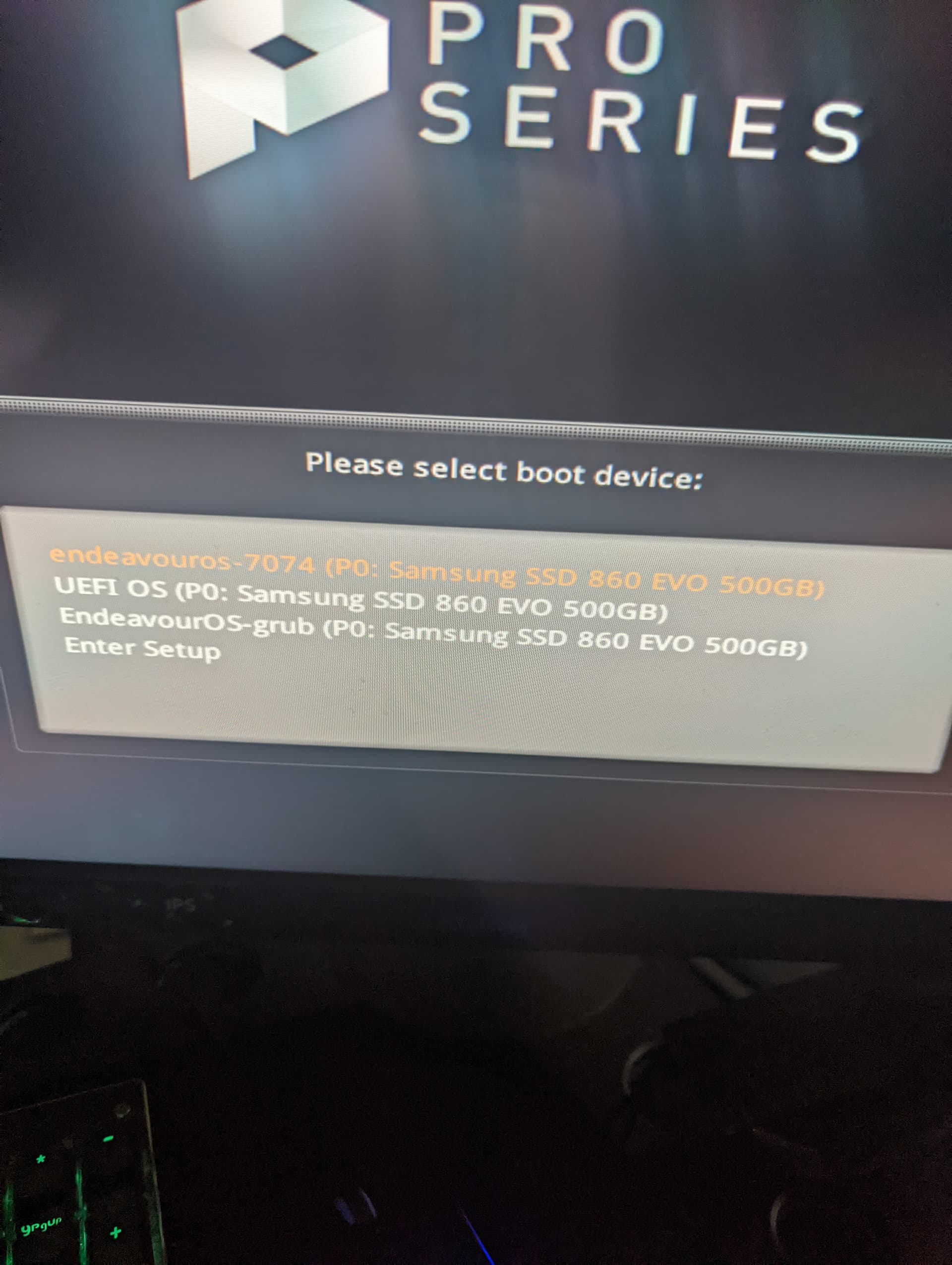
The bottom option is the only one that works. The bios doesn’t provide that option
Bios:
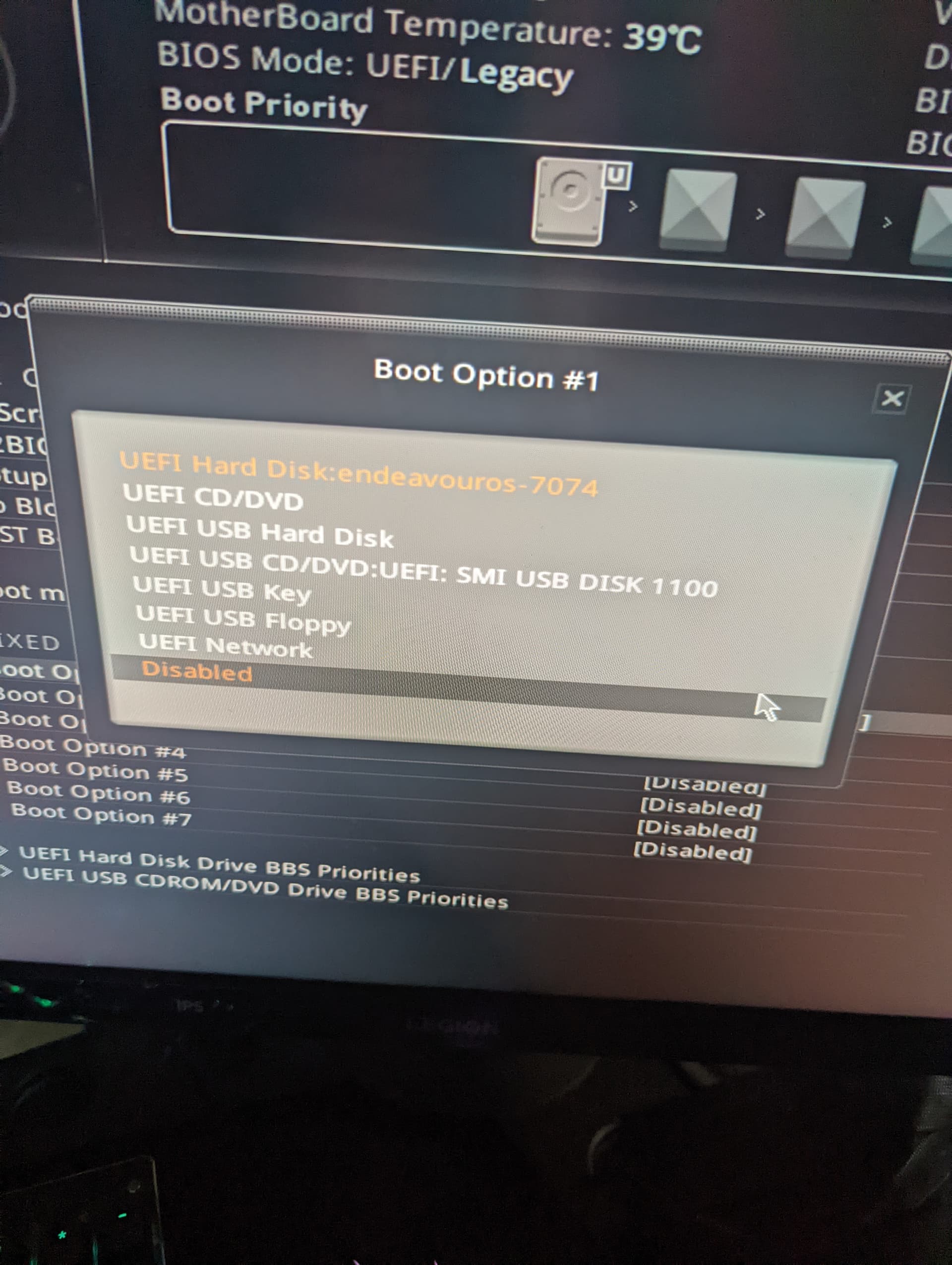
There should be a separate option in your BIOS. You can see it below “UEFI Hard Disk Drive BBS Priorities”
Me too 
Oh sweet thanks. I think were good to go 