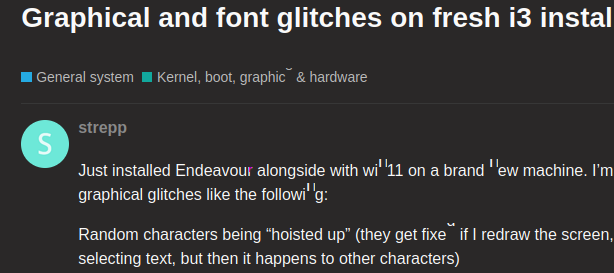
Just installed Endeavour alongside with win11 on a brand new machine. I’m getting weird graphical glitches like the following:
Random characters being “hoisted up” (they get fixed if I redraw the screen, like scrolling or selecting text, but then it happens to other characters)
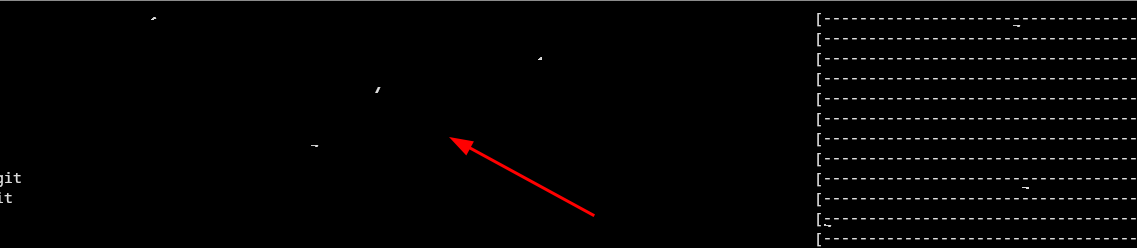
Random white, purple and green dots appear on my terminal. They also disappear on any activity, and others appears
I’m very inclined to say it’s a hardware acceleration problem. If I start Firefox with LIBGL_ALWAYS_SOFTWARE=1 set, the problem disappears. But I don’t want to do that for every software that I run. This happened even during the liveCD installation.
Here’s the output of inxi -G
Graphics:
  Device-1: Advanced Micro Devices [AMD/ATI] Raphael driver: amdgpu v: kernel
  Display: x11 server: X.Org v: 21.1.18 driver: X: loaded: amdgpu
    unloaded: modesetting dri: radeonsi gpu: amdgpu resolution: 1920x1080~60Hz
  API: EGL v: 1.5 drivers: radeonsi,swrast platforms: x11,surfaceless,device
  API: OpenGL v: 4.6 compat-v: 4.5 vendor: amd mesa v: 25.1.6-arch1.1
    renderer: AMD Radeon Graphics (radeonsi raphael_mendocino LLVM 20.1.8 DRM
    3.63 6.15.8-arch1-1)
  API: Vulkan v: 1.4.321 drivers: radv surfaces: N/A
  Info: Tools: api: eglinfo, glxinfo, vulkaninfo
    x11: xdpyinfo, xprop, xrandr
It was only listing OpenGL but I later on installed Vulkan to see if anything would change.
Currently running kernel 6.15.8-arch1-1, with everything up to date (yay reports nothing to update).
I’ve already visited some rabbit holes on different forums, but couldn’t find anything other than the LIBGL_ALWAYS_SOFTWARE=1 tip.
I’d like to know if anyone would have some guidance or ideas on other paths I could pursue on this investigation. Is anyone else seeing this with Raphael iGPUs under X11? Would switching to Wayland (e.g. Hyprland or GNOME) help avoid this issue?
Windows runs fine so I’m pretty sure it’s not a hardware or cable issue. I’m running on a brand new R9 7900 CPU with integrated graphics.