Going back to EndeavourOS after CachyOS (Technical question)

I was interested in the optimizations that CachyOS could offer and I have been using it for around 2 weeks now. It’s a nice distro I guess, but tbh I didn’t feel or see any improvements, although it could be due to my lower end system.

I also didn’t like the customized experience out of the box like the terminal. However, I want to implement some of the optimizations CachyOS offers on my soon to be EndeavourOS system, Implementing the kernel and repo is simple enough, but I don’t necessarily care for them. I’m interested in stuff like z-ram for example.

If I’m not mistaken, EndeavourOS had a swap file thing. So should I do it and how can I go about it if possible, or is there a good reason why swap could be preferred? I have 16 gigs of ddr4 on a laptop if that’s relevant which I assume is. Thanks in advance.

Hi friend,
I used this guide to set up zram…

1 Like

Just choose “No swap” in the installer up and then setup zram after the fact.

In the vast majority of desktop use cases either ZRAM or ZSWAP will be your best option.

Keep in mind, if you want to hibernate your machine, you need a swap partition or swap file to do that but most people don’t use hibernation these days.

2 Likes

Thanks. I did see it, but the debate under it and some other posts made me want to make my own post due to confirmation bias I guess.

Seems like it. I did a previous round of research when I was in the CachyOS installer, because it lacked a swap option and that seemed to be the general consensus from what I saw. Thanks

Ahh yeh, I saw that but trust me it’s all good. :victory_hand:

1 Like

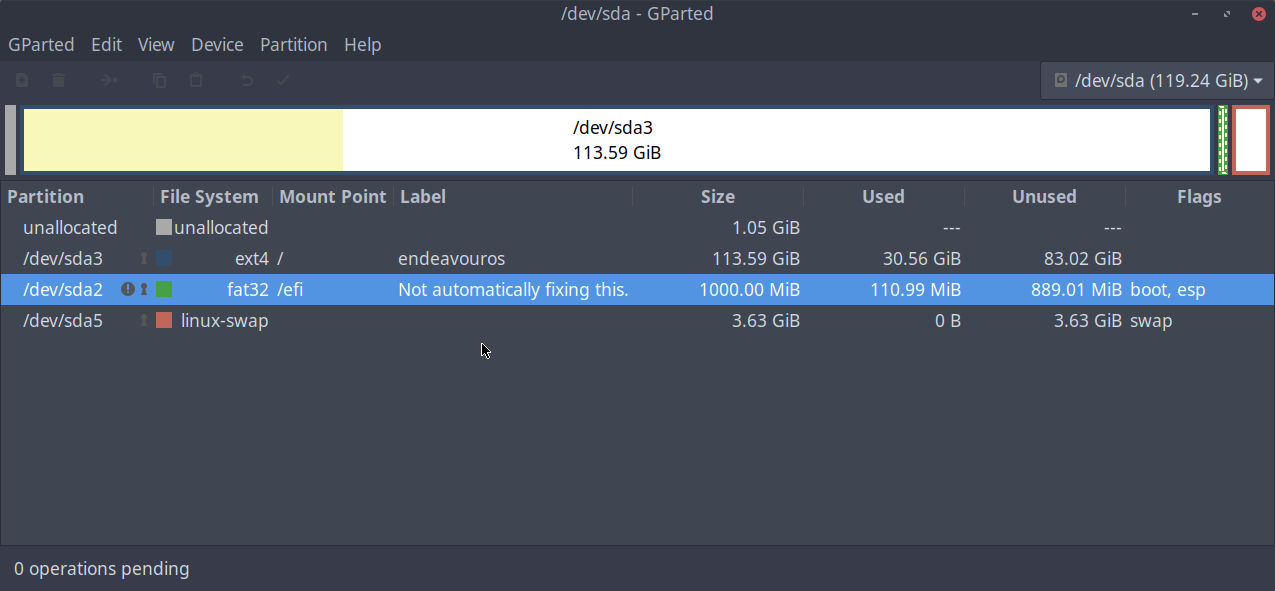
Not to hijack but having stubbornly clinged to making my own physical swap in the installer for ages…

Could I setup ZSWAP by paving over my physical swap (by making /root bigger) in a LIVE gparted environment then getting back into Endeavour and enabling zswap myself?

Seems sensible but thought I’d ask. Or would setting up ZSWAP negate the physical swap in the partition?

Thanks.

The Arch kernels have ZSWAP enabled by default so it is probably already working if you have a swap partition.

See what the output of these are:

cat /sys/module/zswap/parameters/enabled
grep -r . /sys/kernel/debug/zswap/
1 Like

updating another OS right now. Will report back soon. thank you

1 Like

I use both and set the priority of my swap partition in my /etc/fstab very low. So the partition is only used, wenn really needed.

added only additional info

Edit: Only some additional info to see what I meant, just sitting in front of a Mint-Installation at the moment, therefore the different hostname.

Part of /etc/fstab containing the swap configuration:

# 
# # # # # # # # # # # #
#                   #
#      swap       # 
#               #
# # # # # # # #
# swap zram
/dev/zram0 none swap defaults,discard,pri=100 0 0
# swap partition
UUID=508a4048-20f7-4223-9a4d-a5c76a4474d5 none swap sw,pri=-2 0 0
# swap file
#/swapfile                                 none            swap    sw,pri=-1              0       0

And the output in the terminal:

manni@sgtZena:\~$ swapon
NAME       TYPE      SIZE   USED PRIO
/dev/zram0 partition 1,9G 403,3M  100
/dev/sdb3  partition  10G     0B   -2
manni@sgtZena:\~$

$ cat /sys/module/zswap/parameters/enabled
Y

and

$ sudo grep -r . /sys/kernel/debug/zswap/
/sys/kernel/debug/zswap/stored_incompressible_pages:0
/sys/kernel/debug/zswap/stored_pages:0
/sys/kernel/debug/zswap/pool_total_size:0
/sys/kernel/debug/zswap/written_back_pages:0
/sys/kernel/debug/zswap/decompress_fail:0
/sys/kernel/debug/zswap/reject_compress_poor:0
/sys/kernel/debug/zswap/reject_compress_fail:0
/sys/kernel/debug/zswap/reject_kmemcache_fail:0
/sys/kernel/debug/zswap/reject_alloc_fail:0
/sys/kernel/debug/zswap/reject_reclaim_fail:0
/sys/kernel/debug/zswap/pool_limit_hit:0

EDIT @Iwiatsh please forgive me for any ‘jacking. your OP made me remember this was on my to-do list.

It is enabled but unused. That is odd. Is your swap partition activated?

What does swapon show?

$ swapon
NAME TYPE SIZE USED PRIO
/dev/sda5 partition 3.6G 0B -2

I thought all those 0’s were odd too

EDIT:

Endeavour’s own SSD–

have no idea what the comical ‘not fixing’ /boot message is…nor am I asking :slight_smile:

How much RAM do you have?

What does free -m show?

16G

'$ free -m
total used free shared buff/cache available
Mem: 15776 4360 8153 636 4226 11416
Swap: 3713 0 3713

I suppose it is possible it is because you have so little RAM in use that nothing is going to swap.

3 browsers

libreoffice

evince

kitty

pragha music player

keepassxc

–only open apps. No games, no movies. Perhaps you are right.

But now that I look, your swap is full…

crap you are right. what does that mean?

This topic was automatically closed 2 days after the last reply. New replies are no longer allowed.