Ive had EndeavorOS on my Acer 14 Ai laptop from since September last year and have never had any issues that wernt my fault. The only thing is that my gaming performance is a ltttle lackluster for the chip i have. I only play Warframe and Genshin Impact (unfortunately), and I can run warframe fine through steam at medium settings at about 60 fps depending on where I am but generally its stable.
The issue is that I am running Genshin through An Anime Game Launcher ( yay -S an-anime-game-launcher-bin, for clarification) but I keep getting stutters, and i dont feel the smoothness of 60 fps. Even though I lowered my graphical settings to low it still feels laggy (not 60 fps). I could not find any related post on here and i also could not find a video of somebody running my hardware on linux and gaming, so i downloaded Ghost of Tsushima to compare it to a benchmark i saw running the same cpu as me but different laptop.
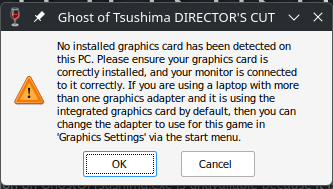
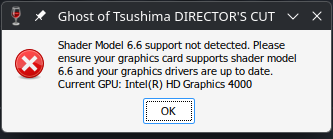
In the video the guy was getting about 50 fps average going up and down. When i ran the game with the same settings he had, i got about 35 fps average only hitting 40 fps once. I was not in the same area as him but i played for like 30 minuites and it never went above 40. I installed the game in lutris and it gave me a little gpu error but the game still ran. when i tried to run the game through steam it gave me two errors and did not run. One other thing i noticed was that in the benchmark video the person was getting abot 30% -50% cpu utilization but i was only getting about 20% throughout the entire time i was gaming. I have vulkan installed and did a system upgrade yesterday so idk what to do. The two screenshots are the errors i got when trying to run Ghost of Tsushima through steam. I was aslo getting the ‘No installed graphics card detected’ message in lutris but the game still ran. I even ran some cpu and gpu geekbench benchmarks and the results I got line up with what im supposed to be getting so i really dont know