game problem

game on arch linux freezing every few seconds for like a second over and over again.

roblox on arch linux (endeavourOS) on sober freezes every few seconds and over time its getting worse and worse the more i join.

Specs: aurora r16 2024 edition *alienware* (rtx 4070 32gb ram i91300f 1tb nvme 1tb hdd.)

monitor oled 175hz AW3423DW *alienware*

*alienware pro headphones(currently not working shocking feeling and popping/crackling and high pitched and making headphones hot at low volume)*

razer balisk 35k v3

alienware keyboard

Does anyone know why i can provide more material if needed.

I moved from windows 11 to endavorOS(arch linux based) had some issues with monitor aliasing/blur/pixelated/grey and barely any color fixed when i changed the config and made it output full rgb and switched to x11 from wayland and switched from kwin(was causing slow/low framerate issues) to picom made it alot better disabled kwin. but now over time the issues are getting worse and worse at the start it was barely noticible went to oh just frame spikes then oh its freezing for 2-7 seconds and then it got annoying i dont know why ive tried online and i cant find anything on it i can and will provide more material if asked. i do not want to swtich back to windows 11 i like linux WAY more more privacyfocused and customizible can anyone help me plz?

Welcome to the community @randomusernam2143542 :partying_face: :tada: :enos_flag:

First up, your system looks way more than capable, so this isn’t normal. You should be able to expect smooth performance under Linux.

Can you share the output of this please:

inxi -SMGDsxx --za

The first thing I’d note from your specs, is the HDD possibly being the weakest component there. Is that being used for system swap, or game installs?

No it is currently, unused i am running everything on nvme right now I will soon use HDD for random files that arent crucial right now I have to wipe the drive because windows encrypted it without me picking it. For your question ([wpc_linx@wpclinx-alienwareaurorar16-byebyewindows ~]$ inxi -SMGDsxx --za
System:
Kernel: 6.18.7-arch1-1 arch: x86_64 bits: 64 compiler: gcc v: 15.2.1
Desktop: KDE Plasma v: 6.5.5 tk: Qt v: N/A wm: kwin_x11 dm: SDDM
Distro: EndeavourOS base: Arch Linux
Machine:
Type: Desktop System: Alienware product: Alienware Aurora R16 v: N/A
serial: Chassis: type: 3 serial:
Mobo: Alienware model: 0RF96M v: A02 serial:
part-nu: 0CD2 Firmware: UEFI vendor: Alienware v: 2.20.0 date: 07/28/2025
Graphics:
Device-1: NVIDIA AD104 [GeForce RTX 4070] vendor: Dell driver: nvidia
v: 590.48.01 arch: Lovelace pcie: speed: 16 GT/s lanes: 16 ports:
active: none off: DP-1 empty: DP-2,DP-3,HDMI-A-1 bus-ID: 01:00.0
chip-ID: 10de:2786
Display: x11 server: X.Org v: 21.1.21 with: Xwayland v: 24.1.9
compositors: 1: kwin_x11 2: Picom v: 12.5 driver: X: loaded: nvidia
gpu: nv_platform,nvidia,nvidia-nvswitch display-ID: :0 screens: 1
Screen-1: 0 s-res: 3440x1440 s-dpi: 107
Monitor-1: DP-1 mapped: DP-0 note: disabled model: Dell AW3423DW res: N/A
dpi: 108 diag: 883mm (34.8")
API: EGL v: 1.5 platforms: device: 0 drv: nvidia device: 2 drv: swrast
gbm: drv: nvidia surfaceless: drv: nvidia x11: drv: nvidia
inactive: wayland,device-1
API: OpenGL v: 4.6.0 compat-v: 4.5 vendor: nvidia mesa v: 590.48.01
glx-v: 1.4 direct-render: yes renderer: NVIDIA GeForce RTX 4070/PCIe/SSE2
API: Vulkan v: 1.4.335 surfaces: N/A device: 0 type: discrete-gpu
driver: nvidia device-ID: 10de:2786
Info: Tools: api: clinfo, eglinfo, glxinfo, vulkaninfo
de: kscreen-console,kscreen-doctor gpu: nvidia-settings,nvidia-smi
wl: wayland-info x11: xdpyinfo, xprop, xrandr
Drives:
Local Storage: total: 1.84 TiB used: 184.09 GiB (9.8%)
ID-1: /dev/nvme0n1 vendor: Samsung model: PM9A1 NVMe 1024GB
size: 953.87 GiB speed: 63.2 Gb/s lanes: 4 serial: temp: 31.9 C
ID-2: /dev/sda vendor: Seagate model: ST1000DM014-2UB10D size: 931.51 GiB
speed: 6.0 Gb/s serial:
Sensors:
System Temperatures: cpu: 46.0 C mobo: 27.0 C gpu: nvidia temp: 38 C
Fan Speeds (rpm): cpu: 2616 mobo: 489 gpu: nvidia fan: 31%
[wpc_linx@wpclinx-alienwareaurorar16-byebyewindows ~]$

) and also I have had many problems with opengl most things are running on vulkan.

Ha, from that Reddit thread:

Arch (and Arch based) is the Pinnacle of Linux. It’s the distro for the ultra Linux nerd or guru.
…but with Nvidia you will have to do a bunch of backend work in Arch to get going

It turns out all you need to do to achieve pinnacle “nerd guru” status, is select the Nvidia boot option from the EndeavourOS live ISO boot menu :sweat_smile:

:flexed_biceps::nerd_face:

I’m sure that poster means well. Perhaps they’ve not tried EndeavourOS :wink:

Anyway, back to the issue. I’d suggest if you can, monitoring while running Roblox, to see what processes are consuming resources. Ideally you’d have this up on a separate monitor, so you can see it in real-time.

The tools I’d suggest for this are htop and iotop.

htop will let you monitor per process CPU and memory usage.
iotop will let you monitor per process disk read/writes.

Hopefully, when the freezes happen, you’ll see a process pop to the top of the list that may provide some clues.

Oh I should also note, I couldn’t spot anything in your shared specs that raised any alarms for me.

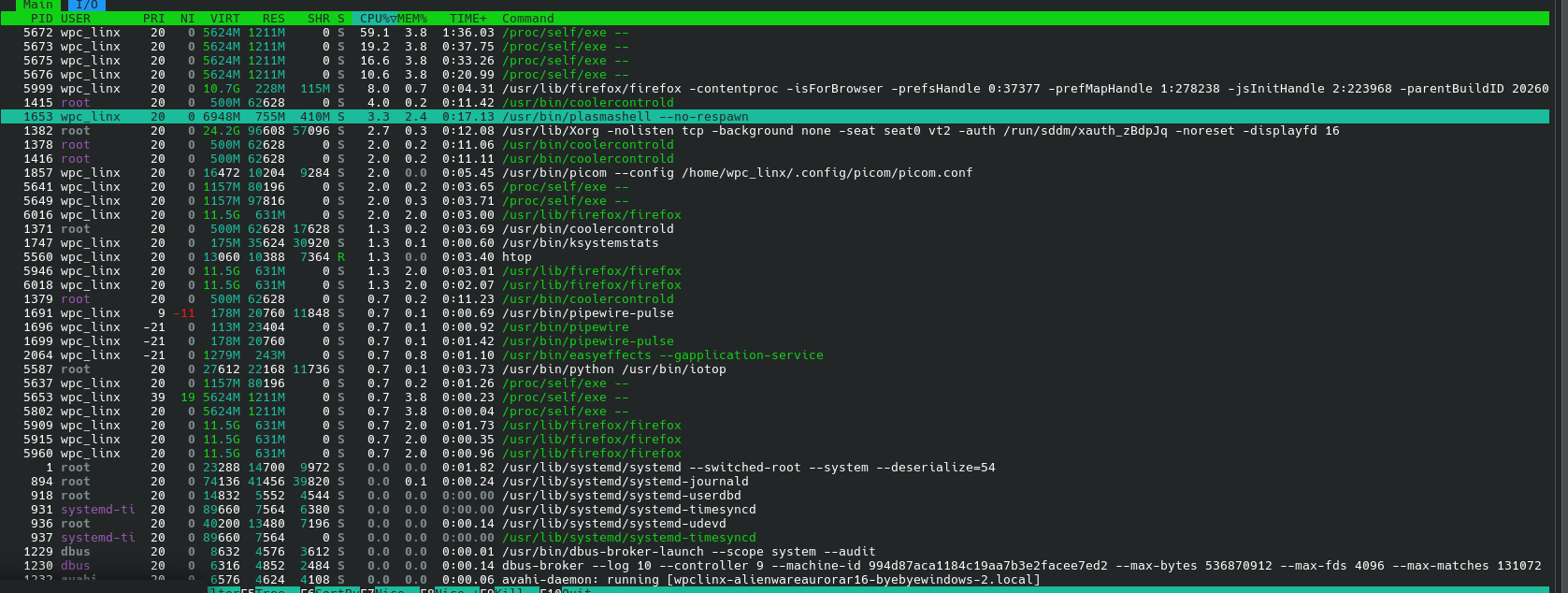
for htop

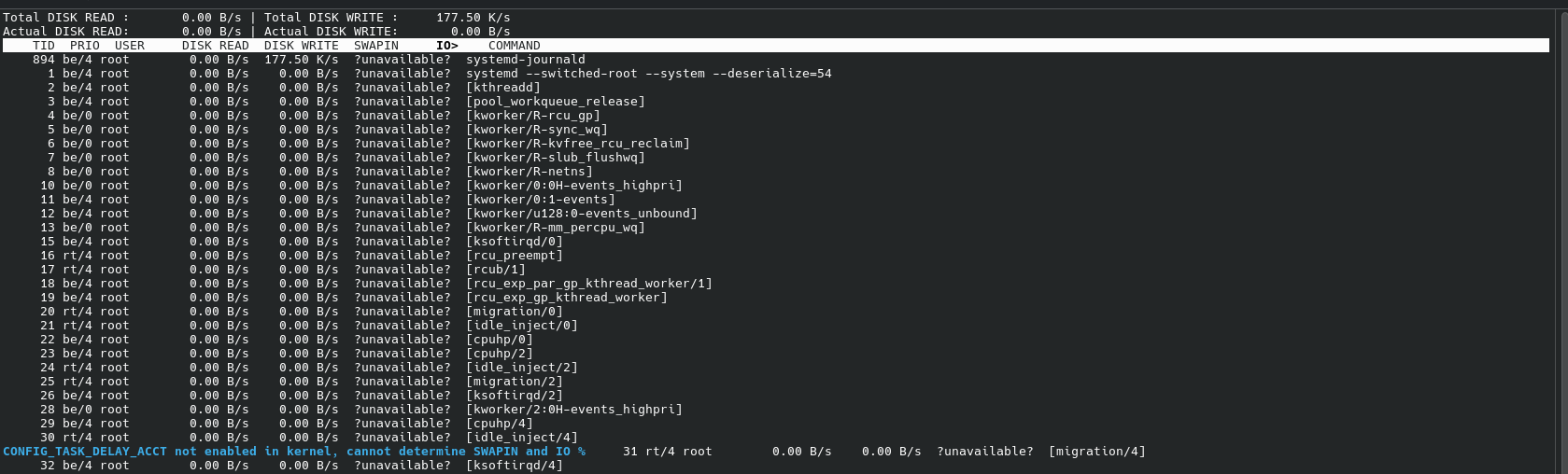
it looks like cooler controld and xorg with “seat” in its name and for iotop it stays normal from before - after the skips but sometimes it shows “kworker”

your inxi output that it lists both kwin_x11 and Picom as active compositors.

Unless I’m mistaken, running Picom on top of KDE (which already uses KWin) usually causes massive stuttering/lag in games because they fight over the screen refresh. Have you tried killing Picom to see if the skipping stops?
Regards, Aditya :crossed_swords: