Firewalld fails to start at boot on headless RPi5

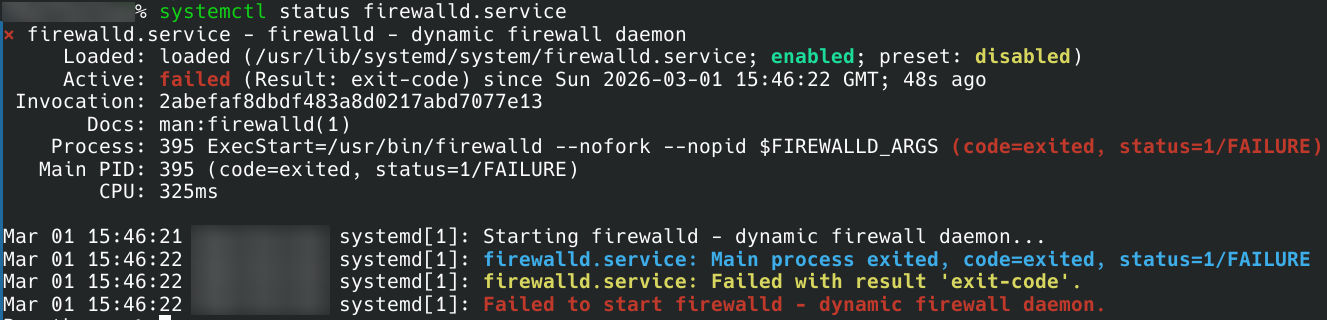
Since the last few updates I’ve noticed that systemctl reports a degraded status owing to firewalld failing to start. It’s set to enabled. I’m not sure what’s changed. Running sudo systemctl restart firewalld.service successfully launches firewalld without error.

I don’t have this problem on my desktop installation. It only seems to affect the headless install on my RPi5.

output of journalctl -eu firewalld:

Feb 27 07:34:52 Paarthurnax systemd[1]: Starting firewalld - dynamic firewall daemon...
Feb 27 07:34:52 Paarthurnax systemd[1]: firewalld.service: Main process exited, code=exited, status=1/FAILURE
Feb 27 07:34:52 Paarthurnax systemd[1]: firewalld.service: Failed with result 'exit-code'.
Feb 27 07:34:52 Paarthurnax systemd[1]: Failed to start firewalld - dynamic firewall daemon.

How did you install your headless RPi 5. Did you use the image located here

I am busy this morning, hopefully I will be able to try a test install this afternoon and see what we can come up with.

Pudge

I did a new install from

and it all worked as expected.

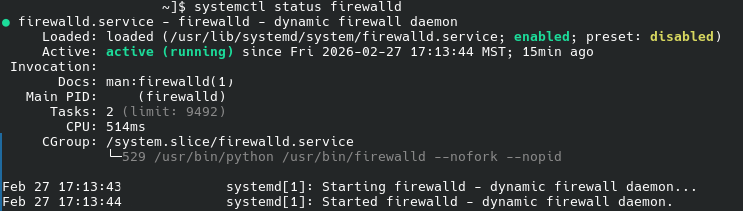
firewalld started with no problems. Run systemctl status firewalld immediately after boot up while firewalld is is still not ative, and you should get the above results. Namely “enabled” listed above in green letters, “active (running)” listed above in green letters

As far as I know, if firewalld is installed and firewalld is enabled AS ROOT, then
firewalld should self start on the next boot.

$ su   (enter your root passwd)
# systemctl enable --now firewalld

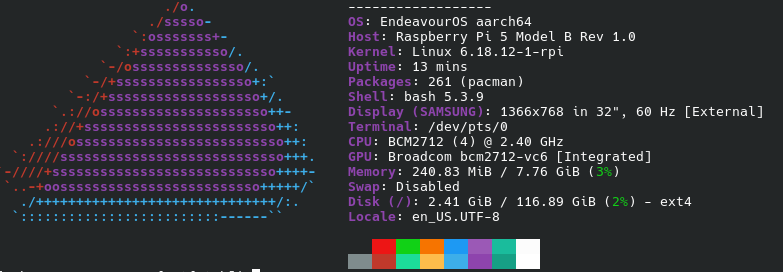
Notice Packages: 261 (pacman) and Memory: 240.83 MiB
This is really a base install.

So a couple of questions.
Did you create your headless server without using the EnOS RPi 5 image?

What do you want to do with your RPi 5 headless setup? Setup a LAN server, or
experiment with IOT, or controlling external hardware, or such?

Pudge

1 Like

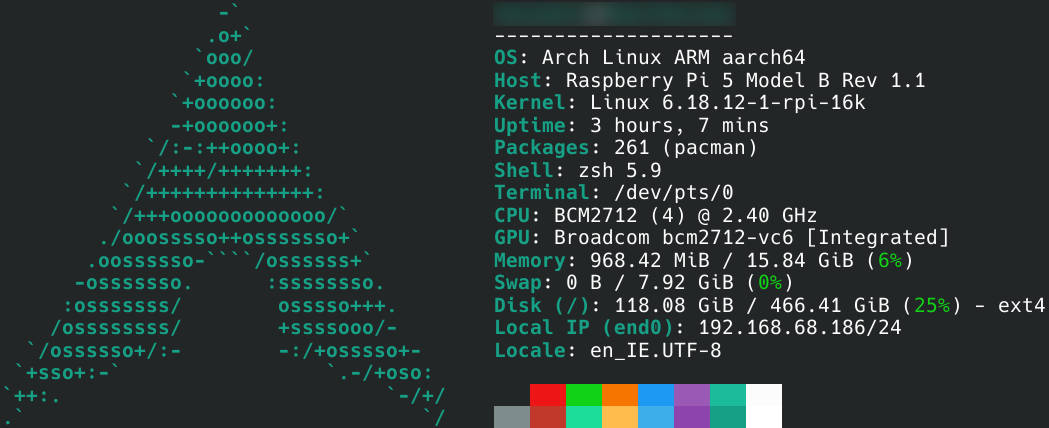
I used an SD image EnOS to put Arch on a PCIe SSD. It’s a pretty minimal install. I actually have the exact same number of packages as you do:

I get the following output from systemctl status firewalld.service immediately after boot:

Then, magically after running sudo systemctl restart firewalld.service:

I mostly use the headless setup as a filesync server via syncthing.

Nice.

Is this still failing to start firewalld immediately after booting up, which then requires

sudo systemctl restart firewalld.service

to start it up?

Once firewalld is enabled, it should start firewalld as part of the boot up procedures.
The only way to enable it is

sudo systemctl enable firewalld.service

The only differences I see are from your systemctl print outs.
Right after boot up and firewalld not running

Process: 395 ExecStart=/usr/bin/firewalld --nofork --nopid $FIREWALLD_ARGS 

after executing systemctl restart firewalld.service

CGroup: /system.slice/firewalld.service
               |_559 /usr/bin/python /usr/bin/firewalld --nofork --noip

I only thing I can think of, maybe

sudo systemctl enable firewalld

has never been issued or didn’t take for some reason.
Try entering the enable command and see what happens on reboot.

This is getting over my head, I might need some help on this.

Pudge

Just tried disabling & re-enabling firewalld.service. No dice. Fails to start on boot.

I considered editing /usr/lib/systemd/system/firewalld.service to remove “$FIREWALLD_ARGS" from the end of the line:

ExecStart=/usr/bin/firewalld --nofork --nopid $FIREWALLD_ARGS

However, I noticed that this line is the same as on my desktop Arch setup, so I’m guessing that isn’t the problem.

I’m kind of out of ideas at this point. Tried reinstalling. Still no dice.

1 Like

So am I. Perhaps @dalto @bink @thefrog @ajgringo619 or some others might have an idea.

Pudge

Increase logging verbosity so you can see where it is failing.

Use systemctl edit firewalld.service and add the param --debug=10 to the executable

2 Likes

I’ve never used a Raspberry Pi, but I’ll take a look. As suspected, the $FIREWALLD_ARGS is probably not doing anything as the default environment file that’s being sourced is empty by default. @dalto’s should be enough to give a better description of the error.

Speaking of the error message, a search found this common with python version mismatches. Are you running something like conda or pyenv?

(Sorry, could not figure out how to change the reply-to)

2 Likes

Once the kernel is up and running, software running on an ARM device (aarch64) is exactly like x86_64. Which is what makes RPi 5 so handy for DE hopping, testing new apps, etc. Or just doing your normal daily routines on an extremely power efficient device.

Pudge

1 Like

It’s still a different ISA though, it isn’t common but still easy to catch a runtime stray bullet in a package, esp. since Arch on Arm is mostly an hobby and not widely deployed or tested.

I’ve tried editing the ExecStart field in the [Service] bit via:

sudo systemctl edit --full firewalld.service

to:

ExecStart=/usr/bin/firewalld --nofork --nopid --debug=10 $FIREWALLD_ARGS

Where can I find the additional debug output? The only content in /var/log/firewalld is:

2026-03-03 10:50:24 Dropped Linux capabilities to NET_ADMIN, NET_RAW, SYS_MODULE.
1 Like

Just a guess but in the past when I have run into this situation when a service does not load on boot and after boot I can get it loaded it is caused by some condition under [Unit] is not being met when it tries to activate in the .system file. You could try adding under here in the file to make it try a few more times and check after a little while after boot a few times to see if it activates. If it does then try to see what is really happening more closely under the [Unit] section.

[Service]
Restart=on-failure
RestartSec=5s
StartLimitBurst=5
StartLimitIntervalSec=30
2 Likes

Welcome to the EndeavourOS forum. :handshake: I hope you enjoy your time here.

Thank you for your input.

Pudge

2 Likes

To retrieve the firewalld logs from the current session:

journalctl -b -u firewalld
1 Like

Tried this after adding the --debug=10 option, but the output looks the same:

Mar 09 20:28:20 [SYSTEMNAME] systemd[1]: Starting firewalld - dynamic firewall daemon...
Mar 09 20:28:21 [SYSTEMNAME] systemd[1]: firewalld.service: Main process exited, code=exited, status=1/FAILURE
Mar 09 20:28:21 [SYSTEMNAME] systemd[1]: firewalld.service: Failed with result 'exit-code'.
Mar 09 20:28:21 [SYSTEMNAME] systemd[1]: Failed to start firewalld - dynamic firewall daemon.
At the moment, the only parameters set in [Unit] are:

[Unit]
Description=firewalld - dynamic firewall daemon
Before=network-pre.target
Wants=network-pre.target
Requires=dbus.service
After=dbus.service
After=polkit.service
Conflicts=iptables.service ip6tables.service ebtables.service ipset.service
Documentation=man:firewalld(1)

However, as a temporary fix, your edits have at least ensured it does launch:

Mar 09 20:35:29 [SYSTEMNAME] systemd[1]: Starting firewalld - dynamic firewall daemon...
Mar 09 20:35:30 [SYSTEMNAME] systemd[1]: firewalld.service: Main process exited, code=exited, status=1/FAILURE
Mar 09 20:35:30 [SYSTEMNAME] systemd[1]: firewalld.service: Failed with result 'exit-code'.
Mar 09 20:35:30 [SYSTEMNAME] systemd[1]: Failed to start firewalld - dynamic firewall daemon.
Mar 09 20:35:35 [SYSTEMNAME] systemd[1]: firewalld.service: Scheduled restart job, restart counter is at 1.
Mar 09 20:35:35 [SYSTEMNAME] systemd[1]: Starting firewalld - dynamic firewall daemon...
Mar 09 20:35:36 [SYSTEMNAME] systemd[1]: Started firewalld - dynamic firewall daemon.