Would you mind have a look at my ufw status and see if it is correctly done?
# ufw status verbose
Status: active
Logging: on (medium)
Default: deny (incoming), deny (outgoing), disabled (routed)
New profiles: skip

To                         Action      From
--                         ------      ----
Anywhere                   ALLOW OUT   Anywhere on tun0
1194                       ALLOW OUT   Anywhere
192.168.50.1               ALLOW OUT   Anywhere
This machine doesn’t need to be reached by any other device. 1194 is the vpn port and the third rule is for connecting to the router from the web interface.
I guess it would be better to put 1 and 2 in one rule?
Do you need to worry about ipv6 traffic? One of the biggest mistakes people make is putting a ton of ipv4 rules in place while letting ipv6 traffic flow freely.
Do you need to allow both udp and tcp traffic on port 1194? I think you may only need to allow udp.
I don’t think you can.
The first rule is “Allow any outbound traffic on the vpn”.
The second rule is “Allow the connection to the vpn on port 1194”
I would just block v6 completely if you don’t need it. It is probably already blocked by your default rule but just to be safe it wouldn’t hurt to add a rule blocking all ipv6 traffic out.
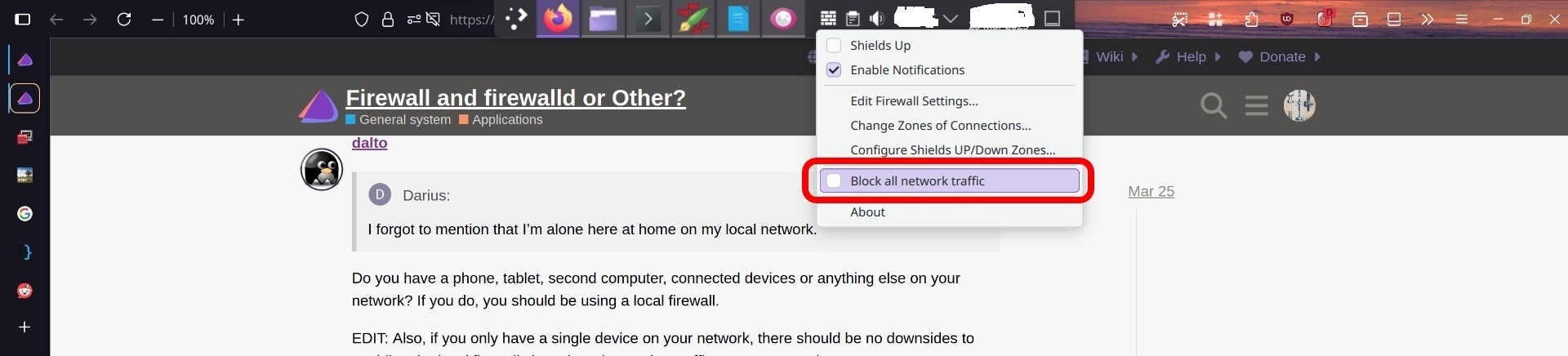
There is this option that I get when I use FirewallD and right click on the firewall icon. “Block all network traffic” It is circled in red in the image below. Will that work?
If I am not mistaken there is a kernel boot parameter that disabled ipv6 entirely. And since most of us are behind home or office or starbucks router we need not get a IPV6 assigned to us.
This offcourse does not apply those computers who use a 5g/4g dongle or have a cellular sim installed on their computer.
Will a VPN work by blocking all the ipv6 traffic? If I am not mistaken many of the VPN software depends on ipv6 addresses since they have such a massive user base to carter to.
ufw status verbose

Status: active
Logging: on (medium)
Default: deny (incoming), deny (outgoing), disabled (routed)
New profiles: skip

To                         Action      From
--                         ------      ----
Anywhere                   ALLOW OUT   Anywhere on tun0
192.168.50.1               ALLOW OUT   Anywhere
1194/udp                   ALLOW OUT   Anywhere
Anywhere/ipv6              DENY OUT    Anywhere/ipv6
Before doing this please do confirm with VPN provider if they will support a IPV4 connection alone. I have heard of cases where people have run into issues using VPN when they had disabled IPV6.
@dalto, I’m sorry, just one last question. Should I leave this alone
# /etc/default/ufw
#

# Set to yes to apply rules to support IPv6 (no means only IPv6 on loopback
# accepted). You will need to 'disable' and then 'enable' the firewall for
# the changes to take affect.
IPV6=yes
Not at all, it was still all about firewalls. For me it is to the point.
Remember I said I never ever did any firewall on Linux since I started in 2000 and I really know nothing about firewalls and all what we discussed here.
Second, I have seen on some other forum (Arch based) a specific thread or link or page like a poll where users report if the latest update (and its release date) is working fine or there are issues.
To be honest and clear it was on Manjaro’s forum). I know they have their own way of releasing updates and it is not that rolling as we have here, but maybe we can make it only for major and serious updates only, like kernel update, Grub, Boot loader,… or whatever serious update that may affect system stability. But not for a browser update or an end user app update. I mean only updates that may affect the system.
Maybe we need another dedicated thread for this. I will leave it for admins and developers to do this thread if they see this is worth it.
Just curious, why did you suggest this here? I mean do you see this thread qualifies as a best thread?