File choosers on Qt apps

Hi,

I’ve got several boxes, similar installations with two desktops: Plasma KDE and DMS niri. I live my life mostly on niri. On one box qBittorrent uses normal (big, functional, and pretty) KDE file dialog on Plasma and GTK file chooser on niri. This is acceptable. On another box I see something else:

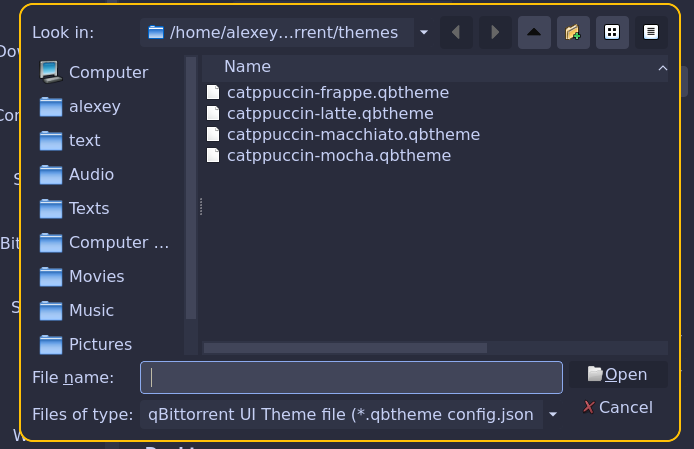
This is probably a KDE dialog, but from a second hand store. The same with Okular, so the setting is system wide. How to change it for something decent?

Have you got xdg-desktop-portal and xdg-desktop-portal-kde installed?

You will probably need to edit your desktop-portal.conf for this :

In ~/.config/xdg-desktop-portal/

You should have at least two files, something like:

kde-portals.conf and niri-portals.conf (maybe not the right name for niri, one for each of your DE)

If they don’t exist, copy them from /usr/share

cp -r /usr/share/xdg-desktop-portal/ ~/.config/

Then for each desktop-portal.conf, under [prefered], add this line :

org.freedesktop.impl.portal.FileChooser=kde

This will set the default file picker to kde, but you can also choose gtk depending on your preference.

You can set different file pickers for each DE without problem by editing this in the corresponding .conf file.

(To avoid some problems on niri you might want to set it to kde;gtk or gtk;kde, this way it will try the first option and if it doesn’t work it will use the second as a fallback)

2 Likes

Yes, I do. Curiously, no ~/.config/xdg-desktop-portal directory on any box.

Then I’d try what @perletero suggested, but creating the necessary directory.

~ cat .config/xdg-desktop-portal/niri-portals.conf :check_mark:
[preferred]
default=gnome;gtk;
org.freedesktop.impl.portal.Access=gtk;
org.freedesktop.impl.portal.Notification=gtk;
org.freedesktop.impl.portal.FileChooser=kde;gtk;
org.freedesktop.impl.portal.Secret=gnome-keyring;
~

Nothing changed for niri (I didn’t forget to relogin). Do I have to copy gtk-portals.conf and kde-portals.conf, too?

NB On my other boxes the content of the /usr/share/xdg-desktop-portal/*portals.conf files is exactly the same, but the behaviour is different.

UPD

Not exactly no effect. Google Chrome now uses normal KDE dialog. If it didn’t use it always, I can’t bet on it.

The file I’ve added and edited, and which works for me is:

.config/xdg-desktop-portal/portals.conf

My settings:

[preferred]
default=gtk;kde;hyprland
org.freedesktop.impl.portal.FileChooser=kde

I use Openbox most of the time, but these settings allow me to always use the KDE file chooser in Openbox, KDE, and Hyprland for QT apps.

Placing gtk first uses the GTK file chooser for GTK apps. Remove it (or place kde first) if you want the KDE file chooser for all apps.

I also have QT_QPA_PLATFORMTHEME=kde set in /etc/environment.

I did as I’ve been told:

~/.config/xdg-desktop-portal  cat portals.conf
[preferred]
default=gtk;kde;niri
org.freedesktop.impl.portal.FileChooser=kde
~/.config/xdg-desktop-portal  cat /etc/environment

QT_QPA_PLATFORMTHEME=kde
~/.config/xdg-desktop-portal  ls
portals.conf
~/.config/xdg-desktop-portal

Nothing changed.

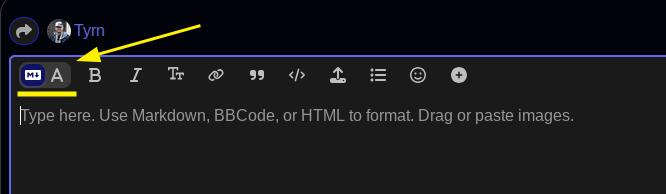
PS Is there a way to turn off the markdown helper, or whatever it is? Once I new just how and where to put a triple backtick and things, now I’m as helpless as on Reddit :slight_smile:

Do you mean this?


As far as my suggestion not working is concerned, you may need to undo/remove the other suggestions you’ve tried so far and reboot.

Logout isn’t enough? I did the reboot, anyway. Nothing changed. I did remove all the other suggestions. Now it’s exactly as I just published. No difference.

Thanks for the A thing :slight_smile:

1 Like

Another thing you could try in combination with the above is qt5ct and qt6ct.

sudo pacman -Syu qt5ct qt6ct

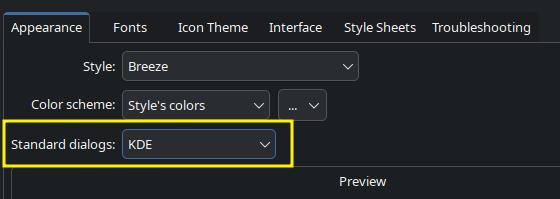
Launch them both and set them to both use KDE for Standard dialogs:

Click “Apply” then click “OK”

Then go back to the /etc/environment file and change the “kde” to “qt6ct”.

QT_QPA_PLATFORMTHEME=qt6ct

Log out and log back in.

1 Like

Thank you very much! This one works. I’ll explore it a bit more…

1 Like

According to Arch Wiki, qt5ct-kde and qt6ct-kde packages are nicer, especially when used outside KDE. They offer better choice, and enforce it somewhat better, indeed. But the whole ecosystem is fragile and way too complicated :frowning:

Yeah, it seems Qt is kinda hard to organize effectively. But GTK has its issues too.

As to additional details: modern KDE file dialog resizes in Plasma KDE, but not in DMS niri. The ugly old one resized.

In other words, try this:

[preferred]
default=kde
org.freedesktop.impl.portal.FileChooser=kde

Most WMs default to GTK or the app’s native file dialog unless you explicitly tell them to use something else. This (and the Arch way) is why most WM-based distros use Thunar and GTK by default.
Thanks, but it turned out that

  1. DMS niri keyboard shortcuts work fine
  2. It’s still possible to config the mouse, they say. Maybe there’s no need :slight_smile:
1 Like

This topic was automatically closed 2 days after the last reply. New replies are no longer allowed.