You don’t have to blur out your local IP, it does not matter if we know it 
Mine is 10.10.0.31 
Mine looks like that. I’ve been too lazy to change it. 
I like only Konsole app, which really looks smiling and happy, don`t reard me Windows terminal
Here’s my full config for anyone interested.
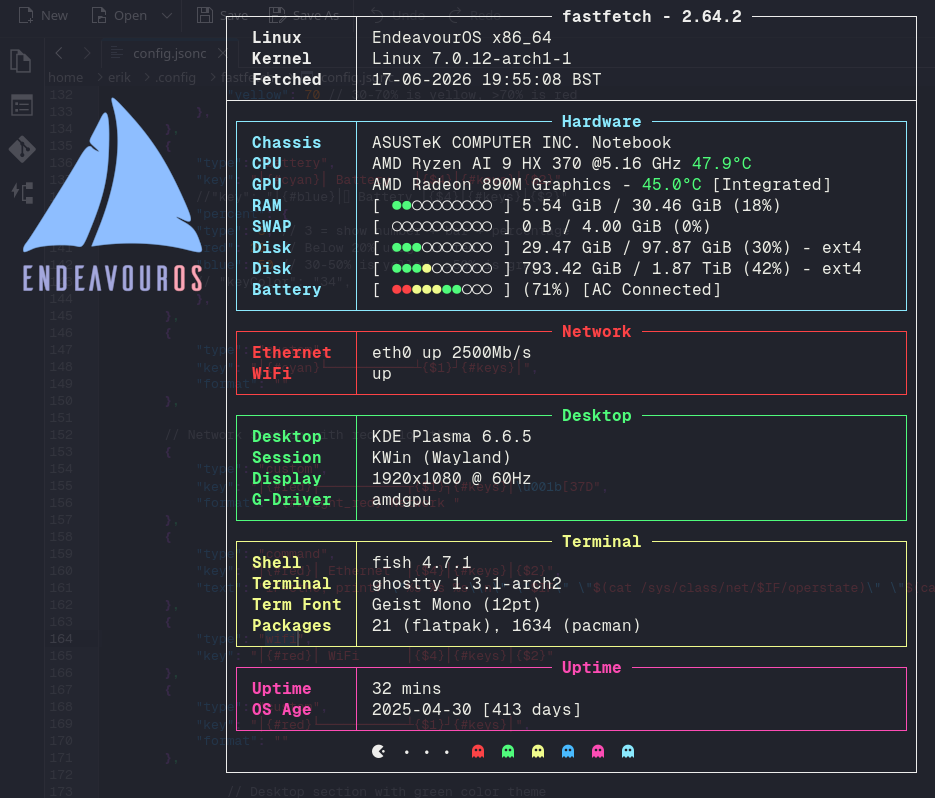
//
//
// ░█▀▀░█▀█░█▀▄░█▀▀░█▀█░█░█░█▀█░█░█░█▀▄░░░█▀█░█▀▀
// ░█▀▀░█░█░█░█░█▀▀░█▀█░▀▄▀░█░█░█░█░█▀▄░░░█░█░▀▀█
// ░▀▀▀░▀░▀░▀▀░░▀▀▀░▀░▀░░▀░░▀▀▀░▀▀▀░▀░▀░░░▀▀▀░▀▀▀
// ░░░░░░░█▀▀░█▀█░█▀▀░▀█▀░█▀▀░█▀▀░▀█▀░█▀▀░█░█
// ░░░░░░░█▀▀░█▀█░▀▀█░░█░░█▀▀░█▀▀░░█░░█░░░█▀█
// ░░░░░░░▀░░░▀░▀░▀▀▀░░▀░░▀░░░▀▀▀░░▀░░▀▀▀░▀░▀
//
// Inspired by many and cobbled together by me!
{
"$schema": "https://github.com/fastfetch-cli/fastfetch/raw/dev/doc/json_schema.json",
"logo": {
"type": "auto",
"source": "/home/erik/Pictures/En-OS-Noodly-OG-En-OS-Logo.png",
"width": 20, // Width in characters (for image logos)
"height": 10, // Height in characters (for image logos)
"padding": {
"top": 5, // Top padding
"left": 1, // Left padding
"right": 1 // Right padding
}
},
"display": {
"color": {
"keys": "white"
},
"separator": "",
"constants": [
"──────────────────────────────────────────────────────", // {$1} - horizontal line for borders
"\u001b[55D", // {$2} - move cursor left 55 columns
"\u001b[55C", // {$3} - move cursor right 55 columns
"\u001b[54C" // {$4} - move cursor right 54 columns
],
"brightColor": true,
"bar": {
"width": 10, // Width of percentage bars
"char": {
"elapsed": "●", // Character for elapsed portion
// "elapsed": "■", // Character for elapsed portion
"total": "", // Character for total portion
},
},
"percent": {
"type": 9, // 1=number, 2=bar, 3=both, 9=colored number
"color": {
"green": "green",
"yellow": "light_yellow",
"red": "light_red"
}
}
},
"modules": [
"break",
{
"type": "version",
"key": "┌────────────┬─{$1}┐\u001b[37D",
"format": "\u001b[1m{#keys} {1} - {2} "
},
{
"type": "os",
"key": "│ \u001b[s{sysname}\u001b[u\u001b[10C│{$3}│{$2}"
},
{
"type": "kernel",
"key": "│ \u001b[sKernel\u001b[u\u001b[10C│{$3}│{$2}"
},
{
"type": "datetime",
"key": "│ Fetched │{$3}│{$2}",
"format": "{day-pretty}-{month-pretty}-{year} {hour-pretty}:{minute-pretty}:{second-pretty} {timezone-name}"
},
//{
// "type": "locale",
// "key": "│ Locale │{$3}│{$2}"
//},
{
"type": "custom",
"key": "├────────────┴─{$1}┤", // Bottom border of the entire layout
"format": ""
},
// Hardware section with cyan color theme
{
"type": "custom",
"key": "│{#cyan}┌───────────┬{$1}┐{#keys}│\u001b[37D",
"format": "{#bright_cyan} Hardware "
},
{
"type": "chassis",
"key": "│{#cyan}│ Chassis │{$4}│{#keys}│{$2}",
"format": "{vendor} {type}"
},
{
"type": "cpu",
"key": "│{#cyan}│ CPU │{$4}│{#keys}│{$2}",
"format": "{name} @{freq-max} {temperature}",
"temp": true
},
{
"type": "gpu",
"key": "│{#cyan}│ GPU │{$4}│{#keys}│{$2}",
"temp": true
},
{
"type": "memory",
"key": "│{#cyan}│ RAM │{$4}│{#keys}│{$2}",
// "keyColor": "34",
"percent": {
"type": 3, // 3 = show number + bar + percentage
"green": 30, // <30% is green
"yellow": 70 // 30-70% is yellow, >70% is red
}
},
{
"type": "swap",
"key": "│{#cyan}│ SWAP │{$4}│{#keys}│{$2}",
// "keyColor": "34",
"percent": {
"type": 3, // 3 = show number + bar + percentage
"green": 30, // <30% is green
"yellow": 70 // 30-70% is yellow, >70% is red
}
},
{
"type": "disk",
"key": "│{#cyan}│ Disk │{$4}│{#keys}│{$2}",
// "keyColor": "34",
"percent": {
"type": 3, // 3 = show number + bar + percentage
"green": 30, // <30% is green
"yellow": 70 // 30-70% is yellow, >70% is red
},
},
{
"type": "battery",
"key": "│{#cyan}│ Battery │{$4}│{#keys}│{$2}",
//"key": "│{#blue}│ Battery │{$4}│{#keys}│{$2}",
"percent": {
"type": 3, // 3 = show number + bar + percentage
"red": 20, // Below 20% usage is red
"blue": 50 // 30-50% is yellow, >50% is green
// "keyColor": "34",
},
},
{
"type": "custom",
"key": "│{#cyan}└───────────┴{$1}┘{#keys}│",
"format": ""
},
// Network section with red color theme
{
"type": "custom",
"key": "│{#red}┌───────────┬{$1}┐{#keys}│\u001b[37D",
"format": "{#bright_red} Network "
},
{
"type": "command",
"key": "│{#red}│ Ethernet │{$4}│{#keys}│{$2}",
"text": "IF=eth0; printf \"%s %s %s\\n\" \"$IF\" \"$(cat /sys/class/net/$IF/operstate)\" \"$(cat /sys/class/net/$IF/speed 2>/dev/null | sed 's/$/Mb\\/s/')\""
},
{
"type": "wifi",
"key": "│{#red}│ WiFi │{$4}│{#keys}│{$2}"
},
{
"type": "custom",
"key": "│{#red}└───────────┴{$1}┘{#keys}│",
"format": ""
},
// Desktop section with green color theme
{
"type": "custom",
"key": "│{#green}┌───────────┬{$1}┐{#keys}│\u001b[37D",
"format": "{#bright_green} Desktop "
},
{
"type": "de",
"key": "│{#green}│ Desktop │{$4}│{#keys}│{$2}"
},
{
"type": "wm",
"key": "│{#green}│ Session │{$4}│{#keys}│{$2}"
},
{
"type": "display",
"key": "│{#green}│ Display │{$4}│{#keys}│{$2}",
"compactType": "original-with-refresh-rate"
},
{
"type": "gpu",
"key": "│{#green}│ G-Driver │{$4}│{#keys}│{$2}",
"format": "{driver}"
},
{
"type": "custom",
"key": "│{#green}└───────────┴{$1}┘{#keys}│",
"format": ""
},
// Terminal section with yellow color theme
{
"type": "custom",
"key": "│{#yellow}┌───────────┬{$1}┐{#keys}│\u001b[37D",
"format": "{#bright_yellow} Terminal "
},
{
"type": "shell",
"key": "│{#yellow}│ Shell │{$4}│{#keys}│{$2}"
},
{
"type": "terminal",
"key": "│{#yellow}│ Terminal │{$4}│{#keys}│{$2}"
},
{
"type": "terminalfont",
"key": "│{#yellow}│ Term Font │{$4}│{#keys}│{$2}"
},
// {
// "type": "terminaltheme",
// "key": "│{#yellow}│ Colors │{$4}│{#keys}│{$2}"
// },
{
"type": "packages",
"key": "│{#yellow}│ Packages │{$4}│{#keys}│{$2}"
},
{
"type": "custom",
"key": "│{#yellow}└───────────┴{$1}┘{#keys}│",
"format": ""
},
// Development section with red color theme
// {
// "type": "custom",
// "key": "│{#red}┌───────────┬{$1}┐{#keys}│\u001b[37D",
// "format": "{#bright_red} Development "
// },
// {
// "type": "command",
// "key": "│{#red}│ Rust │{$4}│{#keys}│{$2}",
// "text": "rustc --version",
// "format": "rustc {~6,13}" // Print 6th to 13th characters (version number)
// },
// {
// "type": "command",
// "condition": {
// "!system": "Windows" // Posix version
// },
// "key": "│{#red}│ Clang │{$4}│{#keys}│{$2}",
// "text": "clang --version | head -1 | awk '{print $NF}'",
// "format": "clang {}"
// },
// {
// "type": "command",
// "condition": {
// "system": "Windows" // Windows version
// },
// "key": "│{#red}│ Clang │{$4}│{#keys}│{$2}",
// "text": "clang --version | findstr version", // Finds the line with "version"
// "format": "clang {~-6}" // Prints the last 6 characters (version number)
// },
// {
// "type": "command",
// "key": "│{#red}│ NodeJS │{$4}│{#keys}│{$2}",
// "text": "node --version",
// "format": "node {~1}" // {~1} removes first character (v)
// },
// {
// "type": "command",
// "key": "│{#red}│ Go │{$4}│{#keys}│{$2}",
// "text": "go version | cut -d' ' -f3",
// "format": "go {~2}" // {~2} removes first 2 characters (go)
// },
// {
// "type": "command",
// "key": "│{#red}│ Zig │{$4}│{#keys}│{$2}",
// "text": "zig version",
// "format": "zig {}"
// },
// {
// "type": "editor",
// "key": "│{#red}│ Editor │{$4}│{#keys}│{$2}"
// },
// {
// "type": "command",
// "key": "│{#red}│ Git │{$4}│{#keys}│{$2}",
// "text": "git version",
// "format": "git {~12}"
// },
// {
// "type": "font",
// "key": "│{#red}│ Interface │{$4}│{#keys}│{$2}",
// "format": "{font1}"
// },
// {
// "type": "custom",
// "key": "│{#red}└───────────┴{$1}┘{#keys}│",
// "format": ""
// },
// Uptime section with magenta color theme
{
"type": "custom",
"key": "│{#magenta}┌───────────┬{$1}┐{#keys}│\u001b[37D",
"format": "{#bright_magenta} Uptime "
},
{
"type": "uptime",
"key": "│{#magenta}│ Uptime │{$4}│{#keys}│{$2}"
},
//{
// "type": "users",
// "myselfOnly": true, // Only show current user
// "key": "│{#magenta}│ Login │{$4}│{#keys}│{$2}"
//},
{
"condition": { // Conditional module: only show on non-macOS
"!system": "macOS"
},
"type": "disk",
"key": "│{#magenta}│ OS Age │{$4}│{#keys}│{$2}",
"folders": "/", // Check root filesystem
"format": "{create-time:10} [{days} days]" // Show creation time and age in days
},
{
"condition": { // Conditional module: only show on macOS
"system": "macOS"
},
"type": "disk",
"key": "│{#magenta}│ OS Age │{$4}│{#keys}│{$2}",
"folders": "/System/Volumes/VM", // Work around for APFS on macOS
"format": "{create-time:10} [{days} days]"
},
{
"type": "custom",
"key": "│{#magenta}└───────────┴{$1}┘{#keys}│",
"format": ""
},
{
"type": "custom",
"key": "│ {$3} │{$2}",
"format":"{#37} {#37} • {#37}• {#37}• {#31} {#32} {#33} {#34} {#35} {#36} "
// "format":"{#37} {#31} {#32} {#33} {#36} {#35} {#34} {#33} {#32} {#31} "
},
{
"type": "custom",
"key": "└──────────────{$1}┘", // Bottom border of the entire layout
"format": ""
},
// End with color palette and line break
// "break", // Add a blank line
//"colors" // Display color palette
"break",
]
}
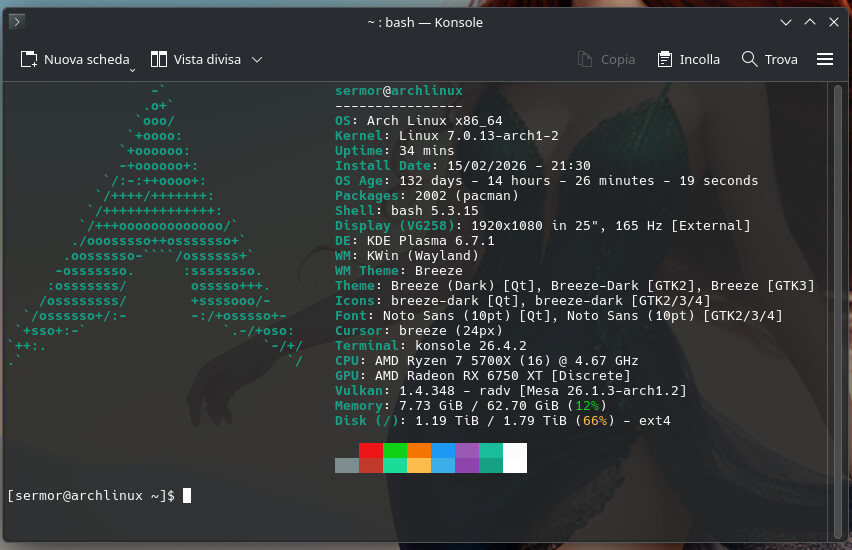
Standard fastfetch configuration, with the addition of a couple of scripts for the installation date and the OS age, but in detail (days, hours, minutes and seconds).
{
  "$schema": "https://github.com/fastfetch-cli/fastfetch/raw/master/doc/json_schema.json",
  "modules": [
    "title",
    "separator",
    "os",
    "host",
    "kernel",
    "uptime",
    {
        "type": "command",
        "key": "Install Date",
        "text": "date -d @$(stat -c %W /) '+%d/%m/%Y - %H:%M'",
        "keyColor": "cyan"
    },
    {
        "type": "command",
        "key": "OS Age",
        "text": "install_ts=$(( $(date -d '2026-02-15 21:30:00' +%s) - 3600 )); now_ts=$(date +%s); total=$((now_ts - install_ts)); days=$((total / 86400)); hours=$(((total % 86400) / 3600)); mins=$(((total % 3600) / 60)); secs=$((tota>
        "keyColor": "cyan"
    },
    "packages",
    "shell",
    "display",
    "de",
    "wm",
    "wmtheme",
    "theme",
    "icons",
    "font",
    "cursor",
    "terminal",
    "terminalfont",
    "cpu",
    "gpu",
    "vulkan",
    "memory",
//    "swap",
    "disk",
//    "localip",
//    "battery",
//    "poweradapter",
//    "locale",
    "break",
    "colors",
    "break"
  ]
}
The exact os age script I used is this:
    {
        "type": "command",
        "key": "OS Age",
        "text": "install_ts=$(( $(date -d '2026-02-15 21:30:00' +%s) - 3600 )); now_ts=$(date +%s); total=$((now_ts - install_ts)); days=$((total / 86400)); hours=$(((total % 86400) / 3600)); mins=$(((total % 3600) / 60)); secs=$((total % 60)); printf \"%d days - %d hours - %02d minutes - %02d seconds\" $days $hours $mins $secs",
        "keyColor": "cyan"
    },
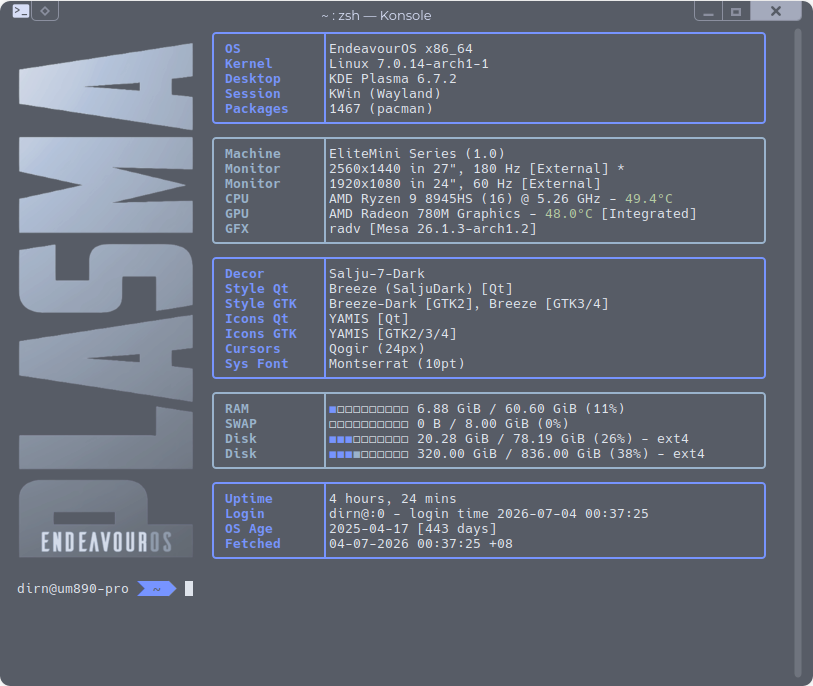
Minor modification: changed to rounded box corners. The rounded corner ASCII characters were copied from @UncleSpellbinder’s config.
config.jsonc
//
//
//  ░█▀▀░█▀█░█▀▄░█▀▀░█▀█░█░█░█▀█░█░█░█▀▄░░░█▀█░█▀▀
//  ░█▀▀░█░█░█░█░█▀▀░█▀█░▀▄▀░█░█░█░█░█▀▄░░░█░█░▀▀█
//  ░▀▀▀░▀░▀░▀▀░░▀▀▀░▀░▀░░▀░░▀▀▀░▀▀▀░▀░▀░░░▀▀▀░▀▀▀
//  ░░░░░░░█▀▀░█▀█░█▀▀░▀█▀░█▀▀░█▀▀░▀█▀░█▀▀░█░█
//  ░░░░░░░█▀▀░█▀█░▀▀█░░█░░█▀▀░█▀▀░░█░░█░░░█▀█
//  ░░░░░░░▀░░░▀░▀░▀▀▀░░▀░░▀░░░▀▀▀░░▀░░▀▀▀░▀░▀
//
//  Inspired by many and cobbled together by Noodly
{
    "$schema": "https://github.com/fastfetch-cli/fastfetch/raw/dev/doc/json_schema.json",
    "logo": {
        // "type": "none"
        "type": "auto",
        "source": "/home/dirn/Pictures/logos/plasma-0.png",
        // "width": 40,          // Width in characters (for image logos)
        // "height": 34,         // Height in characters (for image logos)
        "width": 22, // Width in characters (for image logos)
        "height": 34, // Height in characters (for image logos)
        "padding": {
            "top": 1, // Top padding
            "left": 1, // Left padding
            "right": 1 // Right padding
        }
    },
    "display": {
        "color": {
            "keys": "blue"
        },
        "separator": "",
        "constants": [
            "──────────────────────────────────────────────────────", // {$1} - horizontal line for borders
            "\u001b[55D", // {$2} - move cursor left 55 columns
            "\u001b[55C", // {$3} - move cursor right 55 columns
            "\u001b[54C" // {$4} - move cursor right 54 columns
        ],
        "brightColor": true,
        "bar": {
            "width": 10, // Width of percentage bars
            "char": {
                // "elapsed": "●", // Character for elapsed portion
                // "total": "○"    // Character for total portion
                // "elapsed": "▶", // Character for elapsed portion
                // "total": "▷"    // Character for total portion
                "elapsed": "◼", // Character for elapsed portion
                "total": "◻" // Character for total portion
                // "elapsed": "■", // Character for elapsed portion
                // "total": "□" // Character for total portion
                // "elapsed": "▬", // Character for elapsed portion
                // "total": "▭" // Character for total portion
                // "elapsed": "\udb85\udc0b", // Character for elapsed portion
                // "total": "\udb85\udc0c" // Character for total portion
            },
            "border": {
                "left": "",
                "right": ""
            }
        },
        "percent": {
            "type": 9, // 1=number, 2=bar, 3=both, 9=colored number
            "color": {
                "green": "blue",
                "yellow": "light_blue",
                "red": "light_red"
            }
        }
    },
    "modules": [
        // "break",
        // OS
        {
            "type": "custom",
            "key": " {#35}╭─────────────┬{$1}╮{#keys} \u001b[37D",
            "format": ""
        },
        {
            "type": "os",
            "key": " {#35}│ OS          │{$4}│{#keys} {$2}"
        },
        {
            "type": "kernel",
            "key": " {#35}│ Kernel      │{$4}│{#keys} {$2}"
        },
        {
            "type": "de",
            "key": " {#35}│ Desktop     │{$4}│{#keys} {$2}"
        },
        {
            "type": "wm",
            "key": " {#35}│ Session     │{$4}│{#keys} {$2}"
        },
        {
            "type": "packages",
            "key": " {#35}│ Packages    │{$4}│{#keys} {$2}"
        },
        {
            "type": "custom",
            "key": " {#35}╰─────────────┴{$1}╯{#keys} ",
            "format": ""
        },
        // HW
        {
            "type": "custom",
            "key": " {#34}╭─────────────┬{$1}╮{#keys} \u001b[37D",
            "format": ""
        },
        {
            "type": "host",
            "key": " {#34}│ Machine     │{$4}│{#keys} {$2}"
        },
        {
            "type": "display",
            "key": " {#34}│ Monitor     │{$4}│{#keys} {$2}",
        },
        {
            "type": "cpu",
            "key": " {#34}│ CPU         │{$4}│{#keys} {$2}",
            "temp": true
            // "format": "{name} @{freq-max} - {temperature}",
            // "tempSensor":"hwmon2",
            // "showPeCoreCount": false
        },
        {
            "type": "gpu",
            "key": " {#34}│ GPU         │{$4}│{#keys} {$2}",
            "temp": true
            // "format": "{name} {temperature}",
            // "tempSensor":"amdgpu"
        },
        {
            "type": "vulkan",
            "key": " {#34}│ GFX         │{$4}│{#keys} {$2}",
            "format": "{driver}"
        },
        {
            "type": "custom",
            "key": " {#34}╰─────────────┴{$1}╯{#keys} "
        },
        // Shell
        // {
        //     "type": "custom",
        //     "key": " {#34}╭─────────────┬{$1}╮{#keys} \u001b[37D",
        //     "format": ""
        // },
        // {
        //     "type": "shell",
        //     "key": " {#34}│ Shell       │{$4}│{#keys} {$2}"
        // },
        // {
        //     "type": "terminal",
        //     "key": " {#34}│ Terminal    │{$4}│{#keys} {$2}"
        // },
        // {
        //     "type": "terminalfont",
        //     "key": " {#34}│ Term Font   │{$4}│{#keys} {$2}"
        // },
        // {
        //     "type": "custom",
        //     "key": " {#34}╰─────────────┴{$1}╯{#keys} "
        //     "format": ""
        // },
        // Themes
        {
            "type": "custom",
            "key": " {#35}╭─────────────┬{$1}╮{#keys} \u001b[37D",
            "format": ""
        },
        {
            "type": "wmtheme",
            "key": " {#35}│ Decor       │{$4}│{#keys} {$2}"
        },
        {
            "type": "theme",
            "key": " {#35}│ Style Qt    │{$4}│{#keys} {$2}",
            "format": "{theme1}"
        },
        {
            "type": "theme",
            "key": " {#35}│ Style GTK   │{$4}│{#keys} {$2}",
            "format": "{theme2}"
        },
        {
            "type": "icons",
            "key": " {#35}│ Icons Qt    │{$4}│{#keys} {$2}",
            "format": "{1}"
        },
        {
            "type": "icons",
            "key": " {#35}│ Icons GTK   │{$4}│{#keys} {$2}",
            "format": "{2}"
        },
        {
            "type": "cursor",
            "key": " {#35}│ Cursors     │{$4}│{#keys} {$2}"
        },
        {
            "type": "font",
            "key": " {#35}│ Sys Font    │{$4}│{#keys} {$2}",
            "format": "{font1}"
        },
        {
            "type": "custom",
            "key": " {#35}╰─────────────┴{$1}╯{#keys} ",
            "format": ""
        },
        // Memories
        {
            "type": "custom",
            "key": " {#34}╭─────────────┬{$1}╮{#keys} \u001b[37D",
            "format": ""
        },
        {
            "type": "memory",
            "key": " {#34}│ RAM         │{$4}│{#keys} {$2}",
            "percent": {
                "type": 3, // 3 = show number + bar + percentage
                "green": 30, // <30% is green
                "yellow": 70 // 30-70% is yellow, >70% is red
            }
        },
        {
            "type": "swap",
            "key": " {#34}│ SWAP        │{$4}│{#keys} {$2}",
            "percent": {
                "type": 3, // 3 = show number + bar + percentage
                "green": 30, // <30% is green
                "yellow": 70 // 30-70% is yellow, >70% is red
            }
        },
        {
            "type": "disk",
            "key": " {#34}│ Disk        │{$4}│{#keys} {$2}",
            "percent": {
                "type": 3, // 3 = show number + bar + percentage
                "green": 30, // <30% is green
                "yellow": 70 // 30-70% is yellow, >70% is red
            }
        },
        {
            "type": "custom",
            "key": " {#34}╰─────────────┴{$1}╯{#keys} ",
            "format": ""
        },
        // Session
        {
            "type": "custom",
            "key": " {#35}╭─────────────┬{$1}╮{#keys} \u001b[37D",
            "format": ""
            // "format": "{#bright_blue}"
        },
        {
            "type": "uptime",
            "key": " {#35}│ Uptime      │{$4}│{#keys} {$2}"
        },
        {
            "type": "users",
            "myselfOnly": true, // Only show current user
            "key": " {#35}│ Login       │{$4}│{#keys} {$2}"
        },
        {
            "type": "disk",
            "key": " {#35}│ OS Age      │{$4}│{#keys} {$2}",
            "folders": "/", // Check root filesystem
            "format": "{create-time:10} [{days} days]" // Show creation time and age in days
        },
        {
            "type": "datetime",
            "key": " {#35}│ Fetched     │{$4}│{#keys} {$2}",
            "format": "{day-pretty}-{month-pretty}-{year} {hour-pretty}:{minute-pretty}:{second-pretty} {timezone-name}"
        },
        {
            "type": "custom",
            "key": " {#35}╰─────────────┴{$1}╯{#keys} ",
            "format": ""
        },
        "break"
    ]
}
Took some inspiration from @dirn’s fastfetch regarding the bottom portion of my config. Added a different image.
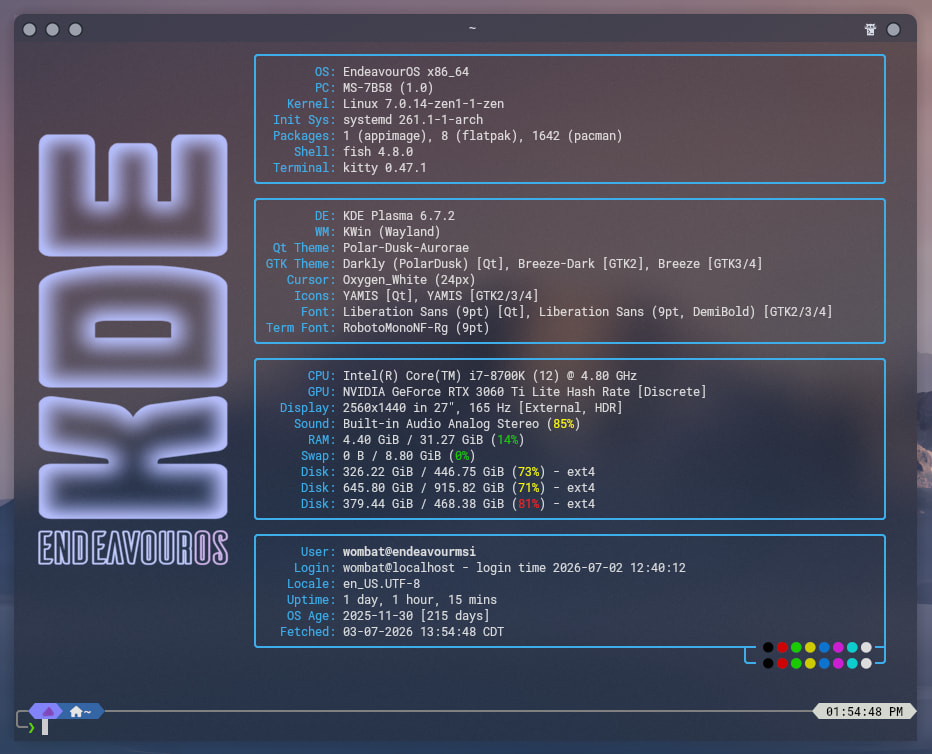
config.jsonc
{
"$schema": "https://github.com/fastfetch-cli/fastfetch/raw/dev/doc/json_schema.json",
"logo": {
"type": "auto",
"source": "/home/wombat/Pictures/Linux/x.png",
"width": 28, // Width in characters (for image logos)
"height": 28, // Height in characters (for image logos)
"padding": {
"top": 6, // Top padding
"left": 3, // Left padding
"right": 3, // Right padding
},
},
"general": {},
"display": {
"brightColor": "false",
"separator": "",
"constants": [
"\u001b[77C", // $1: Move cursor forward 77 columns (adjust if needed)
"\u001b[77D", // $2: Move cursor back 77 columns (not used, defined anyway)
"\u001b[88C", // $3: Move cursor to max width (wide term), or last column (narrow term)
"\u001b[20D", // $4: Move back 20 columns for the color block (both lines)
"───────────────────────────────────────────────────────────────────────────────────────"
],
"key": {
"width": 14
},
},
"modules": [
"break",
{
"type": "custom",
"format": "╭─{$5}─╮",
"outputColor": "38;2;61;174;233"
},
{
"type": "os",
"key": "│ OS:{$1} │",
"keyColor": "38;2;61;174;233",
},
{
"type": "host",
"key": "│ PC:{$1} │",
"keyColor": "38;2;61;174;233"
},
{
"type": "kernel",
"key": "│ Kernel:{$1} │",
"keyColor": "38;2;61;174;233"
},
{
"type": "initsystem",
"key": "│ Init Sys:{$1} │",
"keyColor": "38;2;61;174;233"
},
{
"type": "packages",
"key": "│ Packages:{$1} │",
"keyColor": "38;2;61;174;233"
},
{
"type": "shell",
"key": "│ Shell:{$1} │",
"keyColor": "38;2;61;174;233"
},
{
"type": "terminal",
"key": "│ Terminal:{$1} │",
"keyColor": "38;2;61;174;233"
},
{
"type": "custom",
"format": "╰─{$5}─╯",
"outputColor": "38;2;61;174;233"
},
{
"type": "custom",
"format": "╭─{$5}─╮",
"outputColor": "38;2;61;174;233"
},
{
"type": "de",
"key": "│ DE:{$1} │",
"keyColor": "38;2;61;174;233"
},
{
"type": "wm",
"key": "│ WM:{$1} │",
"keyColor": "38;2;61;174;233"
},
{
"type": "wmtheme",
"key": "│ Qt Theme:{$1} │",
"keyColor": "38;2;61;174;233"
},
{
"type": "theme",
"key": "│ GTK Theme:{$1} │",
"keyColor": "38;2;61;174;233"
},
{
"type": "cursor",
"key": "│ Cursor:{$1} │",
"keyColor": "38;2;61;174;233"
},
{
"type": "icons",
"key": "│ Icons:{$1} │",
"keyColor": "38;2;61;174;233",
//"format": "{2:-47}"
},
{
"type": "font",
"key": "│ Font:{$1} │",
"keyColor": "38;2;61;174;233",
//"format": "{5:-47}"
},
{
"type": "terminalfont",
"key": "│ Term Font:{$1} │",
"keyColor": "38;2;61;174;233"
},
{
"type": "custom",
"format": "╰─{$5}─╯",
"outputColor": "38;2;61;174;233"
},
{
"type": "custom",
"format": "╭─{$5}─╮",
"outputColor": "38;2;61;174;233"
},
{
"type": "cpu",
"key": "│ CPU:{$1} │",
"keyColor": "38;2;61;174;233"
},
{
"type": "gpu",
"key": "│ GPU:{$1} │",
"keyColor": "38;2;61;174;233"
},
{
"type": "display",
"key": "│ Display:{$1} │",
"keyColor": "38;2;61;174;233"
},
{
"type": "sound",
//"format": "{platform-api}/{2} ({3})",
"key": "│ Sound:{$1} │",
"keyColor": "38;2;61;174;233"
},
{
"type": "memory",
"key": "│ RAM:{$1} │",
"keyColor": "38;2;61;174;233"
},
{
"type": "swap",
"key": "│ Swap:{$1} │",
"keyColor": "38;2;61;174;233"
},
{
"type": "disk",
"key": "│ Disk:{$1} │",
"keyColor": "38;2;61;174;233"
},
{
"type": "custom",
"format": "╰─{$5}─╯",
"outputColor": "38;2;61;174;233"
},
{
"type": "custom",
"format": "╭─{$5}─╮",
"outputColor": "38;2;61;174;233"
},
{
"type": "title",
"fqdn": true,
"key": "│ User:{$1} │",
"keyColor": "38;2;61;174;233",
"color": {
"user": "bright_white",
"at": "bright_white",
"host": "bright_white"
}
},
{
"type": "users",
"myselfOnly": true, // Only show current user
"key": "│ Login: {$1}│",
"keyColor": "38;2;61;174;233"
},
{
"type": "locale",
"key": "│ Locale:{$1} │",
"keyColor": "38;2;61;174;233"
},
{
"type": "uptime",
"key": "│ Uptime:{$1} │",
"keyColor": "38;2;61;174;233"
},
{
"type": "disk",
"key": "│ OS Age:{$1} │",
"keyColor": "38;2;61;174;233",
"folders": "/", // Check root filesystem
"format": "{create-time:10} [{days} days]" // Show creation time and age in days
},
{
"type": "datetime",
"key": "│ Fetched: {$1}│",
"keyColor": "38;2;61;174;233",
"format": "{day-pretty}-{month-pretty}-{year} {hour-pretty}:{minute-pretty}:{second-pretty} {timezone-name}"
},
{
"type": "custom",
"format": "╰──{$5}{$4}┬─ {#black} {#red} {#green} {#yellow} {#blue} {#magenta} {#cyan} {#white}{#38;2;61;174;233} ─┤",
"outputColor": "38;2;61;174;233"
},
{
"type": "custom",
"format": " {$3}{$4}╰─ {#bright_black} {#bright_red} {#bright_green} {#bright_yellow} {#bright_blue} {#bright_magenta} {#bright_cyan} {#bright_white}{#reset_default}{#38;2;61;174;233} ─╯",
"outputColor": "38;2;61;174;233"
},
"break",
]
}
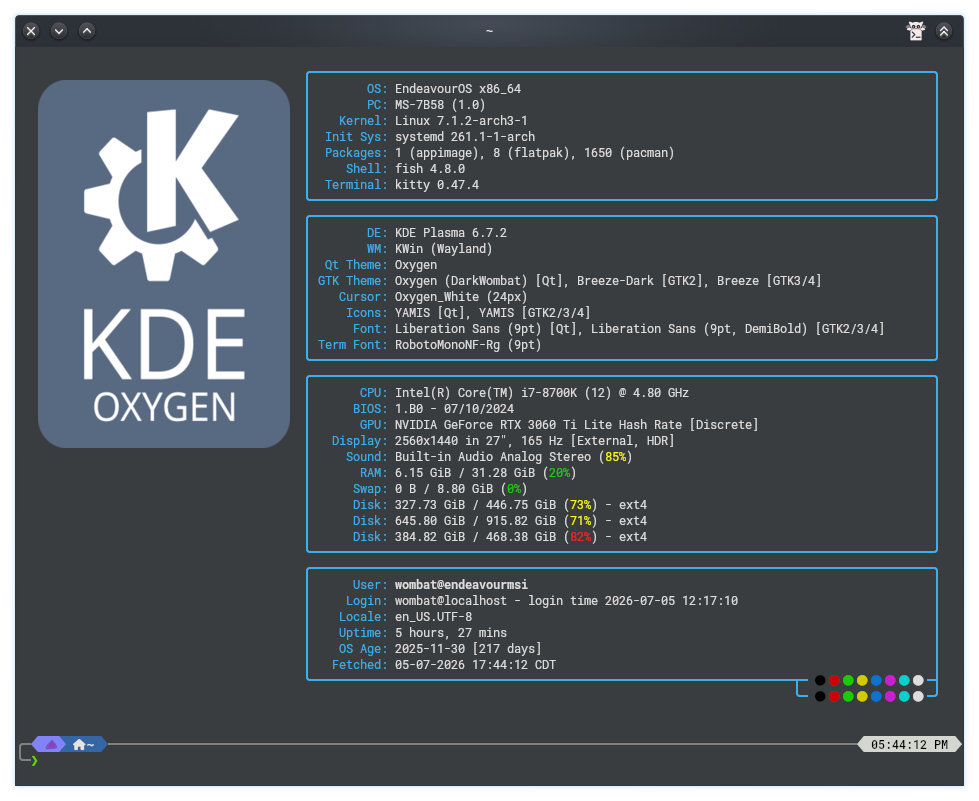
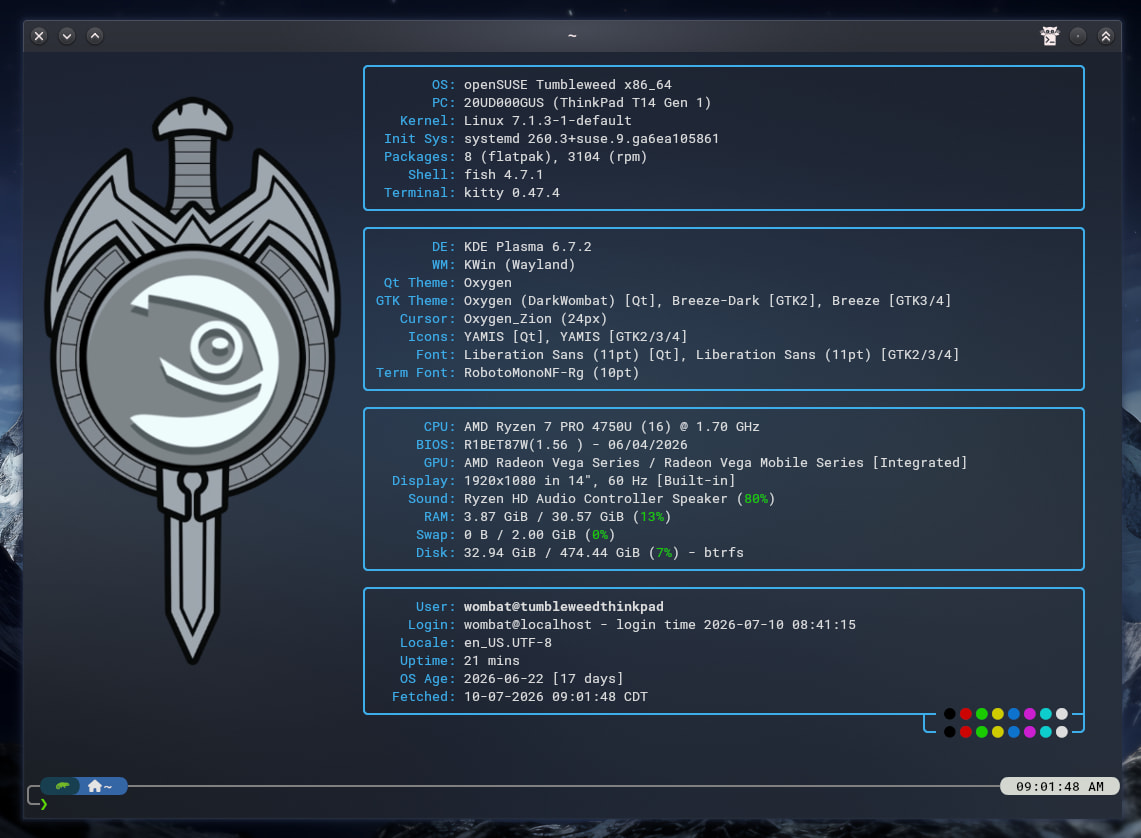
@UncleSpellbinder, would you mind sharing a version without the distro logo?
Thank you so much @UncleSpellbinder
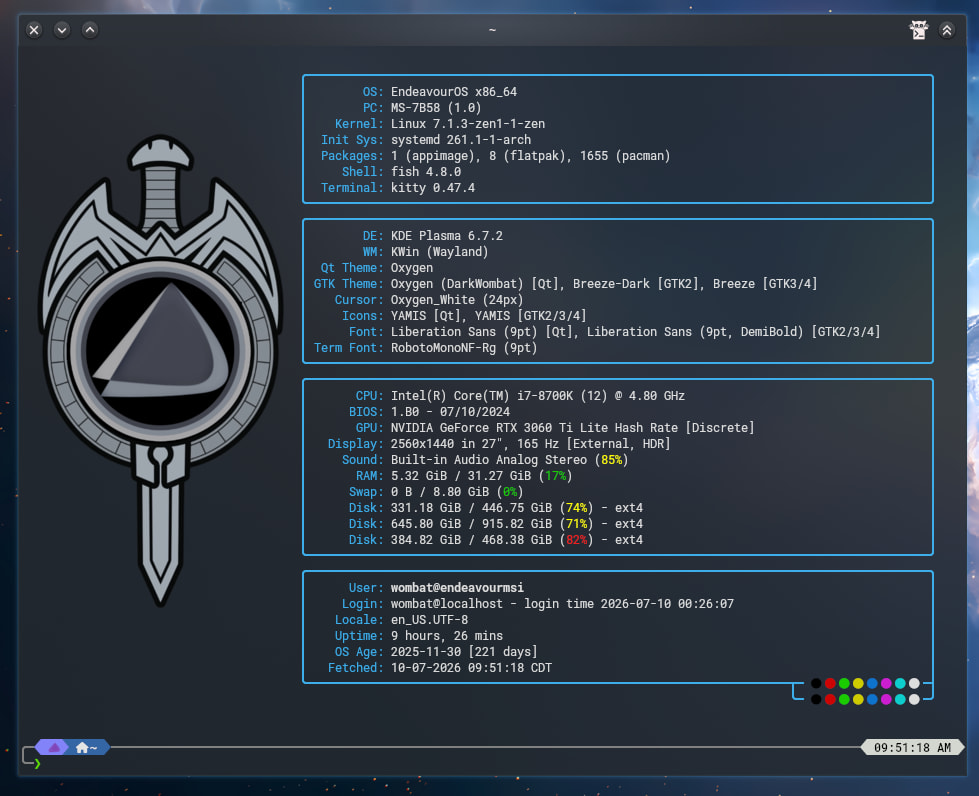
 ). Should’ve used GIMP’s Color to Alpha instead; it probably would’ve given a much better result.
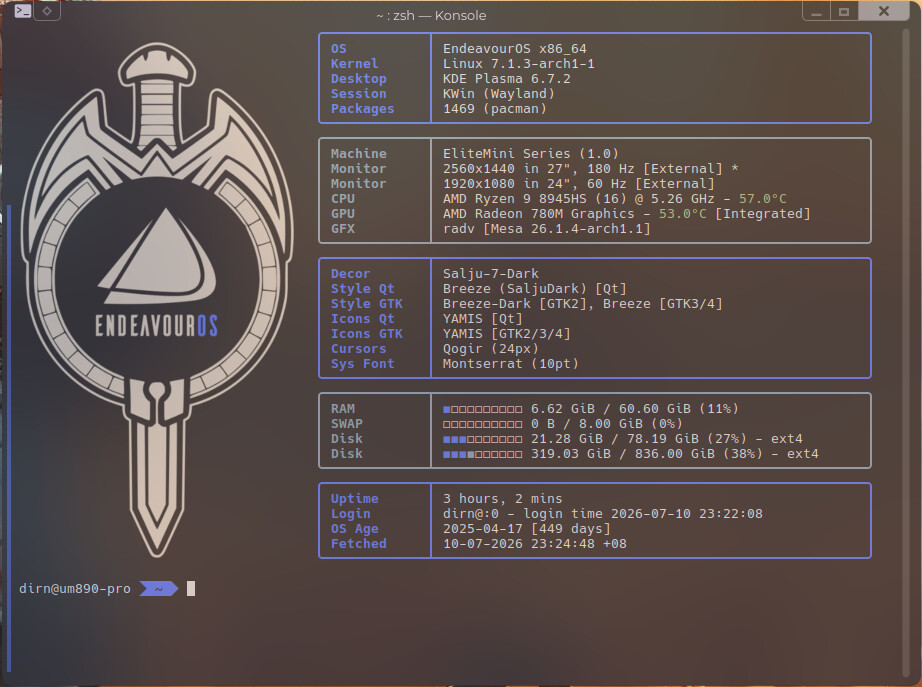

Customized Fastfetch
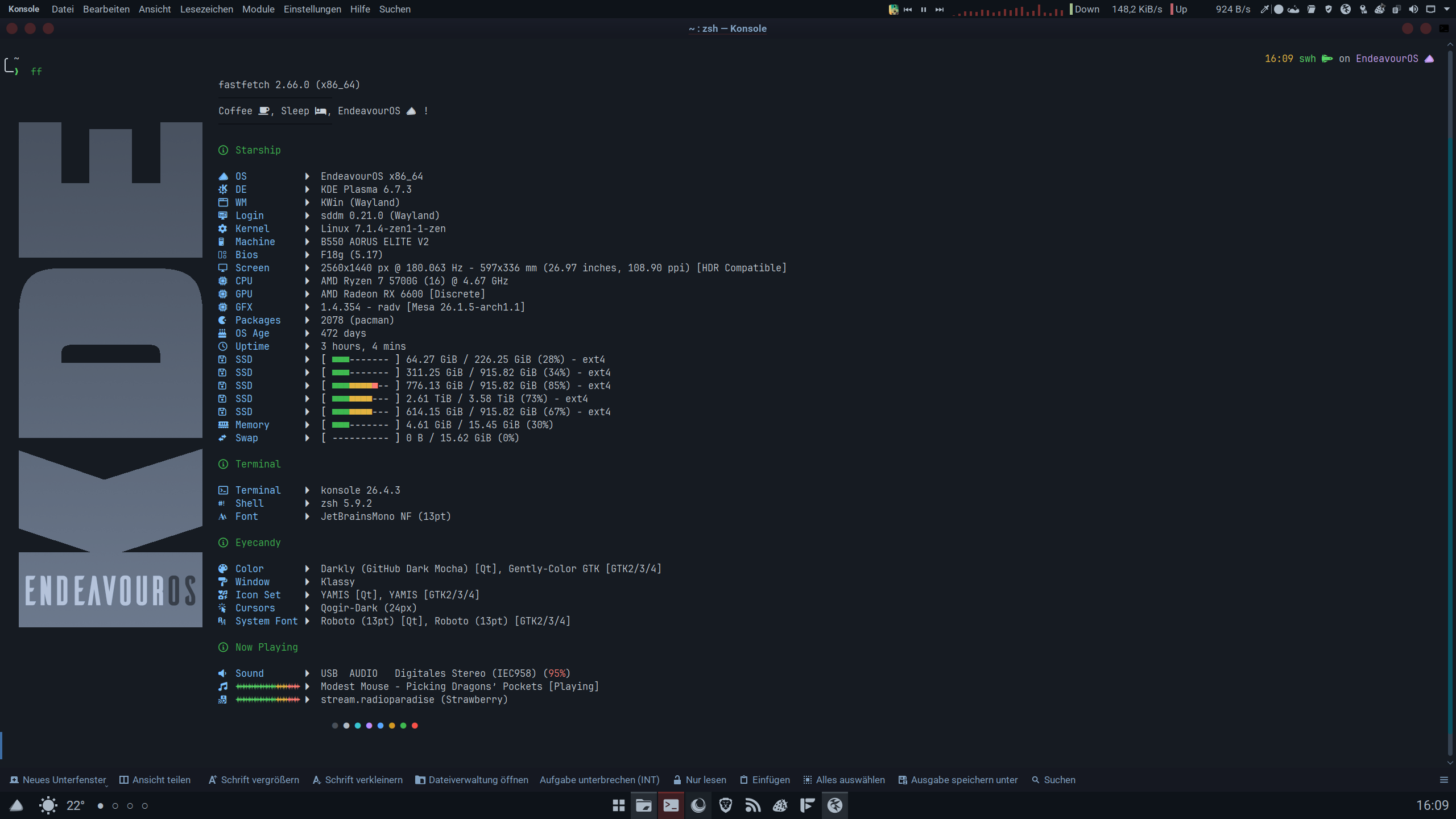
confic.jsonc
//
//
// ░█▀▀░█▀█░█▀▄░█▀▀░█▀█░█░█░█▀█░█░█░█▀▄░░░█▀█░█▀▀
// ░█▀▀░█░█░█░█░█▀▀░█▀█░▀▄▀░█░█░█░█░█▀▄░░░█░█░▀▀█
// ░▀▀▀░▀░▀░▀▀░░▀▀▀░▀░▀░░▀░░▀▀▀░▀▀▀░▀░▀░░░▀▀▀░▀▀▀
// ░░░░░░░█▀▀░█▀█░█▀▀░▀█▀░█▀▀░█▀▀░▀█▀░█▀▀░█░█
// ░░░░░░░█▀▀░█▀█░▀▀█░░█░░█▀▀░█▀▀░░█░░█░░░█▀█
// ░░░░░░░▀░░░▀░▀░▀▀▀░░▀░░▀░░░▀▀▀░░▀░░▀▀▀░▀░▀
//
// Inspired by many and cobbled to swh's needs
{
"$schema": "https://github.com/fastfetch-cli/fastfetch/raw/dev/doc/json_schema.json",
"logo": {
"type": "auto",
"source": "/home/swh/Plasma/EOS/EndeavourOS-Fastfetch-Logos/KDEEos.png",
"padding": {
"top": 2,
"left": 2,
"right": 2
}
},
"display": {
"separator": " "
},
"modules": [
"break",
"break",
"break",
{
"type": "version",
"key": " "
},
{
"type": "custom",
"typeColor": "grey",
"format": "\u001b[30m────────────────────\u001b[0m" // `\u001b` is `\033`, or `\e`
},
{
"type": "custom",
"format": "Coffee , Sleep , EndeavourOS !"
},
{
"type": "custom",
"typeColor": "grey",
"format": "\u001b[30m────────────────────\u001b[0m" // `\u001b` is `\033`, or `\e`
},
"break",
{
"type": "custom",
"format": "\u001b[m{#32} Starship \u001b[0m"
},
"break",
{
"type": "os",
"key": " OS ",
"keyColor": "34",
},
{
"type": "de",
"key": " DE ",
"keyColor": "34",
},
{
"type": "wm",
"key": " WM ",
"keyColor": "34",
},
{
"type": "lm",
"key": " Login " ,
"keyColor": "34"
},
{
"type": "kernel",
"key": " Kernel ",
"keyColor": "34",
},
{
"type": "host",
"key": " Machine ",
"keyColor": "34",
},
{
"type": "bios",
"key": " Bios ",
"keyColor":"34"
},
{
"type": "monitor",
"key": " Screen ",
"keyColor": "34",
},
{
"type": "cpu",
"key": " CPU ",
"keyColor": "34",
},
{
"type": "gpu",
"key": " GPU ",
"keyColor": "34",
},
{
"type": "vulkan",
"key": " GFX ",
"keyColor": "34",
},
{
"type": "packages",
"key": " Packages ",
"keyColor": "34",
},
{
"type": "command",
"key": " OS Age ",
"keyColor": "34",
"text": "birth_install=$(stat -c %W /); current=$(date +%s); time_progression=$((current - birth_install)); days_difference=$((time_progression / 86400)); echo $days_difference days"
},
{
"type": "uptime",
"key": " Uptime ",
"keyColor": "34",
},
{
"type": "disk",
"keyColor": "34",
"key": " SSD ",
"percent": {
"type": 3, // 3 = show number + bar + percentage
"green": 30, // Below 30% usage is green
"yellow": 70 // 30-70% is yellow, >70% is red
},
"bar": {
"width": 20, // Number of characters for the bar
"charElapsed": "■", // Used bar character
"charTotal": "-", // Unused bar character
"borderLeft": "[",
"borderRight": "]"
}
},
{
"type": "memory",
"key": " Memory ",
"keyColor": "34",
"percent": {
"type": 3, // 3 = show number + bar + percentage
"green": 30, // <30% is green
"yellow": 70 // 30-70% is yellow, >70% is red
},
"bar": {
"width": 20, // number of characters in the bar
"charElapsed": "■", // used part of the bar
"charTotal": "-", // unused part of the bar
"borderLeft": "[",
"borderRight": "]"
}
},
{
"type": "swap",
"key": " Swap ",
"keyColor": "34",
"percent": {
"type": 3,
"green": 30,
"yellow": 70
},
"bar": {
"width": 20,
"charElapsed": "■",
"charTotal": "-",
"borderLeft": "[",
"borderRight": "]"
}
},
"break",
{
"type": "custom",
"format": "\u001b[m{#32} Terminal\u001b[0m"
},
"break",
{
"type": "terminal",
"key": " Terminal ",
"keyColor": "34",
},
{
"type": "shell",
"key": " Shell ",
"keyColor": "34",
},
{
"type": "terminalfont",
"key": " Font ",
"keyColor": "34",
},
"break",
{
"type": "custom",
"format": "\u001b[m{#32} Eyecandy \u001b[0m"
},
"break",
{
"type": "theme",
"key": " Color ",
"keyColor": "34",
},
{
"type": "wmtheme",
"key": " Window ",
"keyColor": "34",
},
{
"type": "icons",
"key": " Icon Set ",
"keyColor": "34",
},
{
"type": "cursor",
"key": " Cursors ",
"keyColor": "34",
},
{
"type": "font",
"key": " System Font",
"keyColor": "34",
},
"break",
{
"type": "custom",
"format": "\u001b[m{#32} Now Playing \u001b[0m"
},
"break",
{
"type": "sound",
"key": " Sound ",
"keyColor": "34",
},
{
"type": "media",
"key": " {#32}{#32}{#32}{#32}{#32}{#32}{#32}{#33}{#33}{#31}{#31}",
"keyColor": "34",
},
{
"type": "player",
"key": " {#32}{#32}{#32}{#32}{#32}{#32}{#32}{#33}{#33}{#31}{#31}",
"keyColor": "34",
},
"break",
{
"type": "colors",
"paddingLeft": 20,
"symbol": "circle"
},
"break",
]
}
I suggest rename it to “Show your fatsfetch config!”
2 year old post that people can easily find, why change it?
I found it only from DIscource suggesions, when planned open new topic with similar sence
That sounds like a you issue, as I said this is easy to find.