How customise fasftech?
When I first started I found the easiest way for me was to put one of the example configs I was given in to the fastfetch folder I’d created in..

There are lots of example configs in this thread, just copy one in to a text file and name it config.jsonc.
Once you get the hang of things you may want to change paths to image files if you want a snazzy logo, don’t worry about that to start with though. Just have a scroll through examples in this thread and you should be good to go.
You can mess around adding/removing things by editing the config in Kate so if it goes wrong you can easily revert any changes you made.
Here’s an example of a config.jsonc…
// _____ _ ___ ____
// | ____|_ __ __| | ___ __ ___ _____ _ _ _ __ / _ \/ ___|
// | _| | '_ \ / _` |/ _ \/ _` \ \ / / _ \| | | | '__| | | \___ \
// | |___| | | | (_| | __| (_| |\ V | (_) | |_| | | | |_| |___) |
// |_____|_| |_|\__,_|\___|\__,_| \_/ \___/ \__,_|_| \___/|____/
// | _____ _ ___| |_ / _| ___| |_ ___| |__
// | |_ / _` / __| __| |_ / _ | __/ __| '_ \
// | _| (_| \__ | |_| _| __| || (__| | | |
// |_| \__,_|___/\__|_| \___|\__\___|_| |_|
//
// Inspired by the great EndeavourOS community and cobbled together by me.
{
"$schema": "https://github.com/fastfetch-cli/fastfetch/raw/dev/doc/json_schema.json",
"logo": {
"type": "auto",
"source": "/home/jon/Customisation/EnOS Fastfetch Logos/EOS Noodly Pixel Ship+Shadow.png",
"height": 36,
"padding": {
"top": 12,
"left": 0,
"right": 0
}
},
"display": {
"color": {
"keys": ""
},
"separator": "",
"constants": [
"─────────────────────────────────────────────────────────────────────", // {$1} - horizontal line for borders
"\u001b[70D", // {$2} - move cursor left 55 columns
"\u001b[70C", // {$3} - move cursor right 55 columns
"\u001b[69C" // {$4} - move cursor right 54 columns
],
"brightColor": false,
"bar": {
"width": 10, // Width of percentage bars
"border": {
"left":"",
"right": ""
},
"char": {
"elapsed": "●", // Character for elapsed portion
// "elapsed": "■", // Character for elapsed portion
"total": "" // Character for total portion
}
},
"percent": {
"type": 9, // 1=number, 2=bar, 3=both, 9=colored number
"color": {
"green": "green",
"yellow": "light_yellow",
"red": "light_red"
}
}
}, "modules": [
"break",
{
"type": "custom",
"key": " {#34} F {#34}A {#34}S {#34}T {#34}F {#34}E {#34}T {#34}C {#34}H "
},
"break",
{
"type": "custom",
"key": " {#37}┌─────────────┬{$1}┐{#keys} \u001b[37D",
"format": ""
},
{
"type": "os",
"key": " {#37}│{#35} OS {#37}│{$4}│{#keys} {$2}"
},
{
"type": "kernel",
"key": " {#37}│{#35} Kernel {#37}│{$4}│{#keys} {$2}"
},
{
"type": "de",
"key": " {#37}│{#35} Desktop {#37}│{$4}│{#keys} {$2}"
},
{
"type": "wm",
"key": " {#37}│{#35} Session {#37}│{$4}│{#keys} {$2}"
},
{
"type": "initsystem",
"key": " {#37}│{#35} INIT System {#37}│{$4}│{#keys} {$2}"
},
{
"type": "packages",
"key": " {#37}│{#35} Packages {#37}│{$4}│{#keys} {$2}"
},
{
"type": "processes",
"key": " {#37}│{#35} Processes {#37}│{$4}│{#keys} {$2}"
},
{
"type": "custom",
"key": " {#37}└─────────────┴{$1}┘{#keys} ",
"format": ""
},
{
"type": "custom",
"key": " {#37}┌─────────────┬{$1}┐{#keys} \u001b[37D",
"format": ""
},
{
"type": "host",
"key": " {#37}│{#34} Machine {#37}│{$4}│{#keys} {$2}"
},
{
"type": "display",
"key": " {#37}│{#34} Monitor {#37}│{$4}│{#keys} {$2}"
},
{
"type": "cpu",
"key": " {#37}│{#34} CPU {#37}│{$4}│{#keys} {$2}",
"format": "{name} @{freq-max} {temperature}",
"temp": true,
"showPeCoreCount": false
},
{
"type": "gpu",
"key": " {#37}│{#34} GPU {#37}│{$4}│{#keys} {$2}",
//"format": "{name} {temperature}",
"temp": true
},
{
"type": "gpu",
"key": " {#37}│{#34} G Driver {#37}│{$4}│{#keys} {$2}",
"format": "{driver}"
},
{
"type": "vulkan",
"key": " {#37}│{#34} Vulkan {#37}│{$4}│{#keys} {$2}"
},
{
"type": "board",
"key": " {#37}│{#34} Motherboard {#37}│{$4}│{#keys} {$2}"
},
{
"type": "bios",
"key": " {#37}│{#34} Bios {#37}│{$4}│{#keys} {$2}"
},
{
"type": "custom",
"key": " {#37}└─────────────┴{$1}┘{#keys} ",
"format": ""
},
// Hardware section with cyan color theme
{
"type": "custom",
"key": " {#37}┌─────────────┬{$1}┐{#keys} \u001b[37D",
"format": ""
},
{
"type": "memory",
"key": " {#37}│{#35} RAM {#37}│{$4}│{#keys} {$2}",
"keyColor": "34",
"percent": {
"type": 3, // 3 = show number + bar + percentage
"green": 30, // <30% is green
"yellow": 70 // 30-70% is yellow, >70% is red
}
},
{
"type": "swap",
"key": " {#37}│{#35} SWAP {#37}│{$4}│{#keys} {$2}",
"keyColor": "34",
"percent": {
"type": 3,
"green": 30,
"yellow": 70
}
},
{
"type": "disk",
"keyColor": "34",
"key": " {#37}│{#35} Disk {#37}│{$4}│{#keys} {$2}",
"percent": {
"type": 3, // 3 = show number + bar + percentage
"green": 30, // Below 30% usage is green
"yellow": 70 // 30-70% is yellow, >70% is red
}
},
{
"type": "custom",
"key": " {#37}└─────────────┴{$1}┘{#keys} ",
"format": ""
},
{
"type": "custom",
"key": " {#37}┌─────────────┬{$1}┐{#keys} \u001b[37D",
"format": ""
},
{
"type": "shell",
"key": " {#37}│{#34} Shell {#37}│{$4}│{#keys} {$2}"
},
{
"type": "terminal",
"key": " {#37}│{#34} Terminal {#37}│{$4}│{#keys} {$2}"
},
{
"type": "terminalfont",
"key": " {#37}│{#34} Term Font {#37}│{$4}│{#keys} {$2}"
},
{
"type": "terminaltheme",
"key": " {#37}│{#34} Term Theme {#37}│{$4}│{#keys} {$2}"
},
{
"type": "custom",
"key": " {#37}└─────────────┴{$1}┘{#keys} ",
"format": ""
},
{
"type": "custom",
"key": " {#37}┌─────────────┬{$1}┐{#keys} \u001b[37D",
"format": ""
},
{
"type": "theme",
"key": " {#37}│{#35} Style (Qt) {#37}│{$4}│{#keys} {$2}",
"format": "{theme1}"
},
{
"type": "theme",
"key": " {#37}│{#35} Style (GTK) {#37}│{$4}│{#keys} {$2}",
"format": "{theme2}"
},
{
"type": "wmtheme",
"key": " {#37}│{#35} Decor {#37}│{$4}│{#keys} {$2}"
},
{
"type": "icons",
"key": " {#37}│{#35} Icons {#37}│{$4}│{#keys} {$2}"
},
{
"type": "cursor",
"key": " {#37}│{#35} Cursors {#37}│{$4}│{#keys} {$2}"
},
{
"type": "font",
"key": " {#37}│{#35} System Font {#37}│{$4}│{#keys} {$2}"
},
{
"type": "wallpaper",
"key": " {#37}│{#35} Wallpaper {#37}│{$4}│{#keys} {$2}"
},
{
"type": "custom",
"key": " {#37}└─────────────┴{$1}┘{#keys} ",
"format": ""
},
{
"type": "custom",
"key": " {#37}┌─────────────┬{$1}┐{#keys} \u001b[37D",
"format": ""
},
{
"type": "uptime",
"key": " {#37}│{#34} Uptime Funk {#37}│{$4}│{#keys} {$2}"
},
{
"type": "users",
"myselfOnly": true, // Only show current user
"key": " {#37}│{#34} Login {#37}│{$4}│{#keys} {$2}"
},
{
"type": "disk",
"key": " {#37}│{#34} OS Age {#37}│{$4}│{#keys} {$2}",
"folders": "/", // Check root filesystem
"format": "{create-time:10} [{days} days]" // Show creation time and age in days
},
{
"type": "datetime",
"key": " {#37}│{#34} Fetched {#37}│{$4}│{#keys} {$2}",
"format": "{day-pretty}-{month-pretty}-{year} {hour-pretty}:{minute-pretty}:{second-pretty} {timezone-name}"
},
{
"type": "version",
"key": " {#37}│{#34} FF Version {#37}│{$4}│{#keys} {$2}"
},
{
"type": "locale",
"key": " {#37}│{#34} Locale {#37}│{$4}│{#keys} {$2}"
},
{
"type": "custom",
"key": " {#37}└─────────────┴{$1}┘{#keys} ",
"format": ""
},
{
"type": "custom",
"key": " {#37}┌─────────────┬{$1}┐{#keys}\u001b[37D",
"format": ""
},
{
"type": "wifi",
"key": " {#37}│{#35} Interweb {#37}│{$4}│{#keys} {$2}"
},
{
"type": "bluetooth",
"key": " {#37}│{#35} Bluetooth {#37}│{$4}│{#keys} {$2}"
},
{
"type": "custom",
"key": " {#37}└─────────────┴{$1}┘{#keys} ",
"format": ""
},
{
"type": "custom",
"key": " {#37}┌─────────────┬{$1}┐{#keys}\u001b[37D",
"format": ""
},
{
"type": "sound",
"key": " {#37}│{#34} Sound {#37}│{$4}│{#keys} {$2}",
//"keyColor": "blue",
"percent": {
"type": 3, // 3 = show number + bar + percentage
"green": 25, // <30% is green
"yellow": 70 // 30-60% is yellow, >60% is red
}
},
{
"type": "camera",
"key": " {#37}│{#34} Webcam {#37}│{$4}│{#keys} {$2}"
},
{
"type": "custom",
"key": " {#37}└─────────────┴{$1}┘{#keys} ",
"format": ""
},
"break",
{
"type": "custom",
"key": " {#31} {#32} {#33} {#34} {#35} {#36} {#37} "
}
]
}
Also, make sure you have a nerd font installed. yay -S ttf-jetbrains-mono-nerd. This will ensure the fetch displays stuff correctly.
I would delete the part where the image is located. That’s too confusing for a beginner
Yeh, just ignore that bit when starting out. You’ll still get a logo but it will be ASCII. 
That’s enough for a beginner.
He should start by installing the modules and see how he gets along with them. There are plenty of instructions in this thread
Wow, you have turned fastfetch into bpytop
It wasn’t on purpose … LOL
My latest fastfetch based on Triton Dark konsole colorscheme
fastfetch config.jsonc
//
//
// ░█▀▀░█▀█░█▀▄░█▀▀░█▀█░█░█░█▀█░█░█░█▀▄░░░█▀█░█▀▀
// ░█▀▀░█░█░█░█░█▀▀░█▀█░▀▄▀░█░█░█░█░█▀▄░░░█░█░▀▀█
// ░▀▀▀░▀░▀░▀▀░░▀▀▀░▀░▀░░▀░░▀▀▀░▀▀▀░▀░▀░░░▀▀▀░▀▀▀
// ░░░░░░░█▀▀░█▀█░█▀▀░▀█▀░█▀▀░█▀▀░▀█▀░█▀▀░█░█
// ░░░░░░░█▀▀░█▀█░▀▀█░░█░░█▀▀░█▀▀░░█░░█░░░█▀█
// ░░░░░░░▀░░░▀░▀░▀▀▀░░▀░░▀░░░▀▀▀░░▀░░▀▀▀░▀░▀
//
// Inspired by many and cobbled to swh's needs
{
"$schema": "https://github.com/fastfetch-cli/fastfetch/raw/dev/doc/json_schema.json",
"logo": {
"type": "auto",
"source": "/home/swh/Plasma/EOS/EndeavourOS-Fastfetch-Logos/KDEEos.png",
"padding": {
"top": 4,
"left": 2,
"right": 2
}
},
"display": {
"separator": " "
},
"modules": [
{
"type": "version",
"key": " "
},
{
"type": "custom",
"typeColor": "grey",
"format": "\u001b[30m────────────────────\u001b[0m" // `\u001b` is `\033`, or `\e`
},
{
"type": "custom",
"format": "Coffee , Sleep , EndeavourOS !"
},
{
"type": "custom",
"typeColor": "grey",
"format": "\u001b[30m────────────────────\u001b[0m" // `\u001b` is `\033`, or `\e`
},
"break",
{
"type": "custom",
"format": "\u001b[m{#32} System \u001b[0m"
},
"break",
{
"type": "os",
"key": " OS ",
"keyColor": "34",
},
{
"type": "de",
"key": " DE ",
"keyColor": "34",
},
{
"type": "wm",
"key": " WM ",
"keyColor": "34",
},
{
"type": "lm",
"key": " Login " ,
"keyColor": "34"
},
{
"type": "kernel",
"key": " Kernel ",
"keyColor": "34",
},
{
"type": "packages",
"key": " Packages ",
"keyColor": "34",
},
"break",
{
"type": "custom",
"format": "\u001b[m{#32} Terminal\u001b[0m"
},
"break",
{
"type": "terminal",
"key": " Terminal ",
"keyColor": "34",
},
{
"type": "shell",
"key": " Shell ",
"keyColor": "34",
},
{
"type": "terminalfont",
"key": " Font ",
"keyColor": "34",
},
"break",
{
"type": "custom",
"format": "\u001b[m{#32} Eyecandy \u001b[0m"
},
"break",
{
"type": "theme",
"key": " Color ",
"keyColor": "34",
},
{
"type": "wmtheme",
"key": " Window ",
"keyColor": "34",
},
{
"type": "icons",
"key": " Icon Set ",
"keyColor": "34",
},
{
"type": "cursor",
"key": " Cursors ",
"keyColor": "34",
},
{
"type": "font",
"key": " System Font",
"keyColor": "34",
},
"break",
{
"type": "custom",
"format": "\u001b[m{#32} Starship \u001b[0m"
},
"break",
{
"type": "host",
"key": " Machine ",
"keyColor": "34",
},
{
"type": "bios",
"key": " Bios ",
"keyColor":"34"
},
{
"type": "monitor",
"key": " Screen ",
"keyColor": "34",
},
{
"type": "cpu",
"key": " CPU ",
"keyColor": "34",
},
{
"type": "gpu",
"key": " GPU ",
"keyColor": "34",
},
{
"type": "vulkan",
"key": " GFX ",
"keyColor": "34",
},
{
"type": "disk",
"keyColor": "34",
"key": " SSD ",
"percent": {
"type": 3, // 3 = show number + bar + percentage
"green": 30, // Below 30% usage is green
"yellow": 70 // 30-70% is yellow, >70% is red
},
"bar": {
"width": 20, // Number of characters for the bar
"charElapsed": "■", // Used bar character
"charTotal": "-", // Unused bar character
"borderLeft": "[",
"borderRight": "]"
}
},
{
"type": "memory",
"key": " Memory ",
"keyColor": "34",
"percent": {
"type": 3, // 3 = show number + bar + percentage
"green": 30, // <30% is green
"yellow": 70 // 30-70% is yellow, >70% is red
},
"bar": {
"width": 20, // number of characters in the bar
"charElapsed": "■", // used part of the bar
"charTotal": "-", // unused part of the bar
"borderLeft": "[",
"borderRight": "]"
}
},
{
"type": "swap",
"key": " Swap ",
"keyColor": "34",
"percent": {
"type": 3,
"green": 30,
"yellow": 70
},
"bar": {
"width": 20,
"charElapsed": "■",
"charTotal": "-",
"borderLeft": "[",
"borderRight": "]"
}
},
{
"type": "uptime",
"key": " Uptime ",
"keyColor": "34",
},
{
"type": "command",
"key": " OS Age ",
"keyColor": "34",
"text": "birth_install=$(stat -c %W /); current=$(date +%s); time_progression=$((current - birth_install)); days_difference=$((time_progression / 86400)); echo $days_difference days"
},
"break",
{
"type": "custom",
"format": "\u001b[m{#32} Now Playing \u001b[0m"
},
"break",
{
"type": "sound",
"key": " Sound ",
"keyColor": "34",
},
{
"type": "media",
"key": " {#32}{#32}{#32}{#32}{#32}{#32}{#32}{#33}{#33}{#31}{#31}",
"keyColor": "34",
},
{
"type": "player",
"key": " {#32}{#32}{#32}{#32}{#32}{#32}{#32}{#33}{#33}{#31}{#31}",
"keyColor": "34",
},
"break",
{
"type": "colors",
"paddingLeft": 20,
"symbol": "circle"
},
"break",
"break",
]
}

Blimmin’ marvelous  ing
ing
Yesss nice ing, i like it too 
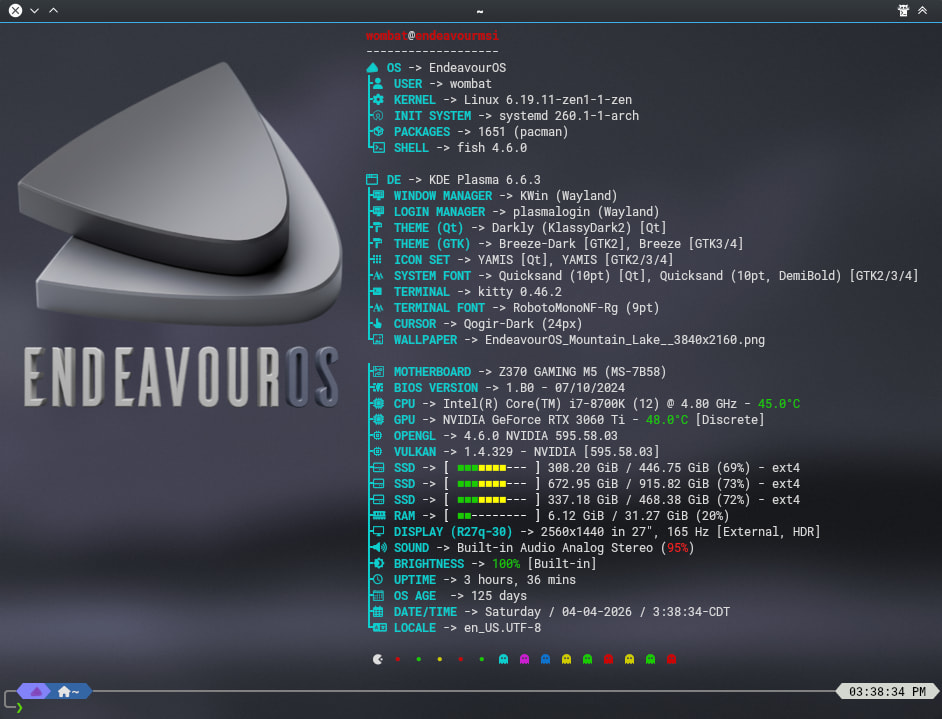

Did some noodling around with my config. 

// _____ _ ___ ____
// | ____|_ __ __| | ___ __ ___ _____ _ _ _ __ / _ \/ ___|
// | _| | '_ \ / _` |/ _ \/ _` \ \ / / _ \| | | | '__| | | \___ \
// | |___| | | | (_| | __| (_| |\ V | (_) | |_| | | | |_| |___) |
// |_____|_| |_|\__,_|\___|\__,_| \_/ \___/ \__,_|_| \___/|____/
// | _____ _ ___| |_ / _| ___| |_ ___| |__
// | |_ / _` / __| __| |_ / _ | __/ __| '_ \
// | _| (_| \__ | |_| _| __| || (__| | | |
// |_| \__,_|___/\__|_| \___|\__\___|_| |_|
//
// Inspired by the great EndeavourOS community and cobbled together by me.
{
"$schema": "https://github.com/fastfetch-cli/fastfetch/raw/dev/doc/json_schema.json",
"logo": {
"type": "auto",
"source": "/home/jon/Customisation/EnOS Fastfetch Logos/EnOS Noodly Binary Sunset+.png",
"height": 34,
"padding": {
"top": 12,
"left": 4,
"right": 4
}
},
"display": {
"color": {
"keys": ""
},
"separator": "",
"constants": [
"────────────────────────────────────────────────────────────────────", // {$1} - horizontal line for borders
"\u001b[69D", // {$2} - move cursor left 55 columns
"\u001b[69C", // {$3} - move cursor right 55 columns
"\u001b[68C" // {$4} - move cursor right 54 columns
],
"brightColor": false,
"bar": {
"width": 10, // Width of percentage bars
"border": {
"left":"",
"right": ""
},
"char": {
"elapsed": "●", // Character for elapsed portion
// "elapsed": "■", // Character for elapsed portion
"total": "" // Character for total portion
}
},
"percent": {
"type": 9, // 1=number, 2=bar, 3=both, 9=colored number
"color": {
"green": "green",
"yellow": "light_yellow",
"red": "light_red"
}
}
}, "modules": [
"break",
{
"type": "custom",
"key": " {#34}┌─────────────┬{$1}┐{#keys} \u001b[37D",
"format": ""
},
{
"type": "os",
"key": " {#34}│{#35} OS {#34}│{$4}│{#keys} {$2}",
},
{
"type": "kernel",
"key": " {#34}│{#35} Kernel {#34}│{$4}│{#keys} {$2}"
},
{
"type": "de",
"key": " {#34}│{#35} Desktop {#34}│{$4}│{#keys} {$2}"
},
{
"type": "wm",
"key": " {#34}│{#35} Session {#34}│{$4}│{#keys} {$2}"
},
{
"type": "initsystem",
"key": " {#34}│{#35} INIT System {#34}│{$4}│{#keys} {$2}"
},
{
"type": "packages",
"key": " {#34}│{#35} Packages {#34}│{$4}│{#keys} {$2}"
},
{
"type": "processes",
"key": " {#34}│{#35} Processes {#34}│{$4}│{#keys} {$2}"
},
{
"type": "custom",
"key": " {#34}└─────────────┴{$1}┘{#keys} ",
"format": ""
},
{
"type": "custom",
"key": " {#34}┌─────────────┬{$1}┐{#keys} \u001b[37D",
"format": ""
},
{
"type": "host",
"key": " {#34}│{#35} Machine {#34}│{$4}│{#keys} {$2}"
},
{
"type": "display",
"key": " {#34}│{#35} Monitor {#34}│{$4}│{#keys} {$2}"
},
{
"type": "cpu",
"key": " {#34}│{#35} CPU {#34}│{$4}│{#keys} {$2}",
"format": "{name} @{freq-max} {temperature}",
"temp": true,
"showPeCoreCount": false
},
{
"type": "gpu",
"key": " {#34}│{#35} GPU {#34}│{$4}│{#keys} {$2}",
//"format": "{name} {temperature}",
"temp": true
},
{
"type": "gpu",
"key": " {#34}│{#35} G Driver {#34}│{$4}│{#keys} {$2}",
"format": "{driver}"
},
{
"type": "vulkan",
"key": " {#34}│{#35} Vulkan {#34}│{$4}│{#keys} {$2}"
},
{
"type": "board",
"key": " {#34}│{#35} Motherboard {#34}│{$4}│{#keys} {$2}"
},
{
"type": "bios",
"key": " {#34}│{#35} Bios {#34}│{$4}│{#keys} {$2}"
},
{
"type": "custom",
"key": " {#34}└─────────────┴{$1}┘{#keys} ",
"format": ""
},
// Hardware section with cyan color theme
{
"type": "custom",
"key": " {#34}┌─────────────┬{$1}┐{#keys} \u001b[37D",
"format": ""
},
{
"type": "memory",
"key": " {#34}│{#35} RAM {#34}│{$4}│{#keys} {$2}",
"keyColor": "34",
"percent": {
"type": 3, // 3 = show number + bar + percentage
"green": 30, // <30% is green
"yellow": 70 // 30-70% is yellow, >70% is red
}
},
{
"type": "swap",
"key": " {#34}│{#35} SWAP {#34}│{$4}│{#keys} {$2}",
"keyColor": "34",
"percent": {
"type": 3,
"green": 30,
"yellow": 70
}
},
{
"type": "disk",
"keyColor": "34",
"key": " {#34}│{#35} Disk {#34}│{$4}│{#keys} {$2}",
"percent": {
"type": 3, // 3 = show number + bar + percentage
"green": 30, // Below 30% usage is green
"yellow": 70 // 30-70% is yellow, >70% is red
}
},
{
"type": "custom",
"key": " {#34}└─────────────┴{$1}┘{#keys} ",
"format": ""
},
{
"type": "custom",
"key": " {#34}┌─────────────┬{$1}┐{#keys} \u001b[37D",
"format": ""
},
{
"type": "shell",
"key": " {#34}│{#35} Shell {#34}│{$4}│{#keys} {$2}"
},
{
"type": "terminal",
"key": " {#34}│{#35} Terminal {#34}│{$4}│{#keys} {$2}"
},
{
"type": "terminalfont",
"key": " {#34}│{#35} Term Font {#34}│{$4}│{#keys} {$2}"
},
{
"type": "terminaltheme",
"key": " {#34}│{#35} Term Theme {#34}│{$4}│{#keys} {$2}"
},
{
"type": "custom",
"key": " {#34}└─────────────┴{$1}┘{#keys} ",
"format": ""
},
{
"type": "custom",
"key": " {#34}┌─────────────┬{$1}┐{#keys} \u001b[37D",
"format": ""
},
{
"type": "theme",
"key": " {#34}│{#35} Style (Qt) {#34}│{$4}│{#keys} {$2}",
"format": "{theme1}"
},
{
"type": "theme",
"key": " {#34}│{#35} Style (GTK) {#34}│{$4}│{#keys} {$2}",
"format": "{theme2}"
},
{
"type": "wmtheme",
"key": " {#34}│{#35} Decor {#34}│{$4}│{#keys} {$2}"
},
{
"type": "icons",
"key": " {#34}│{#35} Icons {#34}│{$4}│{#keys} {$2}"
},
{
"type": "cursor",
"key": " {#34}│{#35} Cursors {#34}│{$4}│{#keys} {$2}"
},
{
"type": "font",
"key": " {#34}│{#35} System Font {#34}│{$4}│{#keys} {$2}"
},
{
"type": "wallpaper",
"key": " {#34}│{#35} Wallpaper {#34}│{$4}│{#keys} {$2}"
},
{
"type": "custom",
"key": " {#34}└─────────────┴{$1}┘{#keys} ",
"format": ""
},
{
"type": "custom",
"key": " {#34}┌─────────────┬{$1}┐{#keys} \u001b[37D",
"format": ""
},
{
"type": "uptime",
"key": " {#34}│{#35} Uptime Funk {#34}│{$4}│{#keys} {$2}"
},
{
"type": "disk",
"key": " {#34}│{#35} OS Age {#34}│{$4}│{#keys} {$2}",
"folders": "/", // Check root filesystem
"format": "{create-time:10} [{days} days]" // Show creation time and age in days
},
{
"type": "datetime",
"key": " {#34}│{#35} Fetched {#34}│{$4}│{#keys} {$2}",
"format": "{day-pretty}-{month-pretty}-{year} {hour-pretty}:{minute-pretty}:{second-pretty} {timezone-name}"
},
{
"type": "version",
"key": " {#34}│{#35} FF Version {#34}│{$4}│{#keys} {$2}"
},
{
"type": "custom",
"key": " {#34}└─────────────┴{$1}┘{#keys} ",
"format": ""
},
{
"type": "custom",
"key": " {#34}┌─────────────┬{$1}┐{#keys}\u001b[37D",
"format": ""
},
{
"type": "wifi",
"key": " {#34}│{#35} Interweb {#34}│{$4}│{#keys} {$2}"
},
{
"type": "bluetooth",
"key": " {#34}│{#35} Bluetooth {#34}│{$4}│{#keys} {$2}"
},
{
"type": "sound",
"key": " {#34}│{#35} Sound {#34}│{$4}│{#keys} {$2}",
//"keyColor": "blue",
"percent": {
"type": 3, // 3 = show number + bar + percentage
"green": 25, // <30% is green
"yellow": 70 // 30-60% is yellow, >60% is red
}
},
{
"type": "camera",
"key": " {#34}│{#35} Webcam {#34}│{$4}│{#keys} {$2}"
},
{
"type": "custom",
"key": " {#34}└─────────────┴{$1}┘{#keys} ",
"format": ""
},
"break",
{
"type": "custom",
"key": " {#31} ░░░░ {#32} ░░░░ {#33} ░░░░ {#34} ░░░░ {#35} ░░░░ {#36} ░░░░ {#37} ░░░░ "
}
]
}


Thx to all of you guys (and to AI’s awesomeness) I managed to finally finish my (win11) fastfetch setup 
I wanted to make it work with my stylish dragon.jpeg and also tried converting jpeg to png but to no avail, it wouldn’t show it properly and when it did, it messed up the whole setup. Then I tried converting to sixel but same sh1t happened. Finally I converted it to .ans using “asciiart.eu” tools but it was way too big of an ascii art and I had to drop it and go w/ something else 
Anyway here’s the screenshot of it + my files if you have the will and time to help a delusional “vibe script kiddo” like me
\Documents\Powershell\powershell.config.json
{
    "$help": "https://aka.ms/terminal-documentation",
    "$schema": "https://aka.ms/terminal-profiles-schema",
    "actions":
    [
        {
            "command":
            {
                "action": "copy",
                "singleLine": false
            },
            "id": "User.copy.644BA8F2"
        },
        {
            "command": "paste",
            "id": "User.paste"
        },
        {
            "command": "find",
            "id": "User.find"
        },
        {
            "command":
            {
                "action": "splitPane",
                "split": "auto",
                "splitMode": "duplicate"
            },
            "id": "User.splitPane.A6751878"
        }
    ],
    "alwaysOnTop": false,
    "copyFormatting": "none",
    "copyOnSelect": false,
    "defaultProfile": "{61c54bbd-c2c6-5271-96e7-009a87ff44bf}",
    "keybindings":
    [
        {
            "id": "User.copy.644BA8F2",
            "keys": "ctrl+c"
        },
        {
            "id": "User.find",
            "keys": "ctrl+shift+f"
        },
        {
            "id": "User.paste",
            "keys": "ctrl+v"
        },
        {
            "id": "User.splitPane.A6751878",
            "keys": "alt+shift+d"
        }
    ],
    "newTabMenu":
    [
        {
            "type": "remainingProfiles"
        }
    ],
    "profiles":
    {
        "defaults":
        {
            "colorScheme": "Catppuccin Mocha",
            "cursorShape": "filledBox",
            "experimental.retroTerminalEffect": false,
            "font":
            {
                "builtinGlyphs": true,
                "cellHeight": "1.2",
                "colorGlyphs": true,
                "face": "JetBrainsMono Nerd Font Mono",
                "size": 10,
                "weight": "extra-black"
            },
            "intenseTextStyle": "all",
            "opacity": 80,
            "padding": "8",
            "useAcrylic": true
        },
        "list":
        [
            {
                "commandline": "%SystemRoot%\\System32\\WindowsPowerShell\\v1.0\\powershell.exe",
                "guid": "{61c54bbd-c2c6-5271-96e7-009a87ff44bf}",
                "hidden": false,
                "name": "Windows PowerShell"
            },
            {
                "commandline": "%SystemRoot%\\System32\\cmd.exe",
                "guid": "{0caa0dad-35be-5f56-a8ff-afceeeaa6101}",
                "hidden": false,
                "name": "Command Prompt"
            },
            {
                "guid": "{b453ae62-4e3d-5e58-b989-0a998ec441b8}",
                "hidden": false,
                "name": "Azure Cloud Shell",
                "source": "Windows.Terminal.Azure"
            },
            {
                "guid": "{18c65171-e6a1-50e1-a3db-0241bfb2ae6e}",
                "hidden": false,
                "name": "Ubuntu",
                "source": "Microsoft.WSL"
            },
            {
                "guid": "{2ece5bfe-50ed-5f3a-ab87-5cd4baafed2b}",
                "hidden": false,
                "name": "Git Bash",
                "source": "Git"
            },
            {
                "guid": "{1c4b46f0-b79e-5df5-a8cf-d45ad470c46d}",
                "hidden": true,
                "name": "Developer Command Prompt for VS 2022",
                "source": "Windows.Terminal.VisualStudio"
            },
            {
                "guid": "{e2e73a82-5513-58a6-8bca-fe14ddf711c2}",
                "hidden": true,
                "name": "Developer PowerShell for VS 2022",
                "source": "Windows.Terminal.VisualStudio"
            }
        ]
    },
    "schemes":
    [
        {
            "background": "#1E1E2E",
            "black": "#45475A",
            "blue": "#89B4FA",
            "brightBlack": "#585B70",
            "brightBlue": "#89B4FA",
            "brightCyan": "#94E2D5",
            "brightGreen": "#A6E3A1",
            "brightPurple": "#F5C2E7",
            "brightRed": "#F38BA8",
            "brightWhite": "#A6ADC8",
            "brightYellow": "#F9E2AF",
            "cursorColor": "#F5E0DC",
            "cyan": "#94E2D5",
            "foreground": "#CDD6F4",
            "green": "#A6E3A1",
            "name": "Catppuccin Mocha",
            "purple": "#F5C2E7",
            "red": "#F38BA8",
            "selectionBackground": "#585B70",
            "white": "#BAC2DE",
            "yellow": "#F9E2AF"
        },
        {
            "background": "#000000",
            "black": "#0C0C0C",
            "blue": "#0037DA",
            "brightBlack": "#767676",
            "brightBlue": "#3B78FF",
            "brightCyan": "#61D6D6",
            "brightGreen": "#16C60C",
            "brightPurple": "#B4009E",
            "brightRed": "#E74856",
            "brightWhite": "#F2F2F2",
            "brightYellow": "#F9F1A5",
            "cursorColor": "#FFFFFF",
            "cyan": "#3A96DD",
            "foreground": "#FFFFFF",
            "green": "#13A10E",
            "name": "Color Scheme 15",
            "purple": "#881798",
            "red": "#C50F1F",
            "selectionBackground": "#FFFFFF",
            "white": "#CCCCCC",
            "yellow": "#C19C00"
        },
        {
            "background": "#282A36",
            "black": "#21222C",
            "blue": "#BD93F9",
            "brightBlack": "#6272A4",
            "brightBlue": "#D6ACFF",
            "brightCyan": "#A4FFFF",
            "brightGreen": "#69FF94",
            "brightPurple": "#FF92DF",
            "brightRed": "#FF6E6E",
            "brightWhite": "#FFFFFF",
            "brightYellow": "#FFFFA5",
            "cursorColor": "#F8F8F2",
            "cyan": "#8BE9FD",
            "foreground": "#F8F8F2",
            "green": "#50FA7B",
            "name": "Dracula",
            "purple": "#FF79C6",
            "red": "#FF5555",
            "selectionBackground": "#44475A",
            "white": "#F8F8F2",
            "yellow": "#F1FA8C"
        }
    ],
    "tabWidthMode": "titleLength",
    "themes": [],
    "useAcrylicInTabRow": true
}
\Documents\Powershell\Microsoft.PowerShell.profile.ps1
===============================================

ACTIVATE PSReadLine for every session

===============================================

Import-Module PSReadLine
Set-PSReadLineOption -PredictionSource History

===============================================

Minimal PowerShell profile: UTF-8 + Fastfetch

===============================================

— Set console to UTF-8 —

try {
[Console]::InputEncoding  = [System.Text.Encoding]::UTF8
[Console]::OutputEncoding = [System.Text.Encoding]::UTF8
$OutputEncoding = [System.Text.UTF8Encoding]::new($false)
chcp 65001 > $null
} catch {}

— Make terminal-icons load everytime to fix the weird char showing up instead of actual icons —

Import-Module -Name Terminal-Icons

— Function to clear screen and redraw Fastfetch —

function global:Clear-Host {
[Console]::Clear()
if (Get-Command fastfetch -ErrorAction SilentlyContinue) {
# Adjust path to your fastfetch config if needed
fastfetch -c “$env:USERPROFILE/.config/fastfetch/dragon.jsonc”
}
}

— Set aliases safely —

if (-not (Get-Alias clear -ErrorAction SilentlyContinue)) { Set-Alias clear Clear-Host }
if (-not (Get-Alias cls -ErrorAction SilentlyContinue))   { Set-Alias cls Clear-Host }

— Initial Fastfetch display on PowerShell start —

Clear-Host

===============================================

End of profile

===============================================
.config\fastfetch\dragon.jsonc
{
  "$schema": "https://github.com/fastfetch-cli/fastfetch/raw/dev/doc/json_schema.json",
  "logo": {
    "type": "file",
    "source": "C:/Users/Amministratore/.config/fastfetch/wolf.txt",
    "color": {
      "1": "#D600FF",
      "2": "#BB00FF",
      "3": "#A000FF",
      "4": "#8500FF",
      "5": "#6A00FF",
      "6": "#5200FF",
      "7": "#4B00FF",
      "8": "#2B00FF",
      "9": "#1A00FF"
    },
    "padding": {
      "top": 1,
      "left": 2,
      "right": 3
    }
  },
  "display": {
    "separator": "",
    "color": {
      "keys": "38;2;160;0;255",
      "title": "38;2;214;0;255"
    },
    "bar": {
      "width": 20,
      "char": {
        "elapsed": "■",
        "total": "·"
      }
    },
    "percent": {
      "type": 9,
      "green": 30,
      "yellow": 70,
      "color": {
        "green": "#A6E3A1",
        "yellow": "#F9E2AF",
        "red": "#F38BA8"
      }
    }
  },
  "modules": [
    {
      "type": "title",
      "format": "...@{host-name-colored}",
      "keyColor": "38;2;214;0;255"
    },
    {
      "type": "custom",
      "format": "\u001b[38;2;214;0;255m  ✦⊱━━━━━━━━━━━━━━ PC SPECS ━━━━━━━━━━━━━━✦\u001b[0m"
    },
    {
      "type": "board",
      "key": "Board       ➜  ",
      "keyColor": "38;2;64;0;255"
    },
    {
      "type": "cpu",
      "key": "CPU         ➜  ",
      "keyColor": "38;2;106;0;255"
    },
    {
      "type": "gpu",
      "key": "GPU         ➜  ",
      "keyColor": "38;2;26;0;255"
    },
    {
      "type": "memory",
      "key": "RAM         ➜  ",
      "keyColor": "38;2;160;0;255",
      "percent": {
        "type": 3,
        "green": 30,
        "yellow": 70
      }
    },
    {
      "type": "custom",
      "format": "\u001b[38;2;214;0;255m  ⊱━━━━━━━━━━━━━━ OS ━━━━━━━━━━━━━━━━━━━━✦\u001b[0m"
    },
    {
      "type": "os",
      "key": "OS          ➜  ",
      "keyColor": "38;2;75;0;255"
    },
    {
      "type": "kernel",
      "key": "Kernel      ➜  ",
      "keyColor": "38;2;90;0;255"
    },
    {
      "type": "packages",
      "key": "Packages    ➜  ",
      "keyColor": "38;2;120;0;255"
    },
    {
      "type": "wifi",
      "key": "Wifi        ➜  ",
      "keyColor": "38;2;130;0;255",
      "format": "{?ssid}{ssid} ({signal-quality}%){?}{/ssid}N/A{/}"
    },
    {
      "type": "bios",
      "key": "BIOS        ➜  ",
      "keyColor": "38;2;110;0;255"
    },
    {
      "type": "terminal",
      "key": "Terminal    ➜  ",
      "keyColor": "38;2;150;0;255"
    },
    {
      "type": "shell",
      "key": "Shell       ➜  ",
      "keyColor": "38;2;140;0;255"
    },
    {
      "type": "custom",
      "format": "\u001b[38;2;214;0;255m  ⊱━━━━━━━━━━━━━━ Disks ━━━━━━━━━━━━━━✦\u001b[0m"
    },
    {
      "type": "disk",
      "key": "C: ",
      "keyColor": "38;2;214;0;255",
      "folders": ["C:\\"],
      "percent": {
        "type": 3,
        "green": 30,
        "yellow": 70
      },
      "format": "{size-percentage-bar} {size-used} / {size-total} ({size-percentage})"
    },
    {
      "type": "disk",
      "key": "D: ",
      "keyColor": "38;2;187;0;255",
      "folders": ["D:\\"],
      "percent": {
        "type": 3,
        "green": 30,
        "yellow": 70
      },
      "format": "{size-percentage-bar} {size-used} / {size-total} ({size-percentage})"
    },
    {
      "type": "disk",
      "key": "E: ",
      "keyColor": "38;2;160;0;255",
      "folders": ["E:\\"],
      "percent": {
        "type": 3,
        "green": 30,
        "yellow": 70
      },
      "format": "{size-percentage-bar} {size-used} / {size-total} ({size-percentage})"
    },
    {
      "type": "disk",
      "key": "F: ",
      "keyColor": "38;2;133;0;255",
      "folders": ["F:\\"],
      "percent": {
        "type": 3,
        "green": 30,
        "yellow": 70
      },
      "format": "{size-percentage-bar} {size-used} / {size-total} ({size-percentage})"
    },
    {
      "type": "custom",
      "format": "\u001b[38;2;214;0;255m  ✦⊱━━━━━━━━━━ Uptime / Age ━━━━━━━━━━✦\u001b[0m"
    },
    {
      "type": "uptime",
      "key": "Uptime      ➜  ",
      "keyColor": "38;2;82;0;255"
    }
  ]
}


Complete overhaul. A bit more simplified. I think there was too much going on, previously.
{
"$schema": "https://github.com/fastfetch-cli/fastfetch/raw/dev/doc/json_schema.json",
"logo": {
"type": "auto",
"source": "/home/wombat/Pictures/Linux/mm.png",
"width": 33, // Width in characters (for image logos)
"height": 16, // Height in characters (for image logos)
"padding": {
"top": 10, // Top padding
"left": 1, // Left padding
"right": 2, // Right padding
},
},
"general": {},
"display": {
"brightColor": "false",
"separator": "",
"constants": [
"\u001b[77C", // $1: Move cursor forward 77 columns (adjust if needed)
"\u001b[77D", // $2: Move cursor back 77 columns (not used, defined anyway)
"\u001b[88C", // $3: Move cursor to max width (wide term), or last column (narrow term)
"\u001b[20D", // $4: Move back 20 columns for the color block (both lines)
"───────────────────────────────────────────────────────────────────────────────────────"
],
"key": {
"width": 14
},
},
"modules": [
"break",
{
"type": "custom",
"format": "╭─{$5}─╮",
"outputColor": "38;2;255;63;0"
},
{
"type": "os",
"key": "│ OS:{$1} │",
"keyColor": "38;2;255;63;0",
},
{
"type": "host",
"key": "│ Laptop:{$1} │",
"keyColor": "38;2;255;63;0"
},
{
"type": "kernel",
"key": "│ Kernel:{$1} │",
"keyColor": "38;2;255;63;0"
},
{
"type": "uptime",
"key": "│ Uptime:{$1} │",
"keyColor": "38;2;255;63;0"
},
{
"type": "packages",
"key": "│ Packages:{$1} │",
"keyColor": "38;2;255;63;0"
},
{
"type": "shell",
"key": "│ Shell:{$1} │",
"keyColor": "38;2;255;63;0"
},
{
"type": "terminal",
"key": "│ Terminal:{$1} │",
"keyColor": "38;2;255;63;0"
},
{
"type": "custom",
"format": "╰─{$5}─╯",
"outputColor": "38;2;255;63;0"
},
{
"type": "custom",
"format": "╭─{$5}─╮",
"outputColor": "38;2;255;175;0"
},
{
"type": "de",
"key": "│ DE:{$1} │",
"keyColor": "38;2;255;175;0"
},
{
"type": "wm",
"key": "│ WM:{$1} │",
"keyColor": "38;2;255;175;0"
},
{
"type": "wmtheme",
"key": "│ Qt Theme:{$1} │",
"keyColor": "38;2;255;175;0"
},
{
"type": "theme",
"key": "│ GTK Theme:{$1} │",
"keyColor": "38;2;255;175;0"
},
{
"type": "cursor",
"key": "│ Cursor:{$1} │",
"keyColor": "38;2;255;175;0"
},
{
"type": "icons",
"key": "│ Icons:{$1} │",
"keyColor": "38;2;255;175;0",
//"format": "{2:-47}"
},
{
"type": "font",
"key": "│ Font:{$1} │",
"keyColor": "38;2;255;175;0",
//"format": "{5:-47}"
},
{
"type": "terminalfont",
"key": "│ Term Font:{$1} │",
"keyColor": "38;2;255;175;0"
},
{
"type": "custom",
"format": "╰─{$5}─╯",
"outputColor": "38;2;255;175;0"
},
{
"type": "custom",
"format": "╭─{$5}─╮",
"outputColor": "38;2;61;233;224"
},
{
"type": "cpu",
"key": "│ CPU:{$1} │",
"keyColor": "38;2;61;233;224"
},
{
"type": "gpu",
"key": "│ GPU:{$1} │",
"keyColor": "38;2;61;233;224"
},
{
"type": "display",
"key": "│ Display:{$1} │",
"keyColor": "38;2;61;233;224"
},
{
"type": "sound",
//"format": "{platform-api}/{2} ({3})",
"key": "│ Sound:{$1} │",
"keyColor": "38;2;61;233;224"
},
{
"type": "memory",
"key": "│ RAM:{$1} │",
"keyColor": "38;2;61;233;224"
},
{
"type": "swap",
"key": "│ Swap:{$1} │",
"keyColor": "38;2;61;233;224"
},
{
"type": "disk",
"key": "│ Disk:{$1} │",
"keyColor": "38;2;61;233;224"
},
{
"type": "custom",
"format": "╰─{$5}─╯",
"outputColor": "38;2;61;233;224"
},
{
"type": "custom",
"format": "╭─{$5}─╮",
"outputColor": "38;2;61;174;233"
},
{
"type": "title",
"fqdn": true,
"key": "│ User:{$1} │",
"keyColor": "38;2;61;174;233",
"color": {
"user": "bright_white",
"at": "bright_white",
"host": "bright_white"
}
},
{
"type": "locale",
"key": "│ Locale:{$1} │",
"keyColor": "38;2;61;174;233"
},
{
"type": "custom",
"format": "╰──{$5}{$4}┬─ {#black} {#red} {#green} {#yellow} {#blue} {#magenta} {#cyan} {#white}{#38;2;61;174;233} ─┤",
"outputColor": "38;2;61;174;233"
},
{
"type": "custom",
"format": " {$3}{$4}╰─ {#bright_black} {#bright_red} {#bright_green} {#bright_yellow} {#bright_blue} {#bright_magenta} {#bright_cyan} {#bright_white}{#reset_default}{#38;2;61;174;233} ─╯",
"outputColor": "38;2;61;174;233"
},
"break",
]
}

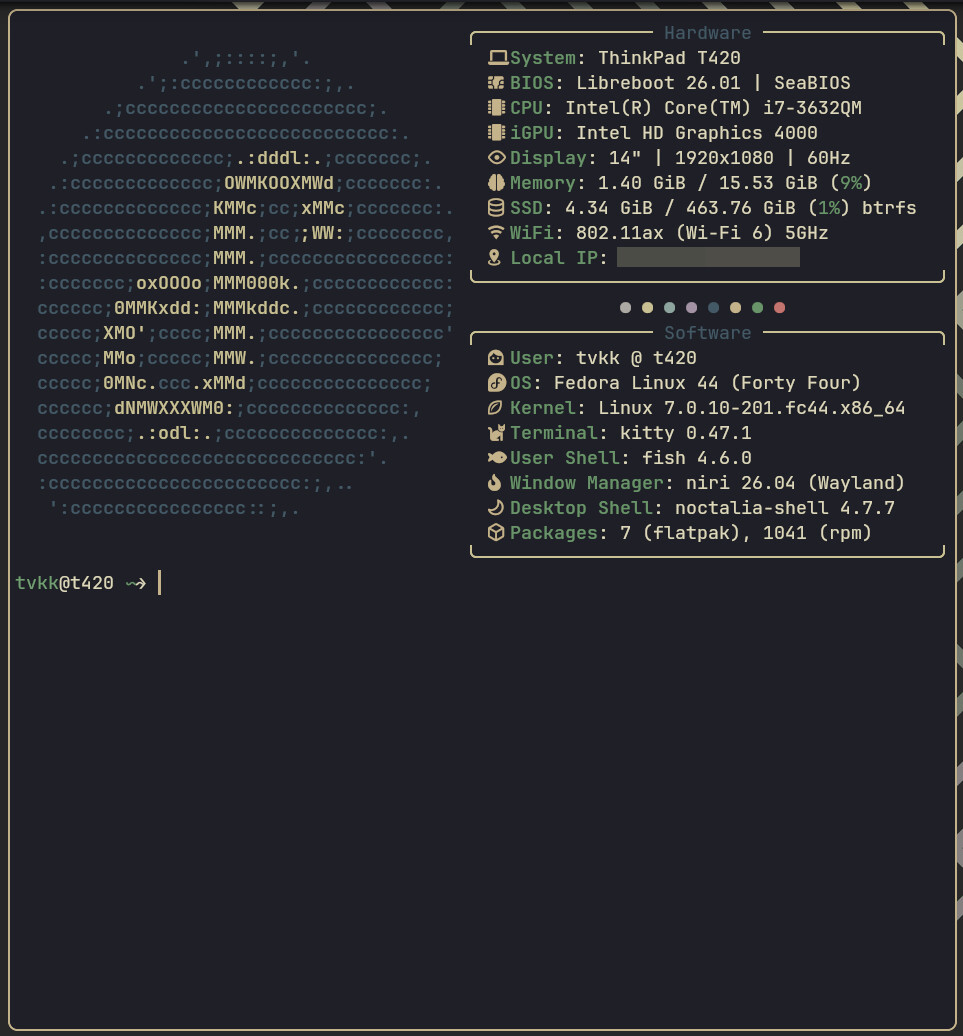
welcome to the forum @kvt 
Thannks @dirn I have been burrowing around in peoples configs and enjoying the creativity for a few weeks now ^.^