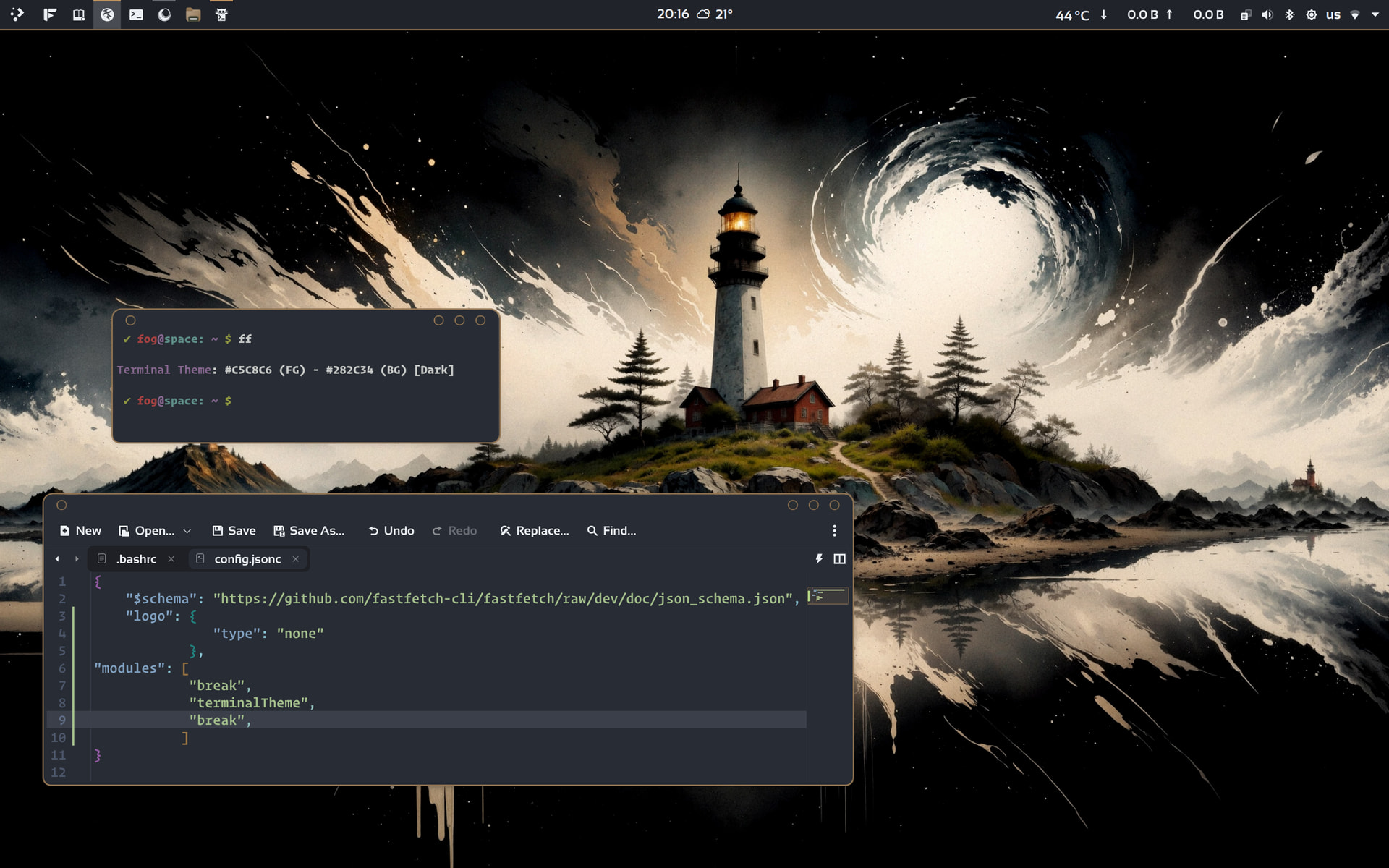
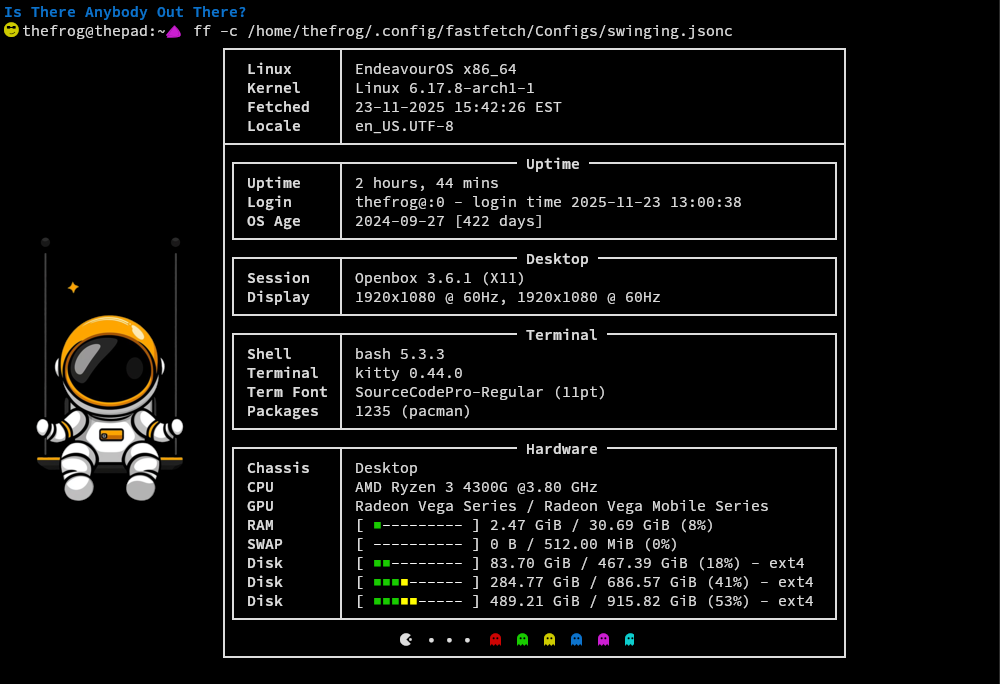
The only module about the terminal theme I found, is the… “terminaltheme”
Maybe I missed something, here is the json_schema.json with all the modules.
With “terminaltheme” module this is the result:
The only module about the terminal theme I found, is the… “terminaltheme”
Maybe I missed something, here is the json_schema.json with all the modules.
With “terminaltheme” module this is the result:
@fog, thank you for your efforts. It doesn’t seem to work the way I would like it to. It should automatically display the color scheme used in the console. It looks like fastfetch only outputs the color output but not the color theme used. Too bad, but thanks for your efforts anyway.
That, my dear @fog, is fantastic. I would never have thought of that. See how simple-minded I am 
It really works. I don’t really understand it, but it works. I can still manage the grep command, but everything that comes after that is too much for me.
grep -oP '^ColorScheme=\\K.*' ~/.config/konsolerc
grep: now we are searching
-o: (only …matching) we want only the matched part of the line, not the entire line
-P: enables advanced perl regular expressions because we want the best 
^ColorScheme= : matches/finds the string ColorScheme= at the beginning of a line (^)
\K: You found it? Now forget it, we don’t want it in the final output. 
.* : Found/match the characters after ColorScheme= , hopefully this is the name of the color scheme.
~/.config/konsolerc: the path to the konsole configuration file where the color scheme is stored and the magic happens 
Holy blimmin’ moly 
Thank you for taking the time to explain all this to me. I understand as far as I can. But you know what? Unlike many others, I am, figuratively speaking, moving on the surface of the water. You are 50 meters below. Others are 100 meters below… I think it’s futile to believe that I can remember all this. Fortunately, there’s the bookmark function And users like you who explain it all to me 
I used the copy function in the Discourse and then wl-paste > ffconfig.jsonc, so there shouldn’t be a forgotten bracket. Maybe my mapping of the emojis to the normal font is broken.
A couple of tweaks and additions. 
This is the thread that just keeps giving. Thanks everyone. 
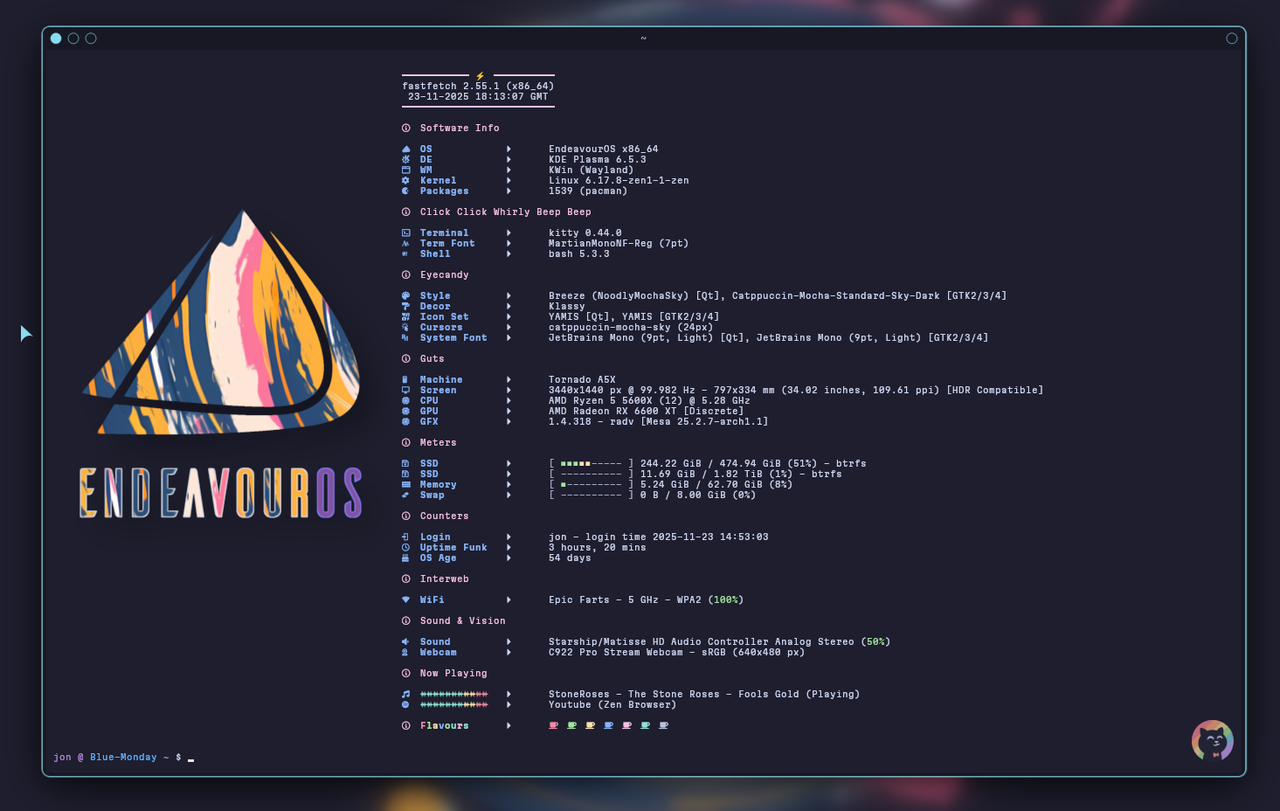
//
//
// ░█▀▀░█▀█░█▀▄░█▀▀░█▀█░█░█░█▀█░█░█░█▀▄░░░█▀█░█▀▀
// ░█▀▀░█░█░█░█░█▀▀░█▀█░▀▄▀░█░█░█░█░█▀▄░░░█░█░▀▀█
// ░▀▀▀░▀░▀░▀▀░░▀▀▀░▀░▀░░▀░░▀▀▀░▀▀▀░▀░▀░░░▀▀▀░▀▀▀
// ░░░░░░░█▀▀░█▀█░█▀▀░▀█▀░█▀▀░█▀▀░▀█▀░█▀▀░█░█
// ░░░░░░░█▀▀░█▀█░▀▀█░░█░░█▀▀░█▀▀░░█░░█░░░█▀█
// ░░░░░░░▀░░░▀░▀░▀▀▀░░▀░░▀░░░▀▀▀░░▀░░▀▀▀░▀░▀
//
// Inspired by many and cobbled together by Noodly
{
"$schema": "https://github.com/fastfetch-cli/fastfetch/raw/dev/doc/json_schema.json",
"logo": {
"type": "auto",
"source": "/home/jon/Pictures/EnOS Fastfetch Logos/EnOS Noodly Logo Paint.png",
"height": 38,
"padding": {
"top": 12,
"left": 1,
"right": 1
}
},
"display": {
"separator": " "
},
"modules": [
"break",
{
"type": "custom",
"format": "\u001b[35m─────────── ⚡ ──────────\u001b[0m"
},
{
"type": "version",
"key": " "
},
{
"type": "datetime",
"key": " ",
"format": " {day-pretty}-{month-pretty}-{year} {hour-pretty}:{minute-pretty}:{second-pretty} {timezone-name}"
},
{
"type": "custom",
"format": "\u001b[35m─────────────────────────\u001b[0m"
},
"break",
{
"type": "custom",
"format": "\u001b[m{#35} Software Info\u001b[0m"
},
"break",
{
"type": "os",
"key": " OS ",
"keyColor": "34",
},
{
"type": "de",
"key": " DE ",
"keyColor": "34",
},
{
"type": "wm",
"key": " WM ",
"keyColor": "34",
},
{
"type": "kernel",
"key": " Kernel ",
"keyColor": "34",
},
{
"type": "packages",
"key": " Packages ",
"keyColor": "34",
},
"break",
{
"type": "custom",
"format": "\u001b[m{#35} Click Click Whirly Beep Beep\u001b[0m"
},
"break",
{
"type": "terminal",
"key": " Terminal ",
"keyColor": "34",
},
{
"type": "terminalfont",
"key": " Term Font ",
"keyColor": "34",
},
{
"type": "shell",
"key": " Shell ",
"keyColor": "34",
},
"break",
{
"type": "custom",
"format": "\u001b[m{#35} Eyecandy\u001b[0m"
},
"break",
{
"type": "theme",
"key": " Style ",
"keyColor": "34",
},
{
"type": "wmtheme",
"key": " Decor ",
"keyColor": "34",
},
{
"type": "icons",
"key": " Icon Set ",
"keyColor": "34",
},
{
"type": "cursor",
"key": " Cursors ",
"keyColor": "34",
},
{
"type": "font",
"key": " System Font",
"keyColor": "34",
},
"break",
{
"type": "custom",
"format": "\u001b[m{#35} Guts\u001b[0m"
},
"break",
{
"type": "host",
"key": " Machine ",
"keyColor": "34",
},
{
"type": "monitor",
"key": " Screen ",
"keyColor": "34",
},
{
"type": "cpu",
"key": " CPU ",
"keyColor": "34",
},
{
"type": "gpu",
"key": " GPU ",
"keyColor": "34",
},
{
"type": "vulkan",
"key": " GFX ",
"keyColor": "34",
},
"break",
{
"type": "custom",
"format": "\u001b[m{#35} Meters\u001b[0m"
},
"break",
{
"type": "disk",
"keyColor": "34",
"key": " SSD ",
"percent": {
"type": 3, // 3 = show number + bar + percentage
"green": 30, // Below 30% usage is green
"yellow": 70 // 30-70% is yellow, >70% is red
},
"bar": {
"width": 20, // Number of characters for the bar
"charElapsed": "■", // Used bar character
"charTotal": "-", // Unused bar character
"borderLeft": "[",
"borderRight": "]"
}
},
{
"type": "memory",
"key": " Memory ",
"keyColor": "34",
"percent": {
"type": 3, // 3 = show number + bar + percentage
"green": 30, // <30% is green
"yellow": 70 // 30-70% is yellow, >70% is red
},
"bar": {
"width": 20, // number of characters in the bar
"charElapsed": "■", // used part of the bar
"charTotal": "-", // unused part of the bar
"borderLeft": "[",
"borderRight": "]"
}
},
{
"type": "swap",
"key": " Swap ",
"keyColor": "34",
"percent": {
"type": 3,
"green": 30,
"yellow": 70
},
"bar": {
"width": 20,
"charElapsed": "■",
"charTotal": "-",
"borderLeft": "[",
"borderRight": "]"
}
},
"break",
{
"type": "custom",
"format": "\u001b[m{#35} Counters\u001b[0m"
},
"break",
{
"type": "users",
"myselfOnly": true,
"key": " Login ",
"keyColor": "34",
},
{
"type": "uptime",
"key": " Uptime Funk",
"keyColor": "34",
},
{
"type": "command",
"key": " OS Age ",
"keyColor": "34",
"text": "birth_install=$(stat -c %W /); current=$(date +%s); time_progression=$((current - birth_install)); days_difference=$((time_progression / 86400)); echo $days_difference days"
},
"break",
{
"type": "custom",
"format": "\u001b[m{#35} Interweb\u001b[0m"
},
"break",
{
"type": "wifi",
"key": " WiFi ",
"keyColor": "34",
},
{
"type": "bluetooth",
"key": " Bluetooth ",
"keyColor": "34",
},
"break",
{
"type": "custom",
"format": "\u001b[m{#35} Sound & Vision\u001b[0m"
},
"break",
{
"type": "sound",
"key": " Sound ",
"keyColor": "34",
},
{
"type": "camera",
"key": " Webcam ",
"keyColor": "34",
},
"break",
{
"type": "custom",
"format": "\u001b[m{#35} Now Playing\u001b[0m"
},
"break",
{
"type": "media",
"key": " {#36}{#36}{#36}{#36}{#36}{#36}{#36}{#33}{#33}{#31}{#31}",
"keyColor": "34",
},
{
"type": "player",
"key": " {#36}{#36}{#36}{#36}{#36}{#36}{#36}{#33}{#33}{#31}{#31}",
"keyColor": "34",
},
"break",
{
"type": "custom",
"key": "{#35} {#31}F{#32}l{#33}a{#34}v{#32}o{#36}u{#35}r{#36}s ",
"format":"{#31} {#32} {#33} {#34} {#35} {#36} {#37} "
},
"break",
"break",
]
}
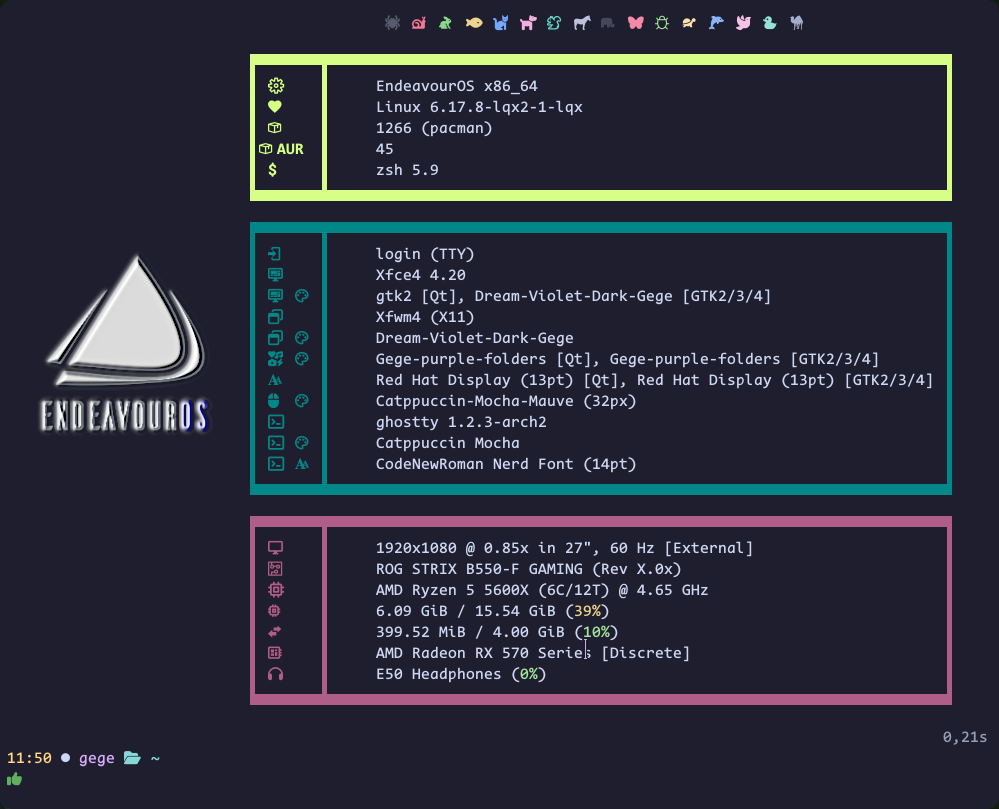
Sooo cuuuuuute 
that’s what I thought 
I think I will keep this one, apart changing the logo from time to time.
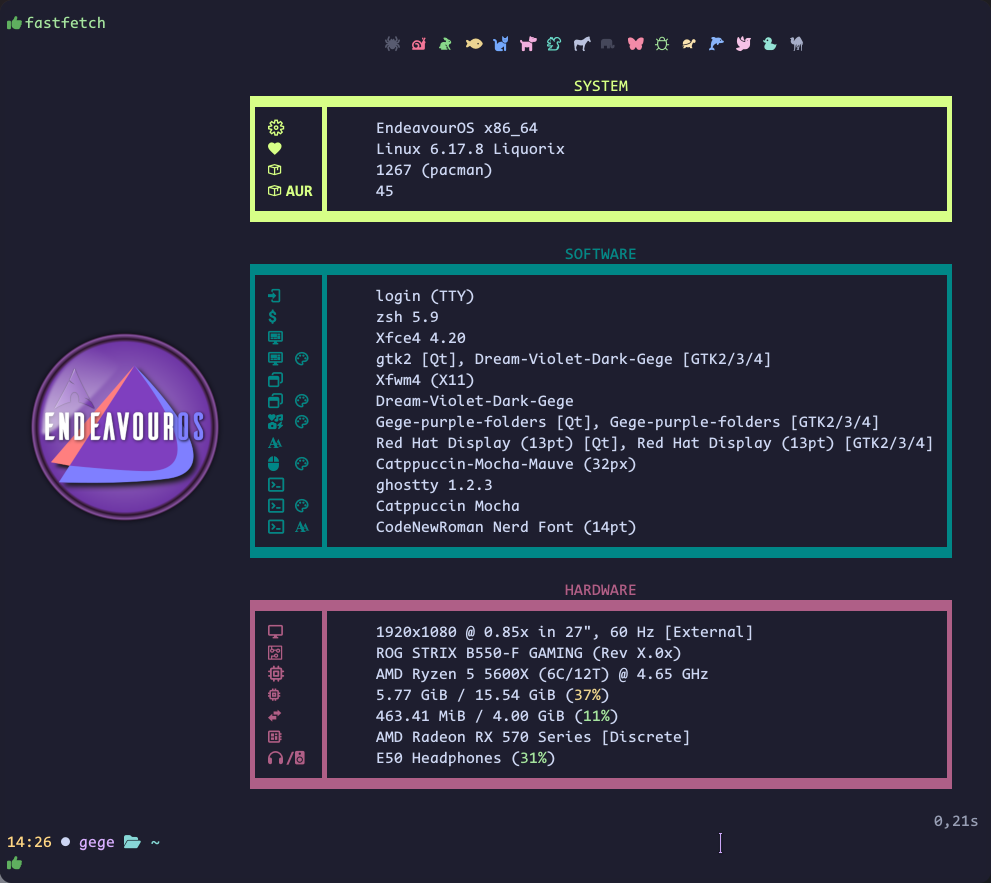
// ~/.config/fastfetch/config.jsonc
// See https://github.com/fastfetch-cli/fastfetch/wiki/Configuration for more details
// See *.jsonc in https://github.com/fastfetch-cli/fastfetch/tree/dev/presets/examples for more examples
{
"$schema": "https://github.com/fastfetch-cli/fastfetch/raw/dev/doc/json_schema.json",
"logo": {
"source": "~/.icons/eoslogo200x200.png",
"type": "auto",
"color": {"1": "38;5;207"},
"padding": {
"top": 14,
"left": 2,
"right": 2,
},
},
"display": {
"color": "38;5;132",
"separator": " ",
"constants": ["\u001b[66C \u001b[38;5;192m▐\u001b[67D",
"\u001b[66C \u001b[38;5;030m▐\u001b[67D",
"\u001b[66C \u001b[38;5;132m▐\u001b[67D",
]
},
"modules": [
"break",
{
"type": "custom",
"format": " \u001b[90m \u001b[91m \u001b[92m \u001b[93m \u001b[94m \u001b[95m \u001b[96m \u001b[97m \u001b[30m \u001b[31m \u001b[32m \u001b[33m \u001b[34m \u001b[35m \u001b[36m \u001b[37m \u001b[0m",
},
"break",
{
"type": "custom",
"format": "\u001b[38;5;192m SYSTEM",
},
{
"type": "custom",
"format": "\u001b[38;5;192m▛▀▀▀▀▀▀▀▛▀▀▀▀▀▀▀▀▀▀▀▀▀▀▀▀▀▀▀▀▀▀▀▀▀▀▀▀▀▀▀▀▀▀▀▀▀▀▀▀▀▀▀▀▀▀▀▀▀▀▀▀▀▀▀▀▀▀▀▀▀▀▀▀▀▀▀▀▜\u001b[0m"
},
{
"type": "os",
"key": "▌ ▌ {$1}",
"keyColor": "38;5;192",
},
{
"type": "kernel",
"key": "▌ ▌ {$1}",
"format": "{sysname} {release:6} Liquorix",
"keyColor": "38;5;192",
},
{
"type": "packages",
"key": "▌ ▌ {$1}",
"keyColor": "38;5;192",
},
{
"type": "command",
"key": "▌ AUR ▌ {$1}",
"keyColor": "38;5;192",
"text": "yay -Qqm | wc -l"
},
{
"type": "custom",
"format": "\u001b[38;5;192m▙▄▄▄▄▄▄▄▙▄▄▄▄▄▄▄▄▄▄▄▄▄▄▄▄▄▄▄▄▄▄▄▄▄▄▄▄▄▄▄▄▄▄▄▄▄▄▄▄▄▄▄▄▄▄▄▄▄▄▄▄▄▄▄▄▄▄▄▄▄▄▄▄▄▄▄▄▟\u001b[0m"
},
"break",
{
"type": "custom",
"format": "\u001b[38;5;030m SOFTWARE",
},
{
"type": "custom",
"format": "\u001b[38;5;030m▛▀▀▀▀▀▀▀▛▀▀▀▀▀▀▀▀▀▀▀▀▀▀▀▀▀▀▀▀▀▀▀▀▀▀▀▀▀▀▀▀▀▀▀▀▀▀▀▀▀▀▀▀▀▀▀▀▀▀▀▀▀▀▀▀▀▀▀▀▀▀▀▀▀▀▀▀▜\u001b[0m"
},
{
"type": "LM",
"key": "▌ ▌ {$2}",
"keyColor": "38;5;030",
},
{
"type": "shell",
"key": "▌ ▌ {$2}",
"keyColor": "38;5;030",
},
{
"type": "de",
"key": "▌ ▌ {$2}",
"keyColor": "38;5;030",
},
{
"type": "theme",
"key": "▌ ▌ {$2}",
"keyColor": "38;5;030",
},
{
"type": "wm",
"key": "▌ ▌ {$2}",
"keyColor": "38;5;030",
},
{
"type": "wmtheme",
"key": "▌ ▌ {$2}",
"keyColor": "38;5;030",
},
{
"type": "icons",
"key": "▌ ▌ {$2}",
"keyColor": "38;5;030",
},
{
"type": "font",
"key": "▌ ▌ {$2}",
"keyColor": "38;5;030",
},
{
"type": "cursor",
"key": "▌ ▌ {$2}",
"keyColor": "38;5;030",
},
{
"type": "terminal",
"format": "{pretty-name} {version:5}",
"key": "▌ ▌ {$2}",
"keyColor": "38;5;030",
},
{
"type": "command",
"key": "▌ ▌ {$2}",
"keyColor": "38;5;030",
"text": "grep -oP '^theme = \\K.*' ~/.config/ghostty/config",
},
{
"type": "terminalfont",
"key": "▌ ▌ {$2}",
"keyColor": "38;5;030",
},
{
"type": "custom",
"format": "\u001b[38;5;030m▙▄▄▄▄▄▄▄▙▄▄▄▄▄▄▄▄▄▄▄▄▄▄▄▄▄▄▄▄▄▄▄▄▄▄▄▄▄▄▄▄▄▄▄▄▄▄▄▄▄▄▄▄▄▄▄▄▄▄▄▄▄▄▄▄▄▄▄▄▄▄▄▄▄▄▄▄▟\u001b[0m"
},
"break",
{
"type": "custom",
"format": "\u001b[38;5;132m HARDWARE",
},
{
"type": "custom",
"format": "\u001b[38;5;132m▛▀▀▀▀▀▀▀▛▀▀▀▀▀▀▀▀▀▀▀▀▀▀▀▀▀▀▀▀▀▀▀▀▀▀▀▀▀▀▀▀▀▀▀▀▀▀▀▀▀▀▀▀▀▀▀▀▀▀▀▀▀▀▀▀▀▀▀▀▀▀▀▀▀▀▀▀▜\u001b[0m"
},
{
"type": "display",
"key": "▌ ▌ {$3}",
"keyColor": "38;5;132",
},
{
"type": "board",
"key": "▌ ▌ {$3}",
"keyColor": "38;5;132",
},
{
"type": "cpu",
"format": "{name} ({cores-physical}C/{cores-logical}T) @ {freq-max}",
"key": "▌ ▌ {$3}",
"keyColor": "38;5;132",
},
{
"type": "memory",
"key": "▌ ▌ {$3}",
"keyColor": "38;5;132",
"percent": {
"type": 0, // 3=Show percentage, number and bar
"green": 30, // Values below 30% in green
"yellow": 70, // 30-70% in yellow, >70% in red
}
},
{
"type": "swap",
"key": "▌ ▌ {$3}",
"keyColor": "38;5;132",
"percent": {
"type": 0, // 3=Show percentage, number and bar
"green": 30, // Values below 30% in green
"yellow": 70, // 30-70% in yellow, >70% in red
}
},
{
"type": "gpu",
"key": "▌ ▌ {$3}",
"keyColor": "38;5;132",
},
{
"type": "sound",
"format": "{name:54} ({3})",
"key": "▌ / ▌ {$3}",
"keyColor": "38;5;132",
},
{
"type": "custom",
"format": "\u001b[38;5;132m▙▄▄▄▄▄▄▄▙▄▄▄▄▄▄▄▄▄▄▄▄▄▄▄▄▄▄▄▄▄▄▄▄▄▄▄▄▄▄▄▄▄▄▄▄▄▄▄▄▄▄▄▄▄▄▄▄▄▄▄▄▄▄▄▄▄▄▄▄▄▄▄▄▄▄▄▄▟\u001b[0m"
},
"break",
"break",
]
}

Those animal icons are cute 
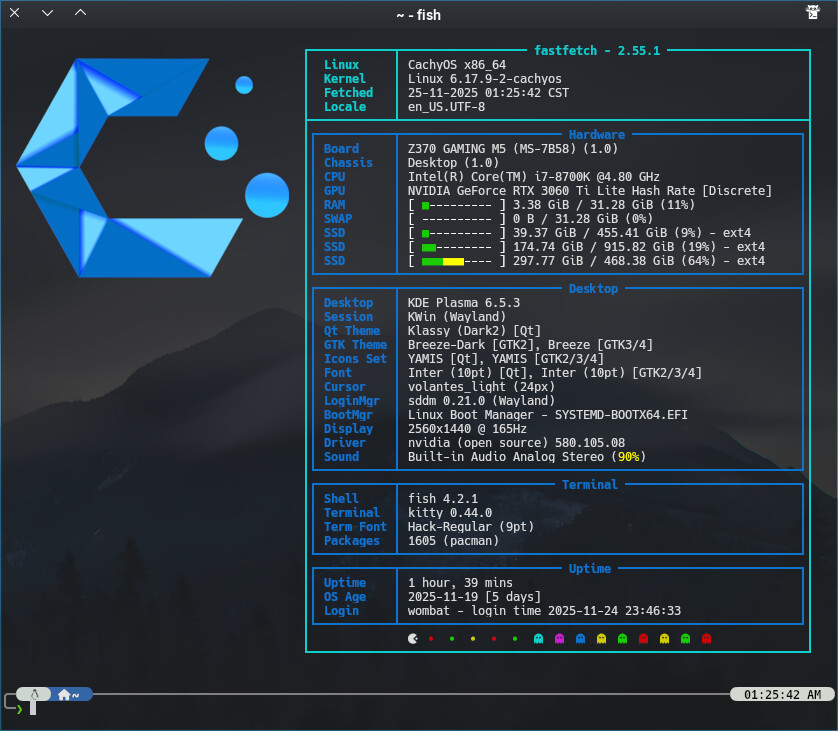
I forgot to start my USB DAC, so the system switched to HDMI audio and… surprise !

I had to truncate the line to 54 characters.
"type": "sound",
"format": "{name:54} ({3})",
"key": "▌ / ▌ {$3}",
"keyColor": "38;5;132",
},


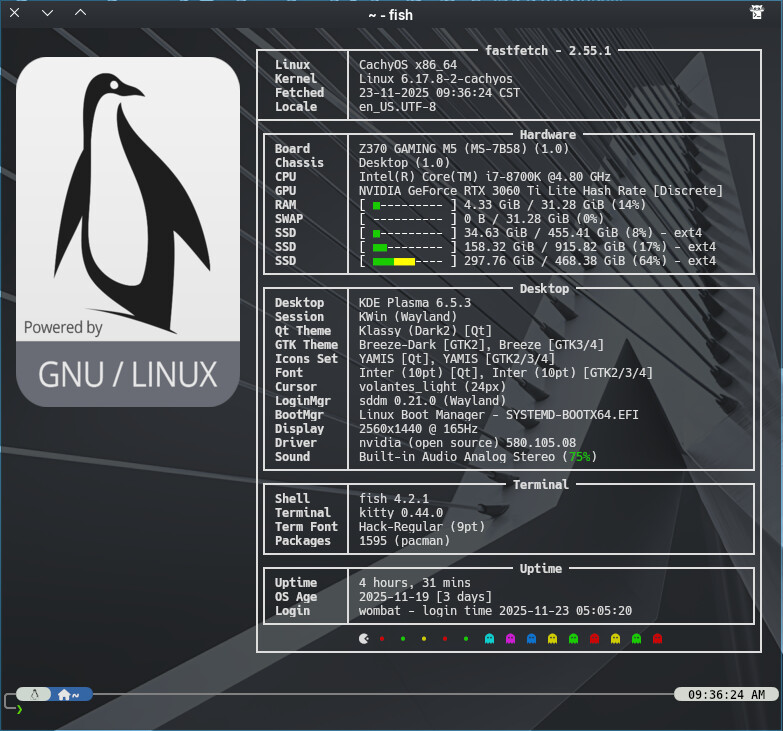
Here’s what I’ve come up with thanks to what I’ve learned from the amazing contributions to this thread.
//
//
// ░█▀▀░█▀█░█▀▄░█▀▀░█▀█░█░█░█▀█░█░█░█▀▄░░░█▀█░█▀▀
// ░█▀▀░█░█░█░█░█▀▀░█▀█░▀▄▀░█░█░█░█░█▀▄░░░█░█░▀▀█
// ░▀▀▀░▀░▀░▀▀░░▀▀▀░▀░▀░░▀░░▀▀▀░▀▀▀░▀░▀░░░▀▀▀░▀▀▀
// ░░░░░░░█▀▀░█▀█░█▀▀░▀█▀░█▀▀░█▀▀░▀█▀░█▀▀░█░█
// ░░░░░░░█▀▀░█▀█░▀▀█░░█░░█▀▀░█▀▀░░█░░█░░░█▀█
// ░░░░░░░▀░░░▀░▀░▀▀▀░░▀░░▀░░░▀▀▀░░▀░░▀▀▀░▀░▀
//
// Inspired by many and cobbled together by Noodly
{
"$schema": "https://github.com/fastfetch-cli/fastfetch/raw/dev/doc/json_schema.json",
"logo": {
"type": "auto",
"source": "/home/jon/Pictures/EnOS Fastfetch Logos/EnOS Noodly Logo Paint Outlined.png",
"height": 32,
"padding": {
"top": 10
}
},
"display": {
"color": {
"keys": "blue"
},
"separator": "",
"constants": [
"──────────────────────────────────────────────────────", // {$1} - horizontal line for borders
"\u001b[55D", // {$2} - move cursor left 55 columns
"\u001b[55C", // {$3} - move cursor right 55 columns
"\u001b[54C" // {$4} - move cursor right 54 columns
],
"brightColor": true
},
"modules": [
"break",
{
"type": "custom",
"key": " {#31}┌───────────────────────┐{#keys} \u001b[37D",
"format": ""
},
{
"type": "custom",
"key": " {#31}│ {#31}F {#32}A {#33}S {#34}T {#32}F {#36}E {#35}T {#36}C {#31}H {#31}│",
},
{
"type": "custom",
"key": " {#31}└───────────────────────┘{#keys} ",
"format": ""
},
{
"type": "custom",
"key": " {#35}┌─────────────┬{$1}┐{#keys} \u001b[37D",
"format": ""
},
{
"type": "os",
"key": " {#35}│ OS │{$4}│{#keys} {$2}"
},
{
"type": "kernel",
"key": " {#35}│ Kernel │{$4}│{#keys} {$2}"
},
{
"type": "de",
"key": " {#35}│ Desktop │{$4}│{#keys} {$2}"
},
{
"type": "wm",
"key": " {#35}│ Session │{$4}│{#keys} {$2}"
},
{
"type": "packages",
"key": " {#35}│ Packages │{$4}│{#keys} {$2}"
},
{
"type": "custom",
"key": " {#35}└─────────────┴{$1}┘{#keys} ",
"format": ""
},
{
"type": "custom",
"key": " {#34}┌─────────────┬{$1}┐{#keys} \u001b[37D",
"format": ""
},
{
"type": "host",
"key": " {#34}│ Machine │{$4}│{#keys} {$2}"
},
{
"type": "display",
"key": " {#34}│ Monitor │{$4}│{#keys} {$2}",
},
{
"type": "cpu",
"key": " {#34}│ CPU │{$4}│{#keys} {$2}",
"format": "{name} @{freq-max}",
"showPeCoreCount": false
},
{
"type": "gpu",
"key": " {#34}│ GPU │{$4}│{#keys} {$2}"
},
{
"type": "vulkan",
"key": " {#34}│ GFX │{$4}│{#keys} {$2}"
},
{
"type": "custom",
"key": " {#34}└─────────────┴{$1}┘{#keys} ",
"format": ""
},
// Hardware section with cyan color theme
{
"type": "custom",
"key": " {#35}┌─────────────┬{$1}┐{#keys} \u001b[37D",
"format": ""
},
{
"type": "memory",
"key": " {#35}│ RAM │{$4}│{#keys} {$2}",
// "keyColor": "34",
"percent": {
"type": 3, // 3 = show number + bar + percentage
"green": 30, // <30% is green
"yellow": 70 // 30-70% is yellow, >70% is red
}
},
{
"type": "swap",
"key": " {#35}│ SWAP │{$4}│{#keys} {$2}",
// "keyColor": "34",
"percent": {
"type": 3, // 3 = show number + bar + percentage
"green": 30, // <30% is green
"yellow": 70 // 30-70% is yellow, >70% is red
}
},
{
"type": "disk",
"key": " {#35}│ Disk │{$4}│{#keys} {$2}",
// "keyColor": "34",
"percent": {
"type": 3, // 3 = show number + bar + percentage
"green": 30, // <30% is green
"yellow": 70 // 30-70% is yellow, >70% is red
},
},
{
"type": "custom",
"key": " {#35}└─────────────┴{$1}┘{#keys} ",
"format": ""
},
{
"type": "custom",
"key": " {#34}┌─────────────┬{$1}┐{#keys} \u001b[37D",
"format": ""
},
{
"type": "shell",
"key": " {#34}│ Shell │{$4}│{#keys} {$2}"
},
{
"type": "terminal",
"key": " {#34}│ Terminal │{$4}│{#keys} {$2}"
},
{
"type": "terminalfont",
"key": " {#34}│ Term Font │{$4}│{#keys} {$2}"
},
{
"type": "custom",
"key": " {#34}└─────────────┴{$1}┘{#keys} ",
"format": ""
},
{
"type": "custom",
"key": " {#35}┌─────────────┬{$1}┐{#keys} \u001b[37D",
"format": ""
},
{
"type": "theme",
"key": " {#35}│ Style │{$4}│{#keys} {$2}",
"format": "{theme1}"
},
{
"type": "wmtheme",
"key": " {#35}│ Decor │{$4}│{#keys} {$2}"
},
{
"type": "icons",
"key": " {#35}│ Icons │{$4}│{#keys} {$2}"
},
{
"type": "cursor",
"key": " {#35}│ Cursors │{$4}│{#keys} {$2}"
},
{
"type": "font",
"key": " {#35}│ System Font │{$4}│{#keys} {$2}"
},
{
"type": "custom",
"key": " {#35}└─────────────┴{$1}┘{#keys} ",
"format": ""
},
{
"type": "custom",
"key": " {#34}┌─────────────┬{$1}┐{#keys} \u001b[37D",
"format": "{#bright_blue}"
},
{
"type": "uptime",
"key": " {#34}│ Uptime Funk │{$4}│{#keys} {$2}"
},
{
"type": "users",
"myselfOnly": true, // Only show current user
"key": " {#34}│ Login │{$4}│{#keys} {$2}"
},
{
"type": "disk",
"key": " {#34}│ OS Age │{$4}│{#keys} {$2}",
"folders": "/", // Check root filesystem
"format": "{create-time:10} [{days} days]" // Show creation time and age in days
},
{
"type": "datetime",
"key": " {#34}│ Fetched │{$4}│{#keys} {$2}",
"format": "{day-pretty}-{month-pretty}-{year} {hour-pretty}:{minute-pretty}:{second-pretty} {timezone-name}"
},
{
"type": "custom",
"key": " {#34}└─────────────┴{$1}┘{#keys} ",
"format": ""
},
{
"type": "custom",
"key": " {#35}┌─────────────┬{$1}┐{#keys}\u001b[37D",
"format": ""
},
{
"type": "wifi",
"key": " {#35}│ Interweb │{$4}│{#keys} {$2}"
},
{
"type": "bluetooth",
"key": " {#35}│ Bluetooth │{$4}│{#keys} {$2}"
},
{
"type": "custom",
"key": " {#35}└─────────────┴{$1}┘{#keys} ",
"format": ""
},
{
"type": "custom",
"key": " {#34}┌─────────────┬{$1}┐{#keys}\u001b[37D",
"format": ""
},
{
"type": "sound",
"key": " {#34}│ Sound │{$4}│{#keys} {$2}",
"format": "{name:43} ({3})",
},
{
"type": "camera",
"key": " {#34}│ Webcam │{$4}│{#keys} {$2}"
},
{
"type": "custom",
"key": " {#34}└─────────────┴{$1}┘{#keys} ",
"format": ""
},
{
"type": "custom",
"key": " {#31}┌───────────────────────┐{#keys} \u001b[37D",
"format": ""
},
{
"type": "custom",
"key": " {#31}│ {#31}F{#32}l{#33}a{#34}v{#32}o{#36}u{#35}r{#36}s {#31}│",
},
{
"type": "custom",
"key": " {#31}│ {#37} {#36} {#35} {#34} {#33} {#32} {#31} {#31}│",
},
{
"type": "custom",
"key": " {#31}└───────────────────────┘{#keys} ",
"format": ""
},
// End with color palette and line break
// "break", // Add a blank line
//"colors" // Display color palette
"break",
]
}
This is Blimmin’ Mooo