Hi.
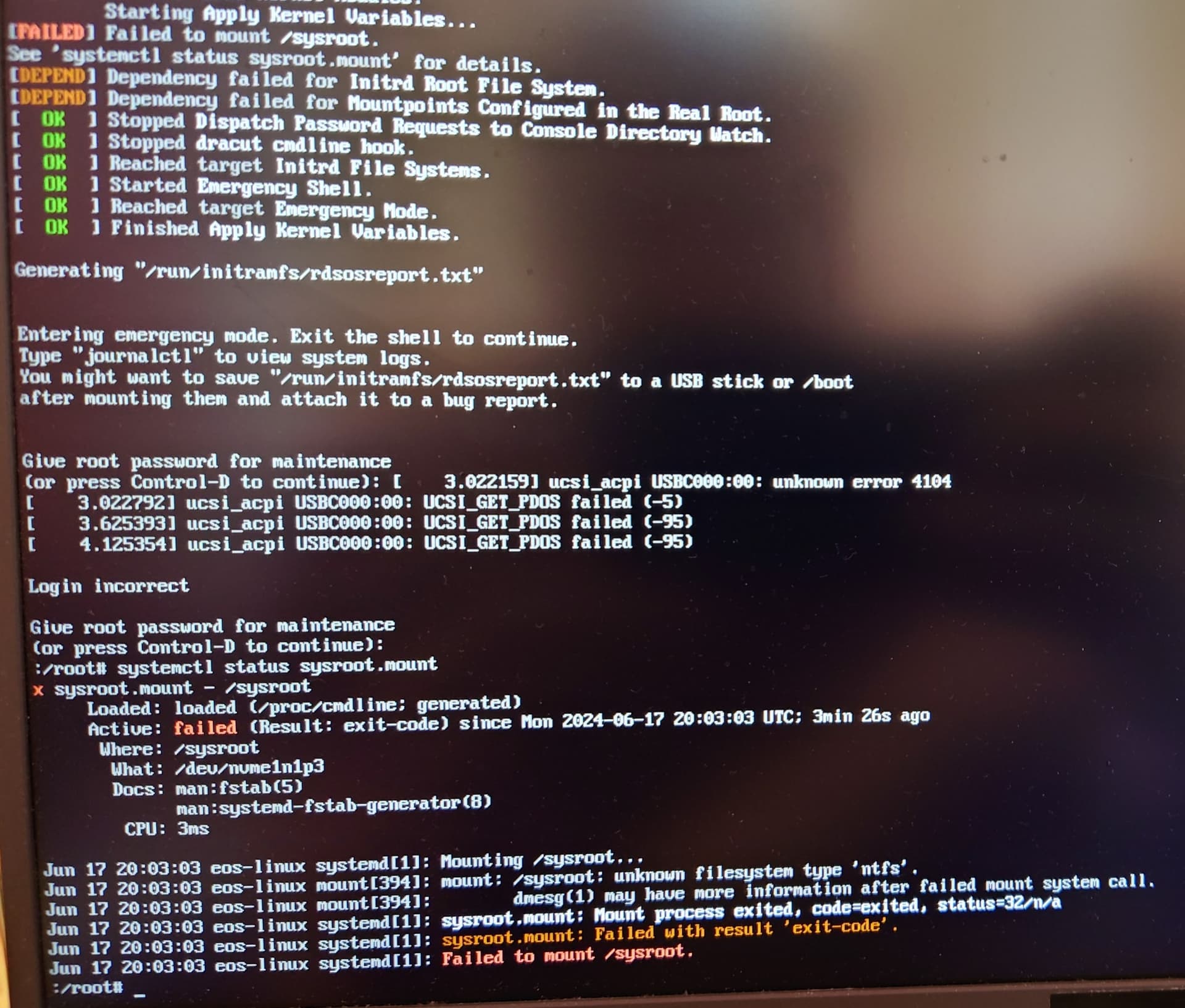
I have installed EndeavourOS and facing the boot issue. It’s not constant and resolves after 3rd-5th reboot, however very frustrating.
systemctl status sysroot.mount shows that the root cause is /dev/nvme1n1p3 that is nothing but a Windows OS system partition. Not sure why it’s trying to mount it as there are no other records in fstab but defaults, so no NTFS partitions.
Machine and system info:
EndeavourOS kernel: 6.9.4-arch1-1
Machine: Asus Rog Strix, Ryzen 9 5900HX, Nvidia 3050 mobile
Other OSs: Manjaro, Windows 11
Bootloader: GRUB from the Manjaro installation
Disks: 2 SSDs. The first contains Manjaro and Windows. The second contains EOS and NTFS storage partition. EFI partition exists on the first disk. There are some recovery/restore partitions in the first disk also.
I tried to install ntfs-3g package but it didn’t help. However, I able to mount any ntfs partition in the successfully booted EOS, so don’t think the missing (?) ntfs driver was the issue.
if possible show complete partitions: sudo fdisk -l
And in case you can access installed system over per example fallback boot option or use installer ISO as rescue Lifesystem and arch-chroot into it…
There you can try rebuilding initramfs images: dracut-rebuild
If EndeavourOS is installed without bootloader it would be interesting to see the grub.cfg from Manjaro too.
Keep in mind these files all showing UUIDS not that hard of a security risk but still … unique identifications
Sure, thanks for your reply. Here is the fdisk -l output from EOS booted with 4th try:
Disk /dev/nvme1n1: 931,51 GiB, 1000204886016 bytes, 1953525168 sectors
Disk model: Samsung SSD 980 PRO 1TB
Units: sectors of 1 * 512 = 512 bytes
Sector size (logical/physical): 512 bytes / 512 bytes
I/O size (minimum/optimal): 512 bytes / 512 bytes
Disklabel type: gpt
Disk identifier: FEBEC396-D1EE-4585-HIDDEN

Device              Start        End    Sectors   Size Type
/dev/nvme1n1p1         34      32767      32734    16M Microsoft reserved
/dev/nvme1n1p2      32768 1758173183 1758140416 838,3G Microsoft basic data
/dev/nvme1n1p3 1758173184 1953523711  195350528  93,2G Linux filesystem


Disk /dev/nvme0n1: 953,87 GiB, 1024209543168 bytes, 2000409264 sectors
Disk model: HFM001TD3JX013N
Units: sectors of 1 * 512 = 512 bytes
Sector size (logical/physical): 512 bytes / 512 bytes
I/O size (minimum/optimal): 512 bytes / 512 bytes
Disklabel type: gpt
Disk identifier: 87E3FD1C-A7A8-44EA-HIDDEN

Device              Start        End    Sectors    Size Type
/dev/nvme0n1p1       2048     534527     532480    260M EFI System
/dev/nvme0n1p2     534528     567295      32768     16M Microsoft reserved
/dev/nvme0n1p3     567296 1138468863 1137901568  542,6G Microsoft basic data
/dev/nvme0n1p4 1957670912 1959104511    1433600    700M Windows recovery environment
/dev/nvme0n1p5 1959104512 1999998975   40894464   19,5G Microsoft basic data
/dev/nvme0n1p6 1999998976 2000408575     409600    200M Windows recovery environment
/dev/nvme0n1p7 1138469519 1140518911    2049393 1000,7M EFI System
/dev/nvme0n1p8 1140518912 1957670911  817152000  389,6G Linux filesystem

Partition table entries are not in disk order.
dracut-rebuild didn’t help. However, I think I got the reason. I executed the same fdisk -l on Manjaro and got different device identifications (nvme0n1 and nvme1n1). They just swapped. As I did update-grub after the EOS installation from Manjaro, it actually created the wrong (according to EOS fdisk output) GRUB entry:
menuentry 'EndeavourOS Linux (rolling) (on /dev/nvme0n1p3)' --class endeavouros --class gnu-linux --class gnu --class os $menuentry_id_option 'osprober-gnulinux-simple-3cd52812-e301-HIDDEN' {
	savedefault
	insmod part_gpt
	insmod ext2
	search --no-floppy --fs-uuid --set=root 3cd52812-e301-HIDDEN
	linux /boot/vmlinuz-linux root=/dev/nvme0n1p3
	initrd /boot/initramfs-linux.img
}
submenu 'Advanced options for EndeavourOS Linux (rolling) (on /dev/nvme0n1p3)' $menuentry_id_option 'osprober-gnulinux-advanced-3cd52812-e301-HIDDEN' {
	menuentry 'EndeavourOS Linux (rolling) (on /dev/nvme0n1p3)' --class gnu-linux --class gnu --class os $menuentry_id_option 'osprober-gnulinux-/boot/vmlinuz-linux--3cd52812-e301-HIDDEN' {
		savedefault
		insmod part_gpt
		insmod ext2
		search --no-floppy --fs-uuid --set=root 3cd52812-e301-HIDDEN
		linux /boot/vmlinuz-linux root=/dev/nvme0n1p3
		initrd /boot/initramfs-linux.img
	}
}
Here is the part of fdisk -l output from Manjaro:
Disk /dev/nvme0n1: 931,51 GiB, 1000204886016 bytes, 1953525168 sectors
Disk model: Samsung SSD 980 PRO 1TB
...
Disk /dev/nvme1n1: 953,87 GiB, 1024209543168 bytes, 2000409264 sectors
Disk model: HFM001TD3JX013N
Are those identifications not persistent from boot to boot? Do you have any ideas on what can be done in this situation?
Have disabled os-prober and added EOS grub record manually with UUID instead of device identifier. Works like a charm. @joekamprad@dalto thank you guys for help. Learned something new today.
Grub uses UUID by default, unless you disable it.
In /etc/default/grub, make sure the bellow parameters are not set to true (they are normally commented out)
#GRUB_DISABLE_LINUX_UUID=true # normally in the default file but disabled
#GRUB_DISABLE_UUID=true  # normally not in the default file
It seems either you have modified the default values, or Manjaro (did it again) provides an unsafe default configuration. I hope for the first…
In Manjaro’s /etc/default/grub I see GRUB_DISABLE_LINUX_UUID=true commented out. Don’t see any mentions of GRUB_DISABLE_UUID however. Actually, this situation is strange as at first, with enabled OS prober, it generated the GRUB config where Manjaro entries used UUIDs to boot, but for EOS it chose to use device IDs.
I don’t think I changed anything UUID-related in GRUB config manually. However, I’m running Manjaro without re-installation for 3 years, so maybe I forgot something.
The only case this can happen is when grub cannot detect EnOS initrd image files.
The only case this can happen is with a non-(default|archlinux) grub version (=modified)
The usually happens with Manjaro.
Or your EnOS installation is broken on grub. You can verify if EnOS system is broken on grub, by running grub-mkconfig when booted in EnOS.