Hi everyone. I installed EndeavorOs in VirtualBox as a guest on a Linux Mint host. I need to set the network as a “bridged card” but I can’t browse this way. Everything is ok if set as NAT but no access to my network printer. I’ve tried other distros on VirtualBox and only with Arch and derivatives this setting doesn’t work. The network card in use on the host is wifi. Has anyone had the same problem?
I’d say - it is normal - if you have both enp and wlp devices - the enp is always preselected - alphabetic order of e vs. w.
When you set the virtual network as bridged - make sure you select the correct NIC in the dropdown box - as your primary is wireless make sure to select the card whose path starts with wl*.
If you switch between cable and wireless - be sure to alter the VM network accordingly.
1 Like
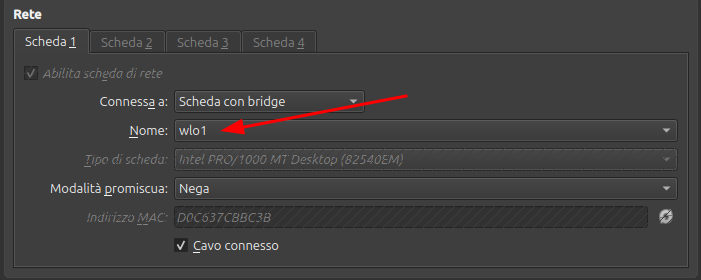
Hi Root,
as you can see from the screenshot I have already selected the wireless NIC. Do you have any other suggestions? Thank you!
Just a thought: have you adjusted the firewall in EOS to be able to reach the printer?
There is an EOS wiki about setting the firewall, but I’m not at home and can’t provide you with a direct link, at the moment.
I have had issues with VirtualBox network dropping connections but only with Windows VM.
If you changed the value while the vm was running - you may need to restart the vm.
Or at least restart the network - using the cable connected option.
Outgoing traffic from client to printer is not controlled by firewalld.
Other than that I have no other suggestions.
Hi SemLraug,
in NAT mode I tried to disable the firewall but I still can’t see the printer, it must be said that in NAT mode the guest adopts a class of IP addresses different from the hot one and therefore also from the printer.
Yes I did but without success. I also had the same problem with pure Arch and other derivatives. Everything works correctly with Fedora and Debian derivatives.
I have no issues running EOS in a virtualbox vm - on an Arch host.
So perhaps your issue is related to your host system.
I think the same, but why does all the other distros work correctly?
Usually - when setting up a vm - one uses guest additions CD image to install supporting components.
It is important to realize that this should not be done on EOS - and therefore - if using the installer provided it may break interface components, this could include network.
I remember making that mistake a couple of times in the past.
Arch has these supporting components in a separate package virtualbox-guest-utils, the package is installed as part of the installation when the target is virtualbox.