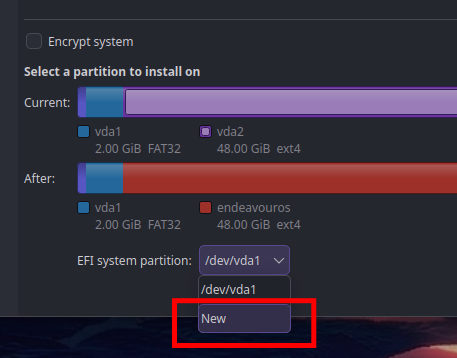
i’m trying to install endeavouros on my 2015 13" macbook pro and the installation stopped because of an error. i looked at the log sent and saw this:
2026-06-23 - 18:10:35 [6]: void {anonymous}::PowerManagementInterface::uninhibitSleep()
2026-06-23 - 18:10:35 [6]: Sleep was never inhibited.
i don’t know if this would help, but i’m trying to dual boot with macos 12, i used ventoy, and i used the online installation. i haven’t changed anything with the mirrors either.
2026-06-23 - 18:10:34 [1]: ERROR: Error while running: FileNotFoundError: [Errno 2] No such file or directory: '/tmp/calamares-root-l4g9vzsa/efi/loader/loader.conf'
thats the cause of the failed install.
Could be reusing ESP EFI partition? Consider creating a new one instead, as it seems the one used was readonly corrupted etc.
2026-06-23 - 17:13:37 [6]: system is EFI and new EFI system partition has been found.
2026-06-23 - 18:05:11 [6]:     .. Target cmd: QList("mount", "-t", "exfat", "-o", "fmask=0137,dmask=0027", "/dev/sdb1", "/tmp/calamares-root-l4g9vzsa/efi") Exit code: 32 output:
mount: /tmp/calamares-root-l4g9vzsa/efi: fsconfig() failed: /dev/sdb1: Can't open blockdev.
       dmesg(1) may have more information after failed mount system call.
efi ESP boot partition must be fat32 not exfat.
And from what i see there is only one harddrive and the installer USB so /dev/sdb1 is the usb thats not correct to be used as /efi needs to be on the bootdrive itself..
A lot technical text but anyway welcome here , its only a little step away from getting it installed.
from the logs it looks like you have choosen a partition on the USB stick as efi thats the cause of your failed install.
Do not remove the EFI from MACOS please you can reuse it by adding it without partitioning it.
this is to small to reuse .. so you need to add a new one ..
must be 2GB if using automatic replacing partition option you should find an efi partition option at the bottom with a dropdown there you can choose NEW
is it too small because i selected systemd boot? would i need to make a new efi partition if i chose grub? because i used grub before on this machine and it worked fine with the 200mb efi partition.
yes grub can do, but with systemd-boot we have to put kernels on the efi so it must be bigger.
For grub you need like basically 50MB free space there.
In case of multiboots i do see Grub easier to handle that too.
But could be it will not let you choose the existing efi with grub too on automatic partition options, may you have to go for manual partition and set the existing efi to be mounted as /boot/efi and not format it. (not formatting it!!! only set mountpoint! ) in cas eyou get a warning about efi and size but you can ignore it will install fine-.
 , its only a little step away from getting it installed.