Leigh
April 23, 2026, 10:53am
1
Hi
Windows 11, working fine before dualboot EOS installation
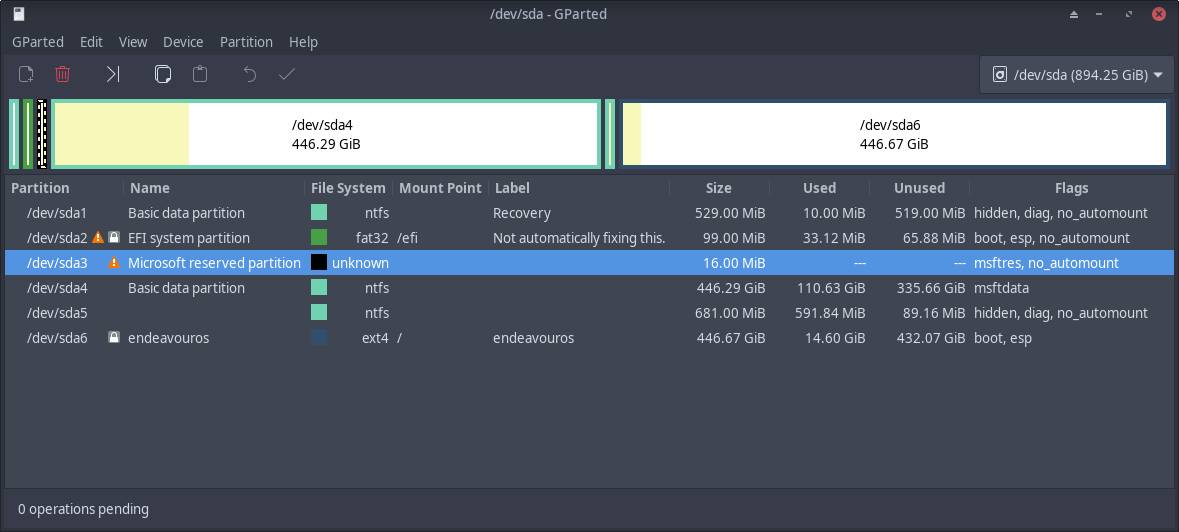
I made a partition for EndeavourOS, then installed using Calamares by replacing that partition
Endeavour is fine, but no Windows in Grub
I have os-prober installed and un-disabled in /etc/default/grub
I have used update-grub & the full version which is in the update-grub wrapper
I then tried manually adding Windows as a menu entry, which now appears in grub, but selecting it leads to a bootmgr not found error
Help!
EDIT:
It’s just Grub telling you to get rid of the garbage(Windows).
Leigh
April 23, 2026, 11:10am
3
I know - totally agree, but work (Finite Element) software needs Win
Then can’t you run Windows
Like any of these?
Don’t know why link came out as German?
I haven’t used a VM in years so I don’t know witch is best but I think after what I’ve been reading it’s VMware.?
Leigh
April 23, 2026, 12:37pm
5
I have win in a Virtualbox on ArchLabs at home - never use it
It’s just another layer of overheads and then you are using M$ WinMerda anyway
For some FEA and CFD software etc in my uni research job, there are not alternatives in Linux that are up to it
For home use - there are only software in Linux that are not so good in win, not the other way around
So, I use Windows at work and Linux at home
Trust me - I’ve tried everything, I’m ten steps ahead of you
Anyway,I found another disc and will dual boot that way, EOS on one and W*n on the other - less messing around with Efi-ng
Looks like installing EndeavourOS overwrote the Win11 boot manager files. That can happen if you had the installer format the efi partition. Normally, you would need to boot Windows 11 install media and fix it.
However -
This is your solution. Dual boot from 2 drives. Windows on one, EndeavourOS on the other. You’ll need to reinstall Windows but that will be short-term pain for long-term gain.
Leigh
April 23, 2026, 5:11pm
7
nuked everything
clean EOS installed on SSD #1
Now just need to install Win 11 on SSD #2
Thanks @PackRat , see - I sometimes listen to reason
in case choosing replace partition and Grub bootloader it will use the windows ESP to add EndeavourOS to it .. it will not format it by default, or have such option. (only informative)
Leigh
April 23, 2026, 6:01pm
9
I wonder how I manage that then?
Pure talent for destruction
Nothing is perfect, possible something went wrong.



 I a VM?
