recently something changed on the Wayland side of things …
I have 2 monitors:
- Lenovo Group Limited LEN E232swA connected to VGA cable that is connected to a HDMI-A-1 converter
- Samsung S22B150 on a VGA cable that connects to a DVI-I-1 converter
everything worked fine, correct model in both GNOME and Plasma, and on Xorg and Wayland, and even on Window managers, correct resolutions, no problems, Lenovo picked up as “primary monitor” as it is supposed to be…
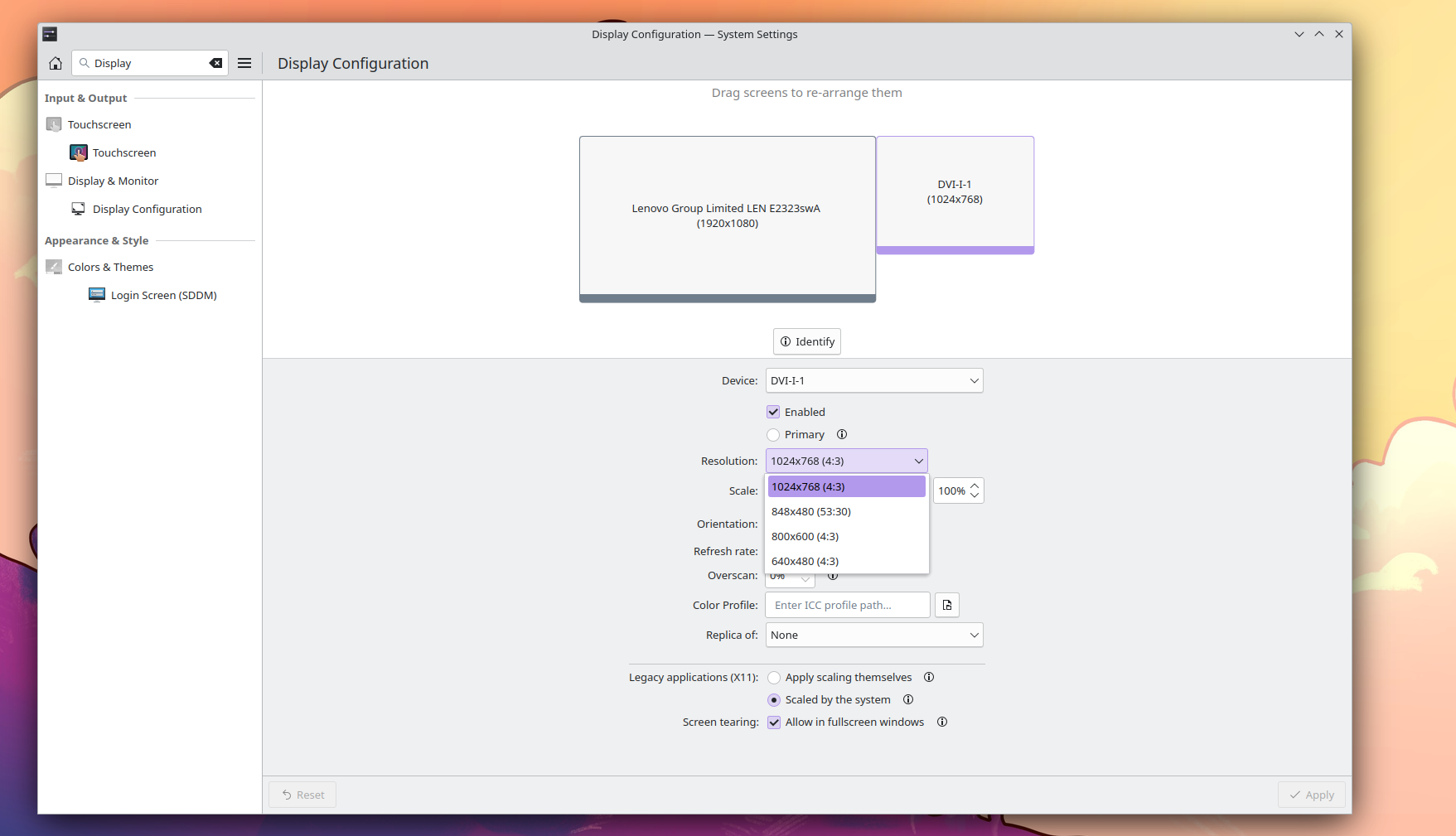
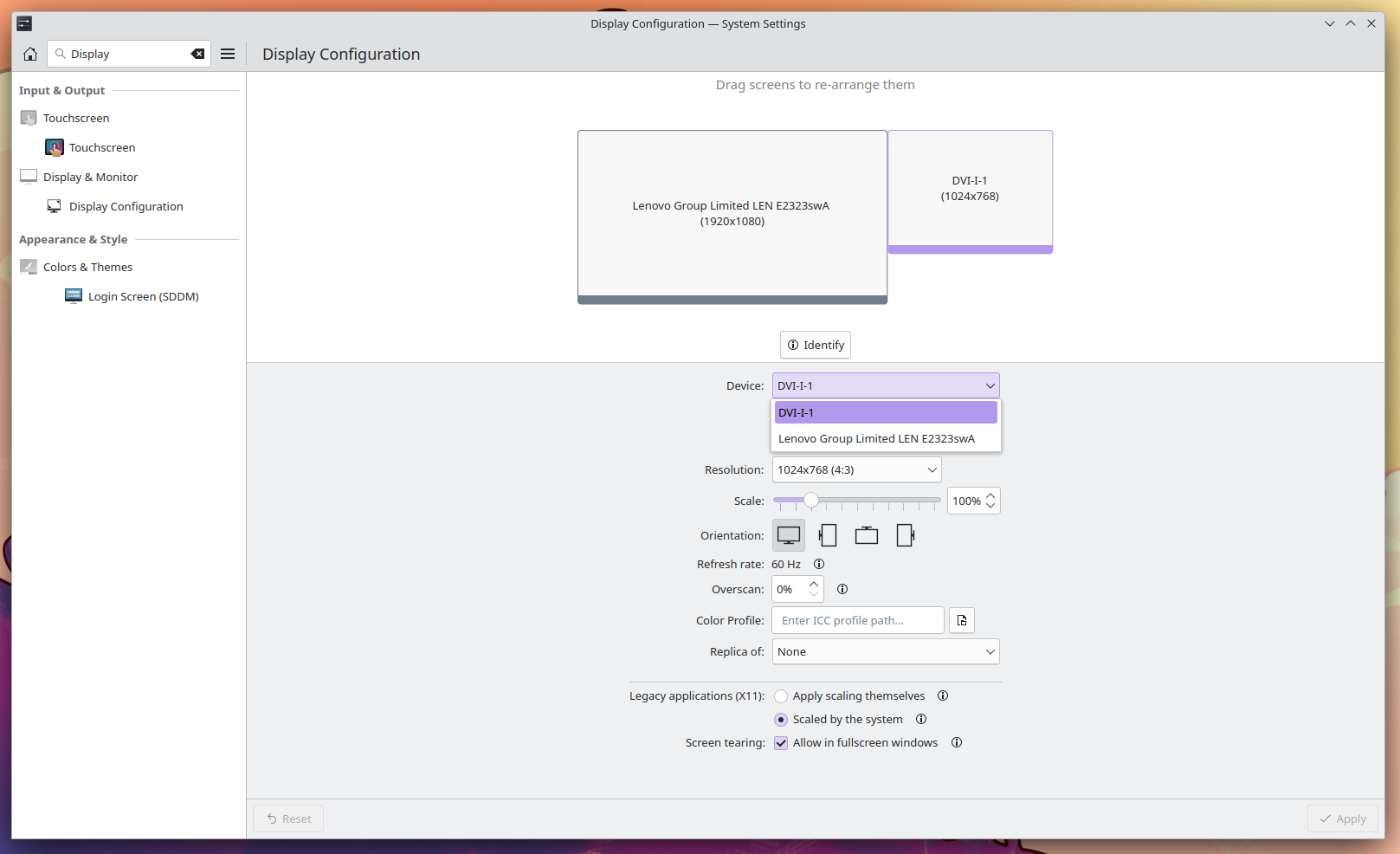
but recently something changed, cuz all of a sudden my SAMSUNG that is plugged to the DVI-I-1 port went “Unknown Model” or better to call it “DVI-I-1” and some basic low resolution, with no ability to place it to 1920x1080 while the Lenovo monitor is seen as “Northgate Computer Systems” with correct resolution
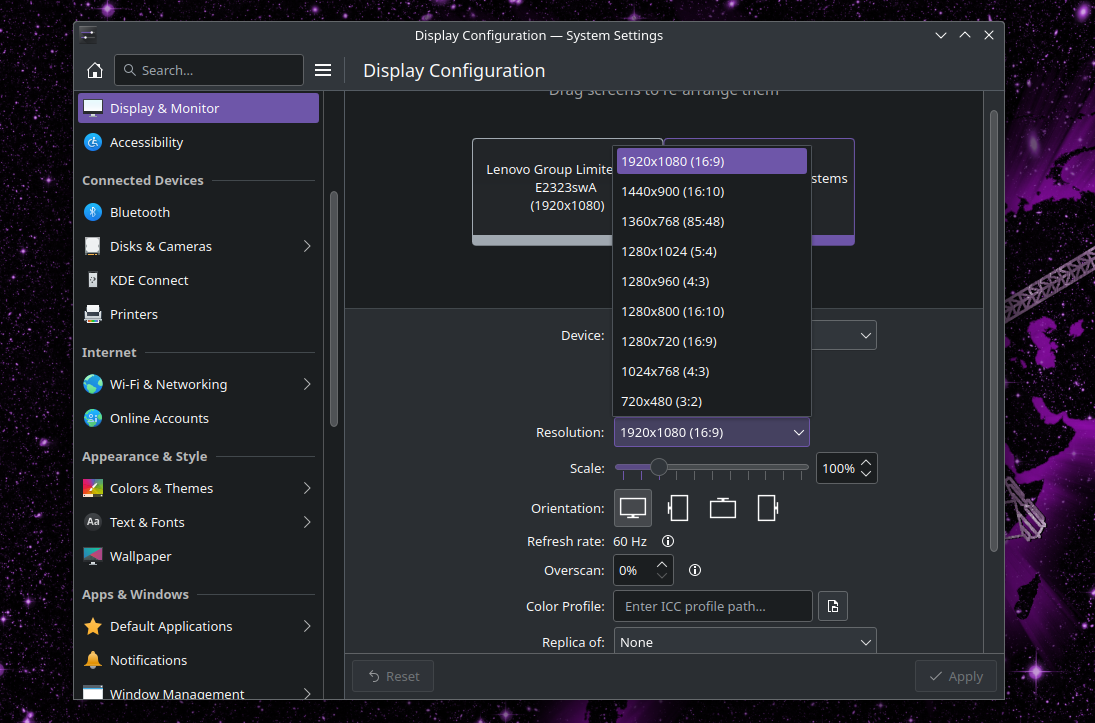
i reinstalled a bunch of times, tried all drivers, recommendations regarding xrandr on Arch wiki, nothing helped. Then I switch the cables and placed the Lenovo on the DVI-I-1, and the Samsung on the HDMI-A-1, all of a sudden the Samsung Monitor is seen as North Gate Computer Systems, starts first time with wrong resolution but does have the ability to set it to 1920x1080, after i set it to 1920x1080 every next time, it works fine, but always picks up that Samsung monitor as the “primary one” just on the login screen, once i login, Lenovo is again primary, but all games, and applications when first launched start on the Samsung monitor
strange as f… and annoying as f
System:
  Host: susanoo Kernel: 6.7.8-arch1-1 arch: x86_64 bits: 64
  Desktop: KDE Plasma v: 6.0.1 Distro: EndeavourOS
Machine:
  Type: Desktop Mobo: MSI model: B75MA-E33 (MS-7808) v: 1.0 serial: N/A
    UEFI: American Megatrends v: 1.7 date: 09/30/2013
CPU:
  Info: quad core model: Intel Core i5-3350P bits: 64 type: MCP cache:
    L2: 1024 KiB
  Speed (MHz): avg: 2358 min/max: 1600/3300 cores: 1: 3142 2: 2547 3: 1600
    4: 2146
Graphics:
  Device-1: AMD Tonga PRO [Radeon R9 285/380] driver: amdgpu v: kernel
  Device-2: Logitech Webcam C170 driver: snd-usb-audio,uvcvideo type: USB
  Display: server: X.Org v: 23.2.4 with: Xwayland v: 23.2.4 driver: X:
    loaded: amdgpu unloaded: modesetting dri: radeonsi gpu: amdgpu resolution:
    1: 1920x1080~60Hz 2: 1920x1080~60Hz
  API: EGL v: 1.5 drivers: radeonsi,swrast platforms: x11,surfaceless,device
  API: OpenGL v: 4.6 compat-v: 4.5 vendor: amd mesa v: 24.0.2-arch1.1
    renderer: AMD Radeon R9 380 Series (radeonsi tonga LLVM 16.0.6 DRM 3.57
    6.7.8-arch1-1)
  API: Vulkan v: 1.3.279 drivers: radv surfaces: xcb,xlib
Audio:
  Device-1: AMD Tonga HDMI Audio [Radeon R9 285/380] driver: snd_hda_intel
  Device-2: VIA ICE1712 [Envy24] PCI Multi-Channel I/O driver: snd_ice1712
  Device-3: Logitech Webcam C170 driver: snd-usb-audio,uvcvideo type: USB
  API: ALSA v: k6.7.8-arch1-1 status: kernel-api
Network:
  Device-1: Realtek RTL8111/8168/8211/8411 PCI Express Gigabit Ethernet
    driver: r8169
  IF: enp3s0 state: up speed: 100 Mbps duplex: full mac: d4:3d:7e:36:c7:04
Drives:
  Local Storage: total: 1.15 TiB used: 266.46 GiB (22.6%)
  ID-1: /dev/sda vendor: Samsung model: SSD 860 EVO 250GB size: 232.89 GiB
  ID-2: /dev/sdb vendor: Toshiba model: DT01ACA100 size: 931.51 GiB
  ID-3: /dev/sdc vendor: SanDisk model: Cruzer Force size: 14.32 GiB
    type: USB
Partition:
  ID-1: / size: 31.24 GiB used: 13.96 GiB (44.7%) fs: ext4 dev: /dev/sda2
  ID-2: /home size: 195.8 GiB used: 9.75 GiB (5.0%) fs: ext4 dev: /dev/sda3
Swap:
  Alert: No swap data was found.
Sensors:
  System Temperatures: cpu: 47.0 C mobo: N/A gpu: amdgpu temp: 63.0 C
  Fan Speeds (rpm): N/A gpu: amdgpu fan: 821
Info:
  Memory: total: 16 GiB available: 15.56 GiB used: 2.46 GiB (15.8%)
  Processes: 209 Uptime: 1h 2m Shell: Sudo inxi: 3.3.33
xrandr -q
Screen 0: minimum 16 x 16, current 3840 x 1080, maximum 32767 x 32767 HDMI-A-1 connected 1920x1080+1920+0 (normal left inverted right x axis y axis) 300mm x 230mm 1920x1080     59.96+ 1440x1080     59.99
1400x1050     59.98
1280x1024     59.89
1280x960      59.94
1152x864      59.96
1024x768      59.92
800x600       59.86
640x480       59.38
320x240       59.52
1680x1050     59.95
1440x900      59.89
1280x800      59.81
1152x720      59.97
960x600       59.63
928x580       59.88
800x500       59.50
768x480       59.90
720x480       59.71
640x400       59.95
320x200       58.96
1600x900      59.95
1368x768      59.88
1280x720      59.86
1024x576      59.90
864x486       59.92
720x400       59.55
640x350       59.77
DVI-I-1 connected primary 1920x1080+0+0 (normal left inverted right x axis y axis) 530mm x 310mm 1920x1080     59.96+ 1440x1080     59.99
1400x1050     59.98
1280x1024     59.89
1280x960      59.94
1152x864      59.96
1024x768      59.92
800x600       59.86
640x480       59.38
320x240       59.52
1680x1050     59.95
1440x900      59.89
1280x800      59.81
1152x720      59.97
960x600       59.63
928x580       59.88
800x500       59.50
768x480       59.90
720x480       59.71
640x400       59.95
320x200       58.96
1600x900      59.95
1368x768      59.88
1280x720      59.86
1024x576      59.90
864x486       59.92
720x400       59.55
640x350       59.77
scenario where Lenovo is in HDMI-A-1 and Samsung in DVI-I-1:
HDMI-A-1 connected primary 1920x1080+0+0 (normal left inverted right x axis y axis) 530mm x 310mm
   1920x1080     59.96*+
   1440x1080     59.99
   1400x1050     59.98
   1280x1024     59.89
   1280x960      59.94
   1152x864      59.96
   1024x768      59.92
   800x600       59.86
   640x480       59.38
   320x240       59.52
   1680x1050     59.95
   1440x900      59.89
   1280x800      59.81
   1152x720      59.97
   960x600       59.63
   928x580       59.88
   800x500       59.50
   768x480       59.90
   720x480       59.71
   640x400       59.95
   320x200       58.96
   1600x900      59.95
   1368x768      59.88
   1280x720      59.86
   1024x576      59.90
   864x486       59.92
   720x400       59.55
   640x350       59.77
DVI-I-1 connected 1024x768+1920+0 (normal left inverted right x axis y axis) 0mm x 0mm
   1024x768      59.92*+
   800x600       59.86
   640x480       59.38
   320x240       59.52
   960x600       59.63
   928x580       59.88
   800x500       59.50
   768x480       59.90
   720x480       59.71
   640x400       59.95
   320x200       58.96
   1024x576      59.90
   864x486       59.92
   720x400       59.55
   640x350       59.77
the issue I have with the “working setup” is that applications get launched on secondary monitor, including games, even thou Lenovo is set as primary …
to simplify it: Lenovo works on DVI-I-1 and HDMI-A-1, but when on HDMI-A-1 it’s seen as “Northgate Computer Systems” while when on DVI-I-1 it’s seen as Lenovo
Samsung only works on HDMI-A-1 and is seen as Northgate Computer Systems, while on DVI-I-1 it is unknown device, with only basic 1024x768 resolution, and no mode to increase it …
I will also note that this issue seems persistent across all distros, and desktops that use Wayland …
any clue whats going on?
If you need more info, output, or what ever, plz provide commands you want me to use, cuz im mediocre at this stuff  appreciate anyone’s time
Samsung on HDMI-A-1:
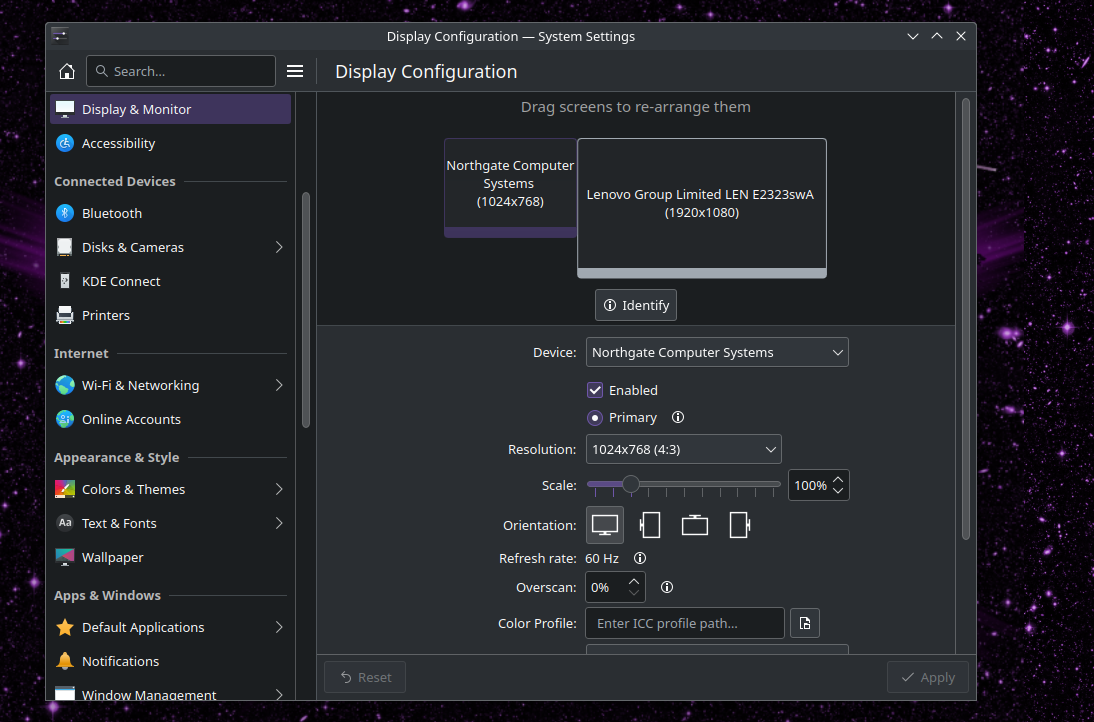
Samsung on DVI-I-1