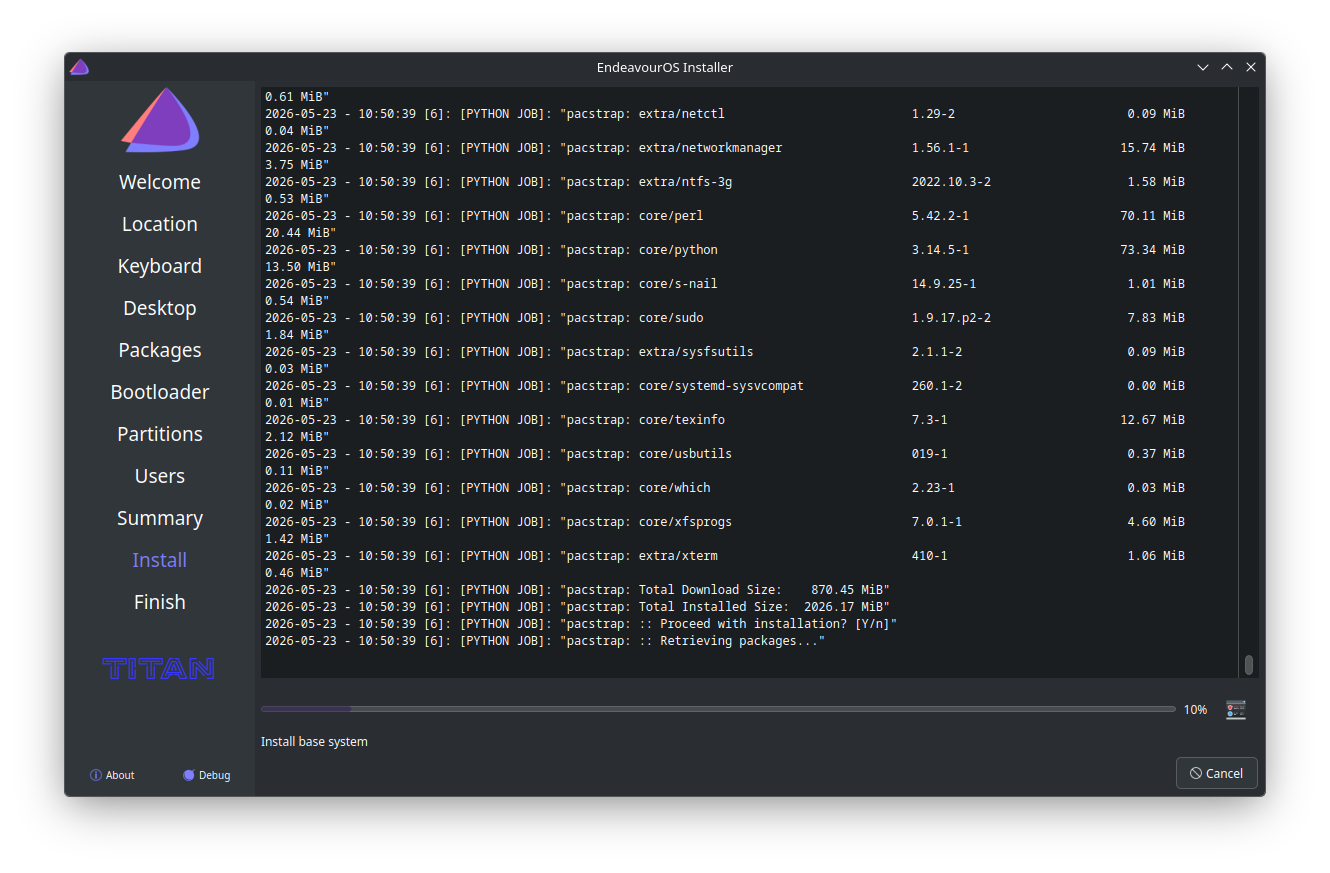
Twice during the online installation (of Titan), at 11% and 36%, the system is downloading files. To the user, the installation appears to be stuck or halted, because there are no indicators of the download process, or sub-process. Not everybody clicks on the terminal icon.
There needs to be some sort of assurance, that the process actually moving forward.
I think this is a Calamares limitation; not sure if it’s a “bug”, or a “feature”. I’ve seen this exact same thing on CachyOS and Manjaro, as well as other non-Arch installs I’ve done in the past. I’ve always changed the view to show the live installation log instead of the various slideshows.
This will happen during an offline install, as well.
Totally agree with @ajgringo619 on this I have installed quite a number of distros that where using calamares , and they all showed the same behaviour.
I has been a while since I used Calamares. If I remember correctly, in the bottom right corner of window, I believe horizontal to the Progress bar is an obscure button that will bring up a console window with the progress of the install.
It’s the little box next to 10% in the above screenshot.
Pressing this will bring up a terminal window which will display every command as it is executed.
That is all Calamares will give you. Feature requests should be directed to the Calamares devs.
In more civilized UI times we had progress bars that were pulsing, rotating etc. indicating activity (even if lying), but alas we lost them to flat design.
pacman is not giving any info that would be usable. And it would need some checking as of while downloading it doe snot know how long it takes anyway, network connection could drop e.t.c.
The progress can get adjust only be % of the complete process of the install. (afaik)
I just installed a new EOS two days ago, I just watched the progress bar go from 0 to 100%.
Non-dramatic, easey peasey.
you are requesting a guarantee that someone can vouch something is happening somewhere as far as forward installation progress when there appears to be no progress at all.
Bold .
You are as impatient as I.
Here’s how you know mirrors etc are messed up: your stops are not 11% and 36%; they are at 7, 9, 13, 18, 24, 27 39, 43, 49, 57, 1:09, 3:31 and more. I updated mirrors over and over on one installation just to get it to finish.
11 and 36 is good news. Air pockets in the high pressure line.
The point is that the UI should communicate an ongoing operation or being stuck. Nobody is questioning that it reaches 100% eventually if not being stuck.
occasional stuck seems such a normal and transient (abeit occasional) state, is it worth the UI confirming it’s stuck if the stuck lasts, let’s say, 15 seconds? 10? 45? Not for me to answer but if you are going to go, go all the way. A confirmation with an ETA of the stuck would be better. 2 cents.
/* Progress bar container /
QProgressBar {
background-color: #2a2e32;
border: 1px solid #4d5052;
border-radius: 3px;
text-align: center;
color: #ffffff; / Text color for the percentage display, if active */
}
/* The filling bar /
QProgressBar::chunk {
background-color: #3daee9; / Primary color of the progress bar /
width: 2px; / Width/spacing of the individual segments */
}
weight (optional) In the exec phase of the sequence, progress
is reported as jobs are completed. The jobs from a single module
together contribute the full weight of that module. The overall
progress (0 .. 100%) is divided up according to the weight of each
module. Give modules that take a lot of time to complete, a larger
weight to keep the overall progress moving along steadily. This
weight overrides a weight given in the module descriptor. If no weight
is given, uses the value from the module descriptor, or 1 if there
isn’t one there either.

 .
.