Hello,
After installing Endeavour on my laptop with Arch, I can see two entries in BOOT:
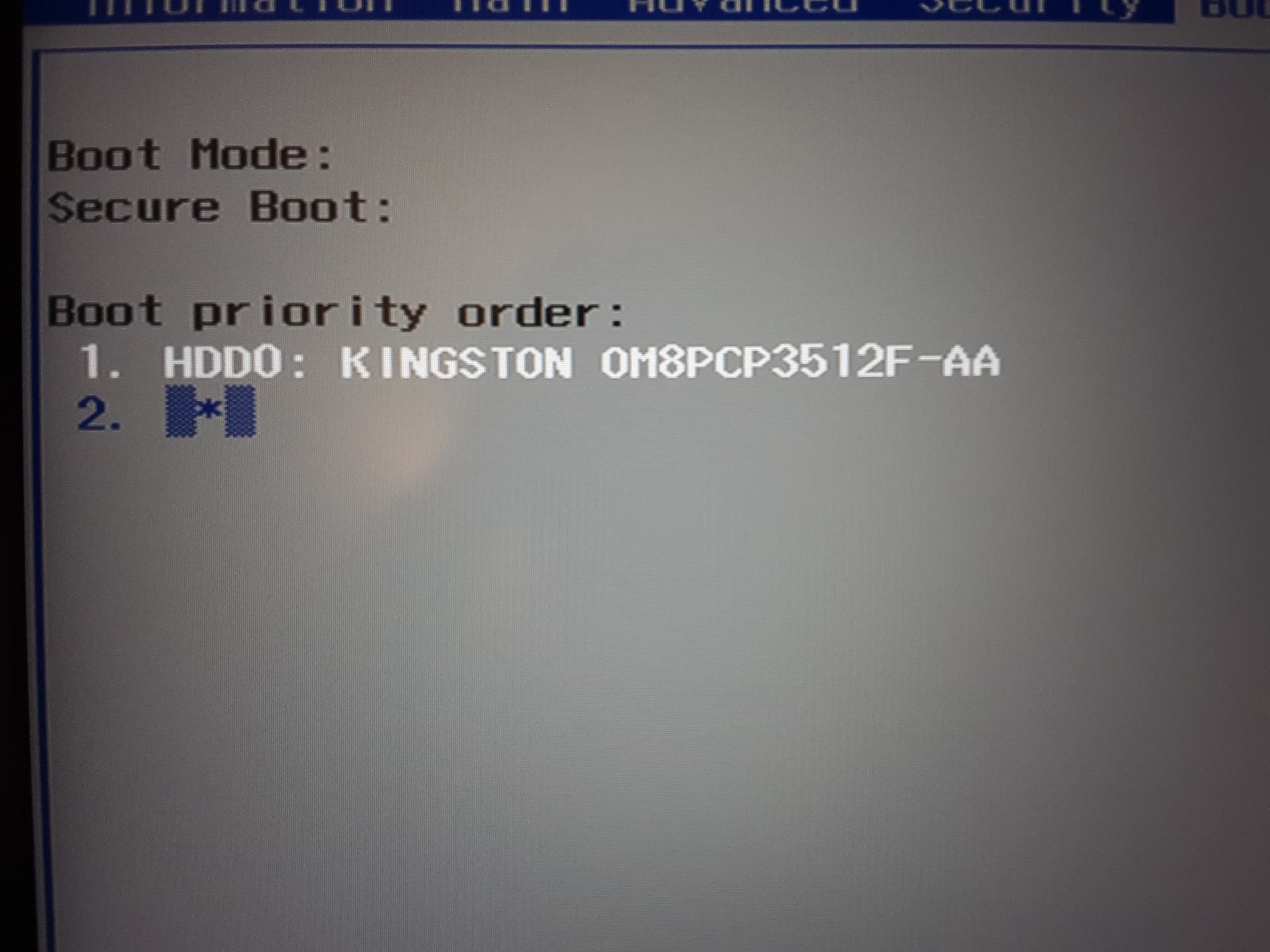
Is it all right? If not, how can I get rid of the second mysterios one?
Thank you.
What says:
efibootmgr
?
BootCurrent: 0000
Timeout: 0 seconds
BootOrder: 0000,0002,2001,2002,2003
Boot0000* HDD0: KINGSTON OM8PCP3512F-AA	PciRoot(0x0)/Pci(0xe,0x0)/NVMe(0x1,00-26-B7-68-59-34-8E-F5)/HD(1,GPT,f47ee519-6cf8-4d91-9570-413abb51d246,0x1000,0x200000)RC
Boot0002* endeavouros	HD(1,GPT,f47ee519-6cf8-4d91-9570-413abb51d246,0x1000,0x200000)/\EFI\endeavouros\grubx64.efi
Boot2001* EFI USB Device	RC
Boot2002* EFI DVD/CDROM	RC
Boot2003* EFI Network	RC
It looks alright. However Boot0002* endeavouros shoul be first in boot order normally.
Edit:
Could you also post tree /boot/efi ?
$ tree /boot/efi
/boot/efi  [error opening dir]

0 directories, 1 file
Try:sudo tree /boot/efi
/boot/efi
└── EFI
├── boot
│ └── bootx64.efi
└── endeavouros
└── grubx64.efi
4 directories, 2 files
It looks fine.
I would just put 0002 first in the boot order:
sudo efibootmgr -o 0002,0000,2001,2002,2003
$ sudo efibootmgr -o 0002,0000,2001,2002,2003
BootCurrent: 0000
Timeout: 0 seconds
BootOrder: 0002,0000,2001,2002,2003
Boot0000* HDD0: KINGSTON OM8PCP3512F-AA PciRoot(0x0)/Pci(0xe,0x0)/NVMe(0x1,00-26-B7-68-59-34-8E-F5)/HD(1,GPT,f47ee519-6cf8-4d91-9570-413abb51d246,0x1000,0x200000)RC
Boot0002* endeavouros HD(1,GPT,f47ee519-6cf8-4d91-9570-413abb51d246,0x1000,0x200000)/\EFI\endeavouros\grubx64.efi
Boot2001* EFI USB Device RC
Boot2002* EFI DVD/CDROM RC
Boot2003* EFI Network RC
Everything look alright now?
Yes. It’s all good.
Thank you very much!
While we’re at it, I have a couple of more questions:
My laptop is 16GB RAM, 11th Gen. Intel i7, 512GB SSD. Should I choose Grub or System… (don’t remember)? And which is better - swap file or swap part?
O, and what about Fast Boot?
You have already Grub installed.
I would just leave it at that.
swapfile is more flexible if you ever need to resize it at some point. From the functional point of view I would say they are equivalent.
In the Bios settings? I see some people recommend disabling it.
I have a Dell machine running Arch. Fast Boot is enabled in the Bios settings and I am not having any issues.
For those dual-booting with Windows, it is rather appropriate to disable Fast Startup in the power management settings within Windows if they are going to mount some shared partitions in Linux.
Thank you very much again!