Double check on understanding storage in linux from a windows user switching to linux as a dailiy driver

I’ve been looking and reading a lot more about how Linux in general tends to download applications/programs/packages and the new terms to use while looking and I think I understand it at least a little where it probably would be a good idea to rearrange where some files live. I know windows does this to but I’m far more used to that workflow on downloading applications to a specific location (like a different physical drive or instead of C downloading to E for example)

I know a lot of packages and the information that applications need install kinda all over given they need to be there and its a common practice to move at least your /home to either its own partition on the same drive or a partition on a different physical drive. as someone who games and has been starting to work on more video production projects again, would it be a good idea to go with my plan of moving my /hometo a partition on a different drive that has more space as well since that directory is where most of the more beefy/large parts of that information tends to go?

I know video wise it will go there, given home is where photos, videos, and desktop/projects go and steam (where most of my games are and what I plan to use to run the ones not on steam officially) can move where they download, but my main concern is actually the ones that arent on steam officially so the ones that I get from the developers official website (i know theres more to that and each game I plan to do that with probably has it down guide that i plan to more at here soon, but I at least wanna see if my thinking and understanding is right), those would also have most the the thicker parts of that data under would be in/home(given thats where the game is being pulled from for steam).

I know there are other launchers out there that that would have the games that I want to still plan that steam doesnt have a port for and they probably have a download location choice anyway, but its only a small handful of games. most are the hoyoverse titles (and zenless will soon be ported to steam officially) and arknights endfield, which arknights has a linux how-to-play/launch guide in the official discord server. plus i find swapping launchers tedious

plus moving home does make it easier to distro hop, not that I plan to do that any time soon but if the os side gets funky then I have a lower chance of losing data.

ok so then, what am i looking for help information wise? am i understanding whats in /homecorrectly that it holds not only personal files like photos and videos but also where the more storage space demanding (big files) tend to reside, be them games or applications like video editing or digital drawing software. so moving it to another drive or partition is a good idea not only for distro hopping or if the os gets funky but also for more space for more space demanding applications.

side question but I could also mount a partition of a different physical drive to where home is too right?

also sorry if parts of this read oddly or is worded weird, I’m not sure how to explain it since its still new to me

Hi,

Yes, /home is where most of your stuff is, but nothing prevents from storing your large files on say, an external drive.

Whether from Steam or GOG, you’ll find few, if any, games that need to be under /home/something specifically.

If you absolutely want something large to be under /home/you/something, you can mount an external drive to /home/something. For instance /home/you/VIDEOS will go to the external drive, and everything else in /home will be stored on your main drive.

You may also want to look into BTRFS subvolumes if you want data separation and versioning in a way that’s more flexible than classical partitions. That’s a bit more “advanced”, perhaps, so not a priority for a new user. But worth mentioning since you seem to be giving this a lot of thought :wink:

Oh, and welcome to Linux :slight_smile:


addendum / edit: For me, putting /home on another partition is mostly for the purpose of later reinstalling the system without touching /home, more than space considerations.
I personally don’t do this anymore, as it lacks flexibility and presents risks.

There is no need to move /home directory. It is simpler to mount to the /home drive or mount the device using the /mnt folder and then link to your home folder what ever you need to.

/home = your stuff

/root = system files you shouldn’t mess with that need elevated permissions

.bin =.exe (binary instead of executable)

Many Places = centralized Program Files (the .bin will be in a different folder than it’s cfg file etc) ****this you must understand imo

0 (nothing) = registry that I can tell

install in one piece, don’t separate /home, don’t worry about distro-hopping with a permanent /home (it’s over-rated)

you are over-thinking but that is good. it separates the important from the unimportant and that’s the hierarchy you have to approach Linux (and largely life :wink: ) with imo

2-3 cents there

My 2 cents:

  • Generally, it’s not /home per se, but /home/username, similar to Users\username in Windows.
  • “Applications like video editing” - it depends on how the actual application is packaged. Sort of similar to “user installs” vs “system installs” in Windows; Linux “system installs” are more rigid though and it’s hard to move them to a different drive without driving the package management system crazy.
  • “Moving /home makes it easier to distrohop” - it depends.

Get to know your filesystem hierarchy and more:

:file_cabinet:

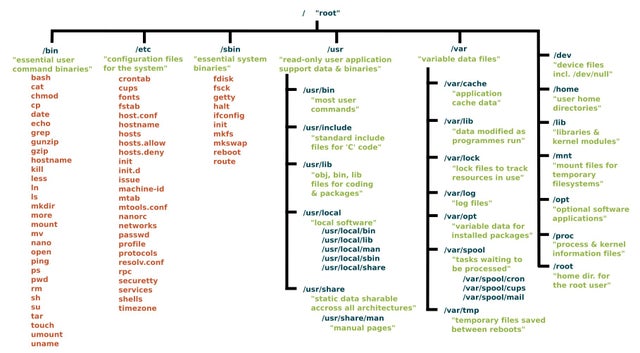
Here’s a reference I found years ago. I don’t remember where, so I can’t give proper credit for it.

Then there are the official docs, straight from Freedesktop.org:

That said, the FHS allows the individual system adminstrator (you, me, whoever) flexibility to do what makes sense for them. I would rather keep /home/brucew clear of my directories and files, reserving it for the dotfiles and such. Thus, I’ve moved the standard FHS user directories (Desktop, Documents, Downloads, etc.) to a separate SSD under a directory called /Data. I get yelled at a lot by greybeards for doing this–that it’s not “correct” and so forth–but the FHS specifically permits this under section 1.1-Purpose

The FHS document has a limited scope:

  • Local placement of local files is a local issue, so FHS does not attempt to usurp system administrators.

  • FHS addresses issues where file placements need to be coordinated between multiple parties such as local sites, distributions, applications, documentation, etc.

Then in KDE, I set the userdirs from the defaults (/home/brucew/whatever) to my chosen placements (/Data/whatever) so the system (distro and applications) knows what I’ve done, to cover the second bullet point above.

Yes and no.

Remember that your home directory also includes the dotfiles–hidden files and directories–that contain configurations that may be distribution-specific. That’s why I use the method I described above, so that my personal files are truly distribution-independent.

I hope doing one mega response is alright, multiple messages can clutter and I tend to be on the introverted side so it takes a lot more out of me ToT

still, to actually start, thank you so much for the answers and the help! its a big relief to be able to ask questions, even more similar ones that are more like this. its helped a lot to settle in <3

I am glad that I had an overall correct idea on storage on a decent/basic level, enough where my plans to set up my storage, partition and space wise, will probably work. before asking this I was at two major ideas, either move my /home to a different partition or just move the personal files inside of /home to a different partition. after this double check I am going to probably do the later

speaking of maybe moving /home, thank you all but specifically @Gamall @thefrog and @brucew for the heads up about what moving /home to a different partition can do in general, where yeah it can work for distro hopping but that it may not due to the more hidden and general connector files that it can hold so an idea of moving the beefy files else where would be better, as those would be the ones that I would want to actually fully move with me (like pics, vids, downloads, stuff like that)

(also thank you @drunkenvicar for the mention that the idea of moving /home can be a little overrated at minimum cause i did see it a looot when looking into this which almost convinced me to do it myself without asking the forum)

ooo will be keeping this in the back of my mind, I have seen a lot about btrfs, well a lot of mentions and not detail but still, enough to make me curious to look at it later when (and you are so right about thinking on it a lot :D)

honestly this pic/info graphic really helped with not only knowing where the files are but also a short description of what tends to be fount in it so I will be keeping this close while I still get used to the new file organization (w to the og creater as well, whoever they may be)

ooo thank you for that heads up, I will look into that given you mean the desktop environment as i ended up going with kde as well

There’s a bit of a trick to it, should you decide to go this way.

Try it out first by setting up the disks, partitions and directories as you think you want them, then…

In KDE System Settings, Session, Locations, change the folder locations to your intended locations.

Before rebooting, test it out to make sure it works for you and that there were no typos.

A reboot will clear this back to the defaults, which works nicely for a quick reset, but to make it permanent, from the terminal run this command: chmod +i ~/.config/user-dirs.dirs. This makes the file the GUI modified immutable so it will survive a reboot.

Should you want to make changes in the future, you must first undo this with chmod -i ~/.config/user-dirs.dirs.

Now you also know where to look if you want to edit the file directly rather than using the GUI.